
MSI’s PRO MAX OLED 271UPJW12 is the first announced 27-inch desktop monitor to combine a 3,840 × 2,160 OLED panel, 120 Hz refresh rate, and inkjet-printed manufacturing—but it remains an announcement without a price, retail date, regional availability, warranty terms, or even a complete port list. For Windows users who have wanted OLED’s contrast without the familiar small-text compromises of unconventional subpixel layouts, the potential payoff is the panel’s stated RGB Stripe pixel structure at 164 PPI.
MSI’s announcement, republished by TechPowerUp on August 3, follows reports from Hardwareluxx, OLED-Info, Display Ninja, Guru3D, and others that surfaced around July 14–15. Those earlier reports described the same monitor and specifications, while MSI’s current product-news page is dated August 2. The timeline suggests this is a renewed or broader announcement rather than a newly revealed display; MSI has not explained the gap or used the new post to add the details that determine whether the monitor is actually close to sale.
The central development is not that MSI has built another 4K OLED monitor. It is that the 271UPJW12 appears to be the first commercial desktop monitor built around a large, inkjet-printed OLED panel from TCL CSOT, introducing a third panel technology path into a market that has largely been supplied by Samsung Display QD-OLED and LG Display WOLED panels.
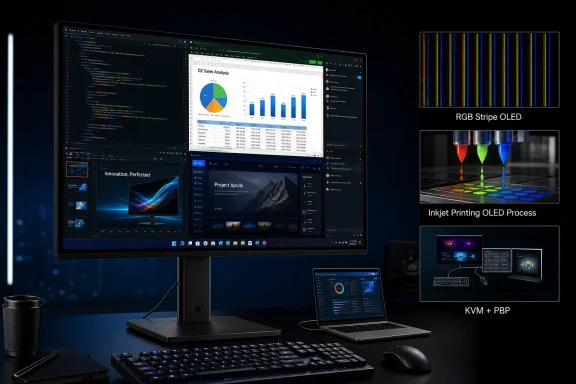
The PRO MAX OLED 271UPJW12 pairs a 27-inch 4K panel with a 120 Hz maximum refresh rate, resulting in roughly 164 pixels per inch. That density is already helpful for Windows desktop work, but MSI’s more consequential claim is its “optimized RGB Stripe” subpixel layout: each pixel uses red, green, and blue subpixels in a straightforward horizontal sequence resembling a conventional LCD.
That is a direct answer to a long-running issue for OLED monitor buyers. Windows’ ClearType text rendering was developed around RGB-stripe LCD assumptions, while many OLED panels use different subpixel arrangements. Those arrangements can create colored fringes or make fine text look less precise, particularly in development tools, spreadsheets, browser tabs, email clients, and remote-management consoles full of small type.
Hardwareluxx and OLED-Info both identify the panel as likely originating from TCL CSOT, and OLED-Info calls it one of the first consumer products using TCL CSOT’s inkjet-printed OLED technology. MSI itself does not name the panel supplier in its announcement, so that attribution remains externally reported rather than vendor-confirmed. Still, the shared specifications—27 inches, 4K, 120 Hz, 164 PPI, and real RGB stripe—make the connection highly credible.
The monitor’s 120 Hz ceiling also reveals its intended niche. This is not positioned against the 240 Hz and 480 Hz OLEDs now marketed principally to competitive gamers. MSI is aiming at a mixed desktop workload: smoother Windows interaction and video playback than a 60 Hz or 75 Hz office display, with enough refresh headroom for conventional gaming, but without sacrificing the 4K pixel density needed for daily productivity.
That positioning is sensible, but it needs independent testing. RGB stripe does not automatically settle every text-quality question: coating treatment, pixel geometry, Windows scaling, font weight, panel uniformity, and subpixel rendering settings can all affect what users see at a desk. No independent review or measurement of the 271UPJW12 has yet established whether it matches a high-end IPS display for long-form coding and document work.
TCL CSOT has been publicly demonstrating inkjet-printed OLED technology well before this monitor. Its CES 2026 materials showcased IJP OLED concepts, while reporting from Electronic Times in July said the company had completed internal validation of a 27-inch 4K 120 Hz RGB-stripe monitor panel and was preparing mass production. MSI’s model is therefore the important commercial step: a named product, from an established monitor vendor, built around a technology that had mainly been a trade-show and panel-roadmap story.
But buyers should not turn “inkjet printed” into shorthand for “cheap.” MSI has disclosed no price at all, and no independent outlet has reported one. A first-generation, low-volume panel launch often carries a premium rather than an immediate cost advantage, especially once an adjustable stand, KVM switch, calibration, anti-glare coating, and a vendor’s distribution margin are added.
The technology’s actual market effect will depend on production yield, panel longevity, consistency across large volumes, and competing suppliers’ pricing—not on the existence of one monitor announcement. For the moment, IJP has produced a technically interesting 27-inch OLED configuration that the existing mainstream desktop OLED panel supply did not offer in precisely this form. It has not yet produced a demonstrably less expensive alternative.
The “world’s first” language also needs its proper boundaries. MSI can reasonably claim the first announced 27-inch 4K IJP OLED monitor at these specifications. It should not be read as a claim that MSI invented printed OLED or that it is the first commercial use of inkjet OLED in every display category. OLED-Info notes that Japan’s JOLED had commercial inkjet OLED production in earlier years, although it did not establish this kind of mainstream 27-inch 4K 120 Hz desktop panel business.
DisplayHDR True Black 500 is a VESA certification tier for self-emissive displays such as OLED. It evaluates more than a headline peak-nit number, including black level, color gamut, bit depth, and HDR behavior under specified test conditions. The “up to 1,000 nits” claim, meanwhile, typically concerns a small bright highlight rather than a full-screen white field.
The practical implication for Windows users is straightforward: a 1,000-nit figure does not establish how bright the monitor will remain when a full browser, spreadsheet, white IDE theme, or large document window fills the panel. Display Ninja reports a 300-nit SDR brightness specification at 100% average picture level for the underlying panel, but MSI’s current announcement does not plainly state a full-screen SDR brightness figure or the size of the HDR test window associated with its 1,000-nit claim.
That omission matters more in a productivity monitor than it would in a display marketed only for dark-room games and movies. OLED’s per-pixel contrast and black performance remain valuable, but desktop use places a sustained brightness burden on the panel that cannot be inferred from a peak HDR number. An independent test will need to check full-screen luminance, automatic brightness limiting behavior, color accuracy after calibration, reflection handling, and near-black uniformity before the HDR and office-use claims can be considered proven.
MSI does state 99% DCI-P3 coverage and Delta E at or below 2. Those are credible targets for a modern professional OLED, but they are factory specifications rather than a substitute for validation. The company also has not stated which color modes are calibrated, whether the claimed Delta E is measured before or after calibration, or whether an sRGB clamp is available and accurate.
For users who run always-on status dashboards, management consoles, pinned chat clients, taskbars, or static development interfaces, less intrusive maintenance is welcome. The same is true for gamers who do not want a panel-care cycle inserted at the end of a session. If MSI’s implementation performs reliably, it could make OLED ownership feel less like a device requiring regular manual attention.
However, this is a usability change, not evidence that static-image aging has been eliminated. MSI does not publish the compensation schedule, the measurable effect of DCC over time, the expected behavior after long static workloads, or the burn-in warranty coverage for this specific model. It also has not said whether the monitor will carry the multi-year OLED burn-in protection that some competing vendors now offer on select models.
That missing warranty information is the most important unanswered purchasing detail. A background compensation process can reduce interruptions, but buyers need to know who bears the cost if panel retention or uneven aging becomes visible during ordinary business use.
The constraint is the USB-C power figure. Fifteen watts is sufficient for many phones, small accessories, and perhaps a very lightly loaded ultraportable, but it will not power most Windows laptops as a true single-cable desk setup. Users with 45 W, 65 W, 90 W, or higher-charging notebooks should expect to use their normal charger or a dock that provides its own power delivery.
MSI’s release also fails to list the precise input mix, DisplayPort version, HDMI version, USB upstream arrangement, USB hub speeds, VRR support, adaptive-sync certifications, response-time specification, VESA mount details, or the stand’s adjustment ranges. Those are not minor omissions in a monitor meant to bridge workstations and entertainment systems. They determine whether an IT professional can attach a desktop, work laptop, console, and peripheral set without adapters or compromise.
The anti-glare coating is another specification that needs hands-on validation. MSI says it improves surface hardness from 2H to 3H and delivers 2.5 times better scratch resistance. That may help durability, but matte and anti-glare OLED coatings can also affect perceived black depth, reflection diffusion, and fine-text sharpness. A monitor whose main selling point is unusually clean RGB-stripe text will need to demonstrate that the coating does not blunt that advantage.
MSI has put a technically significant panel into a product that looks designed for Windows-heavy, multi-device desks. Until it supplies a price, sale date, regional rollout, full connectivity specification, and OLED warranty terms, the PRO MAX OLED 271UPJW12 is best treated as the opening signal for printed OLED monitors—not yet as a procurement-ready replacement for a proven IPS, QD-OLED, or WOLED display.
The central development is not that MSI has built another 4K OLED monitor. It is that the 271UPJW12 appears to be the first commercial desktop monitor built around a large, inkjet-printed OLED panel from TCL CSOT, introducing a third panel technology path into a market that has largely been supplied by Samsung Display QD-OLED and LG Display WOLED panels.
 The Real RGB Stripe Claim Targets Windows Text
The PRO MAX OLED 271UPJW12 pairs a 27-inch 4K panel with a 120 Hz maximum refresh rate, resulting in roughly 164 pixels per inch. That density is already helpful for Windows desktop work, but MSI’s more consequential claim is its “optimized RGB Stripe” subpixel layout: each pixel uses red, green, and blue subpixels in a straightforward horizontal sequence resembling a conventional LCD.That is a direct answer to a long-running issue for OLED monitor buyers. Windows’ ClearType text rendering was developed around RGB-stripe LCD assumptions, while many OLED panels use different subpixel arrangements. Those arrangements can create colored fringes or make fine text look less precise, particularly in development tools, spreadsheets, browser tabs, email clients, and remote-management consoles full of small type.
Hardwareluxx and OLED-Info both identify the panel as likely originating from TCL CSOT, and OLED-Info calls it one of the first consumer products using TCL CSOT’s inkjet-printed OLED technology. MSI itself does not name the panel supplier in its announcement, so that attribution remains externally reported rather than vendor-confirmed. Still, the shared specifications—27 inches, 4K, 120 Hz, 164 PPI, and real RGB stripe—make the connection highly credible.
The monitor’s 120 Hz ceiling also reveals its intended niche. This is not positioned against the 240 Hz and 480 Hz OLEDs now marketed principally to competitive gamers. MSI is aiming at a mixed desktop workload: smoother Windows interaction and video playback than a 60 Hz or 75 Hz office display, with enough refresh headroom for conventional gaming, but without sacrificing the 4K pixel density needed for daily productivity.
That positioning is sensible, but it needs independent testing. RGB stripe does not automatically settle every text-quality question: coating treatment, pixel geometry, Windows scaling, font weight, panel uniformity, and subpixel rendering settings can all affect what users see at a desk. No independent review or measurement of the 271UPJW12 has yet established whether it matches a high-end IPS display for long-form coding and document work.
Inkjet Printing Is the Market Story, Not a Consumer Feature Yet
Inkjet-printed OLED, or IJP OLED, changes how the organic light-emitting material is deposited during manufacturing. Instead of relying on the fine-metal-mask processes associated with many conventional OLED panels, the emissive material is printed onto the substrate. The production method has long been promoted as a route to better material utilization and potentially lower costs at larger panel sizes.TCL CSOT has been publicly demonstrating inkjet-printed OLED technology well before this monitor. Its CES 2026 materials showcased IJP OLED concepts, while reporting from Electronic Times in July said the company had completed internal validation of a 27-inch 4K 120 Hz RGB-stripe monitor panel and was preparing mass production. MSI’s model is therefore the important commercial step: a named product, from an established monitor vendor, built around a technology that had mainly been a trade-show and panel-roadmap story.
But buyers should not turn “inkjet printed” into shorthand for “cheap.” MSI has disclosed no price at all, and no independent outlet has reported one. A first-generation, low-volume panel launch often carries a premium rather than an immediate cost advantage, especially once an adjustable stand, KVM switch, calibration, anti-glare coating, and a vendor’s distribution margin are added.
The technology’s actual market effect will depend on production yield, panel longevity, consistency across large volumes, and competing suppliers’ pricing—not on the existence of one monitor announcement. For the moment, IJP has produced a technically interesting 27-inch OLED configuration that the existing mainstream desktop OLED panel supply did not offer in precisely this form. It has not yet produced a demonstrably less expensive alternative.
The “world’s first” language also needs its proper boundaries. MSI can reasonably claim the first announced 27-inch 4K IJP OLED monitor at these specifications. It should not be read as a claim that MSI invented printed OLED or that it is the first commercial use of inkjet OLED in every display category. OLED-Info notes that Japan’s JOLED had commercial inkjet OLED production in earlier years, although it did not establish this kind of mainstream 27-inch 4K 120 Hz desktop panel business.
HDR Claims Need to Be Read as Two Different Measurements
MSI lists VESA DisplayHDR True Black 500 certification and up to 1,000 nits of HDR peak brightness. Those figures are compatible, not contradictory, but they describe different things.DisplayHDR True Black 500 is a VESA certification tier for self-emissive displays such as OLED. It evaluates more than a headline peak-nit number, including black level, color gamut, bit depth, and HDR behavior under specified test conditions. The “up to 1,000 nits” claim, meanwhile, typically concerns a small bright highlight rather than a full-screen white field.
The practical implication for Windows users is straightforward: a 1,000-nit figure does not establish how bright the monitor will remain when a full browser, spreadsheet, white IDE theme, or large document window fills the panel. Display Ninja reports a 300-nit SDR brightness specification at 100% average picture level for the underlying panel, but MSI’s current announcement does not plainly state a full-screen SDR brightness figure or the size of the HDR test window associated with its 1,000-nit claim.
That omission matters more in a productivity monitor than it would in a display marketed only for dark-room games and movies. OLED’s per-pixel contrast and black performance remain valuable, but desktop use places a sustained brightness burden on the panel that cannot be inferred from a peak HDR number. An independent test will need to check full-screen luminance, automatic brightness limiting behavior, color accuracy after calibration, reflection handling, and near-black uniformity before the HDR and office-use claims can be considered proven.
MSI does state 99% DCI-P3 coverage and Delta E at or below 2. Those are credible targets for a modern professional OLED, but they are factory specifications rather than a substitute for validation. The company also has not stated which color modes are calibrated, whether the claimed Delta E is measured before or after calibration, or whether an sRGB clamp is available and accurate.
OLED Auto Care Removes Prompts, Not Burn-In Risk
The 271UPJW12 introduces what MSI calls OLED Auto Care Technology, based on Data Counting Compensation, or DCC. MSI says the system calculates and applies compensation dynamically in the background, avoiding the forced maintenance prompts and mid-session interruptions that can occur with some OLED monitor pixel-refresh routines.For users who run always-on status dashboards, management consoles, pinned chat clients, taskbars, or static development interfaces, less intrusive maintenance is welcome. The same is true for gamers who do not want a panel-care cycle inserted at the end of a session. If MSI’s implementation performs reliably, it could make OLED ownership feel less like a device requiring regular manual attention.
However, this is a usability change, not evidence that static-image aging has been eliminated. MSI does not publish the compensation schedule, the measurable effect of DCC over time, the expected behavior after long static workloads, or the burn-in warranty coverage for this specific model. It also has not said whether the monitor will carry the multi-year OLED burn-in protection that some competing vendors now offer on select models.
That missing warranty information is the most important unanswered purchasing detail. A background compensation process can reduce interruptions, but buyers need to know who bears the cost if panel retention or uneven aging becomes visible during ordinary business use.
The Productivity Hardware Is Strong but Incompletely Specified
MSI has included the right category of features for a modern desk display: a built-in KVM switch, picture-in-picture and picture-by-picture modes, an ergonomic stand, and USB-C with 15 W Power Delivery. KVM support means a keyboard and mouse can be shared between two systems, while PIP/PBP gives users a way to view those systems at once.The constraint is the USB-C power figure. Fifteen watts is sufficient for many phones, small accessories, and perhaps a very lightly loaded ultraportable, but it will not power most Windows laptops as a true single-cable desk setup. Users with 45 W, 65 W, 90 W, or higher-charging notebooks should expect to use their normal charger or a dock that provides its own power delivery.
MSI’s release also fails to list the precise input mix, DisplayPort version, HDMI version, USB upstream arrangement, USB hub speeds, VRR support, adaptive-sync certifications, response-time specification, VESA mount details, or the stand’s adjustment ranges. Those are not minor omissions in a monitor meant to bridge workstations and entertainment systems. They determine whether an IT professional can attach a desktop, work laptop, console, and peripheral set without adapters or compromise.
The anti-glare coating is another specification that needs hands-on validation. MSI says it improves surface hardness from 2H to 3H and delivers 2.5 times better scratch resistance. That may help durability, but matte and anti-glare OLED coatings can also affect perceived black depth, reflection diffusion, and fine-text sharpness. A monitor whose main selling point is unusually clean RGB-stripe text will need to demonstrate that the coating does not blunt that advantage.
MSI has put a technically significant panel into a product that looks designed for Windows-heavy, multi-device desks. Until it supplies a price, sale date, regional rollout, full connectivity specification, and OLED warranty terms, the PRO MAX OLED 271UPJW12 is best treated as the opening signal for printed OLED monitors—not yet as a procurement-ready replacement for a proven IPS, QD-OLED, or WOLED display.
References
- Primary source: TechPowerUp
Published: 2026-08-03T07:39:33+00:00
Loading…
www.techpowerup.com - Related coverage: oled-info.com
Loading…
www.oled-info.com - Related coverage: hardwareluxx.de
Loading…
www.hardwareluxx.de - Related coverage: guru3d.com
Loading…
www.guru3d.com - Related coverage: io-tech.fi
Loading…
www.io-tech.fi - Related coverage: hardware-news.de
Loading…
www.hardware-news.de - Related coverage: displayninja.com
Loading…
www.displayninja.com - Related coverage: techtimes.com
Loading…
www.techtimes.com - Related coverage: b92.net
Loading…
www.b92.net - Related coverage: kitguru.net
Loading…
www.kitguru.net - Related coverage: zoom.cnews.ru
Loading…
zoom.cnews.ru - Related coverage: techradar.com
Loading…
www.techradar.com - Related coverage: tomshardware.com
Loading…
www.tomshardware.com - Related coverage: rtings.com
Loading…
www.rtings.com - Related coverage: vesa.org
Loading…
vesa.org - Related coverage: vesa.org
Loading…
vesa.org - Related coverage: tclcentral.com
Loading…
www.tclcentral.com