
Hi-Tech.ua reported the L20 this week as a compact Windows and Linux-capable system built around Lunar Lake, while Ninkear’s own storefront lists the 16GB/512GB configuration at €699 and the 16GB/1TB model at €799. IT Home and Notebookcheck separately reported the European launch on August 18, including the same €100 storage upgrade. This is therefore a real retail product rather than an early concept announcement, but it is not a broad desktop replacement merely because its headline AI number is high.
For Windows users, the L20 is notable because it brings a current Copilot+ capable Intel platform to a category usually populated by older mobile chips or higher-wattage AMD APUs. It should suit a compact office, a VESA-mounted multi-monitor workstation, or a small Windows 11 endpoint where local AI features matter more than upgradeable memory or discrete graphics.
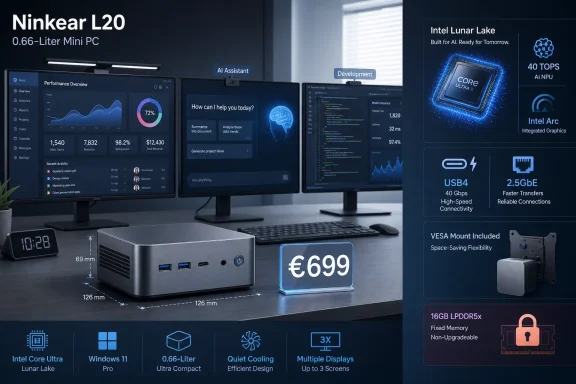 The Copilot+ claim rests on the NPU, not 97 TOPS
Ninkear markets the L20 as having “97 TOPS AI Performance” and “Copilot+ PC support.” Both numbers can be true, but they describe different things. Intel’s official specifications for the Core Ultra 5 226V list 97 TOPS as the processor’s overall peak AI throughput, which combines capabilities across the CPU, Arc 130V integrated GPU, and NPU.
Microsoft’s Copilot+ PC threshold is narrower. Microsoft defines the category around an NPU capable of more than 40 TOPS, because the NPU is the low-power accelerator used for supported on-device Windows AI workloads. Intel lists the 226V’s Intel AI Boost NPU at exactly 40 TOPS, placing this chip at the entry point for the Copilot+ hardware class.
That distinction affects how the L20 should be bought and evaluated. The 97 TOPS figure does not mean the NPU alone delivers 97 TOPS, nor does it mean every AI application will run locally or automatically use all three compute engines. Software has to support Windows ML, DirectML, ONNX Runtime, OpenVINO, or a comparable acceleration path to make useful use of the hardware. A browser-based Copilot session, for example, remains a cloud service rather than turning into a 97-TOPS local model because the PC happens to carry that label.
Microsoft lists features such as Windows Studio Effects, Live Captions translation, Recall where available, and certain Photos capabilities among the Copilot+ experiences that benefit from compatible hardware. Whether each feature is enabled on a particular L20 installation will still depend on the installed Windows 11 release, language and regional availability, Microsoft’s staged feature delivery, and device drivers. Ninkear advertises Windows 11 on its product page, while one European retailer specifically lists Windows 11 Pro; neither listing establishes a separate, Ninkear-specific support commitment for every future Copilot+ feature.
The practical takeaway is simple: the L20 has the necessary NPU hardware for Copilot+ PC-class Windows features, but the 97 TOPS total should be treated as a platform metric, not as a promise about the performance of a particular local AI task.
Lunar Lake makes this mini PC compact — and caps it at 16GB
The Core Ultra 5 226V is an unusual choice for a mini PC because Intel originally positioned Lunar Lake in the mobile segment. It combines four performance cores and four low-power efficient cores for eight threads total, with a 17W processor base power rating and up to 4.5GHz boost frequency. Intel also specifies the chip with up to 16GB of LPDDR5X-8533 memory.
That maximum matters more here than the L20’s impressive port count. Ninkear sells only 16GB configurations, and Intel’s own specification sets 16GB as the maximum memory size for the 226V. Buyers cannot treat this like a traditional small desktop where a later SODIMM upgrade can turn a 16GB purchase into a 32GB or 64GB system.
Storage is the part that can grow. Ninkear specifies two M.2 2280 SSD slots, with 512GB and 1TB factory options. For an office PC, thin client, media system, or compact home lab management box, that makes the lower-priced 512GB version a sensible starting point if the second slot is available for expansion. It does not solve RAM pressure from virtual machines, large creative projects, heavy browser workloads, or local AI models that need substantially more system memory.
The 16GB ceiling is also relevant to the L20’s Arc 130V graphics. Like other integrated GPUs, the Arc 130V uses system memory rather than dedicated VRAM. Intel rates it at seven Xe cores and up to 1.85GHz, which is capable hardware for display output, media work, and some 1080p games. But it is not equivalent to a desktop graphics card, and a 16GB shared-memory system will have less room for demanding graphics workloads once Windows and applications are active.
For IT buyers, this points to a clear deployment fit. The L20 is better suited to knowledge-worker endpoints, conference-room systems, digital-signage controllers, compact development machines, and VESA-mounted task stations than to virtualization hosts or memory-heavy engineering desktops. Its small enclosure is an advantage only when the workloads match the platform’s fixed memory design.
The display claim needs a closer reading
Ninkear advertises the L20 as a “triple 4K display workstation,” and the underlying Intel platform officially supports up to three displays. The hardware basis for that claim is sound: Intel’s Core Ultra 5 226V specification lists support for three displays, and the Arc 130V supports modern HDMI and DisplayPort standards.
The L20’s own port list deserves more care than the headline suggests. Ninkear specifies two HDMI outputs, one DisplayPort 1.4 connection, and USB4. But its detailed product listing differentiates between an HDMI 2.1 port rated for 4K at 120Hz or 8K at 60Hz and a second HDMI 1.4 port rated for 4K at 30Hz. That means “three 4K displays” should not be read as three high-refresh 4K displays.
The product page also does not publish a complete simultaneous-display matrix: it does not state which three outputs can be active together, what refresh rate each combination supports, or whether USB4 display output is required to reach the advertised three-screen arrangement. Intel’s processor specification establishes the platform maximum, but board-level wiring and firmware determine how a particular mini PC exposes it.
Administrators planning a three-monitor rollout should therefore verify the exact monitor interfaces and desired refresh rates before standardizing on the L20. A pair of 4K office displays plus a lower-refresh third display is a realistic target. A setup involving three high-refresh 4K panels is not supported by the information Ninkear has published.
Connectivity is stronger than the price suggests
At €699, the L20’s appeal is less about raw CPU throughput than about avoiding the compromises common in low-cost mini PCs. Ninkear lists USB4, five USB 3.2 Gen 1 Type-A ports, one USB 3.2 Gen 2 Type-A port, a USB 2.0 Type-A port, a USB Type-C power-delivery port, DisplayPort 1.4, two HDMI outputs, 2.5GbE, Wi-Fi 6, and Bluetooth 5.3. The chassis measures 129 × 129 × 43 mm and weighs 625 grams, with a VESA mount included.
The 2.5GbE port is particularly useful in a system positioned for local storage access, media, or administrative work. It gives the L20 a more credible role as a compact workstation on modern network infrastructure than mini PCs limited to 1GbE. USB4 also provides a cleaner expansion path for docks and fast external storage than the USB-C ports found on many budget systems.
There are still unanswered operational questions. Ninkear advertises worldwide shipping and a two-year warranty, but it has not published business-focused deployment documentation, remote-management options, replacement-part availability, a firmware update policy, or a Windows driver support timetable. Intel lists the 226V as a client/mobile chip without embedded availability, which further distinguishes this from a long-lifecycle commercial mini desktop.
The L20 is a credible compact Windows 11 PC for buyers who want a current Intel NPU, 2.5GbE, USB4, and up to three displays without paying for a laptop they will never move. Its defining trade-off is permanent: storage can expand, but the 16GB memory limit cannot.