
.LOG trigger that appends a timestamp whenever a file is opened. The practical warning is that neither feature creates dependable document metadata. One is a print-time setting Microsoft says is not saved; the other alters the text file on open, with no audit trail, identity information, time-zone marker, or protection against clock changes.For casual notes, both are harmless conveniences. For IT staff using Notepad to jot down maintenance actions, capture troubleshooting observations, or produce hard-copy runbooks, Microsoft’s own wording makes clear that
.LOGshould not be mistaken for a system log and that page headers must be checked before every print job.
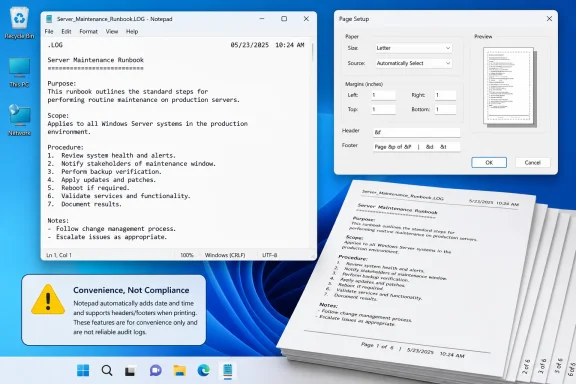 The print defaults are less clear than Microsoft suggests
Microsoft says Notepad’s default print header is
&f, which inserts the document name, while the default footer is
Page &p, which inserts the page number. Its support page further states that clearing either field suppresses that element on the printed page, and lists the available codes for alignment, current date, current time, filename, and page number.
The codes themselves are straightforward:
&l,&c, and&rset left, center, and right alignment for the text that follows.&dand&tinsert the current date and time at print time.&finserts the document filename, while&pinserts the page number.
There is an important formatting catch: Microsoft says the alignment code has to be the first item in the Header field. Enter
Project Phoenix &land the header will remain centered; enter
&lProject Phoenixand it will print left-aligned. This is the kind of behavior that looks like a bug to a user because the dialog accepts the text without warning.
But Microsoft’s newly published help does not establish which Notepad versions actually begin with
&fand
Page &ppopulated. A 2023 walkthrough from I Have A PC, based on its Windows 10/11 testing, reported that headers and footers were empty by default. The difference may reflect an app-version change, a retained per-user setting, or a discrepancy in either set of instructions. Microsoft does not say.
That omission matters more now than it did when Notepad changed rarely. Microsoft’s Windows Insider Blog has continued to ship Notepad as a versioned app, including version 11.2510.6.0 in late 2025, which added table support and streamed AI-writing results for Insider builds. A support article that labels itself only for “Windows 10” and “Windows 11,” without naming a Notepad app version, leaves administrators unable to determine whether the described defaults apply to their deployed package.
The safe operational conclusion is simple: treat the Page Setup fields as state that must be verified, not assumed. Before printing a text-based procedure, incident note, or configuration capture, open File > Page Setup and inspect both fields. If a printout must contain no filename, no page number, and no accidental date stamp, empty both boxes and verify the preview or output.
Notepad deliberately does not preserve the print setup
Microsoft says custom header and footer entries cannot be saved, so they must be entered manually each time a user wants to print. That means the feature is designed as a temporary print decoration rather than a property of the document.
This distinction has an immediate consequence for runbooks and support records. A technician can save a
.txtfile that looks complete in Notepad, hand it to another technician, and still get different hard-copy output depending on the second user’s Page Setup state. The file does not carry the intended title, paging scheme, or print timestamp with it.
For a one-page note, that limitation is mostly an annoyance. For a multi-page procedure or a document expected to survive handoffs, it creates a reproducibility problem. A printout that uses
&fcan reveal an internal filename or share naming convention; a footer using
&dand
&tmay show the print time rather than the time the procedure was authored or approved. Neither fact appears in the body of the text file.
Notepad also offers no richer page-layout controls in this help material: there is no documented first-page exception, odd/even page treatment, saved template, document-level metadata field, or per-file print profile. The feature is adequate for a plain-text printout, but it is unsuitable as the final publishing path for controlled documentation.
The practical fix is to place durable identifiers in the document body itself. If a procedure needs a revision number, owner, approval date, ticket number, or classification, write it into the first lines of the text file. Use Notepad headers and footers only as optional output aids, never as the sole record of those details.
.LOG is an open-time timestamp trigger, not event logging
The other behavior documented by Microsoft is
.LOG: create a new file, put
.LOGalone on the first line, save it, and Notepad will append the current date and time when that file is subsequently opened. The cursor is positioned after the newly added timestamp so the user can continue writing.
The defining detail is when the file is opened. Not when a new entry is completed, not when the file is saved, and not when an operator performs a specific action. Opening the file is the trigger.
That makes
.LOGuseful for a personal shift note, a scratchpad tracking when someone resumed work, or a quick manual journal. It is not a replacement for Windows Event Log, PowerShell transcription, application logging, change-management records, or an incident timeline. Microsoft’s support page describes no mechanism to record the Windows account that opened the file, the machine involved, the original file contents, a monotonic timestamp, the time zone, or whether a line was later edited or removed.
The timestamp also becomes part of the document’s content. Simply opening the file causes a modification before the user has recorded a meaningful event. In an operational context, that can muddy rather than clarify a timeline: a person reviewing yesterday’s notes will create a fresh entry that may look like activity unless they explicitly add explanatory text.
Independent how-to coverage has consistently described the same basic behavior. Itechguides, for example, notes that Notepad automatically inserts the date and time for
.LOGfiles, while older Windows documentation and user guides have described the feature as an automatic open-time diary mechanism. There is no indication in Microsoft’s current help that the feature has gained controls appropriate for records management.
Admins should therefore use
.LOGonly where its limitations are acceptable:
- It can provide a low-friction, human-readable timestamp for a personal or disposable text journal.
- It should not be used as evidence of who performed an action or when that action occurred.
- It should not be used for logs that require tamper resistance, retention controls, centralized collection, or correlation with system events.
- It should be avoided for shared files, where merely checking the contents may create misleading new entries.
Microsoft documents the legacy behavior but not the deployment reality
The support page is notable for what it leaves out. It provides no Notepad package version, no Windows build mapping, no rollout information, and no explanation of whether Windows 10’s inbox experience and a fully updated Windows 11 Store-delivered Notepad are expected to behave identically. It also gives no policy or enterprise-management guidance for organizations that restrict Microsoft Store app updates or maintain managed desktop images with differing Notepad versions.
That missing version context is increasingly relevant because Notepad has moved well beyond the static utility implied by the help page. Microsoft has been adding Markdown support, formatting controls, tables, and AI-assisted writing features through the app’s evolving release track. Yet the support entry for print headers, footers, and
.LOGreads as version-neutral legacy documentation.
The behavior may indeed be stable across versions. Microsoft’s page applies the instructions to both Windows 10 and Windows 11, and third-party Windows guides continue to find the Page Setup and
.LOGfunctions. But the record does not support assuming identical defaults or user-interface details across every supported image. Organizations standardizing a printed output should validate the actual Notepad package deployed to endpoints rather than relying on a generic OS label.
For everyday users, the page is a useful reminder that Notepad can still produce a paginated paper copy and a crude timestamped journal. For administrators, the more valuable takeaway is narrower: put permanent information in the text file, verify print settings at the point of use, and keep .LOG out of any workflow that needs a trustworthy audit record.