
LibreOffice is using Microsoft Office 2021’s October 13, 2026 end-of-support deadline to make a broader case for abandoning perpetual Office licenses and standardizing on open-source productivity software. The campaign, highlighted by Thurrott.com and set out in a July 29 post from The Document Foundation, gets one immediate point right: Office 2021 will continue to run after that date, but Microsoft will stop providing security fixes, bug fixes, technical support, and extended security updates.
For Windows users and IT administrators, however, the important finding is that The Document Foundation’s headline comparison leaves out two material facts. Microsoft’s supported path does not run solely through a Microsoft 365 subscription, and LibreOffice releases absolutely do have support end dates even if the LibreOffice project has no announced expiration date.
That does not weaken the case for testing LibreOffice. It does mean organizations should treat this as a migration decision involving document fidelity, workflows, macros, support arrangements, and patch management—not as a simple choice between a subscription and software that needs no lifecycle planning.
Microsoft’s own support documentation confirms that Office 2021 support ends on October 13, 2026, with no extension and no Extended Security Updates program. The affected retail editions include Office Home & Student 2021, Home & Business 2021, and Professional 2021; the same date applies to the volume-licensed Office LTSC 2021 line.
The practical consequence is familiar: existing installations do not suddenly deactivate, but newly discovered vulnerabilities will remain unpatched. For businesses handling untrusted attachments, spreadsheets from external parties, or documents with embedded content, remaining on Office 2021 past October is difficult to justify under ordinary security and compliance controls.
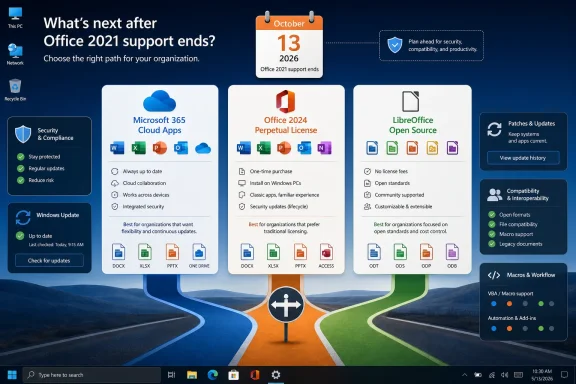
Where The Document Foundation overstates its case is its assertion that “the only sanctioned path forward runs through a subscription.” Microsoft recommends Microsoft 365 Apps to many customers, but its published Office 2021 guidance also directs commercial customers that cannot move to the cloud to Office LTSC 2024. Consumers can purchase Office 2024 as a one-time, non-subscription license for a PC or Mac.
Office 2024 is not an indefinite entitlement to future versions: it receives security updates during its support window and requires a full-price purchase for a future major upgrade. But it is a real, currently supported perpetual-license option, with retirement scheduled for October 9, 2029. Office LTSC 2024 follows the same October 9, 2029 endpoint for commercial customers.
The sharper, defensible criticism is therefore not that Microsoft has eliminated perpetual Office. It has shortened the expected support window of new perpetual releases to roughly five years and made Microsoft 365 the only route to continuously updated Office apps, cloud services, and new features. Those are different claims, and the distinction affects procurement decisions.
But support that does not expire is not an accurate description of the security posture of a deployed LibreOffice version.
The foundation declared LibreOffice 25.8 end-of-life on June 12, 2026. Its final update, LibreOffice 25.8.7, was explicitly described as the final maintenance release; users were told to move to the 26.2 branch because 25.8 would receive no additional security updates. The current LibreOffice 26.2.5 release, published in late July, repeats that warning.
This is more than semantics. The LibreOffice security-advisory record includes several 2026 memory-safety flaws in document importers, including issues involving ODF, DXF, EMF+, and OOXML files. The foundation’s advisories tell users to update to fixed versions such as LibreOffice 26.2.3 or 25.8.7. An organization that holds at an obsolete LibreOffice release is taking the same category of risk that it would by holding Office 2021 after October 13: it will still have a working office suite, but it will no longer receive fixes for vulnerabilities found afterward.
LibreOffice’s lifecycle works differently from Office’s, and it is generally less expensive to stay current. There is no license repurchase or subscription renewal gate. Yet the operational requirement remains: package, test, deploy, and monitor new releases. Administrators should not let an appealing anti-subscription message turn into an excuse to exempt LibreOffice from normal vulnerability management.
The foundation also points enterprise customers toward LibreOffice Enterprise distributions from ecosystem partners, which can include service-level agreements and security backports for three to five years. That is an acknowledgement that free community releases and managed enterprise support are separate products in practice.
The foundation argues that OOXML is an ISO standard only in name and that independent implementations are necessarily approximations. That language is polemical, but it points to a genuine administrative issue: a format being formally documented does not guarantee that a complex document renders identically in every application.
Microsoft’s own documentation makes the reciprocal point about ODF. Word, Excel, and PowerPoint can open and save ODF documents, and Office 2024 adds ODF 1.4 support. But Microsoft also maintains detailed compatibility tables showing that some features are partially supported or unavailable when documents move between DOCX/XLSX/PPTX and ODF. WordArt, theme behavior, object positioning, advanced charts, some shapes, content controls, macros, and application-specific features can all change or be lost depending on the document and application.
The same warning applies in the other direction. LibreOffice can open and save Microsoft formats, but its own security notices demonstrate the enormous surface area involved in parsing OOXML. Complex Excel workbooks, Word templates, Access integrations, VBA automation, PowerPoint decks with brand-sensitive layouts, and documents tied to SharePoint or OneDrive workflows must be tested against the actual files an organization sends and receives.
The meaningful unit of migration is the document workflow, not the file extension. A team writing basic letters, reports, and simple spreadsheets may move with little disruption. A finance department relying on Power Query, VBA, external data connections, pivot-model behavior, or advanced Excel formulas may find the conversion cost substantially larger than the license saving. The same is true for legal, engineering, and sales teams whose templates have years of accumulated formatting assumptions.
A useful pilot should include more than opening a few DOCX files. It should cover:
Microsoft 365 is one supported route. Office 2024 and Office LTSC 2024 are supported perpetual-license routes through October 2029. LibreOffice 26.2.5 is a credible zero-license-cost option for users whose workflows pass compatibility testing, provided it is kept on a supported branch and patched like any other exposed desktop application.
LibreOffice’s campaign succeeds where it urges customers to ask who controls their documents and why software upgrades should be planned rather than accepted as an invoice. Its “endless support” label does not survive its own release history. Free upgrades remove the license barrier; they do not remove the responsibility to upgrade.
That does not weaken the case for testing LibreOffice. It does mean organizations should treat this as a migration decision involving document fidelity, workflows, macros, support arrangements, and patch management—not as a simple choice between a subscription and software that needs no lifecycle planning.
 Office 2021’s deadline is real, but Microsoft still sells perpetual Office
Microsoft’s own support documentation confirms that Office 2021 support ends on October 13, 2026, with no extension and no Extended Security Updates program. The affected retail editions include Office Home & Student 2021, Home & Business 2021, and Professional 2021; the same date applies to the volume-licensed Office LTSC 2021 line.The practical consequence is familiar: existing installations do not suddenly deactivate, but newly discovered vulnerabilities will remain unpatched. For businesses handling untrusted attachments, spreadsheets from external parties, or documents with embedded content, remaining on Office 2021 past October is difficult to justify under ordinary security and compliance controls.
Where The Document Foundation overstates its case is its assertion that “the only sanctioned path forward runs through a subscription.” Microsoft recommends Microsoft 365 Apps to many customers, but its published Office 2021 guidance also directs commercial customers that cannot move to the cloud to Office LTSC 2024. Consumers can purchase Office 2024 as a one-time, non-subscription license for a PC or Mac.
Office 2024 is not an indefinite entitlement to future versions: it receives security updates during its support window and requires a full-price purchase for a future major upgrade. But it is a real, currently supported perpetual-license option, with retirement scheduled for October 9, 2029. Office LTSC 2024 follows the same October 9, 2029 endpoint for commercial customers.
The sharper, defensible criticism is therefore not that Microsoft has eliminated perpetual Office. It has shortened the expected support window of new perpetual releases to roughly five years and made Microsoft 365 the only route to continuously updated Office apps, cloud services, and new features. Those are different claims, and the distinction affects procurement decisions.
LibreOffice has no project sunset date; individual versions do expire
The Document Foundation’s central phrase—“LibreOffice, yours for a lifetime”—describes the availability of its code and the ability to obtain a newer release without paying a vendor renewal fee. LibreOffice is open source, its code is publicly available, and The Document Foundation cannot remotely disable a copy on a Windows PC when a commercial term ends.But support that does not expire is not an accurate description of the security posture of a deployed LibreOffice version.
The foundation declared LibreOffice 25.8 end-of-life on June 12, 2026. Its final update, LibreOffice 25.8.7, was explicitly described as the final maintenance release; users were told to move to the 26.2 branch because 25.8 would receive no additional security updates. The current LibreOffice 26.2.5 release, published in late July, repeats that warning.
This is more than semantics. The LibreOffice security-advisory record includes several 2026 memory-safety flaws in document importers, including issues involving ODF, DXF, EMF+, and OOXML files. The foundation’s advisories tell users to update to fixed versions such as LibreOffice 26.2.3 or 25.8.7. An organization that holds at an obsolete LibreOffice release is taking the same category of risk that it would by holding Office 2021 after October 13: it will still have a working office suite, but it will no longer receive fixes for vulnerabilities found afterward.
LibreOffice’s lifecycle works differently from Office’s, and it is generally less expensive to stay current. There is no license repurchase or subscription renewal gate. Yet the operational requirement remains: package, test, deploy, and monitor new releases. Administrators should not let an appealing anti-subscription message turn into an excuse to exempt LibreOffice from normal vulnerability management.
The foundation also points enterprise customers toward LibreOffice Enterprise distributions from ecosystem partners, which can include service-level agreements and security backports for three to five years. That is an acknowledgement that free community releases and managed enterprise support are separate products in practice.
The document-format argument is stronger than the support slogan
The more substantial part of The Document Foundation’s campaign concerns file ownership. LibreOffice defaults to OpenDocument Format files—ODT for text, ODS for spreadsheets, and ODP for presentations—rather than DOCX, XLSX, and PPTX. ODF is an open standard maintained through OASIS and implemented by more than one office suite. For long-lived records, having a published, implementable format matters.The foundation argues that OOXML is an ISO standard only in name and that independent implementations are necessarily approximations. That language is polemical, but it points to a genuine administrative issue: a format being formally documented does not guarantee that a complex document renders identically in every application.
Microsoft’s own documentation makes the reciprocal point about ODF. Word, Excel, and PowerPoint can open and save ODF documents, and Office 2024 adds ODF 1.4 support. But Microsoft also maintains detailed compatibility tables showing that some features are partially supported or unavailable when documents move between DOCX/XLSX/PPTX and ODF. WordArt, theme behavior, object positioning, advanced charts, some shapes, content controls, macros, and application-specific features can all change or be lost depending on the document and application.
The same warning applies in the other direction. LibreOffice can open and save Microsoft formats, but its own security notices demonstrate the enormous surface area involved in parsing OOXML. Complex Excel workbooks, Word templates, Access integrations, VBA automation, PowerPoint decks with brand-sensitive layouts, and documents tied to SharePoint or OneDrive workflows must be tested against the actual files an organization sends and receives.
The meaningful unit of migration is the document workflow, not the file extension. A team writing basic letters, reports, and simple spreadsheets may move with little disruption. A finance department relying on Power Query, VBA, external data connections, pivot-model behavior, or advanced Excel formulas may find the conversion cost substantially larger than the license saving. The same is true for legal, engineering, and sales teams whose templates have years of accumulated formatting assumptions.
Windows deployments need a coexistence plan before a replacement plan
For a Windows organization approaching Office 2021 end of support, LibreOffice is best evaluated as an application portfolio decision. Installing it beside Office 2021 is straightforward; replacing Office 2021 for every user at once is where the actual work begins.A useful pilot should include more than opening a few DOCX files. It should cover:
- Documents received from customers, regulators, suppliers, and external counsel, especially those that must return with unchanged formatting.
- Excel workbooks with formulas, linked data, macros, protected sheets, pivot tables, charts, and printing requirements.
- Word templates, mail merge jobs, digital-signature procedures, and document-management integrations.
- PowerPoint decks that depend on fonts, SmartArt, embedded media, animation, and layout precision.
- The organization’s update mechanism, because current LibreOffice releases still need prompt deployment after security advisories.
October 13 is a decision date, not a forced subscription date
Office 2021 users have about ten weeks before Microsoft stops fixing the product on October 13, 2026. Doing nothing leaves a supported Windows installation paired with an unsupported document-processing application—a poor arrangement when malicious files remain a common delivery mechanism.Microsoft 365 is one supported route. Office 2024 and Office LTSC 2024 are supported perpetual-license routes through October 2029. LibreOffice 26.2.5 is a credible zero-license-cost option for users whose workflows pass compatibility testing, provided it is kept on a supported branch and patched like any other exposed desktop application.
LibreOffice’s campaign succeeds where it urges customers to ask who controls their documents and why software upgrades should be planned rather than accepted as an invoice. Its “endless support” label does not survive its own release history. Free upgrades remove the license barrier; they do not remove the responsibility to upgrade.
References
- Primary source: thurrott.com
Published: 2026-08-02T15:52:18+00:00
Loading…
www.thurrott.com - Related coverage: learn.microsoft.com
Office LTSC 2021 reaching end of support on October 13, 2026 - Microsoft Lifecycle | Microsoft Learn
Announcing Office LTSC 2021 reaching end of support on October 13, 2026.learn.microsoft.com - Related coverage: support.microsoft.com
Loading…
support.microsoft.com - Related coverage: blog.documentfoundation.org
Loading…
blog.documentfoundation.org - Related coverage: learn.microsoft.com
Loading…
learn.microsoft.com - Related coverage: support.microsoft.com
Loading…
support.microsoft.com - Related coverage: libreoffice.org
Loading…
www.libreoffice.org - Related coverage: libreoffice.org
Loading…
www.libreoffice.org - Related coverage: techradar.com
Loading…
www.techradar.com - Related coverage: techradar.com
LibreOffice slams rival Euro-Office as a 'de facto ally' of Microsoft lock-in — as concerns over possible Russian interference rise | TechRadar
Euro-Office criticized over sovereignty claimswww.techradar.com - Related coverage: itpro.com
‘Open source should rest on transparency, not deception’: Euro-Office ‘sovereignty’ claims questioned in scathing open letter by LibreOffice maintainers | IT Pro
The developers behind LibreOffice have questioned Euro-Office’s sovereignty credentials and use of a Microsoft-based document formatwww.itpro.com