
OllamaSetup.exe from Ollama’s Windows download page or winget install --id Ollama.Ollama -e; the more important decision is whether the model and its data will actually remain local after installation.Ollama’s own Windows documentation confirms that the application installs per user, does not require administrator rights, adds its CLI directory to the user PATH, runs in the background, and exposes its local API at
localhost:11434. That makes it suitable for a workstation deployment, but it also means every locally integrated editor, browser UI, or automation tool on that PC can talk to the service unless administrators put their own controls around it.
The biggest correction is versioning. How2Shout says it tested
OllamaSetup.exe 0.32.6on August 10, 2026. Ollama’s public GitHub releases currently identify v0.32.5, released July 27, as the latest published version; searches of the official release record do not show a v0.32.6 release. That does not prove a staged installer build cannot exist, but it means readers should not treat 0.32.6 as a publicly documented stable release or rely on the article’s version-specific behavior without checking
ollama --versionafter installing.
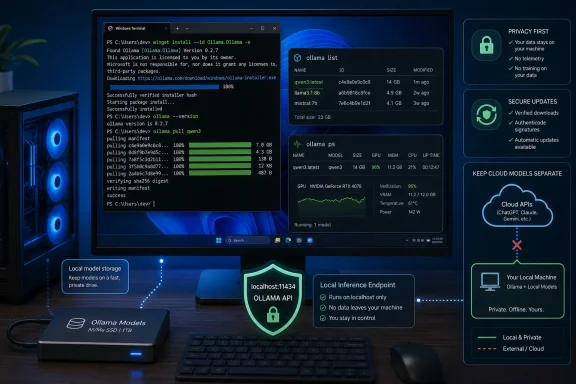 The local install is simple; storage planning is not
The official installer and WinGet package are reasonable default choices for a single Windows 11 machine:
winget install --id Ollama.Ollama -eThe
-eflag is worthwhile because it demands the exact package identifier. WinGet’s community repository can carry multiple similarly named packages over time, and automated deployment scripts should not leave package selection to a fuzzy match.
After installation, open a new PowerShell or Windows Terminal session and run:
ollama --versionA terminal that was open before installation may not inherit the updated user PATH. Ollama’s own documentation places the executable under the user profile’s local application folder rather than a machine-wide
Program Fileslocation, so a missing command usually reflects an old shell session or an incomplete PATH update—not necessarily a failed install.
The model location deserves attention before any downloads begin. Ollama defaults to a
.ollamadirectory under the user profile, which normally means the C: drive. That is painless for one small model and a bad default for an IT-managed laptop with a 256GB SSD, redirected profiles, BitLocker recovery constraints, or a storage quota.
Set
OLLAMA_MODELSbefore pulling models if model files belong on a secondary SSD, a large internal data partition, or an approved local development volume:
OLLAMA_MODELS=D:\Ollama\ModelsQuit Ollama from the notification-area icon and relaunch it after changing the variable. The process reads the environment at launch, so changing it while the server stays resident does not move existing data or redirect new pulls immediately.
There is a related operational catch for removals. Ollama’s Windows uninstaller removes the application, but its documentation says it will not remove models from a custom
OLLAMA_MODELSpath. On a shared or reassigned PC, the cleanup job needs to include that directory explicitly. Otherwise, an “uninstalled” local AI deployment can leave dozens or hundreds of gigabytes of model data behind.
ollama no longer guarantees a local-only session
How2Shout correctly flags a behavioral change that older installation guides miss: recent Ollama releases have turned a bare
ollamacommand into an interactive agent experience rather than a simple help display. The v0.32 series also introduced cloud-enabled features and agent integrations, while Ollama’s commercial pages now describe cloud model access alongside its local runtime.
For people installing Ollama specifically to keep prompts, code, documents, and internal tickets on their own PC, the safe habit is to name a locally downloaded model explicitly:
ollama pull qwen3
ollama run qwen3
Then verify the local inventory:
ollama listModel tags matter. A
:cloudsuffix is a clear warning that the requested model is hosted rather than running from local weights. The presence of a graphical desktop app does not change that boundary: a polished chat panel can call a local model, a cloud model, or an integration that reaches beyond the PC. “Ollama is installed locally” is therefore not proof that a given prompt stays local.
This is the material gap in many consumer-facing local-AI guides. They focus on running software offline but fail to identify which feature path is local and which one invokes a hosted service. For a workstation handling sensitive source code or regulated data, organizations should set a policy around approved local model tags, disable or avoid cloud selections, and test outbound connections rather than relying on interface labels alone.
The practical verification command is:
ollama psIt shows models that are presently loaded and how work is split between CPU and GPU. It does not establish that every interaction is local, but it does confirm whether the local runtime is serving an active model.
GPU detection needs verification, not optimism
Ollama’s Windows documentation lists support for NVIDIA and AMD Radeon hardware and calls for current vendor drivers. Its v0.32.3 release notes also specifically announced CUDA support on Windows ARM64, an important change for Snapdragon X-class hardware. But Windows hardware support is more nuanced than “a GPU exists, therefore Ollama will be fast.”
A model can load with part of its layers in VRAM and the remainder in system RAM. It can also fall entirely back to CPU. In both cases, the chat window works; only performance reveals the difference. The system tray icon, a completed model download, and Device Manager’s presence of a GPU are not useful confirmation of acceleration.
Run a model and inspect it:
ollama psThe
PROCESSORfield is the decisive check. A full GPU allocation indicates the model fits in available VRAM. A mixed percentage indicates CPU offload. CPU-only output means the GPU was not selected or cannot run that workload.
The consequence is especially sharp with laptop GPUs. A nominally capable NVIDIA card may have 6GB or 8GB of VRAM, which sharply limits the model sizes that can remain fully resident. Once a larger model spills into system RAM, throughput often drops enough that users blame the application when the real constraint is model size versus VRAM. Start with a modest current model, prove GPU use, and only then experiment with larger downloads.
AMD users should be even more careful about assuming compatibility from brand alone. Driver version, architecture support, and Ollama’s backend packaging all affect whether the Radeon path actually activates. The published Windows requirements promise Radeon support; they do not promise every Radeon configuration will deliver comparable behavior.
The Windows updater flaw was real, but the patch record needs precision
The security warning in the How2Shout guide is grounded in two real Windows-specific CVEs, though its patch timing is stated more confidently than the public record supports.
CERT Polska disclosed CVE-2026-42248 and CVE-2026-42249 on April 29, 2026. The first describes Ollama for Windows accepting update executables without integrity or authenticity verification. The second describes path traversal in updater file handling, potentially allowing an attacker who can manipulate update responses to write executable content outside the intended update directory, including a user’s Startup folder. CERT Polska says the combination could produce silent, persistent code execution because the Windows client performed automatic updates without prompting.
The affected range documented by CERT Polska and the National Vulnerability Database is 0.12.10 through 0.17.5, inclusive. Both records say other versions were not tested and may have been affected. That is not the same as a vendor-confirmed statement that every later version was vulnerable, nor is it a definitive vendor-backed fix matrix.
The guide says a fix merged on May 11. Public vulnerability records do not provide a clean official Ollama remediation announcement or a vendor-maintained “fixed in” release table for the Windows app. Snyk identifies a later updater package version, 0.23.3-rc0 or newer, as containing a fix, but that is third-party package analysis rather than a full Windows desktop release statement from Ollama. The defensible action is to install a current publicly listed release from Ollama or WinGet, not to assume an old installation is safe because automatic updates are enabled.
Checking the installer’s Windows digital signature before first execution is still sensible hygiene, but it is not a substitute for this history. It verifies the file currently on disk; it does not retroactively establish that earlier silent update transactions were properly authenticated.
For business deployments, the stronger response is to treat Ollama like any other developer-facing local server: obtain it only from the official publisher or Microsoft’s package source, track the installed version, watch the application’s update log, and restrict hostile or untrusted network paths. The vulnerabilities required an attacker able to influence update traffic, not a generic web-page visit, but that condition is not exotic on poorly controlled Wi-Fi, compromised DNS infrastructure, or enterprise networks with badly governed TLS interception.
Keep the API on the workstation unless there is a deliberate server design
Ollama listens on
localhost:11434by default. That default is appropriate for a desktop installation because it lets local tools—including editors, scripts, and local web interfaces—use the model without placing the service on the network.
Do not change the bind address to
0.0.0.0simply to reach Ollama from another device. A network-accessible model server needs an authentication layer, TLS, firewall rules, logging, patch management, and a decision about who is allowed to submit model files or prompts. The “Bleeding Llama” flaw tracked as CVE-2026-7482 reinforced why that distinction matters: it affected pre-0.17.1 Ollama servers that processed malicious GGUF content through exposed API functions, with researchers warning that exposed deployments could leak process memory.
That CVE is separate from the Windows updater flaws. It is also less directly relevant to a default single-user Windows 11 install, because a service restricted to localhost is not reachable from the network. The mistake is turning a local inference tool into an informal LAN service without applying server-grade safeguards.
Windows administrators should also avoid casually allowing Ollama through the firewall on public networks. Localhost traffic does not require an inbound public firewall exception. If Windows displays a network prompt, private-network access should only be permitted when a specific local-network integration requires it and the device’s network trust level is understood.
The reliable Windows installation path is therefore less about the wizard than the follow-through: install from the official channel, move model storage before downloads, run explicitly named local models, verify the GPU with
ollama ps, and leave the API bound to localhost. The current public record supports v0.32.5 as Ollama’s latest listed release—not the 0.32.6 build claimed by How2Shout—so version validation belongs in every deployment checklist before a model server is trusted with real work.