
For organizations that use browser-based OneNote as a standard collaboration surface, this is more than a ribbon-button removal. New Loop tables, task lists, voting tables, and other live components will no longer be inserted or edited inline from OneNote for the web. Existing components are expected to remain accessible, but Microsoft’s described fallback changes them into links that open their associated Loop pages.
That preserves the underlying content. It does not preserve the workflow.
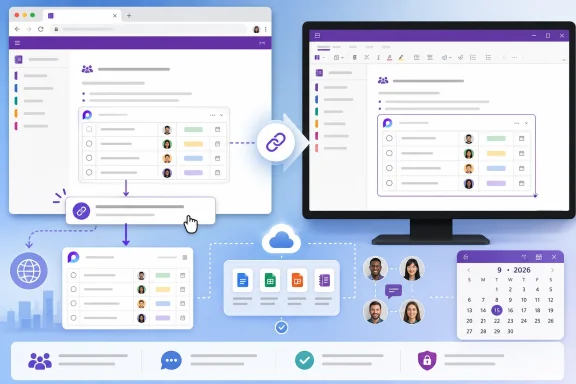 Existing OneNote pages will lose their live collaboration surface
Loop components are portable Microsoft 365 files: the same component can be embedded in more than one location and remain synchronized. A list placed in a OneNote page could therefore be edited by several people without turning the notebook into a collection of copied-and-pasted status updates.
Microsoft’s reported plan leaves those existing files in place, which avoids the worst-case outcome of deleting customer content. But converting an embedded component to a link changes how people consume the notebook. A meeting note that formerly showed a live action-item table inline will instead ask the reader to leave OneNote, open Loop, and then return to the notes.
That is a material downgrade for teams that use OneNote pages as the record of a meeting, project, or incident. The source of truth may remain intact in Loop, but the context around it — decisions, annotations, screenshots, and discussion captured in OneNote — is separated from the object users need to update.
It also introduces a documentation problem. A OneNote page is often treated as self-contained by the people reading it later. Linked Loop content depends on the recipient retaining access to the separate Loop file, while the notebook itself may have different sharing rules. Microsoft’s existing Loop documentation notes that access to embedded components and access to the notebook are related but not identical considerations, so administrators should not assume that a working OneNote permission model automatically guarantees a friction-free handoff to every linked Loop page.
Microsoft’s public documentation still describes web support
The timing is awkward because Microsoft’s currently available support and administration documentation still identifies OneNote for the web as a Loop-capable endpoint. Microsoft’s support article for using Loop components in OneNote says they can be used in OneNote Web and the Windows desktop app, and Microsoft Learn documentation updated in June 2026 likewise lists OneNote as available for Loop components.
Those pages describe the product as it exists before the announced retirement rather than disproving the Message Center notice. Still, the documentation gap matters: users searching Microsoft’s public guidance today can reasonably conclude that OneNote for the web remains supported for the precise workflow Microsoft is preparing to remove.
Microsoft should update the support article, requirements matrix, and administrative guidance before the retirement takes effect. Otherwise, help-desk teams will face a predictable stream of reports from users who see a documented feature in the browser but cannot create a component in their own tenant.
The company’s stated rationale, as reported by Neowin, is to “streamline the OneNote for the web experience while preserving access to existing Loop content.” That explains the intended outcome — links instead of deleted data — but says nothing about why Windows remains supported, whether feature parity might return, or whether a browser-based alternative is planned.
There is no public evidence that the change is caused by a security issue, a Loop service retirement, or a change in Microsoft 365 licensing. Administrators should resist presenting any of those explanations as fact. The known scope is narrower: the embedded Loop experience is being withdrawn from OneNote for the web, not from Loop itself and not from OneNote for Windows.
Windows-only availability creates an operational split
The remaining supported client is OneNote for Windows, which makes the decision particularly consequential for mixed-device organizations. Employees on managed Windows PCs can continue creating and editing Loop components within a notebook, while users working through a browser — including those on macOS, ChromeOS, Linux, shared devices, virtual desktops, or locked-down endpoints — will be directed away from the notebook and into Loop pages.
That is a practical access divide, not merely a cosmetic difference between desktop and web interfaces. Many enterprises deliberately use web apps to avoid local installation, simplify device replacement, support contractors, or meet virtual-desktop policies. For those users, “use OneNote for Windows instead” is not a neutral workaround; it may be unavailable or inconsistent with the organization’s endpoint strategy.
Microsoft’s own Loop guidance shows why the distinction matters. Loop components are meant to remain live wherever they are shared, including across Teams, Outlook, Whiteboard, OneNote, and the Loop app. Removing inline components from one of those destinations means OneNote for the web becomes a viewer and link launcher for this specific content type, rather than a first-class editing host.
The decision may be technically sensible if maintaining the embedded web editor inside OneNote created reliability or engineering costs, but Microsoft has not said that. What customers can establish now is the result: browser users lose an in-context collaboration feature that Microsoft had previously promoted as part of OneNote’s web and desktop experience.
What Microsoft 365 administrators should do before September
Microsoft reportedly gives tenant administrators no control to postpone, disable, or otherwise manage this retirement. That eliminates the usual phased-migration option: there is no policy switch that allows an organization to keep web-based component insertion while it revises its procedures.
Administrators should inventory the notebooks and business processes that rely on Loop components, especially shared project notebooks, meeting templates, operational runbooks, and Team-connected documentation. The important question is not whether a page contains a Loop link; it is whether users are expected to edit a live component from that page.
A focused response should include the following:
- Tell browser-only OneNote users that existing components will open as Loop links rather than remain editable inside the notebook after the retirement.
- Update notebook templates that instruct users to insert a Loop component from OneNote for the web, because those instructions will become wrong.
- Confirm that affected users can access the Loop app and the relevant files in OneDrive or SharePoint under the organization’s existing Loop policies.
- Review any workflow where a OneNote page is shared more broadly than the underlying Loop component, since a link-based experience makes access failures more visible.
- Decide whether Windows desktop OneNote is an approved exception for teams that need embedded Loop editing, rather than leaving users to discover the client split on their own.
The immediate risk is not loss of data; Microsoft’s reported migration behavior is designed to avoid that. The risk is silent workflow breakage when users open an established notebook after mid-September and find that formerly live content has become an outbound link.
Microsoft has not provided an exact September 2026 date, a public roadmap entry, or a commitment to restore the feature to OneNote for the web. Until it does, organizations should plan on the Windows client being the only OneNote endpoint for inline Loop work and treat every browser-based Loop-in-OneNote process as a migration candidate.
