
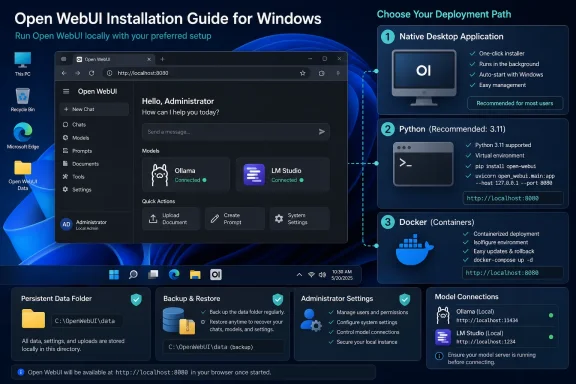
For a single Windows 10 or Windows 11 PC, the native desktop app is the lowest-friction route. For a setup that will be shared, backed up, exposed to a LAN, or kept running as a service, use the Python or Docker deployment path and treat it like a small server—not like a chat app.
Open WebUI 0.11.0, released July 27, 2026, is primarily an interface reorganization. Open WebUI’s own release post says settings, administration, sidebar navigation, model controls and keyboard shortcuts have moved or been rebuilt. That makes older screenshots and menu paths unreliable, particularly for connection setup: in 0.11.0, instance-wide provider configuration belongs under Settings > Admin > Connections.
 The desktop release is not Open WebUI 0.11.0
The easiest install on a personal PC is now available through WinGet:
winget install --id OpenWebUI.OpenWebUI -e
This package installs Open WebUI Desktop, a native Windows application that can operate a local Open WebUI server, connect to another Open WebUI instance, and optionally run local models through its built-in llama.cpp support. Its appeal is straightforward: it avoids asking a Windows user to manage Python, a virtual environment, a database location, or Docker Desktop before they can send their first prompt.
But do not confuse its version with the web application’s version. The current desktop release is 0.0.20, while the server project’s current release is 0.11.0. The desktop project labels itself Early Alpha, and its own repository says that things may break. H2S Media’s advice that it is suitable for a single machine is fair; calling it the default choice for every installation would be premature.
That distinction becomes important where reliability matters. The desktop app has reported Windows-specific launch failures involving GPU processes and missing Microsoft Visual C++ runtime dependencies, while its release history shows rapid development. A user who wants a convenient local AI interface should try it first. An administrator who needs controlled upgrades, repeatable configuration, reliable backups, or a service that survives unattended restarts should use the more explicit Python or container routes.
The practical rule is simple: use Desktop for personal use, and use a managed server-style deployment for anything that has users besides you.
Python 3.13 is still the wrong starting point
Open WebUI’s current installation documentation says Python 3.11 and 3.12 are supported, with Python 3.11 receiving the heaviest testing. Python 3.13 remains unsupported because some dependencies have not fully caught up; an installation can fail outright or behave unpredictably after it appears to complete.
This is especially awkward on Windows because current Python installs may be newer than the version Open WebUI supports. Checking first takes seconds:
python --version
If that shows Python 3.13, do not attempt to solve package errors one dependency at a time. Install Python 3.11 instead, or let uv provision it for this application. Microsoft’s current Python guidance naturally points users toward newer Python builds, which is sensible in general but does not override an application’s compatibility matrix.
For a local server installed from Python, uv is the better Windows choice because it can request the compatible interpreter directly:
$env:DATA_DIR="C:\OpenWebUI\data"
uvx --python 3.11 open-webui@latest serve
Open WebUI’s documentation uses the same pattern. The relevant detail is --python 3.11: uv can fetch and isolate that runtime rather than silently relying on whatever python.exe happens to be first on the system PATH.
The command assumes uv is installed. If an organization permits WinGet packages, use it to search for the current uv package and verify the publisher before installation rather than running an unreviewed remote PowerShell bootstrap command. That is less glamorous than a two-line quick start, but it is the safer workflow on a managed Windows endpoint.
Persistent storage is the part that cannot be improvised later
The most consequential line in a Windows quick start is not the installer command. It is the storage location:
$env:DATA_DIR="C:\OpenWebUI\data"
Open WebUI stores its local state—including user accounts, chat history, settings and uploaded-content metadata—in its application data store. With uvx, the project warns that omitting DATA_DIR can place data in temporary or cached application storage that may disappear when the process ends. H2S Media describes that result as losing everything after the first restart; the vendor documentation is slightly more careful, saying the temporary location might be deleted. Either way, a persistent data directory should be treated as mandatory.
Create the directory before starting the service:
New-Item -ItemType Directory -Force C:\OpenWebUI\data
$env:DATA_DIR="C:\OpenWebUI\data"
uvx --python 3.11 open-webui@latest serve
Then browse to [url]http://localhost:8080[/url]. The first account created becomes the administrator. That is an operational control, not a cosmetic label: the administrator can manage users, providers, instance-wide features, security settings and defaults. On a household or small office setup, create the owner’s account first, before handing the address to anyone else.
There is another Windows-specific consequence: a PowerShell environment variable set with $env: only exists in that PowerShell session. If you close the terminal and later start Open WebUI from a fresh shell without setting DATA_DIR again, you risk launching it against a different location. Put the command in a PowerShell script, create a shortcut that runs that script, or configure a scheduled task or service wrapper if the instance is meant to persist.
Back up the chosen data directory before upgrading from an older Open WebUI release. The 0.11.0 release includes database schema changes, so a rollback is not necessarily as simple as reinstalling an earlier package version over the top.
Use a virtual environment when choosing pip
pip install open-webui works, but a system-wide Python installation is the least maintainable choice on Windows. Open WebUI pulls in a substantial dependency stack, and mixing it into the interpreter used for scripts, development tools or other applications creates avoidable upgrade conflicts.
A virtual environment gives the installation a defined boundary:
py -3.11 -m venv C:\OpenWebUI\venv
C:\OpenWebUI\venv\Scripts\Activate.ps1
python -m pip install --upgrade pip
pip install open-webui
$env:DATA_DIR="C:\OpenWebUI\data"
open-webui serve
If PowerShell reports that open-webui is not recognized, the virtual environment is usually not active. The official fallback is:
python -m open_webui serve
The default package uses SQLite rather than PostgreSQL support. That is appropriate for one person or a lightly used private installation, but it should shape expectations. SQLite is a local-file database, not a substitute for a planned multi-user production deployment with regular backups, access control, monitoring and a tested recovery process.
Docker can provide a more repeatable deployment, but on Windows it brings Docker Desktop and the WSL 2 backend into the picture. Open WebUI’s documentation specifically tells Windows users to run Docker commands from their WSL environment, not from ordinary PowerShell or Command Prompt. For one person on one PC, that overhead usually buys little. For a server deployment, Docker’s named volume or explicit mounted data directory is valuable because it makes persistence deliberate.
Connect the model server only after it works on its own
Open WebUI is the interface and policy layer; it does not magically make a broken local inference server healthy. It will automatically try to reach Ollama at its normal local endpoint, port 11434. If the model list is empty, verify that Ollama is running and serving models before changing Open WebUI settings.
For providers that speak the OpenAI-compatible API convention—including many LM Studio configurations—add the connection under Settings > Admin > Connections. Open WebUI’s provider documentation confirms that it supports native Ollama connections, OpenAI-compatible endpoints and Open Responses-compatible endpoints, with models typically discovered from the provider automatically.
A useful troubleshooting boundary follows from that design:
- If Ollama or LM Studio cannot answer a direct local API request, the fault is in the model server, model installation, port binding or firewall path.
- If the backend answers directly but Open WebUI has no models, inspect the connection URL and its configuration in Admin Settings.
- If the browser interface loads but chats do not stream, inspect WebSocket handling, endpoint security software and any reverse proxy before reinstalling Python packages.
For Docker deployments, localhost has a special trap: inside a container, it refers to the container itself rather than the Windows host. Open WebUI’s documentation directs Docker users to use host.docker.internal when the local model server is running on the host. That one address difference explains many apparently mysterious “Open WebUI cannot see Ollama” reports.
Open WebUI 0.11.0 makes the interface easier to navigate, but it does not simplify the underlying responsibility: choose a supported runtime, make storage persistent, claim the administrator account intentionally, and verify the model backend separately. Do those four things, and a Windows installation becomes a useful local AI control panel rather than a temporary experiment whose chat history disappears with the next restart.