
The OpenAI API is the developer interface that lets an application send work to OpenAI models and receive a machine-readable result back. For a Windows administrator, developer, or hobbyist building a tool, that means a PowerShell utility, .NET service, Teams bot, desktop app, or internal web portal can ask a model to summarize text, classify a ticket, extract data from a document, analyze an image, or produce structured output without the user opening ChatGPT.
Analytics Insight describes the API as the “waiter” between an app and OpenAI’s AI models. The analogy is useful for a first introduction, but it leaves out the part that causes most real deployment failures: the API is not a shared ChatGPT window embedded in an application. It is an authenticated, metered service interface with security, data-handling, rate-limit, and reliability consequences that the application owner must manage.
OpenAI’s own developer documentation describes the API as an interface for text generation, natural-language processing, image and file analysis, tool use, streaming responses, and real-time interactions. The significant practical point is that the application, not OpenAI, owns the workflow: it decides what data to send, which model and tools to allow, what to show the user, when to retry, and whether a model-generated action is actually carried out.
An API — short for Application Programming Interface — is a documented way for software systems to exchange requests and responses. Your code sends an HTTP request containing instructions and input; OpenAI processes it using the model and returns a response object. The response is data your software must interpret, not a finished feature with a user interface, access controls, audit policy, and business rules already attached.
A simple text request may include a model selection and an input prompt. The application can then read returned text and display it in a ticketing system, save it to a database, pass it to another service, or reject it after validation. In a production setup, the request also needs identifiers, logs, timeouts, error handling, moderation or policy checks where appropriate, and spending controls.
That makes the OpenAI API fundamentally different from using ChatGPT in a browser. ChatGPT is a consumer or business product with its own interface, account-level features, conversation controls, and plan terms. The API is intended for developers integrating model capability into their own software. OpenAI’s help documentation treats API access, model availability, and pricing separately from ChatGPT and related products.
A ChatGPT subscription should therefore not be treated as a pool of API calls for an application. An organization planning an internal support assistant or automated document processor needs to establish API billing and usage controls separately, then test the precise model and endpoint it intends to use.
OpenAI’s current platform uses the Responses API as its primary starting point for new text and multimodal applications. It supports ordinary generated output, streaming output as it becomes available, file and image inputs, hosted tools such as web or file search, and custom function calls. A function call does not mean the model has executed a command in your environment; it means the model has requested that your application run a defined function with supplied arguments.
That distinction matters for Windows and enterprise automation. If a model asks to call a custom function named
The most common beginner mistake is building a JavaScript web page or Windows desktop app and embedding the key directly in the application. Anyone who can inspect the browser traffic, unpack the installer, inspect memory, or read the source can extract it. An exposed key can be used by someone else to make requests against the owner’s account, resulting in unexpected charges and potentially service disruption.
For local development on Windows, an environment variable is safer than inserting a key in source code:
That command applies to future Command Prompt sessions, so a new terminal must be opened before testing. It is still only a local-development measure; a production service should retrieve secrets from an appropriate secret-management system and run with the least privilege it needs.
OpenAI also supports API-key permissions and recommends separate keys for people, services, and environments. In practice, a development key, a staging key, and a production key should not be interchangeable. If one leaks, the blast radius is smaller, usage is easier to attribute, and rotation does not require taking every environment offline.
Never put an OpenAI API key in a public Git repository, a client-side app, or a screenshot. If it is exposed, revoke or rotate it immediately rather than assuming deletion from a commit history or app store listing makes it safe again.
Model responses vary with the instructions, input, model selected, available tools, and model updates. A workflow that needs consistent data should ask for a defined structure, validate the returned fields, and provide a safe failure path. For example, a service extracting incident details should validate that a returned priority is one of the allowed values before it writes to ServiceNow, Jira, or an internal database.
Latency also deserves realistic expectations. Analytics Insight says the model can return an answer in seconds, which is often true for simple requests, but it is not an availability or response-time guarantee. Input size, output length, selected model, external tool use, streaming behavior, rate limits, and service conditions all affect response time. A user-facing application should show progress, impose a timeout, and make retry behavior deliberate rather than leaving a spinning dialog box indefinitely.
OpenAI returns HTTP status information and request identifiers that can help developers diagnose failures and understand rate limiting. Those details should be logged carefully in production, alongside an internal correlation ID, while avoiding the accidental collection of sensitive prompts, documents, credentials, or personal data in application logs.
The same caution applies to data sent to the platform. An API request is not merely a local inference operation on a Windows PC; selected content leaves the application and is processed by OpenAI’s service. OpenAI documents data controls and retention behavior by endpoint, including application-state retention for Responses API use under its documented defaults. Organizations handling customer records, health information, source code, credentials, or regulated material should review the current API data controls, contractual requirements, retention settings, and any third-party tool connections before sending production data.
Start with a backend service that receives a limited input, sends it to one selected model, and returns clearly labeled output to a human. Record the request type, latency, success or failure, response identifier, estimated usage, and whether the human accepted or corrected the result. That record is what tells a team whether the model is saving time or just producing polished extra work.
Then add controls in the order they are needed: schema validation, role-based access, input redaction, rate limiting, spending alerts, test data, evaluation sets, and human approval for consequential actions. Tool use and agent-style workflows are powerful extensions, but they multiply the places where a bad assumption can turn into a real system change.
The key takeaway from both Analytics Insight’s beginner explanation and OpenAI’s platform documentation is simple: the API gives software access to model capabilities. It does not give an application judgment, security architecture, reliable facts, or permission to act. For Windows-focused teams, the useful first milestone is a small backend-integrated feature that treats model output as assistance — and keeps every credential, authorization decision, and irreversible action under conventional software control.
OpenAI’s own developer documentation describes the API as an interface for text generation, natural-language processing, image and file analysis, tool use, streaming responses, and real-time interactions. The significant practical point is that the application, not OpenAI, owns the workflow: it decides what data to send, which model and tools to allow, what to show the user, when to retry, and whether a model-generated action is actually carried out.
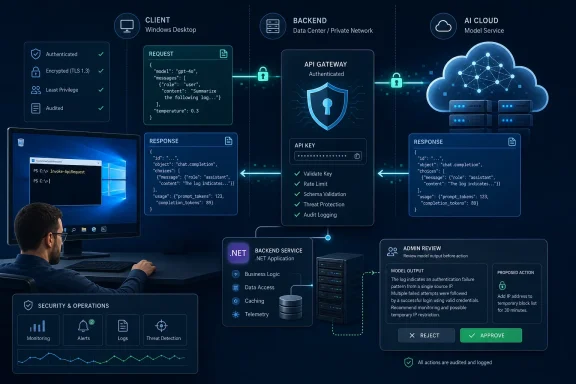 The API Is a Contract Between Your Software and OpenAI’s Service
An API — short for Application Programming Interface — is a documented way for software systems to exchange requests and responses. Your code sends an HTTP request containing instructions and input; OpenAI processes it using the model and returns a response object. The response is data your software must interpret, not a finished feature with a user interface, access controls, audit policy, and business rules already attached.A simple text request may include a model selection and an input prompt. The application can then read returned text and display it in a ticketing system, save it to a database, pass it to another service, or reject it after validation. In a production setup, the request also needs identifiers, logs, timeouts, error handling, moderation or policy checks where appropriate, and spending controls.
That makes the OpenAI API fundamentally different from using ChatGPT in a browser. ChatGPT is a consumer or business product with its own interface, account-level features, conversation controls, and plan terms. The API is intended for developers integrating model capability into their own software. OpenAI’s help documentation treats API access, model availability, and pricing separately from ChatGPT and related products.
A ChatGPT subscription should therefore not be treated as a pool of API calls for an application. An organization planning an internal support assistant or automated document processor needs to establish API billing and usage controls separately, then test the precise model and endpoint it intends to use.
What Happens During an API Request
The typical flow is straightforward:- A user or automated process gives your application some input, such as a support ticket, a PDF, an image, or a request to draft a response.
- Your backend service builds an API request with instructions, allowed tools, the selected model, and the relevant input.
- OpenAI authenticates the request, processes it, and returns generated content or a tool-call instruction.
- Your application validates the result and decides what happens next.
OpenAI’s current platform uses the Responses API as its primary starting point for new text and multimodal applications. It supports ordinary generated output, streaming output as it becomes available, file and image inputs, hosted tools such as web or file search, and custom function calls. A function call does not mean the model has executed a command in your environment; it means the model has requested that your application run a defined function with supplied arguments.
That distinction matters for Windows and enterprise automation. If a model asks to call a custom function named
ResetUserPassword, your service still needs to authenticate the caller, verify their authorization, validate the target account, record an audit event, and then invoke Microsoft Entra ID, Active Directory, or another approved system. The model should never be the access-control layer.A Key Is a Credential, Not a Configuration Detail
Every API request is authenticated with an API key. That key is a secret credential tied to access and potential billable usage, which makes it closer to a cloud-service password than an application setting. OpenAI explicitly warns developers not to place keys in browser code, mobile apps, repositories, or other client-side environments.The most common beginner mistake is building a JavaScript web page or Windows desktop app and embedding the key directly in the application. Anyone who can inspect the browser traffic, unpack the installer, inspect memory, or read the source can extract it. An exposed key can be used by someone else to make requests against the owner’s account, resulting in unexpected charges and potentially service disruption.
For local development on Windows, an environment variable is safer than inserting a key in source code:
setx OPENAI_API_KEY "replace-with-your-secret-key"That command applies to future Command Prompt sessions, so a new terminal must be opened before testing. It is still only a local-development measure; a production service should retrieve secrets from an appropriate secret-management system and run with the least privilege it needs.
OpenAI also supports API-key permissions and recommends separate keys for people, services, and environments. In practice, a development key, a staging key, and a production key should not be interchangeable. If one leaks, the blast radius is smaller, usage is easier to attribute, and rotation does not require taking every environment offline.
Never put an OpenAI API key in a public Git repository, a client-side app, or a screenshot. If it is exposed, revoke or rotate it immediately rather than assuming deletion from a commit history or app store listing makes it safe again.
The “AI” Part Does Not Remove the Need for Systems Design
The beginner version of an API example usually sends a prompt and prints an answer. That proves connectivity, but it does not solve the operational questions that appear as soon as users depend on the tool.Model responses vary with the instructions, input, model selected, available tools, and model updates. A workflow that needs consistent data should ask for a defined structure, validate the returned fields, and provide a safe failure path. For example, a service extracting incident details should validate that a returned priority is one of the allowed values before it writes to ServiceNow, Jira, or an internal database.
Latency also deserves realistic expectations. Analytics Insight says the model can return an answer in seconds, which is often true for simple requests, but it is not an availability or response-time guarantee. Input size, output length, selected model, external tool use, streaming behavior, rate limits, and service conditions all affect response time. A user-facing application should show progress, impose a timeout, and make retry behavior deliberate rather than leaving a spinning dialog box indefinitely.
OpenAI returns HTTP status information and request identifiers that can help developers diagnose failures and understand rate limiting. Those details should be logged carefully in production, alongside an internal correlation ID, while avoiding the accidental collection of sensitive prompts, documents, credentials, or personal data in application logs.
The same caution applies to data sent to the platform. An API request is not merely a local inference operation on a Windows PC; selected content leaves the application and is processed by OpenAI’s service. OpenAI documents data controls and retention behavior by endpoint, including application-state retention for Responses API use under its documented defaults. Organizations handling customer records, health information, source code, credentials, or regulated material should review the current API data controls, contractual requirements, retention settings, and any third-party tool connections before sending production data.
A Sensible First Project Is Narrow and Reversible
The best first OpenAI API project is not “build an autonomous IT administrator.” It is a narrow task with a human reviewer and an obvious way to measure whether the output helped. Good examples include drafting a reply to a routine help-desk request, turning a long incident timeline into a short handoff summary, extracting fields from a standardized form, or classifying feedback for a team queue.Start with a backend service that receives a limited input, sends it to one selected model, and returns clearly labeled output to a human. Record the request type, latency, success or failure, response identifier, estimated usage, and whether the human accepted or corrected the result. That record is what tells a team whether the model is saving time or just producing polished extra work.
Then add controls in the order they are needed: schema validation, role-based access, input redaction, rate limiting, spending alerts, test data, evaluation sets, and human approval for consequential actions. Tool use and agent-style workflows are powerful extensions, but they multiply the places where a bad assumption can turn into a real system change.
The key takeaway from both Analytics Insight’s beginner explanation and OpenAI’s platform documentation is simple: the API gives software access to model capabilities. It does not give an application judgment, security architecture, reliable facts, or permission to act. For Windows-focused teams, the useful first milestone is a small backend-integrated feature that treats model output as assistance — and keeps every credential, authorization decision, and irreversible action under conventional software control.
References
- Primary source: Analytics Insight
Published: 2026-08-05T07:30:14+00:00
Loading…
www.analyticsinsight.net - Related coverage: platform.openai.com
Loading…
platform.openai.com - Related coverage: platform.openai.com
Loading…
platform.openai.com - Related coverage: help.openai.com
Loading…
help.openai.com - Related coverage: help.openai.com
Loading…
help.openai.com