
Analytics Insight’s August 6 tutorial, “OpenAI API Tutorial: Build Your First AI Application,” correctly frames OpenAI’s API as a way to add text, image, and other AI capabilities without training a model. But as a guide for someone building a first Windows-hosted application, it leaves out the decisions that determine whether a demo becomes a secure, controllable service: the current API interface, separate API billing, secret handling, and a boundary between a browser UI and the model provider.
The omission is material because OpenAI’s current developer quickstart uses the Responses API and its official SDKs, while the Analytics Insight excerpt describes the platform only in broad terms as a cleaner successor to older systems. That is directionally true, but it gives a beginner no concrete API surface, model selection rule, or upgrade path. No other outlet appears to have independently reported a specific platform change tied to Analytics Insight’s tutorial; this is a tutorial explainer rather than a product announcement.
There is also a basic timestamp discrepancy in the submitted article metadata. It says the piece was published at 10:30 UTC on August 6, 2026, but modified at 10:03:51 UTC the same day — a modification time 26 minutes before publication. That can happen through a content-management workflow or a timezone mistake, but Analytics Insight does not explain it. It does mean readers should not treat “latest OpenAI platform” as a versioned, dated technical claim.
OpenAI’s own quickstart presently directs developers toward a single request to the Responses API. In the JavaScript example, a server-side Node.js application installs the official
That is a useful simplification for a first project, but it is not an abstraction developers should ignore. An application that only sends a short string and displays a short string can be built in minutes. A document assistant that accepts uploads, a support system that queries a customer database, or an “agent” that triggers actions has a very different failure profile. The move from a prompt-and-response demo to a tool-enabled application introduces authorization, auditing, input validation, output validation, cost controls, and recovery paths for partial failures.
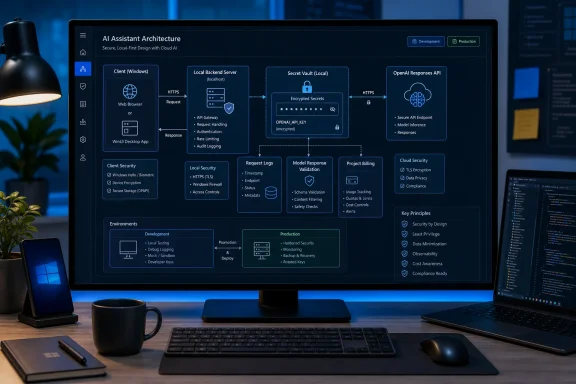
For Windows developers, the practical starting point is a small local server application — Node.js, Python, .NET, or another server-side runtime — with one route that accepts an allowed user request and makes the OpenAI call. A web page, WinUI app, Electron client, mobile app, or Power Platform front end should call that service, not OpenAI directly. The local proof of concept can be simple; the architecture should not teach an unsafe habit.
Analytics Insight is right that a developer can start small and expand. The missing qualifier is that the initial shape should preserve the ability to expand without exposing a credential or welding application logic to one free-form model response.
That distinction affects every “first app” checklist. Before a developer tests a request, they need an API-platform account configuration, a project, credentials, and a billing plan or balance appropriate to the account type. A successful call does not establish a fixed future cost: output length, input size, selected model, tool use, retries, concurrent traffic, and attached files all affect consumption.
OpenAI offers prepaid billing, auto-recharge settings, monthly recharge limits, and usage information at organization and project levels. Those controls are not bookkeeping after the build; they are part of deploying an application safely. The provider also warns that billing enforcement can lag slightly after prepaid credit is consumed, so a configured balance is a spending-control aid, not an absolute technical cutoff.
A useful first deployment separates development from production immediately:
The rule applies just as strongly to a desktop application. Packing an API key into an
On Windows, OpenAI’s documented baseline is to store
A secure flow looks mundane, which is precisely the point. The user authenticates to the application. The client sends a request to the developer’s backend. The backend authorizes the user, applies rate and content rules, reads its protected API key, calls OpenAI, and returns only the response the client needs. The client never receives the OpenAI credential.
OpenAI recommends unique keys for individual team members and warns against sharing personal keys with coworkers. Its platform also supports project-based keys and permissions. A team that begins by pasting one key into every developer’s
A simple chat application needs a conversation state policy. Decide whether the application stores prior messages, how long it retains them, who may retrieve them, and what happens when a user asks the system to forget a conversation. A content tool needs limits on response size and a review process if it publishes material. A document assistant needs permission checks before retrieval, so the model is never given files the current user lacks permission to see. A support tool must distinguish between helpful drafted text and an action that changes an order, account, entitlement, or subscription.
Tool use deserves particular caution. An API-connected model can be given functions that query inventory, open tickets, provision accounts, execute scripts, or alter records. The model should propose structured arguments; application code should validate each argument against an allowlist and enforce the caller’s permissions. High-impact actions should require explicit user confirmation or a human approval step. Giving a model an unrestricted shell, a broadly privileged database connection, or a general-purpose administrator token converts a language-model integration into an unnecessary privilege-escalation route.
The same discipline applies to output. Do not assume plain text will always arrive in the expected form, and do not render it as trusted HTML. If downstream code needs fields such as priority, category, confidence, or approval status, request and validate a defined structure rather than scraping prose. If the model summarizes customer or system data, treat it as an assistive output that can be wrong, incomplete, or manipulated by content in the data it reads.
That project proves the important parts: the application can authenticate users, protect a secret, call the current API, handle a response failure, account for usage, and make an output useful without treating it as authoritative. Only then should a developer add long-lived conversations, private document retrieval, external tools, or automatic actions.
Analytics Insight’s central message — that developers do not need to train an AI model from scratch to build useful software — remains sound. The real first lesson, however, is that an API call is the smallest part of an AI application. The first production decision is where the key lives and which system is responsible when the model returns the wrong answer, makes an expensive request, or is asked to act beyond the user’s authority.
There is also a basic timestamp discrepancy in the submitted article metadata. It says the piece was published at 10:30 UTC on August 6, 2026, but modified at 10:03:51 UTC the same day — a modification time 26 minutes before publication. That can happen through a content-management workflow or a timezone mistake, but Analytics Insight does not explain it. It does mean readers should not treat “latest OpenAI platform” as a versioned, dated technical claim.
 The first application should begin with the current interface
OpenAI’s own quickstart presently directs developers toward a single request to the Responses API. In the JavaScript example, a server-side Node.js application installs the official openai package, creates a client, sends input to a named model, and reads a simplified text field from the response. The same API can accept structured multimodal content, invoke built-in services such as web or file search, and call developer-defined functions.That is a useful simplification for a first project, but it is not an abstraction developers should ignore. An application that only sends a short string and displays a short string can be built in minutes. A document assistant that accepts uploads, a support system that queries a customer database, or an “agent” that triggers actions has a very different failure profile. The move from a prompt-and-response demo to a tool-enabled application introduces authorization, auditing, input validation, output validation, cost controls, and recovery paths for partial failures.
For Windows developers, the practical starting point is a small local server application — Node.js, Python, .NET, or another server-side runtime — with one route that accepts an allowed user request and makes the OpenAI call. A web page, WinUI app, Electron client, mobile app, or Power Platform front end should call that service, not OpenAI directly. The local proof of concept can be simple; the architecture should not teach an unsafe habit.
Analytics Insight is right that a developer can start small and expand. The missing qualifier is that the initial shape should preserve the ability to expand without exposing a credential or welding application logic to one free-form model response.
API access is separate from a ChatGPT subscription
The tutorial’s broad language could easily lead a first-time reader to assume that a paid ChatGPT account includes programmatic usage. It does not. OpenAI says its API service is billed and managed separately from ChatGPT, with API usage generally charged according to usage rather than included as part of a ChatGPT subscription.That distinction affects every “first app” checklist. Before a developer tests a request, they need an API-platform account configuration, a project, credentials, and a billing plan or balance appropriate to the account type. A successful call does not establish a fixed future cost: output length, input size, selected model, tool use, retries, concurrent traffic, and attached files all affect consumption.
OpenAI offers prepaid billing, auto-recharge settings, monthly recharge limits, and usage information at organization and project levels. Those controls are not bookkeeping after the build; they are part of deploying an application safely. The provider also warns that billing enforcement can lag slightly after prepaid credit is consumed, so a configured balance is a spending-control aid, not an absolute technical cutoff.
A useful first deployment separates development from production immediately:
- Create distinct projects and keys for local development, staging, and the live application.
- Apply a deliberately low budget for the experimental project before inviting other users.
- Record the model, request type, token counts, latency, and application user or tenant for every production request.
- Review cost data by project and model rather than attempting to infer expense from individual prompts.
Never put the key in the Windows client
The most consequential missing step in many beginner API tutorials is key security. OpenAI explicitly says API keys must never be deployed in client-side environments, including browsers and mobile apps, because anyone who obtains the key can send requests under the account. That can cause unapproved charges, burn through quotas, and expose access patterns or account data.The rule applies just as strongly to a desktop application. Packing an API key into an
.exe, Electron bundle, installer, JavaScript file, configuration file shipped to users, or a public Git repository does not conceal it. A determined user can inspect the application or observe its outbound traffic. Obfuscation changes the time required to recover a key; it does not make the key private.On Windows, OpenAI’s documented baseline is to store
OPENAI_API_KEY as an environment variable. Its setup guidance uses setx OPENAI_API_KEY "your_api_key" from Command Prompt, then requires opening a new terminal window before the new setting becomes available. That is reasonable for a developer workstation, but a production deployment should normally obtain the secret from the hosting platform’s secret store or a dedicated key-management service rather than a user-profile variable.A secure flow looks mundane, which is precisely the point. The user authenticates to the application. The client sends a request to the developer’s backend. The backend authorizes the user, applies rate and content rules, reads its protected API key, calls OpenAI, and returns only the response the client needs. The client never receives the OpenAI credential.
OpenAI recommends unique keys for individual team members and warns against sharing personal keys with coworkers. Its platform also supports project-based keys and permissions. A team that begins by pasting one key into every developer’s
.env file will have no reliable way to identify the source of a leak or separate one developer’s experiments from another’s production workload.“Build a chatbot” is not yet an application design
The tutorial’s suggested uses — chat applications, content tools, document assistants, and customer support systems — are all valid categories. They are not interchangeable implementations.A simple chat application needs a conversation state policy. Decide whether the application stores prior messages, how long it retains them, who may retrieve them, and what happens when a user asks the system to forget a conversation. A content tool needs limits on response size and a review process if it publishes material. A document assistant needs permission checks before retrieval, so the model is never given files the current user lacks permission to see. A support tool must distinguish between helpful drafted text and an action that changes an order, account, entitlement, or subscription.
Tool use deserves particular caution. An API-connected model can be given functions that query inventory, open tickets, provision accounts, execute scripts, or alter records. The model should propose structured arguments; application code should validate each argument against an allowlist and enforce the caller’s permissions. High-impact actions should require explicit user confirmation or a human approval step. Giving a model an unrestricted shell, a broadly privileged database connection, or a general-purpose administrator token converts a language-model integration into an unnecessary privilege-escalation route.
The same discipline applies to output. Do not assume plain text will always arrive in the expected form, and do not render it as trusted HTML. If downstream code needs fields such as priority, category, confidence, or approval status, request and validate a defined structure rather than scraping prose. If the model summarizes customer or system data, treat it as an assistive output that can be wrong, incomplete, or manipulated by content in the data it reads.
A durable first milestone is smaller than the tutorial suggests
The beginner project worth shipping internally is not a full customer-support bot or autonomous document agent. It is a narrow application with a protected server endpoint, one clearly defined task, bounded inputs, logged requests, a low spending threshold, and a manual review path. Examples include a tool that rewrites selected internal text, extracts fields from a controlled document format, or drafts a reply that a user must approve.That project proves the important parts: the application can authenticate users, protect a secret, call the current API, handle a response failure, account for usage, and make an output useful without treating it as authoritative. Only then should a developer add long-lived conversations, private document retrieval, external tools, or automatic actions.
Analytics Insight’s central message — that developers do not need to train an AI model from scratch to build useful software — remains sound. The real first lesson, however, is that an API call is the smallest part of an AI application. The first production decision is where the key lives and which system is responsible when the model returns the wrong answer, makes an expensive request, or is asked to act beyond the user’s authority.
References
- Primary source: Analytics Insight
Published: 2026-08-06T10:30:00+00:00
Loading…
www.analyticsinsight.net - Related coverage: help.openai.com
Loading…
help.openai.com - Related coverage: help.openai.com
Loading…
help.openai.com - Related coverage: platform.openai.com
Loading…
platform.openai.com - Related coverage: developers.openai.com
Model guidance | OpenAI API
Compare model features, migration guidance, and prompting best practices across OpenAI models. developers.openai.com
- Related coverage: cdn.openai.com
Loading…
cdn.openai.com - Related coverage: cdn.openai.com
Loading…
cdn.openai.com - Related coverage: platform.openai.com
Loading…
platform.openai.com