
TechPowerUp reports that OpenMouse, a newly announced open-source mouse control panel, plans to add support for Logitech’s Haptic Inductive Trigger System, or HITS. For Windows users with a Logitech G PRO X2 SUPERSTRIKE, the important word is plans: the report describes HITS support as incoming rather than shipping today, and neither a supported-device matrix nor a public timetable appears to have been published alongside the announcement.
That leaves OpenMouse as an interesting project announcement rather than an immediate replacement for Logitech G HUB. But the target matters. Logitech’s HITS-equipped mouse is one of the few current devices whose core click behavior depends on vendor configuration software: actuation depth, reset behavior, and haptic feedback are settings users expect to change after buying the hardware.
Logitech introduced HITS with the PRO X2 SUPERSTRIKE as an inductive, haptic alternative to conventional mechanical main-button switches. Logitech says the system supports ten actuation-point steps, five rapid-trigger reset settings, and six haptic-intensity levels. Its own setup documentation directs owners to G HUB’s “HITS Configuration” page to alter those options.
Those settings are fundamentally different from Windows’ built-in pointer speed, button swap, wheel scrolling, and accessibility controls. Windows can receive ordinary clicks from the mouse without knowing whether the click originated from a mechanical microswitch, an optical switch, or an inductive sensor. It does not include a generic control panel for modifying the electronics that decide when a click is registered or how forcefully the mouse produces tactile feedback.
That distinction is the real technical hurdle for OpenMouse. The software would need to communicate with Logitech’s device-specific configuration interface, discover which commands and values the mouse accepts, and translate a Windows-facing control panel into those commands. Open source does not make that protocol public by itself; it makes the replacement software inspectable once developers have implemented it.
Logitech has made the user-facing behavior public, but it has not published a general HITS configuration protocol for third-party utilities. TechPowerUp’s report therefore points to a reverse-engineering and compatibility effort, not an arrangement that gives OpenMouse privileged access to Logitech’s firmware.
USB HID, the standard class used by most mice, solves the basic input problem. It describes conventional reports for movement, scroll-wheel motion, and button presses, allowing Windows to use a mouse immediately without a manufacturer driver. It does not require every manufacturer to expose configuration functions in a common, interoperable way.
Advanced features are commonly carried through vendor-defined HID reports or another private USB interface. The transport may still be HID; the meaning of each command is vendor-specific. One byte sequence may select a 1,600-DPI stage on one mouse, set an RGB effect on another, or do nothing on a third device that reports the same basic hardware identifiers.
This is why sharing a USB vendor ID and product ID is weaker evidence of interchangeability than it appears. The vendor ID identifies the organization assigned that ID, while the product ID is meaningful within that vendor’s allocation. It does not certify that two devices have identical firmware, sensor settings, radio hardware, LEDs, flash layouts, or configuration commands. OEM mice sold under several labels can look alike and enumerate similarly while using incompatible firmware revisions.
For inexpensive white-label mice, the problem is often worse: the original configuration application may be abandoned, unsigned, poorly localized, distributed only through a reseller page, or designed for an earlier Windows release. Installing an unknown peripheral utility simply to change a DPI stage or turn off lighting is an avoidable trust problem on a work PC.
Independent projects have already shown that direct, local control of selected Logitech peripherals is possible. OpenLogi and Mouser, for example, focus on Logitech HID++ devices and expose subsets of button remapping, DPI, scrolling, device profiles, and SmartShift controls without an account requirement. Their existence is proof that vendor software is not always technically necessary for a given configuration task.
It is not proof that HITS support is easy. Logitech’s productivity devices and the PRO X2 SUPERSTRIKE sit on different product and protocol paths, and HITS is a new switch-control system rather than a familiar extra-button mapping. A utility that can set a DPI value or remap a side button cannot automatically configure main-button actuation or manage the haptic mechanism safely.
RTINGS’ testing of the PRO X2 SUPERSTRIKE underscores why the configuration work matters. The mouse’s signature feature is a tunable click system that replaces the normal physical switch feel with sensor-driven detection and haptic confirmation. If a third-party tool exposes those controls poorly, users could end up with accidental clicks, a click feel they dislike, or settings that do not persist as expected after a reboot, profile switch, firmware update, or move to another PC.
Those omissions are significant for an IT-minded audience. A portable configuration utility that writes settings to onboard memory is a different proposition from a tool that must inject or intercept input continuously. The latter can conflict with games, anti-cheat systems, remote-desktop sessions, accessibility tools, endpoint controls, and corporate application allowlists.
The project also has to answer a more basic support question: whether it will target a narrow list of verified devices or try to identify compatible mice automatically. Automatic detection sounds convenient, but generic identifiers and similar hardware shells make false matches dangerous. Writing an incorrect vendor report can be harmless, can reset settings, or can leave a device requiring the manufacturer’s software to recover.
For now, the safest reading is restrained. OpenMouse has identified a real gap: sophisticated mice are increasingly sold with features whose practical usability depends on closed vendor utilities. Logitech’s HITS mouse makes that dependence unusually visible because its headline click technology is configurable only through software.
Until OpenMouse publishes code, signed Windows builds, a compatibility list, and evidence that it can configure a retail PRO X2 SUPERSTRIKE reliably, G HUB remains the supported option. The project becomes consequential when it can demonstrate that HITS settings are controllable locally, persist predictably, and do not require users to trade one opaque control panel for another.
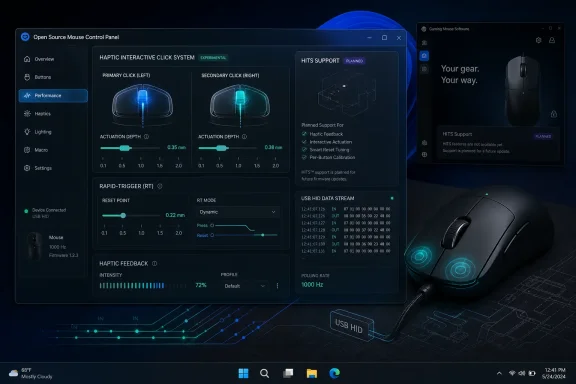 Logitech’s HITS settings are more than ordinary mouse controls
Logitech introduced HITS with the PRO X2 SUPERSTRIKE as an inductive, haptic alternative to conventional mechanical main-button switches. Logitech says the system supports ten actuation-point steps, five rapid-trigger reset settings, and six haptic-intensity levels. Its own setup documentation directs owners to G HUB’s “HITS Configuration” page to alter those options.Those settings are fundamentally different from Windows’ built-in pointer speed, button swap, wheel scrolling, and accessibility controls. Windows can receive ordinary clicks from the mouse without knowing whether the click originated from a mechanical microswitch, an optical switch, or an inductive sensor. It does not include a generic control panel for modifying the electronics that decide when a click is registered or how forcefully the mouse produces tactile feedback.
That distinction is the real technical hurdle for OpenMouse. The software would need to communicate with Logitech’s device-specific configuration interface, discover which commands and values the mouse accepts, and translate a Windows-facing control panel into those commands. Open source does not make that protocol public by itself; it makes the replacement software inspectable once developers have implemented it.
Logitech has made the user-facing behavior public, but it has not published a general HITS configuration protocol for third-party utilities. TechPowerUp’s report therefore points to a reverse-engineering and compatibility effort, not an arrangement that gives OpenMouse privileged access to Logitech’s firmware.
USB HID gets the cursor working, but it does not standardize vendor features
The announcement also speaks to a broader frustration familiar to owners of rebadged gaming mice: a device can work perfectly as a mouse in Windows while its DPI presets, RGB zones, debounce settings, lift-off distance, polling modes, macros, battery telemetry, and onboard profiles remain inaccessible without a particular utility.USB HID, the standard class used by most mice, solves the basic input problem. It describes conventional reports for movement, scroll-wheel motion, and button presses, allowing Windows to use a mouse immediately without a manufacturer driver. It does not require every manufacturer to expose configuration functions in a common, interoperable way.
Advanced features are commonly carried through vendor-defined HID reports or another private USB interface. The transport may still be HID; the meaning of each command is vendor-specific. One byte sequence may select a 1,600-DPI stage on one mouse, set an RGB effect on another, or do nothing on a third device that reports the same basic hardware identifiers.
This is why sharing a USB vendor ID and product ID is weaker evidence of interchangeability than it appears. The vendor ID identifies the organization assigned that ID, while the product ID is meaningful within that vendor’s allocation. It does not certify that two devices have identical firmware, sensor settings, radio hardware, LEDs, flash layouts, or configuration commands. OEM mice sold under several labels can look alike and enumerate similarly while using incompatible firmware revisions.
For inexpensive white-label mice, the problem is often worse: the original configuration application may be abandoned, unsigned, poorly localized, distributed only through a reseller page, or designed for an earlier Windows release. Installing an unknown peripheral utility simply to change a DPI stage or turn off lighting is an avoidable trust problem on a work PC.
The promise is strongest where vendor software is weakest
OpenMouse’s value proposition will depend on whether it can become a transparent local tool rather than another opaque background agent. Logitech G HUB is still the supported route for configuring the PRO X2 SUPERSTRIKE, and Logitech’s published instructions make clear that G HUB is where HITS tuning currently lives.Independent projects have already shown that direct, local control of selected Logitech peripherals is possible. OpenLogi and Mouser, for example, focus on Logitech HID++ devices and expose subsets of button remapping, DPI, scrolling, device profiles, and SmartShift controls without an account requirement. Their existence is proof that vendor software is not always technically necessary for a given configuration task.
It is not proof that HITS support is easy. Logitech’s productivity devices and the PRO X2 SUPERSTRIKE sit on different product and protocol paths, and HITS is a new switch-control system rather than a familiar extra-button mapping. A utility that can set a DPI value or remap a side button cannot automatically configure main-button actuation or manage the haptic mechanism safely.
RTINGS’ testing of the PRO X2 SUPERSTRIKE underscores why the configuration work matters. The mouse’s signature feature is a tunable click system that replaces the normal physical switch feel with sensor-driven detection and haptic confirmation. If a third-party tool exposes those controls poorly, users could end up with accidental clicks, a click feel they dislike, or settings that do not persist as expected after a reboot, profile switch, firmware update, or move to another PC.
“Support incoming” needs a testable definition
The announcement leaves several operational details unresolved. TechPowerUp’s report does not establish a release date for HITS functionality, identify a tested firmware version for the PRO X2 SUPERSTRIKE, say whether support will work over LIGHTSPEED wireless and wired USB, or explain whether settings will be stored on the mouse or applied by a background process in Windows.Those omissions are significant for an IT-minded audience. A portable configuration utility that writes settings to onboard memory is a different proposition from a tool that must inject or intercept input continuously. The latter can conflict with games, anti-cheat systems, remote-desktop sessions, accessibility tools, endpoint controls, and corporate application allowlists.
The project also has to answer a more basic support question: whether it will target a narrow list of verified devices or try to identify compatible mice automatically. Automatic detection sounds convenient, but generic identifiers and similar hardware shells make false matches dangerous. Writing an incorrect vendor report can be harmless, can reset settings, or can leave a device requiring the manufacturer’s software to recover.
For now, the safest reading is restrained. OpenMouse has identified a real gap: sophisticated mice are increasingly sold with features whose practical usability depends on closed vendor utilities. Logitech’s HITS mouse makes that dependence unusually visible because its headline click technology is configurable only through software.
Until OpenMouse publishes code, signed Windows builds, a compatibility list, and evidence that it can configure a retail PRO X2 SUPERSTRIKE reliably, G HUB remains the supported option. The project becomes consequential when it can demonstrate that HITS settings are controllable locally, persist predictably, and do not require users to trade one opaque control panel for another.
References
- Primary source: TechPowerUp
Published: 2026-08-04T18:33:53+00:00
Loading…
www.techpowerup.com - Related coverage: github.com
Loading…
github.com - Related coverage: checknotes.wordpress.com
Loading…
checknotes.wordpress.com - Related coverage: hotgithub.com
Loading…
hotgithub.com - Related coverage: git.hubp.de
Loading…
git.hubp.de - Related coverage: checknotes.wordpress.com
Loading…
checknotes.wordpress.com - Related coverage: bitsavers.org
Loading…
www.bitsavers.org - Related coverage: rtings.com
Loading…
www.rtings.com - Related coverage: stuff.tv
Loading…
www.stuff.tv - Related coverage: learn.microsoft.com
Loading…
learn.microsoft.com - Related coverage: codegenes.net
Loading…
www.codegenes.net - Related coverage: elastic.org.cn
Loading…
www.elastic.org.cn - Related coverage: futureisnow.logitechg.com
Loading…
futureisnow.logitechg.com - Related coverage: news.logitech.com
Loading…
news.logitech.com - Related coverage: rtings.com
Loading…
www.rtings.com - Related coverage: logitech.com
Loading…
www.logitech.com - Related coverage: news.logitech.com
Loading…
news.logitech.com - Related coverage: pcgamesn.com
Loading…
www.pcgamesn.com - Related coverage: pcgamer.com
Loading…
www.pcgamer.com - Related coverage: tomsguide.com
Loading…
www.tomsguide.com - Related coverage: tomshardware.com
Loading…
www.tomshardware.com - Related coverage: techradar.com
Loading…
www.techradar.com - Related coverage: pcgamer.com
Loading…
www.pcgamer.com - Related coverage: cincodias.elpais.com
Loading…
cincodias.elpais.com - Related coverage: as.com
Loading…
as.com - Related coverage: openmouse.co
Loading…
openmouse.co - Related coverage: github.com
Loading…
github.com - Related coverage: marktribestudio.com
Loading…
www.marktribestudio.com