
This is a usability change, not an expansion of who can use Copilot in Outlook. Neowin correctly identified the new pop-out control in its report, but Microsoft’s August 19 update to Message Center notice MC1454996 makes clear that the rollout timeline moved from mid-August to late August. More importantly, the notice applies only to people who already have access to Copilot Chat in Outlook on the two supported platforms.
For organizations trying to set expectations around Microsoft 365 Copilot, that distinction is worth making plainly: no new entitlement, tenant setting, or admin deployment switch accompanies this release. It is a different window treatment for an existing Copilot Chat experience.
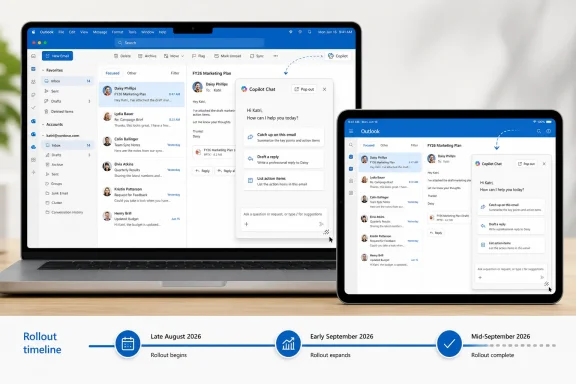 A floating panel, not a free-standing Copilot app
The change adds a Pop out button inside Copilot Chat. Selecting it moves the chat into a separate panel that floats over the main Outlook window, keeping mail controls, the message list, and the current email visible behind it.
On macOS, users can drag and resize the Copilot Chat panel, but only within the boundaries of the Outlook application window. That limitation means this is not a conventional independent macOS window that can be moved onto a second display or left visible while the user switches to another application. It is better understood as an Outlook-managed overlay that offers a more flexible layout than the existing docked chat surface.
The iPad implementation is more constrained. Microsoft says users can move the panel horizontally and resize it vertically; the notice does not promise free-form resizing or placement. That follows the platform’s more controlled multitasking model, but it also means Mac and iPad users should not expect identical behavior.
A Return button places the chat back into Outlook’s main window, while a Close button exits Copilot Chat. Those controls matter operationally because the pop-out state is an optional workspace choice, rather than a replacement interface that users must learn around.
Microsoft’s support documentation has described Copilot Chat in Outlook as opening beside the existing Outlook window so people can continue working in email. The new pop-out capability changes that fixed adjacency into a movable in-app panel. It addresses a basic issue with side panes: a chat window that consumes part of a narrow Outlook layout can make both the email and the AI conversation harder to read.
The schedule slipped before the feature reached users
Microsoft published MC1454996 on August 14, initially saying the worldwide rollout would begin in mid-August and finish by mid-September. On August 19, the company updated the notice and shifted the start to late August, while retaining a mid-September completion date.
That is a small but meaningful revision. A Microsoft 365 Roadmap entry, listed as feature ID 568368, had already described the feature as an August general-availability item. Windows Central also surfaced the roadmap entry earlier this month as part of a broader list of planned Outlook improvements. The Message Center update is the more useful record for IT staff because it carries the revised rollout window and identifies the affected platforms.
The update also corrects a loose reading of the timing in early coverage. This is not a rollout expected to finish “within a couple of weeks” of its original start. Microsoft’s current published schedule is a staged deployment that runs from late August through the middle of September, so some eligible users may not see the Pop out control until several weeks after the first tenants receive it.
As with other Microsoft 365 service changes, the message does not provide a build number for Outlook for Mac, an iPadOS version requirement, a tenant-by-tenant rollout schedule, or a way for administrators to force availability early. Organizations should therefore avoid tying training sessions or support documentation to a precise day in late August.
Eligibility remains the practical dividing line
Microsoft’s notice is narrowly scoped: it affects users with access to Copilot Chat in Outlook for Mac and Outlook for iPad. The company does not say that the pop-out panel adds Copilot Chat for consumer accounts, classic Outlook for Windows, new Outlook for Windows, Outlook on the web, Android, or iPhone.
That last point is particularly relevant for mixed-device organizations. A company can have employees using the same Microsoft 365 tenant and the same Copilot licensing arrangement, but see different Outlook interfaces depending on whether those users work from a Mac, iPad, Windows PC, browser, or phone. Training material that simply says “open Copilot in Outlook” is increasingly likely to be incomplete.
Microsoft’s public Outlook Copilot guidance also places boundaries around what the service can do with mailbox content. Copilot scenarios are generally tied to a user’s primary mailbox and Exchange Online; the support documentation lists limitations involving archive mailboxes, encryption, Information Rights Management, some sensitivity-labeled messages, and certain shared or delegated mailbox situations. The floating panel does not alter any of those data-access rules. It changes the location of the chat surface, not Copilot’s access to mail or the policies governing that access.
For users, the best use case is straightforward: keep an email thread, calendar item, or inbox view open while asking Copilot to summarize material, prepare a response, explain a message, or help organize follow-up work. The panel can reduce repeated open-and-close actions, but it cannot make an unsupported mailbox type, protected email, or unavailable Copilot capability suddenly available.
What administrators should do before late August
Microsoft says no administrative action is required, and its Message Center entry identifies no new compliance consideration. That is credible for deployment purposes: there is no announced policy to enable, no stated migration requirement, and no new permission model attached to the pop-out behavior.
Still, “no action required” should not be confused with “no support impact.” Help desks may see questions from users who notice a new control in Copilot Chat or who expect it to work on a Windows PC after seeing it demonstrated by a colleague on a Mac. A short internal note can prevent both problems.
Administrators should update their Copilot guidance to state that:
- The pop-out option is rolling out automatically to eligible Outlook for Mac and Outlook for iPad users from late August through mid-September 2026.
- The feature rearranges Copilot Chat inside Outlook and does not grant Copilot access to users or mailboxes that did not already have it.
- Mac users can move and resize the panel within Outlook, while iPad users can move it horizontally and resize it vertically.
- The panel can be returned to the normal in-window view or closed without changing a user’s Copilot configuration.
The practical benefit is modest but real. Copilot Chat becomes less of a pane that competes with the mail client for space and more of a movable aid for people who already use it. The more consequential news for IT is the revised date: eligible Mac and iPad users should begin seeing the control in late August, with Microsoft allowing until mid-September 2026 for the rollout to finish.