
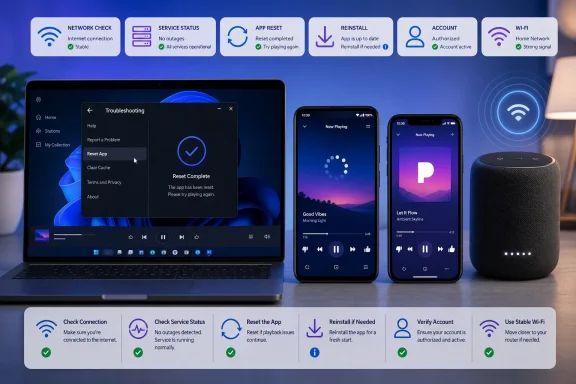
WindowsReport has published a new Pandora troubleshooting guide for Android, iPhone, Windows 11 and Sonos users facing playback failures, endless buffering, crashes, login errors or stations that refuse to load. The practical advice is familiar but useful: rule out a service outage and network problem before resetting or reinstalling the client.
For Windows users, the notable point is that Pandora still documents a Microsoft Store desktop app alongside browser playback. Pandora’s own support guidance says the desktop client can be reset from its hidden menu bar: press
WindowsReport correctly puts service availability and connectivity ahead of more destructive troubleshooting. If Pandora will not load stations across a phone, PC and Sonos speaker on the same account, the likely fault is not a corrupted Windows app cache. Conversely, a single failing endpoint points toward its app state, local network settings, or account session.
Pandora’s current support documentation also matters for older devices: the iOS app now requires iOS 15 or later, while Android support starts at Android 7.0. On a Windows 11 PC, the fallback is straightforward—test Pandora in an updated Edge, Chrome, Firefox or Safari browser where applicable, then isolate whether the problem is limited to the Store app.
Administrators and enthusiasts running Windows Insider builds should also note Pandora’s support position: it does not support unofficial Windows releases, including preview or developer builds. That does not prove an Insider build caused a playback issue, but it changes the support path; reproduce the problem on a stable Windows 11 release before treating it as a Pandora defect.
For iPhone and iPad users, there is no equivalent system-wide Pandora cache button. Restarting the app, checking cellular-data permissions, updating iOS and reinstalling the app remain the practical recovery sequence.
The key consequence is simple: do not reset every device at once. Test Pandora in a browser or on a second device first, then reset the affected client only after ruling out an outage, account conflict or unstable connection.
Alt, select Help, then choose Reset App Data. If that does not restore playback, uninstalling and reinstalling from the Microsoft Store is the next vendor-supported step.
 Start with the failure that is actually happening
WindowsReport correctly puts service availability and connectivity ahead of more destructive troubleshooting. If Pandora will not load stations across a phone, PC and Sonos speaker on the same account, the likely fault is not a corrupted Windows app cache. Conversely, a single failing endpoint points toward its app state, local network settings, or account session.Pandora’s current support documentation also matters for older devices: the iOS app now requires iOS 15 or later, while Android support starts at Android 7.0. On a Windows 11 PC, the fallback is straightforward—test Pandora in an updated Edge, Chrome, Firefox or Safari browser where applicable, then isolate whether the problem is limited to the Store app.
Resetting is not the same as reinstalling
A reset clears local app data and requires another sign-in, while a reinstall removes and restores the package. WindowsReport recommends resetting through Windows 11 Settings under Apps > Installed apps > Pandora > Advanced options > Reset, but Pandora’s own documented in-app reset is the more targeted first move.Administrators and enthusiasts running Windows Insider builds should also note Pandora’s support position: it does not support unofficial Windows releases, including preview or developer builds. That does not prove an Insider build caused a playback issue, but it changes the support path; reproduce the problem on a stable Windows 11 release before treating it as a Pandora defect.
Mobile fixes need one extra check
On Android, Pandora’s latest troubleshooting guidance goes beyond clearing storage. It recommends removing battery optimization and background restrictions, because aggressive power controls can terminate playback or prevent the app from maintaining a stream. Clearing app data can also remove downloaded Premium content, so it should not be treated as a no-cost first step.For iPhone and iPad users, there is no equivalent system-wide Pandora cache button. Restarting the app, checking cellular-data permissions, updating iOS and reinstalling the app remain the practical recovery sequence.
Sonos failures can be an authorization problem
For Sonos owners, WindowsReport advises removing Pandora from the Sonos services list and adding it again. That approach refreshes the connection between the Sonos account and Pandora credentials, which is distinct from fixing the Pandora app on a phone or PC.The key consequence is simple: do not reset every device at once. Test Pandora in a browser or on a second device first, then reset the affected client only after ruling out an outage, account conflict or unstable connection.
References
- Primary source: Windows Report
Published: 2026-07-30T12:12:07+00:00
Pandora Not Working? Try 10 Fixes for Playback, Login & Sonos Issues
Pandora not working? Fix playback, login and app crashes on Android, iPhone and Windows 11 with these proven solutions today fast. windowsreport.com
- Related coverage: support.microsoft.com
Install mobile apps and the Amazon Appstore on Windows | Microsoft Support
Learn how to use and install mobile apps on your Windows 11 PC with the Windows Subsystem for Android™.support.microsoft.com - Related coverage: community.pandora.com
Pandora desktop app disables Windows 11 hotkeys - Pandora Community
Whenever I run the Pandora desktop app on Windows 11, my Windows hotkeys quit working. If I then close the Pandora desktop app, after a few seconds,community.pandora.com
