
Mac users who need Windows in 2026 have a clearer choice than they did a few years ago: Parallels Desktop remains the polished default, while VMware Fusion Pro is now the serious no-cost alternative for administrators and developers. That is the practical takeaway from The Mac Observer’s latest virtual-machine software roundup, which also highlights UTM, Oracle VirtualBox, and Tart for more specialized workflows.
The decision is no longer simply about price. On Apple silicon Macs, the guest operating system’s processor architecture determines both compatibility and performance. Windows 11 on Arm and ARM64 Linux distributions run as virtual machines; older x86 and x64 guests may require emulation, which carries a substantial performance penalty.
Parallels Desktop is the easiest route for someone who needs Windows applications integrated into a daily Mac workflow. Its guided Windows 11 setup, shared folders, clipboard support, peripheral handling, and Coherence mode reduce the sense that Windows is living inside a separate machine.
Microsoft recognizes Parallels Desktop as an authorized solution for Windows 11 Pro and Enterprise on Apple silicon. That matters for organizations that need a supportable Windows environment rather than an experimental setup, particularly where device management, licensing, and compliance enter the picture.
The caveat is that Windows 11 on Arm is not identical to a traditional x64 PC. Microsoft notes that nested-virtualization scenarios are unsupported, including Windows Sandbox and Windows Subsystem for Linux, while some games, drivers, hardware-dependent applications, and anti-cheat systems can also be problematic. A Mac running Parallels is excellent for Office, line-of-business software, browser testing, and many development tasks; it is not a universal substitute for an Intel or AMD Windows workstation.
Fusion provides the machinery IT pros expect: snapshots, clones, encryption, custom virtual networking, shared folders, and support for importing several existing virtual-machine formats. Those features make it a credible platform for reproducible test environments, Linux servers, malware-analysis labs that are properly isolated, and application compatibility work.
The trade-off is setup friction. Fusion is less opinionated than Parallels, which is an advantage when building labs but a disadvantage for users who merely want to install a Windows application. Downloads and account management through Broadcom’s portal remain a practical annoyance.
That flexibility makes UTM particularly useful for enthusiasts, security researchers, and developers handling unusual operating systems or old software. But it comes with an important distinction: matching host and guest architectures is virtualization; crossing architectures is emulation. An ARM Linux guest on an M-series Mac can be quick, while an x64 Windows image emulated on the same Mac is a much more constrained proposition.
UTM is less compelling for graphics-heavy Windows workloads. Its desktop integration and accelerated graphics support trail Parallels, making it better suited to labs and experiments than a full-time Windows desktop.
But Apple silicon support is still sharply limited. Oracle’s documentation says Arm-host VMs must use Arm-based guest operating systems; x86 guests will not run. Other restrictions affect graphics, audio, storage, Guest Additions, unattended installation, and saved states. For lightweight ARM Linux testing, it can work, but current Mac users should validate every required feature before standardizing on it.
For developers testing a Mac application across controlled environments, Tart can be the better answer than a desktop hypervisor. For a user who wants to open a Windows accounting package beside Safari, it is plainly the wrong one.
The practical split is straightforward: choose Parallels for the smoothest Windows desktop, Fusion Pro for a free professional lab tool, UTM for open-source flexibility and emulation, VirtualBox for carefully scoped cross-platform testing, and Tart for automated Apple-focused development. The most important prerequisite is no longer the hypervisor—it is whether the required guest OS, drivers, and tools can live with Windows on Arm.
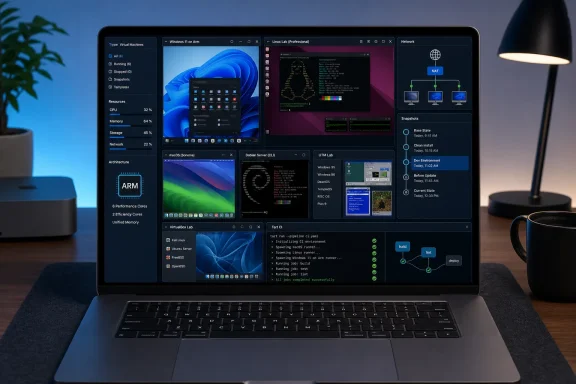 Parallels Still Owns the Windows-on-Mac Experience
Parallels Desktop is the easiest route for someone who needs Windows applications integrated into a daily Mac workflow. Its guided Windows 11 setup, shared folders, clipboard support, peripheral handling, and Coherence mode reduce the sense that Windows is living inside a separate machine.Microsoft recognizes Parallels Desktop as an authorized solution for Windows 11 Pro and Enterprise on Apple silicon. That matters for organizations that need a supportable Windows environment rather than an experimental setup, particularly where device management, licensing, and compliance enter the picture.
The caveat is that Windows 11 on Arm is not identical to a traditional x64 PC. Microsoft notes that nested-virtualization scenarios are unsupported, including Windows Sandbox and Windows Subsystem for Linux, while some games, drivers, hardware-dependent applications, and anti-cheat systems can also be problematic. A Mac running Parallels is excellent for Office, line-of-business software, browser testing, and many development tasks; it is not a universal substitute for an Intel or AMD Windows workstation.
VMware Fusion Pro Changes the Free Tier
VMware Fusion Pro is the strongest free option for users who prioritize virtual-machine controls over desktop polish. Broadcom made Fusion Pro free for personal, educational, and commercial use beginning with Fusion 13.5.2, eliminating the earlier split between a free personal edition and paid professional licensing.Fusion provides the machinery IT pros expect: snapshots, clones, encryption, custom virtual networking, shared folders, and support for importing several existing virtual-machine formats. Those features make it a credible platform for reproducible test environments, Linux servers, malware-analysis labs that are properly isolated, and application compatibility work.
The trade-off is setup friction. Fusion is less opinionated than Parallels, which is an advantage when building labs but a disadvantage for users who merely want to install a Windows application. Downloads and account management through Broadcom’s portal remain a practical annoyance.
UTM Covers the Architectures the Others Avoid
UTM is the open-source choice for users who want both virtualization and emulation from one Mac-native interface. Built around QEMU and Apple’s virtualization technologies, it can virtualize ARM64 guests at near-native performance on Apple silicon and emulate architectures including x86, x86-64, PowerPC, MIPS, and RISC-V.That flexibility makes UTM particularly useful for enthusiasts, security researchers, and developers handling unusual operating systems or old software. But it comes with an important distinction: matching host and guest architectures is virtualization; crossing architectures is emulation. An ARM Linux guest on an M-series Mac can be quick, while an x64 Windows image emulated on the same Mac is a much more constrained proposition.
UTM is less compelling for graphics-heavy Windows workloads. Its desktop integration and accelerated graphics support trail Parallels, making it better suited to labs and experiments than a full-time Windows desktop.
VirtualBox Is Still Cross-Platform, Not Fully Apple-Silicon Ready
Oracle VirtualBox remains valuable where a team needs the same VM tooling across Windows, Linux, and Intel Macs. Its snapshots, virtual networking, shared folders, command-line management, and portable disk formats are familiar to almost every long-time administrator.But Apple silicon support is still sharply limited. Oracle’s documentation says Arm-host VMs must use Arm-based guest operating systems; x86 guests will not run. Other restrictions affect graphics, audio, storage, Guest Additions, unattended installation, and saved states. For lightweight ARM Linux testing, it can work, but current Mac users should validate every required feature before standardizing on it.
Tart Is for the Build Pipeline, Not the Desktop
Tart occupies a different category. It is a command-line virtualization tool aimed at automated macOS and Linux environments on Apple silicon Macs running macOS Ventura or later. Its value is in disposable, reproducible images for CI runners, clean macOS test environments, and automated build pipelines.For developers testing a Mac application across controlled environments, Tart can be the better answer than a desktop hypervisor. For a user who wants to open a Windows accounting package beside Safari, it is plainly the wrong one.
The practical split is straightforward: choose Parallels for the smoothest Windows desktop, Fusion Pro for a free professional lab tool, UTM for open-source flexibility and emulation, VirtualBox for carefully scoped cross-platform testing, and Tart for automated Apple-focused development. The most important prerequisite is no longer the hypervisor—it is whether the required guest OS, drivers, and tools can live with Windows on Arm.
