
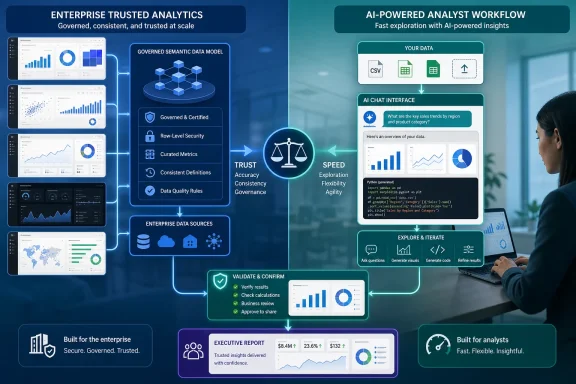
Microsoft Power BI Copilot, Tableau Pulse, Gemini in Looker, ThoughtSpot’s current Spotter platform, and Qlik Answers are primarily enterprise analytics layers. They depend on governed models, curated metrics, permissions, and administered data sources. ChatGPT Data Analysis and Julius AI are closer to exploratory workbenches, where an analyst uploads a file, asks questions, inspects outputs, and iterates quickly. Treating them as interchangeable “AI analytics tools” is the mistake that can lead teams to buy overlapping software—or worse, let a general-purpose chat interface become an unofficial reporting system.
The practical takeaway for Windows-centric IT shops is straightforward: choose the AI layer that matches where the data already lives and who must be able to defend the answer. The tool does not remove the need for a data model, access controls, or an analyst who can verify the result.
 Power BI Copilot is an extension of Fabric capacity, not a desktop add-on
For organizations already working in Microsoft 365, Azure, and Power BI, Power BI Copilot is the most natural tool in Analytics Insight’s list. Microsoft’s documentation confirms that it can help business users summarize reports and ask questions about semantic models, while report authors can create or edit reports, generate DAX queries, and add model descriptions.
The important operational caveat is that Power BI Copilot is not unlocked by merely assigning a Power BI Pro or Premium Per User license. Microsoft requires paid Fabric capacity at F2 or above, or Power BI Premium P1 or above; trial capacity and free SKUs do not qualify. An administrator must enable Copilot, the capacity must sit in a supported region, and sovereign clouds remain unsupported.
That changes the purchasing calculation considerably. An analyst who wants AI help with an occasional spreadsheet will not get a low-friction desktop feature simply by installing Power BI Desktop. Their organization needs the underlying Fabric or Premium infrastructure, and Microsoft meters Copilot consumption through capacity units. For sysadmins, this turns “enable AI analytics” into a capacity-planning and governance project, not an individual productivity setting.
Microsoft is also explicit about a point that vendor roundups tend to bury: Copilot’s output quality depends on preparation of the semantic model. Without model descriptions, clean measures, business-friendly names, and AI instructions, Microsoft says Copilot can return generic, inaccurate, or misleading responses. The expensive part is therefore not prompting Copilot; it is building and maintaining the governed model that gives Copilot reliable terms to work from.
Microsoft 365 Copilot’s separate Analyst agent is worth distinguishing from Power BI Copilot. Microsoft positions Analyst as a file-oriented assistant that can work across attached Excel spreadsheets, CSV files, databases, and other sources to calculate statistics, identify trends, flag outliers, and produce reports with charts and tables. It may suit a team that lives in Microsoft 365 but has not standardized its data in Fabric. It does not replace a managed Power BI semantic model for regulated or repeatable reporting.
Tableau Pulse and Gemini in Looker start with defined metrics and models
Analytics Insight describes Tableau Pulse as a system that continuously monitors datasets for anomalies. Tableau’s own documentation is more precise: Pulse delivers insights about metrics that users define and follow. A Pulse metric is rooted in a metric definition specifying a published data source, measure, time dimension, filters, and the dimensions available for analysis.
This is a meaningful limitation, not a minor configuration detail. Tableau Pulse is designed to keep a sales leader, operations manager, or finance user informed about changes in agreed-upon metrics through Tableau Cloud, Slack, and email digests. It is not a free-form replacement for an analyst opening several workbooks and discovering what can be reconciled. Pulse needs a single published data source for a metric definition, and Tableau’s own setup guidance requires administrators to enable the service and make sure appropriate data is available.
That makes Pulse compelling for proactive monitoring of KPIs such as revenue, churn, order volume, or support backlog. It is far less suited to first-pass investigation of a messy CSV export. Teams considering it should budget for metric-definition ownership: somebody must define which measure is authoritative, which date field applies, which direction is favorable, and which dimensions Pulse may use to explain a change.
Google’s current product name is also more specific than the roundup’s “Google Looker AI.” Google documents the capability as Gemini in Looker, including Conversational Analytics, visualization formatting, LookML assistance, and—in enabled data-agent configurations—Python-backed advanced analysis and visualizations. The distinction matters because Gemini in Looker is governed through Looker roles, model permissions, administrator enablement, and instance versions. It is not simply a chatbot placed over a warehouse.
Looker’s practical strength is its semantic layer. A business definition for “active customer,” “net revenue,” or “qualified lead” can be expressed once in LookML and reused by dashboards, applications, and conversational agents. That gives an organization a chance to have the AI answer with the same calculation that its existing dashboards use. But it also means Looker is a platform decision. It is rarely the right first purchase for a department that only needs to inspect spreadsheet exports faster.
The roundup’s ThoughtSpot and Qlik entries need current names and narrower use cases
Analytics Insight calls out ThoughtSpot Sage as a natural-language analytics option. That name is historically accurate—ThoughtSpot launched Sage in 2023—but the company’s current materials, training, and pricing pages now foreground Spotter as its conversational AI agent. Spotter uses business context, semantic mappings, and data models to translate questions into structured analysis and visualization.
The naming shift is not cosmetic. It signals the broader move from a text-to-search feature toward an agent-oriented product that can plan multi-step work, generate analyses, and connect results to downstream workflows. A buyer searching only for “ThoughtSpot Sage” could end up reading older launch material rather than evaluating the current platform, current limits, and current pricing structure.
ThoughtSpot is a fit for organizations that want natural-language access to large cloud-warehouse data while preserving an analytics model and traceability. Its own product materials emphasize the ability to inspect how a search became SQL and how joins were applied. That is valuable for analysts, because AI-generated charts without query visibility are difficult to audit. Still, its advertised search experience is only as trustworthy as the business vocabulary, relationships, and models supplied to it.
Qlik Answers belongs in a related but different category. Analytics Insight places it alongside natural-language analytics products, but Qlik’s documentation shows that it addresses both structured Qlik application data and unstructured material held in curated knowledge bases. Its answers can include source references to the documents used, and its access is controlled through Qlik roles and space permissions.
For IT departments, that makes Qlik Answers more than a dashboard chatbot. It can be useful where analytical questions depend on policy documents, support manuals, procedures, contracts, and other text that is absent from the warehouse. The trade-off is administrative work: knowledge bases must be scoped, source permissions must be preserved, and owners need to review what the assistant retrieves. A cited answer is more auditable than a bare generative response, but citations do not guarantee that the retrieved material was current or that the user asked the right business question.
ChatGPT Data Analysis and Julius are for investigation, not automatic publication
ChatGPT Data Analysis and Julius AI occupy the most approachable end of the list because they begin with an uploaded file and a plain-language request. OpenAI documents that ChatGPT can analyze spreadsheets, CSV files, PDFs, JSON, XML, YAML, text, and other formats, create tables and charts, and expose code-backed analysis for review. Julius likewise provides a data explorer intended to let users inspect the tables and variables behind its visualizations.
For an experienced analyst, that makes these tools useful accelerators for exploratory work: profiling a CSV, detecting duplicate fields, testing a hypothesis, producing a first chart, or generating a draft Python routine that can be moved into a reproducible notebook or pipeline. They can reduce the blank-page phase of analysis substantially.
They should not be treated as unattended reporting engines. A natural-language request such as “show quarterly customer growth” contains decisions about customer identity, cancellation timing, fiscal calendars, deduplication, currency conversion, and the definition of “growth.” An AI can make those decisions implicitly and generate a polished chart that looks more certain than the data warrants.
The safe workflow is to require reproducibility before a result reaches a dashboard or executive deck:
- Preserve the original dataset, the exact prompt, the generated code or query, and the output used in the report.
- Compare the AI result with a known query, trusted dashboard, or a manual sample before publishing it.
- Keep customer, employee, financial, health, or regulated data inside an organization-approved service with defined retention, access, and contractual controls.
- Promote repeatable analysis out of a chat session and into SQL, Python, Power Query, dbt, or another version-controlled process.
This is where the original roundup is thinnest. It recommends tools by job type—Power BI for Microsoft users, ChatGPT or Julius for exploration, Looker or ThoughtSpot for large warehouses—but provides no methodology, rollout requirements, pricing comparisons, data-residency guidance, or test criteria. Those omissions matter more than the rankings.
The real shortlist begins with the data, not the AI brand
The best 2026 AI analytics tool is usually the one closest to an organization’s governed source of truth. For a Power BI and Fabric shop, that is likely Power BI Copilot, provided the organization accepts the capacity and administration requirements. For Tableau Cloud teams with a fixed KPI catalog, Pulse is designed for alerting and guided metric exploration. Looker, ThoughtSpot, and Qlik fit organizations willing to invest in a semantic layer, curated sources, or both.
ChatGPT Data Analysis and Julius deserve a place beside those systems as analyst tools, especially for rapid exploration and file-based work. They should feed the governed analytics process, not quietly bypass it.
The critical skill in 2026 is therefore not learning to phrase clever prompts. It is knowing whether an answer came from an uploaded file, a curated metric, a governed semantic model, or a retrieved document collection—and being able to prove the calculation before somebody makes a decision on it.
References
- Primary source: Analytics Insight
Published: August 8, 2026 at 11:30 AM UTC
Loading…
www.analyticsinsight.net - Related coverage: learn.microsoft.com
Loading…
learn.microsoft.com - Related coverage: learn.microsoft.com
Loading…
learn.microsoft.com - Related coverage: support.microsoft.com
Loading…
support.microsoft.com - Related coverage: julius.ai
Loading…
julius.ai - Related coverage: analyticsinsight.net
Loading…
www.analyticsinsight.net - Related coverage: support.microsoft.com
Get started with Workflows in Microsoft 365 Copilot | Microsoft Support
Learn how you can automate tasks with Workflows--building, testing, monitoring, and managing your flows with Microsoft 365 Copilot.support.microsoft.com - Related coverage: techcommunity.microsoft.com
- Related coverage: assets.ctfassets.net
Loading…
assets.ctfassets.net - Related coverage: help.openai.com
Loading…
help.openai.com - Related coverage: help.openai.com
Loading…
help.openai.com - Related coverage: cloud.google.com
Introducing Gemini in Looker at Next ‘24 | Google Cloud Blog
Using natural language, Conversational Analytics as part of Gemini in Looker transforms how business intelligence (BI) users engage with data.cloud.google.com
- Related coverage: nist.gov
Loading…
www.nist.gov - Related coverage: nist.gov
Loading…
www.nist.gov - Related coverage: ai-challenges.nist.gov
Loading…
ai-challenges.nist.gov - Related coverage: tsapps.nist.gov
Loading…
tsapps.nist.gov - Related coverage: nvlpubs.nist.gov
Loading…
nvlpubs.nist.gov - Related coverage: thoughtspot.com
ThoughtSpot Expands AI Analytics for Modern Data Experiences
ThoughtSpot, the AI-Powered Analytics company, today announced a series of new product capabilities during their annual customer conference Beyond 2023, to help companies across the globe deliver modern data experiences that advance business outcomes and deliver impact.www.thoughtspot.com - Related coverage: media.thoughtspot.com
Unleashing the Power of Generative AI for Data and Analytics with ThoughtSpot
PDF documentmedia.thoughtspot.com