
But “it still beats a Synology” needs a tighter definition. Lewis’s build wins convincingly on expandable compute, PCIe access, and the ability to run almost any x86 software stack. It does not establish a universal win on power consumption, physical footprint, supportability, noise, or the reliability burden that comes with virtualizing a storage appliance. Those are not minor details when the box is meant to hold the only copy of family photos or business records.
The most useful lesson is not that every NAS buyer should revive an old gaming PC. It is that a retired desktop can be an excellent home server first and a NAS second—provided its owner accepts that the storage layer has to be designed and maintained with more care than a Synology setup wizard requires.
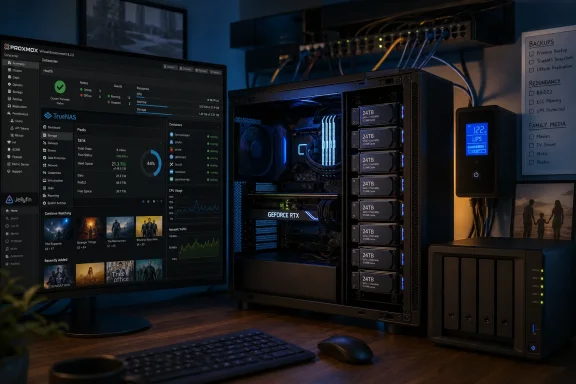 The hardware advantage is real, but it is a comparison of categories
Lewis’s Ryzen 5 1600X is a six-core, 12-thread desktop processor introduced in 2017, and AMD rates it at a 95W default TDP. The RTX 3060 is likewise an unusually capable add-in card for this role: Nvidia lists a 170W graphics-card power specification and includes dedicated encode and decode hardware. Neither figure measures the machine’s actual idle draw, but both make clear that this is a former gaming PC being repurposed as a server, not a low-power appliance with a few extra drives attached.
By comparison, Synology’s current four-bay DS425+ uses an Intel Celeron J4125, ships with 2GB of memory, supports up to 6GB, and provides one 2.5GbE and one 1GbE network port. Synology lists 28.25W of access power consumption and 6.10W during HDD hibernation for that model. The DS425+ also brings hot-swap bays, a compact enclosure, validated firmware, and a single vendor responsible for the appliance experience.
That does not make the Synology faster at the jobs Lewis describes. It makes it purpose-built for a narrower one. A Ryzen desktop with 48GB of RAM has room to run a ZFS storage stack, several Linux services, game servers, monitoring, and a media server without forcing every task to compete for the last few gigabytes of memory. Standard PCIe slots also make expansion practical: a proper host bus adapter can add drive connectivity, while a 10GbE NIC can move the network bottleneck well beyond the 2.5GbE ceiling of many consumer NAS units.
The old PC’s RTX 3060 changes the media-server calculation, too. Hardware transcoding is valuable when a client cannot directly play the source video’s codec, resolution, bitrate, subtitles, or audio format. A television, browser, or remote mobile connection that forces Jellyfin to convert a file can turn a modest NAS CPU into the limiting factor. A desktop GPU is not required for a file server, but it is a major advantage for a server expected to handle multiple media formats and other GPU-capable workloads.
There is an important qualification: a GPU does not make every home server efficient. If the machine idles at a meaningfully higher wattage than a purpose-built NAS, its electricity cost accumulates every hour of the year. Lewis provides no wall-power measurements, drive models, noise measurements, or total build cost, so the article cannot prove the old PC is cheaper to own. Readers considering this route should measure their actual idle and load draw with a plug-in power meter before deciding that “free hardware” is free in operation.
Synology’s transcoding retreat is broader than the article suggests
How-To Geek correctly points to a meaningful change in Synology’s media story, but its wording understates the scope. The article frames the issue around some 2025 Plus models dropping hardware-accelerated H.264 and HEVC transcoding. Synology’s own August 2024 discontinuation notice says the company was transitioning HEVC, AVC/H.264, and VC-1 media processing to end devices across all versions of DiskStation Manager and BeeStation OS, rather than limiting the policy to a subset of new Plus hardware.
Synology said the shift would improve server efficiency because phones, tablets, computers, and smart TVs increasingly support modern codecs themselves. Its DSM release notes also record that Video Station ceased to be available beginning with DSM 7.2.2. German technology publication Heise Online separately reported at the time that Video Station’s removal ended Synology’s built-in movie and television streaming application, including its transcoding role.
For a household using direct playback on recent Apple TV, Android TV, Roku, browser, or mobile hardware, the practical disruption may be limited. If every player decodes the files in the library, the NAS only has to send them over the network. The problem appears when compatibility is not guaranteed: older televisions, bandwidth-constrained remote streaming, subtitle burn-in, odd audio tracks, and high-bitrate 4K files can all trigger conversion work.
That is where an independently managed Jellyfin or Plex deployment on commodity x86 hardware gives the home-built server a clearer edge. It lets the owner choose the media stack, retain a GPU option, and decide when server-side transcoding is worth the power and complexity. Synology’s appliance remains useful for storage and direct media delivery, but its current platform policy makes it a less compelling choice for buyers who specifically want a self-contained transcoding box.
Proxmox plus TrueNAS is powerful, but the storage design is the hard part
Lewis’s architecture puts Proxmox on the bare metal and runs TrueNAS in a virtual machine, with the storage controller passed through to the TrueNAS guest. This is the crucial technical detail in the whole build. It allows ZFS inside TrueNAS to see and manage physical disks through the controller rather than treating virtual disk files as if they were physical drives.
TrueNAS has long described PCI passthrough of a supported HBA as the preferred method when running TrueNAS virtually with data that matters. Its earlier guidance specifically warned that virtualization features such as live migration, VM snapshots, suspend/resume, and hot-added virtual hardware do not cleanly apply once a storage controller is dedicated to the TrueNAS guest. In other words, the layer intended to make experimentation easy is deliberately constrained for the VM holding the disks.
The current TrueNAS hardware guide is even more conservative. It says virtualizing TrueNAS for regular deployment of critical data is not a supported configuration and warns that virtual disks used for a pool can lead to corruption. It still advises passing physical disks or, preferably, the entire controller through when virtualization is unavoidable. The documentation therefore contains a practical tension: PCI passthrough is the least risky virtualized arrangement, but it does not turn a virtualized NAS into a vendor-supported equivalent of TrueNAS installed directly on hardware.
That is a larger caveat than How-To Geek gives it. The proposed build is sensible for a technically confident owner, particularly one who wants Proxmox for separate services. Yet it introduces dependencies a Synology buyer avoids: IOMMU support in firmware, correct PCIe grouping, a controller the host does not need for its own boot device, stable HBA firmware, VM startup ordering, and a recovery plan when the hypervisor fails.
A reader who only wants reliable SMB shares, automated phone-photo backups, snapshots, and a straightforward RAID-like pool should consider installing TrueNAS directly on the machine—or buying the appliance—rather than making a hypervisor the permanent gatekeeper to storage. Proxmox earns its place when the machine is genuinely serving several separate roles.
The build needs a backup plan before it needs another container
The source article correctly says RAID is not backup, and that warning deserves to be the decision point. Redundancy protects against a drive failure. It does not reliably protect against accidental deletion, ransomware synchronized through a network share, a destructive administrative command, electrical damage, theft, fire, or a mistake made while changing the pool configuration.
A functional version of this project should have at least three distinct layers:
- The ZFS pool should use redundancy appropriate to the number and size of disks, with SMART monitoring, scheduled scrubs, and alerts that reach a device the owner actually checks.
- Important data should be replicated or backed up to separate storage that is not continuously writable from the NAS itself.
- The configuration of Proxmox, TrueNAS, containers, application data, and encryption keys should be backed up separately from the media files, because rebuilding services is often more difficult than restoring documents.
A UPS is equally practical rather than optional. ZFS can maintain consistency better than many older filesystems after an unexpected shutdown, but a UPS protects the hypervisor, the guest operating systems, and active writes from a power interruption. It also gives the server time to shut down cleanly instead of relying on filesystem recovery after the fact.
The old gaming PC is a strong candidate for a homelab NAS because it converts abandoned desktop performance into useful capacity and services. It beats a Synology when the buyer needs a flexible x86 server with storage attached. For anyone whose primary requirement is quiet, low-power, vendor-supported storage that can be deployed and forgotten, the Synology is still competing in a different—and often more appropriate—category.