
That decision matters because the proposed integration was intended to turn certain Communication Compliance events into workflow triggers. In practical terms, organizations could have used Power Automate to orchestrate follow-up tasks for Communication Compliance cases and users: routing notifications, assigning investigation work, alerting management, or connecting compliance processes to other approved business systems. The cancellation does not mean that Microsoft Purview Communication Compliance itself has disappeared, nor does it automatically imply that Power Automate integration has ended in Microsoft’s commercial cloud. It means the planned feature availability for the highly regulated GCC High and DoD environments has been abandoned.
For government agencies, defense organizations, and contractors that operate in those sovereign Microsoft 365 clouds, the change is a reminder of a familiar reality: feature parity with commercial Microsoft 365 is never automatic. Compliance technology may be available in the broader platform, but its arrival in government cloud environments depends on architecture, authorization, operational controls, and the particular risk profile of the service integration.
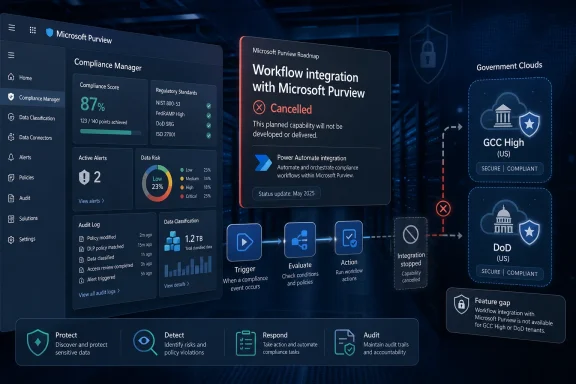 What Microsoft Cancelled — and What It Did Not
The scope of this update is narrow but consequential. Roadmap ID 85606 concerned Communication Compliance integration with Power Automate in GCC High and DoD, on the web platform, across preview and general-availability release rings. The status has changed to Cancelled, meaning organizations should no longer plan on the announced Microsoft-delivered integration becoming available in those environments. The roadmap listing is the controlling public signal for that product-planning change.
It is important not to overread the cancellation. Microsoft Purview Communication Compliance remains an active compliance and insider-risk capability. Microsoft describes it as a service for detecting, capturing, reviewing, and remediating potentially inappropriate or policy-violating communications, including confidential-information sharing, threatening or harassing language, adult content, and certain regulatory risks. Microsoft’s Communication Compliance overview also identifies scenarios involving SEC- and FINRA-related obligations.
Likewise, Power Automate remains integrated with Communication Compliance in documented Microsoft 365 experiences outside the cancelled GCC High and DoD roadmap item. Microsoft’s current documentation describes an alert-driven workflow experience in which authorized Communication Compliance users can create, manage, share, edit, and delete Power Automate flows from within the Purview workflow. Microsoft’s Power Automate and Communication Compliance documentation describes this as a way to automate important tasks tied to alerts and users.
The distinction is crucial:
- Cancelled: the planned deployment of this integration to GCC High and DoD.
- Not cancelled by this roadmap update: Microsoft Purview Communication Compliance as a product category.
- Not established by this roadmap update: a blanket end to Communication Compliance and Power Automate workflows in commercial Microsoft 365 tenants.
- Still subject to tenant-specific validation: any existing government-cloud automation, custom connector, API, mail-based workflow, or third-party process an organization already uses.
For IT leaders, the immediate planning response should be to retire the assumption that this roadmap item will close an automation gap in the future. If an internal program, control matrix, procurement justification, or operating procedure relied on the anticipated native integration, that dependency now needs a replacement plan.
Background: Why Communication Compliance Needs Workflow Automation
Communication Compliance is not simply a passive monitoring feature. It is intended to support a lifecycle that spans policy design, alert review, investigation, remediation, escalation, retention, audit, and continuous refinement. Microsoft’s guidance describes the solution as using machine learning models and keyword matching to identify potential business-conduct or regulatory-policy violations for human investigator review. Microsoft’s solution overview emphasizes that the system is designed to surface potential issues, not to replace human judgment.
That distinction explains why automation can be valuable. An alert is only the beginning of a compliance process. Depending on organizational policy, a match might need to be triaged by a specialist, documented in a case-management system, assigned to a supervisor, escalated to legal counsel, or resolved with a notice to the user. When these steps are performed manually, delays and inconsistency can become operational risks.
Microsoft documents an example Power Automate template for Communication Compliance that can notify a manager when a user has a Communication Compliance alert. The notification can include the applicable policy, alert time, and severity level. Microsoft’s workflow documentation also explains that users can start with recommended templates or customize flows to suit their organization’s scenarios.
For a commercial tenant, this can reduce administrative friction. A compliance team might use automated workflow to:
- Notify an authorized reviewer that a high-severity alert needs attention.
- Open or update an internal service-management ticket.
- Route a non-sensitive workflow status to a restricted mailbox.
- Create reminders when an alert remains unresolved.
- Collect acknowledgements from assigned reviewers.
- Maintain a controlled handoff between compliance, human resources, legal, and security teams.
- Trigger manager notification under a tightly defined internal policy.
In GCC High and DoD, however, the mechanics of that automation are inseparable from the cloud boundary. A workflow that appears straightforward in a commercial Microsoft 365 tenant can introduce more complicated questions around connectors, data paths, identities, approval logic, outbound notification targets, and who may operate or administer the automation.
Why GCC High and DoD Are Different
Microsoft positions GCC High and DoD as specialized Microsoft 365 environments for organizations with demanding U.S. government compliance requirements. GCC High is designed for eligible organizations such as defense contractors handling Controlled Unclassified Information or subject to ITAR obligations, while the DoD environment is reserved for Department of Defense entities. Microsoft’s GCC High and DoD service description explains that these offerings use separate commitments and feature differences compared with general commercial Microsoft 365.
The service description also highlights the higher-assurance context. GCC High and DoD are assessed against NIST SP 800-53 controls at a FIPS 199 High categorization, while the DoD environment supports requirements up to DoD Impact Level 5. Microsoft’s government cloud documentation further notes that the cloud architecture creates feature differences relative to the commercial offering.
That matters for compliance automation because a workflow is more than a button in an interface. It can represent an additional system boundary and an additional set of permissions.
A Communication Compliance alert may involve potentially sensitive communications, identities, policy categories, investigations, and remediation records. Microsoft’s Purview privacy documentation notes that the platform can process customer data such as alerts, reports, emails, files, chats, messages, and Copilot interactions, while also handling end-user identifiable information, administrator data, and pseudonymized identifiers. Microsoft’s Purview privacy documentation makes clear that tenant administrators control many of the policy and retention decisions associated with that data.
In a government cloud, administrators must therefore assess questions such as:
- Where does alert metadata travel?
A workflow that sends a notification, creates a record, or invokes another service must remain within approved boundaries. - Which identities can run or own the flow?
Service accounts, shared connections, personal ownership models, and delegated administration can each create governance concerns. - Which connectors are available and approved?
A workflow’s usefulness depends on the systems it can reach. But the right commercial connector is not necessarily available, accredited, or appropriate in a government environment. - What data is exposed in each action?
Even an alert title, severity field, policy name, or user reference can be sensitive in the context of an active investigation. - How are actions audited and retained?
Automated steps must be traceable and align with records, audit, and investigative requirements.
The cancellation is therefore disappointing for organizations that wanted a simpler Microsoft-supported path, but it is also understandable within the operational complexity of sovereign and government cloud platforms.
The Feature’s Original Appeal
The original roadmap item targeted a real pain point: the distance between detecting risk and acting on it. Communication Compliance can inspect communications across multiple sources, including Microsoft Teams, Exchange Online, Viva Engage, Microsoft 365 Copilot interactions, and supported third-party data sources. Microsoft’s channel-support documentation describes Teams, Exchange, Viva Engage, generative AI applications, and imported third-party sources as potential policy locations.
That breadth is powerful, but it can create an alert-management burden. Different sources also operate on different processing timelines. Microsoft says Exchange messages and attachments that match policy conditions may take about 24 hours to process, while Teams policy matches can take up to 48 hours; imported non-Microsoft content can likewise take 24 to 48 hours depending on ingestion frequency. Microsoft’s channel documentation makes it clear that alerting is not necessarily instantaneous.
Automation can help organize the work after matching occurs, but it cannot eliminate those underlying processing characteristics. That is a key limitation for organizations that envisioned a real-time escalation engine. The proposed integration could have accelerated post-alert coordination; it would not have transformed Communication Compliance into a guaranteed real-time monitoring service.
Microsoft’s documented workflow also has practical guardrails. A user must belong to at least one Communication Compliance role group to create or manage flows from an alert. Microsoft’s Power Automate guidance says the flow creator must explicitly share a flow before other users can access it, and sharing can give added owners full access to the flow. Those are sensible controls, but they underscore why automation ownership is a governance concern rather than a convenience setting.
Privacy, Human Review, and the Risk of Over-Automation
Communication Compliance is designed around privacy by design. Microsoft says usernames are pseudonymized by default, role-based access is built in, investigators are administratively opted in, and audit logs help protect user-level privacy. Microsoft’s Communication Compliance overview frames these protections as foundational to the product rather than optional afterthoughts.
Microsoft also explicitly describes separation of duties. Global administrators do not automatically receive access to Communication Compliance features, and organizations can separate administrators who configure policies from investigators who access and review alerts. Microsoft’s privacy guide for insider risk and Communication Compliance recommends least-privilege role design and notes that administrators can create or manage policies without necessarily being able to investigate alerts.
That architecture should shape any replacement approach following the GCC High and DoD cancellation. The wrong response is to compensate with broad, uncontrolled automation. Sending raw alert content, user identities, or investigative detail to a generic workflow destination could erode the very privacy safeguards that Communication Compliance is meant to preserve.
Microsoft’s own documentation is candid that detection has limits. The platform uses machine learning and matching techniques, which can produce false positives and false negatives; human reviewers must inspect messages before action is taken. Microsoft’s Communication Compliance solution overview also notes that some evasion tactics and language coverage limitations remain relevant.
This is where responsible automation requires restraint. A safe design should automate administrative routing and evidence of process, not make irreversible personnel, legal, or disciplinary decisions based solely on a classifier match.
Good candidates for controlled automation
- Creating a restricted task for an authorized reviewer.
- Sending a generic “review required” notice without message content.
- Recording an alert reference and workflow timestamp in an approved system.
- Escalating overdue review tasks to a designated compliance lead.
- Requesting acknowledgement that a reviewer has accepted an assignment.
- Producing an auditable workflow status record.
Poor candidates for fully automated action
- Automatically disciplining an employee.
- Automatically notifying a manager with detailed sensitive content.
- Automatically disclosing an employee’s identity beyond the approved investigation role.
- Automatically exporting or forwarding communications to systems outside the approved boundary.
- Automatically closing an alert based on a generic workflow outcome.
- Treating a policy match as proof of wrongdoing.
The cancellation may force teams to build more manual processes, but manual review is not necessarily a weakness in a high-consequence environment. In many government and defense scenarios, the need for deliberate human authorization is a control, not an inefficiency.
Operational Consequences for Government Cloud Tenants
Organizations that had planned around this Microsoft Purview Communication Compliance Power Automate integration should treat the cancellation as a program-management event, not merely a product-update footnote.
First, remove Roadmap ID 85606 from future-state architecture diagrams, control roadmaps, and backlog dependencies. A cancelled roadmap item should not remain as an assumed capability in audit responses, compliance-program charters, or technology modernization plans.
Second, identify workflows that were expected to depend on the native integration. The list may include manager notification, case assignment, review queues, incident tracking, or workflow reporting. Categorize each use case by its importance, sensitivity, and data exposure.
Third, distinguish between workflow intent and specific implementation. The intended outcome—such as ensuring that high-severity alerts receive timely human review—may still be achievable through approved government-cloud tools, manual procedures, restricted mail processes, service-management platforms, or a future supported alternative. The cancellation removes one path, not the underlying compliance obligation.
Fourth, revisit service-level expectations. Communication Compliance is designed for detection, review, and remediation, but its documented processing windows can range from hours to as much as 48 hours depending on channel and data source. Microsoft’s channel guidance should inform internal response targets. An organization cannot credibly promise immediate escalation when the source signal itself may not arrive immediately.
Finally, document the gap precisely. The gap is not “we have no compliance capability.” It is: “The planned Microsoft-supported Power Automate integration for Communication Compliance is no longer expected in our GCC High or DoD environment.” That wording is accurate, defensible, and avoids conflating a cancelled workflow feature with the broader Purview compliance solution.
Practical Next Steps After the Cancellation
A disciplined response should focus on control continuity.
1. Reassess existing Communication Compliance operations
Review the policies, designated reviewers, escalation rules, and reporting processes already in use. Microsoft recommends testing policy conditions and validating that configured thresholds are neither too restrictive nor too permissive. Microsoft’s Communication Compliance configuration guidance also advises organizations to test policies before relying on them operationally.
2. Confirm permissions and separation of duties
Check that only appropriate personnel can configure policies, view alerts, investigate cases, or take remediation actions. The principle of least privilege is particularly important when an organization is considering substitute workflow processes. Microsoft’s privacy guide recommends stringent role-based access and explains the distinction between administrative and investigative roles.
3. Preserve auditability
Communication Compliance requires audit logging to display alerts and log reviewer remediation actions. Microsoft’s setup documentation states that audit logs summarize policy-related activities and changes. Any replacement workflow should preserve a comparable evidence trail: who received an assignment, who acknowledged it, what action was taken, and when.
4. Minimize data in substitute notifications
If alert routing is implemented through an approved alternative, send only the minimum information needed to initiate human review. A reference number, priority, and restricted portal location are often safer than message excerpts, employee identities, or policy-match details.
5. Validate the government-cloud boundary
Do not assume a commercial-cloud feature, connector, or automation pattern can be transplanted into GCC High or DoD. Microsoft expressly documents feature differences between government and commercial environments. Microsoft’s GCC High and DoD service description should remain part of the validation process for any proposed replacement.
A Cancellation That Clarifies the Planning Boundary
The cancellation of Microsoft 365 Roadmap ID 85606 is a setback for organizations that hoped to use native Power Automate workflows to streamline Microsoft Purview Communication Compliance processes in GCC High and DoD. It removes a planned convenience layer for alert and user-related task automation at a time when communication-risk programs must contend with an expanding set of channels, data types, and investigative expectations.
Yet the broader Purview capability remains substantial. Communication Compliance continues to provide policy-driven detection, review, remediation, privacy controls, pseudonymization, role separation, and audit support across a growing range of communication channels. Microsoft’s Communication Compliance overview makes clear that the core product’s purpose is to help organizations detect and act on potential business-conduct and regulatory compliance risks.
For GCC High and DoD customers, the practical conclusion is straightforward: stop planning for the cancelled native integration, preserve the human-reviewed compliance workflow, and design any alternative around least privilege, auditability, data minimization, and approved government-cloud boundaries. The most durable compliance program is not the one with the most automated steps; it is the one that can demonstrate that every alert, decision, escalation, and remediation action was handled with appropriate control.
