
Rivian has removed Amazon Alexa from its vehicles and is steering owners toward Rivian Assistant, the company’s own AI voice interface, but the practical change is sharper than a routine assistant swap: Rivian Assistant is a Connect+ subscription feature, while Rivian’s current product page still says basic voice commands remain standard. That leaves non-subscribers with an unclear and apparently narrower voice-control experience after Alexa’s removal.
Drive Tesla Canada first reported that Rivian notified owners the Alexa shutdown took effect on August 4. Owner reports in the Rivian community match the central point: Alexa and its integrations are no longer available, and Amazon Music users have lost the only native in-car route Rivian previously offered for that service. Rivian has not published a matching public announcement spelling out the cutoff date, affected software versions, or a migration path for Alexa users.
The company’s own current Connect+ page confirms the commercial outcome. Rivian Assistant costs $14.99 per month or $149.99 per year in the United States and is listed separately from standard features such as Bluetooth streaming, navigation, software updates, remote vehicle commands, and “basic voice commands.” Rivian has not defined on that page exactly what commands remain available without Connect+, which is the key unanswered detail for owners deciding whether this is a feature upgrade or a newly paid restoration of functionality they already used.
Alexa was not merely a way to set cabin temperature or start navigation. It connected Rivian’s infotainment system to Amazon’s voice ecosystem: Amazon Music playback, smart-home commands, announcements, routines, flash briefings, shopping-related requests, and the broader Alexa skill catalog. Rivian’s older owner documentation explicitly promoted requests such as playing music and sending messages through Alexa.
Those integrations do not transfer automatically to Rivian Assistant. Rivian Assistant can control a much wider range of vehicle functions than Alexa could, but its available third-party connections are far more limited today. Rivian’s launch material identified Google Calendar as the first external app integration, enabling calendar-aware navigation and meeting-related tasks. Its current Connect+ media-app list includes Apple Music, Spotify, YouTube, Google Cast, SiriusXM, Audible, TuneIn Radio, and TIDAL; Amazon Music is absent.
That omission has a concrete consequence. An Amazon Music subscriber can still play audio from a phone over Bluetooth, but loses the integrated catalog browsing, search, and voice playback that Alexa supplied. Drive Tesla Canada reported that Rivian plans a native Amazon Music app, but Rivian has not provided a public release date. Until that changes, Bluetooth is a workaround, not a replacement for a built-in application.
For Windows and IT readers, the familiar parallel is a vendor retiring an established integration in favor of its own managed platform. The replacement may be more capable in core workflows, but it also brings a new control plane, a subscription requirement, new data terms, and a smaller integration surface on day one. The feature name changes from Alexa to Rivian Assistant; the real change is that Rivian now controls the voice layer, its permitted capabilities, and its commercial terms.
TechCrunch reported at that event that Google Vertex AI and Gemini were among the external models augmenting Rivian’s system. Rivian’s own public description has been more careful: it says the assistant uses “frontier large language models,” rather than naming Gemini as its sole foundation. The distinction is substantive. A Gemini-powered query may be part of the experience, but Rivian owns the orchestration layer that decides what model or service handles a request and, more importantly, what vehicle functions the assistant may access.
That access is why the company believes it can do more than Alexa, Siri through CarPlay, or Google Assistant through Android Auto. Rivian Assistant can adjust climate settings, control media, place calls, send messages, operate navigation, surface information from the Owner’s Guide, explain alerts, and assist with some troubleshooting. MotorTrend’s early reporting also described deeper controls such as drive-mode changes, ride-height adjustment, and frunk operation.
The benefit is real: native vehicle control removes the rigid command syntax and limited permissions that tend to frustrate drivers using phone-mirrored assistants. The cost is that feature availability now depends more directly on Rivian’s backend service and its Connect+ entitlement. What had been an Alexa-enabled capability in the vehicle is becoming a cloud-backed Rivian product.
Rivian’s 2026.15 release notes also said that turning on Rivian Assistant would automatically turn off Alexa and all Alexa integrations. At that stage, owners at least had a choice: use the new assistant and lose Alexa, or keep Alexa by declining the new service. The reported August 4 removal ends that coexistence period.
The important discrepancy is in what happens to unsubscribed owners. Drive Tesla Canada says that owners without Connect+ can no longer control the vehicle with voice. Rivian’s current Connect+ comparison page, however, explicitly lists “basic voice commands” as standard equipment and Rivian Assistant as a paid add-on. Both statements can be true if Rivian has retained a limited legacy command set—for example, a small number of climate or navigation controls—while reserving natural-language requests, messaging, vehicle knowledge, and AI responses for Connect+.
But Rivian has not published the command list that would let owners know where that line is. It also has not said whether the standard voice controls work on every generation of R1 hardware, whether they require an active data connection, or whether any formerly Alexa-based commands have equivalents outside Connect+.
Owners should treat “basic voice commands” as an undefined baseline until Rivian documents it. The relevant test is not whether a microphone icon remains on the display; it is whether the specific commands an owner relied on—media selection, navigation, calling, cabin control, smart-home actions, or messaging—still complete successfully without a paid subscription.
That warning is standard for generative AI, but the automotive context raises the stakes. Asking for a restaurant recommendation is low risk. Asking an assistant why a warning light appeared, how to address a charging problem, or what a vehicle setting means can influence a driver’s real-world decisions. Rivian says the assistant can explain alerts and guide troubleshooting, while also explicitly warning that its AI output may be wrong.
Rivian allows users to enable or disable Assistant memory and Google Calendar access, both of which are off by default in the 2026.15 documentation. The assistant’s personalization settings attach to a driver profile and can follow that profile to another Rivian vehicle. That can be convenient for households and shared vehicles, but it means owners should review profile settings after accepting the assistant’s onboarding prompts rather than treating it as a simple replacement for a legacy voice-control system.
The company’s own current Connect+ page confirms the commercial outcome. Rivian Assistant costs $14.99 per month or $149.99 per year in the United States and is listed separately from standard features such as Bluetooth streaming, navigation, software updates, remote vehicle commands, and “basic voice commands.” Rivian has not defined on that page exactly what commands remain available without Connect+, which is the key unanswered detail for owners deciding whether this is a feature upgrade or a newly paid restoration of functionality they already used.
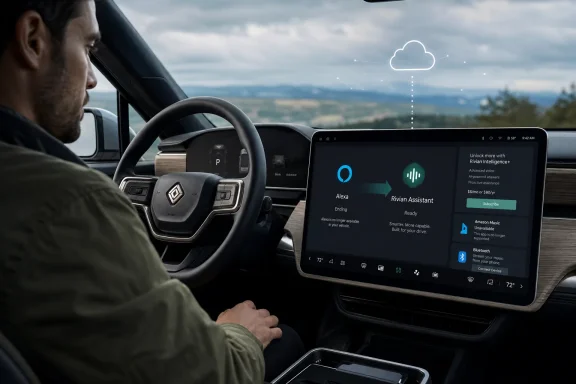 Alexa’s removal ends more than a wake word
Alexa was not merely a way to set cabin temperature or start navigation. It connected Rivian’s infotainment system to Amazon’s voice ecosystem: Amazon Music playback, smart-home commands, announcements, routines, flash briefings, shopping-related requests, and the broader Alexa skill catalog. Rivian’s older owner documentation explicitly promoted requests such as playing music and sending messages through Alexa.Those integrations do not transfer automatically to Rivian Assistant. Rivian Assistant can control a much wider range of vehicle functions than Alexa could, but its available third-party connections are far more limited today. Rivian’s launch material identified Google Calendar as the first external app integration, enabling calendar-aware navigation and meeting-related tasks. Its current Connect+ media-app list includes Apple Music, Spotify, YouTube, Google Cast, SiriusXM, Audible, TuneIn Radio, and TIDAL; Amazon Music is absent.
That omission has a concrete consequence. An Amazon Music subscriber can still play audio from a phone over Bluetooth, but loses the integrated catalog browsing, search, and voice playback that Alexa supplied. Drive Tesla Canada reported that Rivian plans a native Amazon Music app, but Rivian has not provided a public release date. Until that changes, Bluetooth is a workaround, not a replacement for a built-in application.
For Windows and IT readers, the familiar parallel is a vendor retiring an established integration in favor of its own managed platform. The replacement may be more capable in core workflows, but it also brings a new control plane, a subscription requirement, new data terms, and a smaller integration surface on day one. The feature name changes from Alexa to Rivian Assistant; the real change is that Rivian now controls the voice layer, its permitted capabilities, and its commercial terms.
Rivian Assistant is not simply “Gemini in the car”
The claim that Rivian replaced Alexa with a Gemini assistant needs qualification. Rivian Assistant is branded and architected as a Rivian service, built around what the company calls Rivian Unified Intelligence. At its Autonomy & AI Day in December 2025, Rivian said its in-house agentic framework would connect vehicle systems and third-party services, while using frontier large language models for natural conversation, reasoning, and grounded information.TechCrunch reported at that event that Google Vertex AI and Gemini were among the external models augmenting Rivian’s system. Rivian’s own public description has been more careful: it says the assistant uses “frontier large language models,” rather than naming Gemini as its sole foundation. The distinction is substantive. A Gemini-powered query may be part of the experience, but Rivian owns the orchestration layer that decides what model or service handles a request and, more importantly, what vehicle functions the assistant may access.
That access is why the company believes it can do more than Alexa, Siri through CarPlay, or Google Assistant through Android Auto. Rivian Assistant can adjust climate settings, control media, place calls, send messages, operate navigation, surface information from the Owner’s Guide, explain alerts, and assist with some troubleshooting. MotorTrend’s early reporting also described deeper controls such as drive-mode changes, ride-height adjustment, and frunk operation.
The benefit is real: native vehicle control removes the rigid command syntax and limited permissions that tend to frustrate drivers using phone-mirrored assistants. The cost is that feature availability now depends more directly on Rivian’s backend service and its Connect+ entitlement. What had been an Alexa-enabled capability in the vehicle is becoming a cloud-backed Rivian product.
The paywall is the part owners need to scrutinize
Rivian Assistant launched in software version 2026.15 for Gen 1 and Gen 2 R1T and R1S vehicles, with availability tied to an active Connect+ subscription or a trial period. Engadget, InsideEVs, and Rivian’s own release notes all documented that condition when the assistant began rolling out in May.Rivian’s 2026.15 release notes also said that turning on Rivian Assistant would automatically turn off Alexa and all Alexa integrations. At that stage, owners at least had a choice: use the new assistant and lose Alexa, or keep Alexa by declining the new service. The reported August 4 removal ends that coexistence period.
The important discrepancy is in what happens to unsubscribed owners. Drive Tesla Canada says that owners without Connect+ can no longer control the vehicle with voice. Rivian’s current Connect+ comparison page, however, explicitly lists “basic voice commands” as standard equipment and Rivian Assistant as a paid add-on. Both statements can be true if Rivian has retained a limited legacy command set—for example, a small number of climate or navigation controls—while reserving natural-language requests, messaging, vehicle knowledge, and AI responses for Connect+.
But Rivian has not published the command list that would let owners know where that line is. It also has not said whether the standard voice controls work on every generation of R1 hardware, whether they require an active data connection, or whether any formerly Alexa-based commands have equivalents outside Connect+.
Owners should treat “basic voice commands” as an undefined baseline until Rivian documents it. The relevant test is not whether a microphone icon remains on the display; it is whether the specific commands an owner relied on—media selection, navigation, calling, cabin control, smart-home actions, or messaging—still complete successfully without a paid subscription.
Rivian’s AI terms put the responsibility back on the driver
The new assistant also carries terms that matter more than the marketing material suggests. Rivian’s AI Use Terms, last updated May 12, say its AI services can generate inaccurate, incomplete, outdated, or biased output, and warn that AI-generated statements about products, capabilities, and pricing are not definitive. The company directs users to official owner guides, warranty materials, and support resources for verified answers.That warning is standard for generative AI, but the automotive context raises the stakes. Asking for a restaurant recommendation is low risk. Asking an assistant why a warning light appeared, how to address a charging problem, or what a vehicle setting means can influence a driver’s real-world decisions. Rivian says the assistant can explain alerts and guide troubleshooting, while also explicitly warning that its AI output may be wrong.
Rivian allows users to enable or disable Assistant memory and Google Calendar access, both of which are off by default in the 2026.15 documentation. The assistant’s personalization settings attach to a driver profile and can follow that profile to another Rivian vehicle. That can be convenient for households and shared vehicles, but it means owners should review profile settings after accepting the assistant’s onboarding prompts rather than treating it as a simple replacement for a legacy voice-control system.
What Rivian owners can do now
- Owners who depend on Amazon Music should plan on Bluetooth streaming until Rivian delivers the promised native app, because Alexa’s prior integration is gone and Amazon Music does not appear in Rivian’s present supported-app list.
- Owners nearing the end of a Connect+ trial should test the exact voice functions they use before the trial expires, especially calls, messages, navigation, media requests, and climate commands.
- Owners who do subscribe should review Rivian Intelligence settings in the mobile app, including Memory and Google Calendar, before enabling them on a shared driver profile.
- Owners should use Rivian’s Owner’s Guide or Support Center, rather than Assistant responses, for warranty, pricing, safety, service, and diagnostic questions where an incorrect answer could cost money or affect vehicle operation.
References
- Primary source: driveteslacanada.ca
Published: 2026-08-04T22:26:04+00:00
Loading…
driveteslacanada.ca - Related coverage: rivian.com
Loading…
rivian.com - Related coverage: rivian.com
Loading…
rivian.com - Related coverage: stories.rivian.com
Loading…
stories.rivian.com - Related coverage: assets.rivian.com
Loading…
assets.rivian.com - Related coverage: aboutamazon.com
Loading…
www.aboutamazon.com - Related coverage: stories.rivian.com
Loading…
stories.rivian.com - Related coverage: engadget.com
Loading…
www.engadget.com - Related coverage: assets.rivian.com
Loading…
assets.rivian.com - Related coverage: media.rivian.com
Loading…
media.rivian.com - Related coverage: media.rivian.com
Loading…
media.rivian.com - Related coverage: motortrend.com
Loading…
www.motortrend.com - Related coverage: techcrunch.com
Loading…
techcrunch.com - Related coverage: rivianforums.com
Loading…
rivianforums.com - Related coverage: autos.yahoo.com
Loading…
autos.yahoo.com - Related coverage: 13finsight.com
Loading…
13finsight.com - Related coverage: nexusevnews.com
Loading…
nexusevnews.com - Related coverage: rivianrecap.com
Loading…
rivianrecap.com - Related coverage: androidauthority.com
Loading…
www.androidauthority.com - Related coverage: rivianforums.com
Loading…
www.rivianforums.com - Related coverage: insideevs.com
Loading…
insideevs.com