
The more useful reading of this launch is not that ASUS has built another expensive 18-inch desktop replacement. It is that buyers are paying for a system whose headline settings require deliberate configuration—and whose local documentation contains a technical contradiction ASUS has not addressed.
The SCAR 18 is a serious high-power laptop, but its 4K 240Hz screen, 320W power claim, and ROG Nebula ELMB motion-blur feature do not all describe the experience a buyer gets after first booting Windows 11.
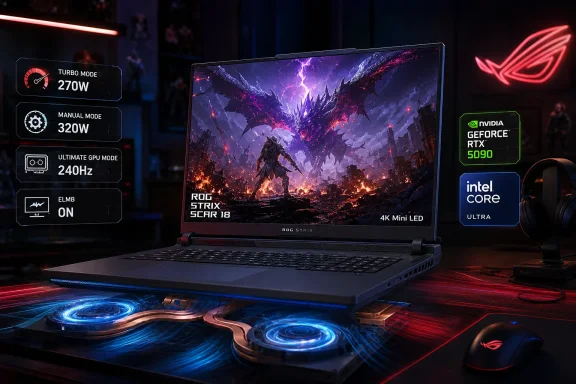 The 320W figure is a Manual-mode ceiling
ASUS markets the Strix SCAR 18 around a sustained maximum total system power of 320W. Globally, the company announced the 2026 model in May as its flagship pairing the 24-core Intel Core Ultra 9 290HX Plus with an RTX 5090 Laptop GPU rated for up to 175W. The Vietnam product page supplies the missing operational detail: Turbo mode allocates 95W to the CPU and 175W to the GPU, for a combined 270W; the advertised 320W is available in Manual mode, where the CPU allocation rises to 145W.
That is a meaningful distinction for anyone comparing the SCAR 18 with other RTX 5090 laptops. ASUS is not claiming every preset drives the platform at 320W, and prospective buyers should not assume a fresh Windows installation will do so. Manual mode exists precisely to let the user trade heat, fan noise, and power draw for an extra 50W of CPU headroom.
The cooling hardware is designed around that proposition. ASUS cites a vapor chamber 20% thicker than the preceding SCAR 18, a three-fan arrangement, 0.1mm copper fins, and Conductonaut Extreme liquid metal on the CPU and GPU. Those are vendor measurements rather than independently standardized ones, but outside testing supports the broad conclusion that the system can sustain heavy loads: Tom’s Hardware recorded an RTX-focused Metro Exodus stress test averaging 141 fps with virtually no performance drop across 15 loops.
There is a physical price for that stability. This is an 18-inch machine built to sit near a mains outlet, and its maximum tuning belongs on a desk rather than on a lap. ASUS’s own local specification page makes clear that the 320W operating mode is a user-selected performance state, not a baseline characteristic of the notebook.
The 4K panel ships at 120Hz unless users change GPU mode
The SCAR 18’s headline display is an 18-inch 3840×2400 Mini-LED panel with a 240Hz refresh rate, more than 2,000 local-dimming zones, 100% DCI-P3 coverage, G-Sync, Dolby Vision, and HDR brightness rated at up to 1,600 nits. ASUS says it is the first laptop panel to combine 18-inch 4K, 240Hz, Mini-LED, and its new ROG Nebula ELMB technology.
The qualification is in the local product page’s footnote: 120Hz is the default refresh rate in Standard, Eco, and Optimized GPU modes. To expose 240Hz, the user must open Armoury Crate and select Ultimate GPU mode. That mode switches the laptop away from Nvidia Optimus and onto the discrete GPU path; it also requires a restart.
Tom’s Hardware independently found the same behavior in review. Out of the box, its SCAR 18 test unit had HDR disabled, the display capped at 120Hz, and G-Sync unavailable because Optimus was active. Switching to Ultimate mode unlocked the 240Hz setting and G-Sync. This is not a defect, but it should be understood as a mode-dependent feature rather than a permanent default.
For Windows users, that means there is a real split between a quieter, more power-conscious everyday configuration and the flagship gaming configuration ASUS advertises. The former preserves hybrid graphics behavior; the latter favors display features and direct RTX 5090 performance. A buyer who leaves Armoury Crate untouched will own the 240Hz screen but initially run it as a 120Hz panel.
The 4K resolution itself also changes the performance equation. In Tom’s Hardware testing of 007: First Light at native 3840×2400 and maximum detail, the RTX 5090 SCAR 18 produced roughly 26–32 fps before DLSS was enabled. DLSS lifted performance to around 70 fps or more. That does not diminish the GPU; it demonstrates that rendering modern AAA games at the panel’s native 9.2 million pixels remains demanding even for Nvidia’s top mobile part. The machine can deliver high-frame-rate 4K gaming, but often through upscaling and frame-generation features rather than brute-force native rendering.
ELMB has a practical HDR trade-off
ROG Nebula ELMB—Extreme Low Motion Blur—is the SCAR 18’s most distinctive display feature. Conventional backlight strobing can improve motion clarity but often disables variable refresh rate support and can reduce brightness. ASUS says its approach independently controls segments of the Mini-LED backlight to time strobing with pixel transitions, allowing ELMB and G-Sync to operate together.
That claim has merit in testing. Tom’s Hardware reported visibly sharper moving objects in a Blur Busters UFO test when ELMB was enabled, describing it as a feature that could matter for competitive esports. It is therefore more than a decorative feature-sheet entry.
But the same reviewer found the key operating restriction: ELMB works only in SDR, single-zone backlight mode, with HDR disabled. ASUS’s own Nebula documentation confirms that requirement. Users must choose between the SCAR 18’s vivid multi-zone HDR presentation and its clearest motion mode; the laptop does not deliver both at once.
That trade-off is entirely reasonable for the technology, yet it is lost in launch coverage that describes the panel as if its HDR, 240Hz, G-Sync, Mini-LED local dimming, and ELMB benefits are all simultaneously active. They are not. An esports player may prefer SDR single-zone mode with ELMB enabled. A player enjoying a cinematic single-player title will more likely want HDR and the multi-zone Mini-LED modes instead.
ASUS’s documentation also conflicts on a basic technical detail. Its global launch announcement and its U.S. availability notice say Nebula ELMB uses eight discrete strobing zones. The ASUS Vietnam SCAR 18 page says the technology uses 40 separate zones. Tạp chí Công thương repeated the eight-zone figure in its launch report.
The discrepancy matters because those zones are the claimed mechanism behind the panel’s motion-clarity advantage. ASUS has not publicly explained whether the Vietnamese product page is describing a different layer of the system, using a revised design specification, or simply carrying an error. Until it does, eight zones is the figure repeated in the company’s global launch material, while 40 remains the number on the local product page.
Tool-less upgrades are useful, but the included Windows edition is limiting
The physical serviceability story is unusually strong for this class of gaming laptop. ASUS provides tool-less bottom-panel access to the RAM and SSD bays, plus Q-Latch retention for M.2 drives, and says the platform supports up to 128GB of DDR5-6400 memory and up to 8TB of storage across two SSD slots. The Vietnam page says the installed configuration can use PCIe 4.0 storage while both slots are ready for PCIe 5.0 upgrades.
That is an advantage over thin premium gaming systems with soldered memory or awkwardly buried storage. Buyers planning to keep an RTX 5090 notebook for several years can replace storage without treating the chassis as a sealed appliance. ASUS still advises checking compatible RAM and SSD parts, and the company notes that real configurations vary by market and SKU.
The more immediate concern for IT professionals is Windows licensing. ASUS Vietnam lists the SCAR 18 with Windows 11 Home Single Language, not Windows 11 Pro. Microsoft’s documentation states that Windows Home editions do not support joining an on-premises Active Directory domain or Microsoft Entra ID.
For a private buyer, Home is unlikely to be a major issue. For a developer, creator, or technical professional buying this as a powerful work machine, it is a cost and deployment step that should be included in the purchase decision. An organization intending to use Microsoft Entra join, Autopilot, or conventional domain join will need to upgrade the edition before onboarding the device.
The Vietnam launch therefore lands as a credible local availability milestone for one of 2026’s most capable Windows gaming laptops. At 179,990,000 VND, however, the SCAR 18 should be purchased with its operating modes in mind: Manual mode for the 320W ceiling, Ultimate GPU mode for 240Hz and G-Sync, SDR single-zone mode for ELMB, and a Windows 11 Pro upgrade for managed deployments.
References
- Primary source: vietnam.vn
Published: August 9, 2026 at 5:21 AM UTC
Loading…
www.vietnam.vn - Related coverage: press.asus.com
Loading…
press.asus.com - Related coverage: rog.asus.com
Loading…
rog.asus.com - Related coverage: asus.com
Loading…
www.asus.com - Related coverage: rog.asus.com
Loading…
rog.asus.com - Related coverage: tomshardware.com
Loading…
www.tomshardware.com - Related coverage: ultrabookreview.com
Asus ROG Strix Scar 18 longer-term review (2026 G835LXG model - Core Ultra 9 290HX Plus, RTX 5090)
This is our detailed review of the refreshed 2026 generation of the Asus ROG Strix Scar 18 G835 laptop, Asus's largest and most powerful notebook available aswww.ultrabookreview.com - Related coverage: gadgets360.com
Loading…
www.gadgets360.com - Related coverage: laptopmedia.com
Loading…
laptopmedia.com - Related coverage: semicurrent.com
Loading…
www.semicurrent.com - Related coverage: altstore.si
Loading…
www.altstore.si - Related coverage: pcomp3000.pl
Loading…
www.pcomp3000.pl - Related coverage: techradar.com
Loading…
www.techradar.com - Related coverage: windowscentral.com
Loading…
www.windowscentral.com - Related coverage: gamesradar.com
Loading…
www.gamesradar.com - Related coverage: tomshardware.com
Loading…
www.tomshardware.com - Related coverage: profesionalreview.com
Loading…
www.profesionalreview.com - Related coverage: tbreak.com
Loading…
tbreak.com - Related coverage: 170-rog.p.syniva.es
Loading…
170-rog.p.syniva.es - Related coverage: elchapuzasinformatico.com
Loading…
elchapuzasinformatico.com - Related coverage: learn.microsoft.com
Loading…
learn.microsoft.com - Related coverage: learn.microsoft.com
Loading…
learn.microsoft.com