
A used Nvidia GPU can be the right upgrade for a Jellyfin server that chokes when remote users force video transccodes—but the compelling part of XDA Developers’ RTX 2070 Super story is not that the card is fast. It is that the server’s CPU was doing work a dedicated video encoder was designed to take away. For a machine whose real problem is live H.264 or HEVC conversion, moving from a GTX 760 to a Turing-generation NVENC card can spare a platform rebuild.
There is an important correction to the broad advice, though: buying an RTX 2070 Super specifically is rarely the requirement. Its gaming horsepower, 8GB of VRAM, and power draw do not automatically translate into more useful Jellyfin capacity than less costly Nvidia cards carrying the same generation of video encoder. The right purchase is the least expensive, physically compatible GPU whose decoder and encoder match the files and streams the server actually has to handle.
XDA Developers reports that its author paid $50 for a used RTX 2070 Super and saw CPU use fall sharply after enabling GPU transcoding. That is a very good outcome for that individual deal, but it should not become a shopping list for every home server. The RTX 2070 Super’s advantage over a GTX 760 is principally the jump from a Kepler-era H.264-focused implementation to Turing’s much more capable H.264 and HEVC media pipeline—not a need for the 2070 Super’s 2,560 CUDA cores.
Jellyfin’s preferred path is Direct Play: send the original video, audio, subtitles, and container to a client untouched. The next-best path is Direct Stream, where Jellyfin may remux the file or convert audio while leaving the video alone. Neither mode calls for a new CPU or a new GPU merely because friends are streaming from outside the house.
A full video transcode begins when the playback device, selected subtitle format, available bandwidth, codec support, resolution limits, or profile support makes the original video unusable as delivered. A 4K HEVC file may need to become a lower-bitrate H.264 stream for a phone on a constrained connection; image-based subtitles may need to be burned into video for a client that cannot render them; HDR content may require conversion to SDR. Those cases can turn one seemingly modest playback request into a continuous real-time conversion job.
That is why a server can appear fine during local use and then falter when remote viewers arrive. The issue is not necessarily the number of users. Three users who Direct Play their files can demand very little compute, while one remote viewer with incompatible subtitles and a restricted bitrate can trigger video decoding, filtering, tone mapping, re-encoding, audio work, and disk activity all at once.
The first practical step is therefore to inspect Jellyfin’s playback information and FFmpeg logs during the failing session. Confirm whether the session says Direct Play, Direct Stream, or Transcode, and identify the listed transcoding reasons. If the reason is an unsupported subtitle format, clients that can render text subtitles directly may eliminate the problem without hardware spending. If the reason is bandwidth, a GPU may help serve the stream smoothly, but it cannot create upload bandwidth that the internet connection does not have.
Jellyfin’s Nvidia documentation supports NVENC and NVDEC acceleration on Windows and Linux, with the caveat that the server must have a supported GPU, current enough driver, and the correct hardware-acceleration settings enabled. On Windows, Jellyfin specifically directs administrators to verify the result in Task Manager’s GPU view by watching the Video Decode and Video Encode engines while a deliberate transcode runs. A GPU installed in the PCIe slot but not selected inside Jellyfin is not an upgrade; it is idle hardware.
For live playback, this offload is valuable because speed consistency matters more than squeezing the last percentage point of compression efficiency from a file. A library conversion can run overnight or for a week. A live transcode has only seconds to stay ahead of playback. If it falls behind, the viewer sees buffering; if it consumes every available CPU core, the rest of the server—storage services, containers, metadata jobs, backups, and operating-system tasks—also starts competing for time.
That does not mean NVENC produces magic. Hardware encoding generally makes a quality-and-compression trade against well-tuned software encoding at the same bitrate, and some advanced filtering work can still involve the GPU’s compute resources or the CPU. But for a temporary stream sent to a remote user, the priority is normally a stable, compatible output rather than producing a permanent archival master.
XDA’s underlying diagnosis is sound: replacing a motherboard, processor, and memory just to resolve a workload that is overwhelmingly video encode/decode work is an expensive way to reach the wrong subsystem.
Jellyfin’s current Nvidia guide describes H.264 acceleration as widely available across NVENC/NVDEC-capable cards, but places the useful HEVC baseline much later. HEVC 8-bit decoding and encoding require second-generation Maxwell or newer, 10-bit HEVC encoding requires Pascal or newer, and modern HDR-related workflows depend on the card having 10-bit HEVC decode support. The GTX 760 belongs on the wrong side of that divide for a library built around HEVC, 4K, HDR, or modern client compatibility needs.
The RTX 2070 Super, released in 2019 on Nvidia’s Turing architecture, has a far better fit for that workload. Jellyfin ranks Turing alongside Ampere and Ada in its higher H.264 and HEVC encoding-quality tier, above Pascal and Maxwell. Nvidia’s current NVENC documentation also shows Turing supporting H.264 and HEVC Main10 encoding capabilities that the older Kepler hardware does not offer.
The upgrade is consequently credible even before considering raw benchmark numbers. A GTX 760 can be adequate for narrow H.264-era tasks; a Turing card can handle the codec mix that forces many modern media servers into software fallback. That is what protects CPU headroom.
Jellyfin’s own hardware-selection guidance recommends Nvidia GTX 16-series and RTX 20-series hardware or newer, while explicitly excluding the original GTX 1650. That recommendation exposes the more economical target: the Turing NVENC generation, not necessarily the RTX branding or a 2070 Super-class board. A compact GTX 1650 Super, GTX 1660, GTX 1660 Super, GTX 1660 Ti, or a workstation-equivalent Turing card may provide substantially the same practical media-engine benefit for a smaller server, depending on local used pricing, slot space, cooling, and power connectors.
There is a second challenge to the Nvidia-first framing. Jellyfin also recommends Intel graphics for many Linux users who do not need CUDA for other software. If the existing processor already has a capable Intel integrated GPU, Quick Sync Video may offer hardware transcoding without buying, powering, cooling, and maintaining a discrete card. A CPU/platform upgrade remains justified when the server actually needs more CPU capacity for virtual machines, databases, software encoding, storage services, or containers—but it should begin with evidence from monitoring, not a transcoding assumption.
The 2070 Super is still sensible when it is genuinely cheap, already owned, fits the chassis, and the server benefits from CUDA-based tone mapping or other Nvidia-specific workloads. It is simply not the minimum viable answer to the problem described.
The Nvidia software stack also matters. Jellyfin’s current setup guidance lists minimum Nvidia driver versions for its current server release line and tells Windows users to install a current driver before enabling NVENC. Linux and container deployments add more failure points: the host needs the proprietary driver and encode/decode libraries, the Jellyfin service account needs access, and a Docker container or virtual machine must be explicitly granted GPU visibility. “GPU transcoding is enabled” in the dashboard does not prove that the active FFmpeg process is using it.
Concurrency requires a reality check as well. Nvidia’s current licensing documentation says consumer GeForce GPUs are limited to eight simultaneous NVENC sessions per system, shared across non-qualified cards, while qualified professional products are constrained by actual system resources instead. Eight sessions is more generous than the old three-session limit repeated across older Jellyfin guides and forum posts, but it is still a session ceiling rather than a guarantee that eight demanding 4K HDR conversions will perform well. Resolution, codec, rate-control settings, filtering, clock speeds, memory, and the rest of the server determine the usable number.
The useful test is to create the playback failure on purpose: lower the client’s bitrate, choose a file known to need conversion, then watch Jellyfin’s dashboard, the FFmpeg command line, CPU utilization, GPU Video Encode and Video Decode usage, disk activity, and outbound network throughput. That test identifies whether the bottleneck is encoding, decoding, storage, upload bandwidth, subtitles, or client compatibility.
A $50 RTX 2070 Super can absolutely be a smarter fix than a new Ryzen, board, and DDR5 kit. But the broader lesson is more valuable: measure the transcode path before rebuilding the server, then buy the oldest efficient hardware that covers the codecs and features that path actually requires.
XDA Developers reports that its author paid $50 for a used RTX 2070 Super and saw CPU use fall sharply after enabling GPU transcoding. That is a very good outcome for that individual deal, but it should not become a shopping list for every home server. The RTX 2070 Super’s advantage over a GTX 760 is principally the jump from a Kepler-era H.264-focused implementation to Turing’s much more capable H.264 and HEVC media pipeline—not a need for the 2070 Super’s 2,560 CUDA cores.
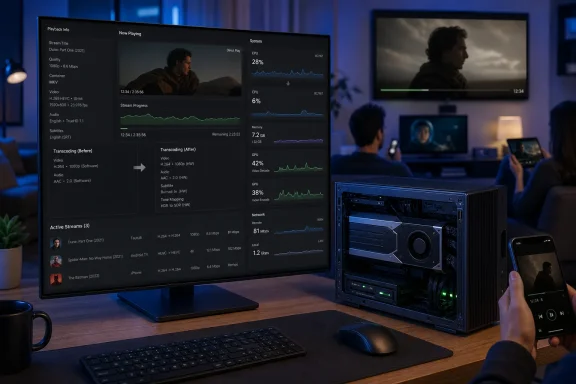 Transcoding is a compatibility fallback, not normal playback
Jellyfin’s preferred path is Direct Play: send the original video, audio, subtitles, and container to a client untouched. The next-best path is Direct Stream, where Jellyfin may remux the file or convert audio while leaving the video alone. Neither mode calls for a new CPU or a new GPU merely because friends are streaming from outside the house.A full video transcode begins when the playback device, selected subtitle format, available bandwidth, codec support, resolution limits, or profile support makes the original video unusable as delivered. A 4K HEVC file may need to become a lower-bitrate H.264 stream for a phone on a constrained connection; image-based subtitles may need to be burned into video for a client that cannot render them; HDR content may require conversion to SDR. Those cases can turn one seemingly modest playback request into a continuous real-time conversion job.
That is why a server can appear fine during local use and then falter when remote viewers arrive. The issue is not necessarily the number of users. Three users who Direct Play their files can demand very little compute, while one remote viewer with incompatible subtitles and a restricted bitrate can trigger video decoding, filtering, tone mapping, re-encoding, audio work, and disk activity all at once.
The first practical step is therefore to inspect Jellyfin’s playback information and FFmpeg logs during the failing session. Confirm whether the session says Direct Play, Direct Stream, or Transcode, and identify the listed transcoding reasons. If the reason is an unsupported subtitle format, clients that can render text subtitles directly may eliminate the problem without hardware spending. If the reason is bandwidth, a GPU may help serve the stream smoothly, but it cannot create upload bandwidth that the internet connection does not have.
Why NVENC changes the CPU calculation
Nvidia’s NVENC is a fixed-function video encoder built into supported GPUs. Nvidia’s own technical documentation makes a point often lost in hardware discussions: the encoding block is separate from the GPU’s general-purpose graphics and CUDA resources. In a media-server workload, that means a CPU does not need to perform every step of the output video encode in software.Jellyfin’s Nvidia documentation supports NVENC and NVDEC acceleration on Windows and Linux, with the caveat that the server must have a supported GPU, current enough driver, and the correct hardware-acceleration settings enabled. On Windows, Jellyfin specifically directs administrators to verify the result in Task Manager’s GPU view by watching the Video Decode and Video Encode engines while a deliberate transcode runs. A GPU installed in the PCIe slot but not selected inside Jellyfin is not an upgrade; it is idle hardware.
For live playback, this offload is valuable because speed consistency matters more than squeezing the last percentage point of compression efficiency from a file. A library conversion can run overnight or for a week. A live transcode has only seconds to stay ahead of playback. If it falls behind, the viewer sees buffering; if it consumes every available CPU core, the rest of the server—storage services, containers, metadata jobs, backups, and operating-system tasks—also starts competing for time.
That does not mean NVENC produces magic. Hardware encoding generally makes a quality-and-compression trade against well-tuned software encoding at the same bitrate, and some advanced filtering work can still involve the GPU’s compute resources or the CPU. But for a temporary stream sent to a remote user, the priority is normally a stable, compatible output rather than producing a permanent archival master.
XDA’s underlying diagnosis is sound: replacing a motherboard, processor, and memory just to resolve a workload that is overwhelmingly video encode/decode work is an expensive way to reach the wrong subsystem.
The GTX 760 to Turing leap is the real story
The original GeForce GTX 760 is a Kepler card. Nvidia introduced NVENC in the Kepler generation, so the assertion that older Nvidia cards can have hardware encoding support is broadly true. But “has NVENC” is not a useful purchasing standard by itself. Codec support, bit depth, decoder capability, encoding quality, driver support, power consumption, and the generation of the media engine determine whether a card remains practical for a Jellyfin server.Jellyfin’s current Nvidia guide describes H.264 acceleration as widely available across NVENC/NVDEC-capable cards, but places the useful HEVC baseline much later. HEVC 8-bit decoding and encoding require second-generation Maxwell or newer, 10-bit HEVC encoding requires Pascal or newer, and modern HDR-related workflows depend on the card having 10-bit HEVC decode support. The GTX 760 belongs on the wrong side of that divide for a library built around HEVC, 4K, HDR, or modern client compatibility needs.
The RTX 2070 Super, released in 2019 on Nvidia’s Turing architecture, has a far better fit for that workload. Jellyfin ranks Turing alongside Ampere and Ada in its higher H.264 and HEVC encoding-quality tier, above Pascal and Maxwell. Nvidia’s current NVENC documentation also shows Turing supporting H.264 and HEVC Main10 encoding capabilities that the older Kepler hardware does not offer.
The upgrade is consequently credible even before considering raw benchmark numbers. A GTX 760 can be adequate for narrow H.264-era tasks; a Turing card can handle the codec mix that forces many modern media servers into software fallback. That is what protects CPU headroom.
The cheaper answer may be a smaller Turing card—or no Nvidia card
Here is where the “used RTX 2070 Super” prescription starts to overreach. The RTX 2070 Super has a single NVENC engine. In a Jellyfin-only machine, its large gaming-oriented GPU configuration is mostly irrelevant to the primary act of encoding video. Higher-end cards can have higher clocks, more memory bandwidth, or multiple encoder engines in some families, but an old high-end gaming card does not automatically create a better media-server purchase.Jellyfin’s own hardware-selection guidance recommends Nvidia GTX 16-series and RTX 20-series hardware or newer, while explicitly excluding the original GTX 1650. That recommendation exposes the more economical target: the Turing NVENC generation, not necessarily the RTX branding or a 2070 Super-class board. A compact GTX 1650 Super, GTX 1660, GTX 1660 Super, GTX 1660 Ti, or a workstation-equivalent Turing card may provide substantially the same practical media-engine benefit for a smaller server, depending on local used pricing, slot space, cooling, and power connectors.
There is a second challenge to the Nvidia-first framing. Jellyfin also recommends Intel graphics for many Linux users who do not need CUDA for other software. If the existing processor already has a capable Intel integrated GPU, Quick Sync Video may offer hardware transcoding without buying, powering, cooling, and maintaining a discrete card. A CPU/platform upgrade remains justified when the server actually needs more CPU capacity for virtual machines, databases, software encoding, storage services, or containers—but it should begin with evidence from monitoring, not a transcoding assumption.
The 2070 Super is still sensible when it is genuinely cheap, already owned, fits the chassis, and the server benefits from CUDA-based tone mapping or other Nvidia-specific workloads. It is simply not the minimum viable answer to the problem described.
GPU acceleration will not cure every playback failure
Hardware transcoding has edges that deserve more attention than the usual “CPU usage dropped” victory screenshot. Audio transcodes, subtitle rendering, library scans, image extraction, and some filters may remain CPU-bound. HDR-to-SDR tone mapping can add another layer of requirements. Jellyfin notes that no Intel, AMD, or Nvidia GPU supports hardware decoding for 10-bit H.264 High10 video, so files in that unusual format can still force software work.The Nvidia software stack also matters. Jellyfin’s current setup guidance lists minimum Nvidia driver versions for its current server release line and tells Windows users to install a current driver before enabling NVENC. Linux and container deployments add more failure points: the host needs the proprietary driver and encode/decode libraries, the Jellyfin service account needs access, and a Docker container or virtual machine must be explicitly granted GPU visibility. “GPU transcoding is enabled” in the dashboard does not prove that the active FFmpeg process is using it.
Concurrency requires a reality check as well. Nvidia’s current licensing documentation says consumer GeForce GPUs are limited to eight simultaneous NVENC sessions per system, shared across non-qualified cards, while qualified professional products are constrained by actual system resources instead. Eight sessions is more generous than the old three-session limit repeated across older Jellyfin guides and forum posts, but it is still a session ceiling rather than a guarantee that eight demanding 4K HDR conversions will perform well. Resolution, codec, rate-control settings, filtering, clock speeds, memory, and the rest of the server determine the usable number.
The useful test is to create the playback failure on purpose: lower the client’s bitrate, choose a file known to need conversion, then watch Jellyfin’s dashboard, the FFmpeg command line, CPU utilization, GPU Video Encode and Video Decode usage, disk activity, and outbound network throughput. That test identifies whether the bottleneck is encoding, decoding, storage, upload bandwidth, subtitles, or client compatibility.
A $50 RTX 2070 Super can absolutely be a smarter fix than a new Ryzen, board, and DDR5 kit. But the broader lesson is more valuable: measure the transcode path before rebuilding the server, then buy the oldest efficient hardware that covers the codecs and features that path actually requires.
References
- Primary source: XDA
Published: 2026-08-04T23:00:10+00:00
Transcoding is the part everyone gets wrong, and the fix is usually a cheaper GPU than you think
You don't have to rebuild your entire server www.xda-developers.com
- Related coverage: jellyfin.org
NVIDIA GPU | Jellyfin
This tutorial guides you on setting up full video hardware acceleration on NVIDIA GPU via NVENC.jellyfin.org - Related coverage: jellyfin.org
Known Issues | Jellyfin
This page lists all known issues and limitations of hardware acceleration with Jellyfin.jellyfin.org