
IGN’s current RTX 5070 Ti deal feed is a useful warning against shopping by GPU badge alone: it combines desktop cards, desktop prebuilts, and laptops under one product name even though the desktop GeForce RTX 5070 Ti and the RTX 5070 Ti Laptop GPU are materially different parts. The practical result is that the apparent flood of “RTX 5070 Ti” bargains on August 5 is not evidence that Nvidia’s $749-class desktop GPU has suddenly become cheap again.
The listings include a $1,699 MSI RTX 5070 Ti gaming PC, a $1,999 HP OMEN 45L, sub-$1,750 and sub-$1,800 Walmart prebuilts, a $1,999 Gigabyte desktop, several Dell Outlet Alienware systems, and a Gigabyte AORUS Master laptop advertised at $750 off. IGN also flags a refurbished MSI-PC promotion through Woot and an Alienware 16X Aurora laptop price cut. Those are all potentially useful system deals, but they require separate value judgments based on CPU, memory, storage, warranty, cooling, and—on notebooks—the configured graphics power limit.
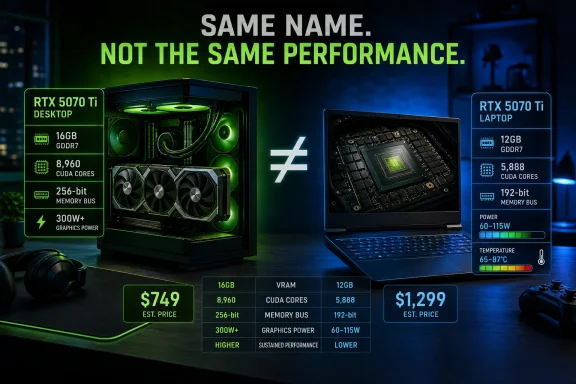
The common label hides the most important distinction. Nvidia specifies the desktop RTX 5070 Ti with 16GB of GDDR7 memory and 896 GB/s of bandwidth; its RTX 5070 Ti Laptop GPU has 12GB of GDDR7 and 5,888 CUDA cores. Desktop cards use 8,960 CUDA cores. A laptop’s GPU clock and power allocation also vary by chassis, while the desktop card is built around a 300W total graphics power target.
In other words, an RTX 5070 Ti laptop is not a portable version of the desktop RTX 5070 Ti in the way a casual product search may imply. It is a lower-spec mobile GPU sharing a name tier. For Windows gamers deciding between a discounted AORUS Master or Alienware notebook and a desktop system such as the MSI, HP, Gigabyte, MSI Codez Z2, or ABS Aeolian Ruby, that difference should be treated as the first filter—not a footnote.
IGN’s newest desktop listing says an MSI GeForce RTX 5070 Ti gaming PC has fallen to $1,699 and describes it as 4K-ready. At that price, the offer is worth examining because standalone RTX 5070 Ti boards have spent much of 2026 well above Nvidia’s original $749 MSRP.
The problem is that “RTX 5070 Ti PC” does not identify the machine well enough to establish value. The listing title does not state the exact processor, motherboard, power supply, RAM capacity or speed, SSD capacity, cooler, Windows edition, or the precise graphics-card model. Those details are where aggressively priced prebuilts commonly save money.
A system with a recent eight-core Ryzen or Core processor, 32GB of dual-channel DDR5, a 2TB NVMe SSD, a reputable 750W-or-better power supply, and a conventional ATX motherboard would make $1,699 unusually competitive in the current market. A build with 16GB of memory, a 1TB drive, a lower-end CPU, proprietary components, or an upgrade-hostile case may still be acceptable, but it is no longer comparable to the better-equipped Walmart and Gigabyte alternatives simply because each carries an RTX 5070 Ti.
The same applies to the HP OMEN 45L advertised at $1,999 with 32GB of DDR5. The memory figure is welcome, but it does not settle the comparison. Buyers need to identify the processor generation and model, storage capacity, PSU rating, available M.2 slots, motherboard expansion, and whether the system uses standard replacement parts before paying a $300 premium over the MSI offer.
The Dell Outlet systems deserve an additional discount for their status. IGN’s listings describe a like-new Alienware Aurora R16 with 64GB of DDR5 at $2,466 and a refurbished Alienware 18 Area-51 laptop at $2,013, both with a one-year warranty. A manufacturer warranty reduces some risk, but it does not turn outlet inventory into new retail stock. Check the stated condition, return terms, battery coverage for notebooks, cosmetic grading, and whether the specific unit is configured as advertised before relying on the headline price.
IGN’s own deal copy says the graphics card by itself has been selling around $950 to $1,000. Recent price tracking from PC Gamer and Tom’s Hardware points in the same direction: the RTX 5070 Ti may still be a strong performer, but current street pricing has drifted substantially from the launch MSRP. TechSpot’s 2026 roundup likewise concluded that paying $1,000 or more for one did not make sense.
That pricing changes the calculation for a prebuilt. If a fully assembled desktop is legitimately available around $1,699 with a modern CPU, 32GB of RAM, sufficient storage, and standard parts, the buyer is effectively getting the rest of the system for a relatively modest increment over the current standalone GPU market. It is an indictment of component availability, not proof that the GPU itself is a bargain.
It also means the $1,999 desktops in IGN’s feed have to justify their extra cost through their non-GPU hardware. A better CPU can matter at 1440p high refresh rates. More storage and memory affect everyday Windows use, game-library management, content creation, virtual machines, and local AI workloads. A stronger PSU and a non-proprietary case affect the ability to install the next graphics card rather than replace the machine.
For IT professionals and enthusiasts who build rather than buy, the correct comparison is no longer “prebuilt versus parts at MSRP.” MSRP is historical context. Compare the actual cart total for a specific board, CPU, memory kit, SSD, case, PSU, operating system license, and warranty against the precise prebuilt configuration available that day.
But 4K-capable does not mean every new game runs at native 4K, maximum settings, full ray tracing, and high-refresh frame rates without upscaling. Independent testing from TechSpot found the RTX 5070 Ti roughly matched the RTX 4070 Ti Super in its 4K rasterized testing and trailed the original RTX 4080 by about 11 percent. The card’s strongest case is a mix of high-quality settings, DLSS Super Resolution where needed, and selective use of frame generation—not an expectation of uncompromised native rendering.
Frame generation also deserves a practical caveat. It can raise the displayed frame rate and smoothness, but it does not create the same responsiveness as a matching increase in native rendered frames. In competitive games, the underlying frame rate, CPU performance, Reflex support, display refresh rate, and input latency remain more important than a large generated-FPS number.
For a living-room 4K display running single-player games, the desktop RTX 5070 Ti remains a credible fit. For a 1440p 144Hz or 165Hz monitor, it has more headroom, though the CPU paired with it becomes more consequential. For a laptop, none of those desktop expectations should be carried over without checking the notebook’s GPU wattage, cooling design, panel resolution, and benchmark results for that exact model.
Nvidia permits a broad boost-clock range for laptop GPUs, and manufacturers decide how much electrical power and cooling capacity the GPU receives. A large 18-inch desktop-replacement chassis can sustain substantially more graphics power than a thinner 16-inch machine. Two notebooks with the same GPU label, processor family, and memory capacity can therefore produce noticeably different gaming results.
The $750 discount on the Gigabyte laptop is particularly impossible to evaluate from the discount alone. IGN identifies it as an AORUS Master system, but a discount is not a price. The base price, final price, display specification, processor, memory, storage, screen resolution, battery condition, and retailer warranty determine whether it is actually competitive.
A discounted laptop can still make sense if portability, integrated display quality, and a complete warranty are the priorities. It should not be purchased on the assumption that it replaces a desktop RTX 5070 Ti system at the same performance level.
The standout candidate is the $1,699 MSI desktop, but only after its full parts list and warranty terms are checked. The $1,999 HP and Gigabyte desktops need to earn their higher price with stronger platform hardware, while Dell Outlet systems need to be evaluated as refurbished inventory rather than treated as equivalent to new builds. The AORUS and Alienware laptop offers belong in a separate comparison entirely.
For Windows users shopping this week, buy the complete configuration, not the RTX 5070 Ti label. The badge may identify the reason a system is on sale; it does not tell you whether the machine behind it is balanced, upgradeable, or priced fairly.
The common label hides the most important distinction. Nvidia specifies the desktop RTX 5070 Ti with 16GB of GDDR7 memory and 896 GB/s of bandwidth; its RTX 5070 Ti Laptop GPU has 12GB of GDDR7 and 5,888 CUDA cores. Desktop cards use 8,960 CUDA cores. A laptop’s GPU clock and power allocation also vary by chassis, while the desktop card is built around a 300W total graphics power target.
In other words, an RTX 5070 Ti laptop is not a portable version of the desktop RTX 5070 Ti in the way a casual product search may imply. It is a lower-spec mobile GPU sharing a name tier. For Windows gamers deciding between a discounted AORUS Master or Alienware notebook and a desktop system such as the MSI, HP, Gigabyte, MSI Codez Z2, or ABS Aeolian Ruby, that difference should be treated as the first filter—not a footnote.
 The $1,699 MSI desktop is the headline, but the configuration decides the deal
IGN’s newest desktop listing says an MSI GeForce RTX 5070 Ti gaming PC has fallen to $1,699 and describes it as 4K-ready. At that price, the offer is worth examining because standalone RTX 5070 Ti boards have spent much of 2026 well above Nvidia’s original $749 MSRP.The problem is that “RTX 5070 Ti PC” does not identify the machine well enough to establish value. The listing title does not state the exact processor, motherboard, power supply, RAM capacity or speed, SSD capacity, cooler, Windows edition, or the precise graphics-card model. Those details are where aggressively priced prebuilts commonly save money.
A system with a recent eight-core Ryzen or Core processor, 32GB of dual-channel DDR5, a 2TB NVMe SSD, a reputable 750W-or-better power supply, and a conventional ATX motherboard would make $1,699 unusually competitive in the current market. A build with 16GB of memory, a 1TB drive, a lower-end CPU, proprietary components, or an upgrade-hostile case may still be acceptable, but it is no longer comparable to the better-equipped Walmart and Gigabyte alternatives simply because each carries an RTX 5070 Ti.
The same applies to the HP OMEN 45L advertised at $1,999 with 32GB of DDR5. The memory figure is welcome, but it does not settle the comparison. Buyers need to identify the processor generation and model, storage capacity, PSU rating, available M.2 slots, motherboard expansion, and whether the system uses standard replacement parts before paying a $300 premium over the MSI offer.
The Dell Outlet systems deserve an additional discount for their status. IGN’s listings describe a like-new Alienware Aurora R16 with 64GB of DDR5 at $2,466 and a refurbished Alienware 18 Area-51 laptop at $2,013, both with a one-year warranty. A manufacturer warranty reduces some risk, but it does not turn outlet inventory into new retail stock. Check the stated condition, return terms, battery coverage for notebooks, cosmetic grading, and whether the specific unit is configured as advertised before relying on the headline price.
The desktop RTX 5070 Ti has become a system-shopping component
Nvidia launched the desktop RTX 5070 Ti in February 2025 at $749, but it did not produce a Founders Edition model. That left the market entirely in the hands of board partners, and the price discipline implied by a reference card never really materialized.IGN’s own deal copy says the graphics card by itself has been selling around $950 to $1,000. Recent price tracking from PC Gamer and Tom’s Hardware points in the same direction: the RTX 5070 Ti may still be a strong performer, but current street pricing has drifted substantially from the launch MSRP. TechSpot’s 2026 roundup likewise concluded that paying $1,000 or more for one did not make sense.
That pricing changes the calculation for a prebuilt. If a fully assembled desktop is legitimately available around $1,699 with a modern CPU, 32GB of RAM, sufficient storage, and standard parts, the buyer is effectively getting the rest of the system for a relatively modest increment over the current standalone GPU market. It is an indictment of component availability, not proof that the GPU itself is a bargain.
It also means the $1,999 desktops in IGN’s feed have to justify their extra cost through their non-GPU hardware. A better CPU can matter at 1440p high refresh rates. More storage and memory affect everyday Windows use, game-library management, content creation, virtual machines, and local AI workloads. A stronger PSU and a non-proprietary case affect the ability to install the next graphics card rather than replace the machine.
For IT professionals and enthusiasts who build rather than buy, the correct comparison is no longer “prebuilt versus parts at MSRP.” MSRP is historical context. Compare the actual cart total for a specific board, CPU, memory kit, SSD, case, PSU, operating system license, and warranty against the precise prebuilt configuration available that day.
“4K-ready” requires the usual qualifiers
IGN’s coverage repeatedly presents the RTX 5070 Ti as a 4K-capable option, and that is reasonable in the modern, qualified sense of the term. The desktop card has 16GB of GDDR7, Nvidia’s Blackwell feature set, DLSS 4, and Multi Frame Generation. It is far better positioned for 4K than GPUs constrained by 8GB or 12GB of VRAM.But 4K-capable does not mean every new game runs at native 4K, maximum settings, full ray tracing, and high-refresh frame rates without upscaling. Independent testing from TechSpot found the RTX 5070 Ti roughly matched the RTX 4070 Ti Super in its 4K rasterized testing and trailed the original RTX 4080 by about 11 percent. The card’s strongest case is a mix of high-quality settings, DLSS Super Resolution where needed, and selective use of frame generation—not an expectation of uncompromised native rendering.
Frame generation also deserves a practical caveat. It can raise the displayed frame rate and smoothness, but it does not create the same responsiveness as a matching increase in native rendered frames. In competitive games, the underlying frame rate, CPU performance, Reflex support, display refresh rate, and input latency remain more important than a large generated-FPS number.
For a living-room 4K display running single-player games, the desktop RTX 5070 Ti remains a credible fit. For a 1440p 144Hz or 165Hz monitor, it has more headroom, though the CPU paired with it becomes more consequential. For a laptop, none of those desktop expectations should be carried over without checking the notebook’s GPU wattage, cooling design, panel resolution, and benchmark results for that exact model.
Laptop listings need a different checklist
The Gigabyte AORUS Master laptop, the Alienware 18 Area-51 outlet model, and the Alienware 16X Aurora all use the RTX 5070 Ti Laptop GPU branding. Their performance may differ sharply from one another even before comparing them with a desktop.Nvidia permits a broad boost-clock range for laptop GPUs, and manufacturers decide how much electrical power and cooling capacity the GPU receives. A large 18-inch desktop-replacement chassis can sustain substantially more graphics power than a thinner 16-inch machine. Two notebooks with the same GPU label, processor family, and memory capacity can therefore produce noticeably different gaming results.
The $750 discount on the Gigabyte laptop is particularly impossible to evaluate from the discount alone. IGN identifies it as an AORUS Master system, but a discount is not a price. The base price, final price, display specification, processor, memory, storage, screen resolution, battery condition, and retailer warranty determine whether it is actually competitive.
A discounted laptop can still make sense if portability, integrated display quality, and a complete warranty are the priorities. It should not be purchased on the assumption that it replaces a desktop RTX 5070 Ti system at the same performance level.
What the current deal feed actually says about the market
The most defensible reading of IGN’s RTX 5070 Ti page is that prebuilt vendors are using Nvidia’s popular 16GB desktop GPU as a sales hook while standalone board pricing remains distorted. The listings do not document a broad reduction in RTX 5070 Ti prices, and they do not establish that every machine listed is a good buy.The standout candidate is the $1,699 MSI desktop, but only after its full parts list and warranty terms are checked. The $1,999 HP and Gigabyte desktops need to earn their higher price with stronger platform hardware, while Dell Outlet systems need to be evaluated as refurbished inventory rather than treated as equivalent to new builds. The AORUS and Alienware laptop offers belong in a separate comparison entirely.
For Windows users shopping this week, buy the complete configuration, not the RTX 5070 Ti label. The badge may identify the reason a system is on sale; it does not tell you whether the machine behind it is balanced, upgradeable, or priced fairly.
References
- Primary source: IGN
Published: 2026-08-05T07:30:26.612437
Loading…
www.ign.com - Related coverage: tomshardware.com
Loading…
www.tomshardware.com - Related coverage: tomshardware.com
Loading…
www.tomshardware.com - Related coverage: nvidia.com
NVIDIA GeForce RTX 5070 Family Graphics Cards
Get game-changing performance with the GeForce RTX 5070 Ti and RTX 5070, powered by NVIDIA Blackwell and unlock new experiences with the power of AI.www.nvidia.com - Related coverage: techspot.com
Loading…
www.techspot.com - Related coverage: tomsguide.com
Loading…
www.tomsguide.com - Related coverage: techspot.com
Loading…
www.techspot.com - Related coverage: techradar.com
Loading…
www.techradar.com - Related coverage: digitaltrends.com
Loading…
www.digitaltrends.com - Related coverage: pcgamesn.com
Loading…
www.pcgamesn.com - Related coverage: positioniseverything.net
Loading…
www.positioniseverything.net - Related coverage: engadget.com
Loading…
www.engadget.com - Related coverage: gamersnexus.net
Loading…
gamersnexus.net - Related coverage: prlog.org
Loading…
www.prlog.org - Related coverage: nvidia.com
Loading…
www.nvidia.com - Related coverage: nvidianews.nvidia.com
- Related coverage: ashgabattimes.com
Loading…
ashgabattimes.com - Related coverage: insiderllm.com
Loading…
insiderllm.com - Related coverage: notebookcheck.net
Loading…
www.notebookcheck.net - Related coverage: notebookcheck.net
Loading…
www.notebookcheck.net - Related coverage: blogs.nvidia.com
Loading…
blogs.nvidia.com - Related coverage: investor.nvidia.com
NVIDIA Corporation - NVIDIA Blackwell GeForce RTX 50 Series Opens New World of AI Computer Graphics
Next Generation of GeForce RTX GPUs Deliver Stunning Visual Realism and 2x Performance Increase, Made Possible by AI, Neural Shaders and DLSS 4 LAS VEGAS, Jan. 06, 2025 (GLOBE NEWSWIRE) - CES - NVIDIA today unveiled the most advanced consumer GPUs for gamers, creators and developers — the...investor.nvidia.com - Related coverage: download.nvidia.com
Loading…
download.nvidia.com - Related coverage: nvidia.cn
Loading…
www.nvidia.cn - Related coverage: images.nvidia.com
- Related coverage: images.nvidia.com
Loading…
images.nvidia.com