
A spare Nvidia RTX A2000 can still earn a second slot in a modern PC, but not by reviving SLI-era gaming: the useful configuration is one GPU per job. In a new first-person account for MakeUseOf, a Linux user describes running the 6GB RTX A2000 through an OCuLink enclosure alongside a primary GPU, then passing the A2000 directly into a Windows 11 LTSC virtual machine for GPU-accelerated Windows software and occasional games.
The distinction is more than terminology. Nvidia’s consumer multi-GPU rendering era effectively ended with the GeForce RTX 3090, the last GeForce card with an NVLink connector and documented two-way SLI support. GeForce RTX 40-series cards arrived without it. Modern Windows games do not generally split a rendering workload across two cards, and putting two GPUs in a machine will not make a game automatically faster.
What the MakeUseOf setup demonstrates is the surviving, practical form of dual-GPU computing: isolation. One card remains available to the host operating system while the other becomes a dedicated PCIe device for a virtual machine, a compute task, a video pipeline, or a frame-generation workload. That remains valuable for enthusiasts who need Windows applications without making Windows their host OS.
The centerpiece of the reported build is GPU passthrough through VFIO, the Linux kernel framework used to assign a physical PCIe device directly to a virtual machine. Once the RTX A2000 is bound to the guest, Windows sees an actual Nvidia GPU rather than an emulated display adapter. That allows the guest to use Nvidia’s Windows driver, DirectX acceleration, CUDA-compatible applications, and physical display outputs in much the same way it would on a bare-metal PC.
This is a sound use of a second GPU because it solves a problem that one GPU does not solve elegantly. A single-GPU passthrough machine can work, but the host must surrender its only display adapter when the VM starts, creating a less forgiving setup process and complicating recovery when a guest fails to boot cleanly. A Ryzen 5 5600G system has integrated Radeon graphics, which can soften that issue, but a discrete host GPU plus a discrete guest GPU creates a much cleaner division of responsibilities.
The account says the Windows 11 LTSC VM is used for Microsoft Office and selected PC Game Pass titles unavailable on Linux. Those results should be read as a report from one configuration, not a compatibility guarantee. Windows gaming in a virtual machine can still collide with anti-cheat policies, DRM, GPU-reset behavior, USB-controller assignment, and the specific IOMMU groupings exposed by a motherboard’s BIOS. Red Hat, Ubuntu, libvirt, and the Linux graphics community all document the same prerequisite: passthrough depends on a functioning IOMMU configuration and a host platform that can isolate the GPU and its associated audio device safely.
For the right workload, though, it is an unusually efficient arrangement. The guest gets a real Windows desktop and hardware-accelerated applications without requiring the user to dual boot, and the host stays available for Linux work, remote access, or troubleshooting.
Nvidia specifies the RTX A2000 with a PCIe 4.0 x16 interface. OCuLink can carry PCIe over a compact external cable, but the reported configuration is PCIe 4.0 x4 at most. That is one-quarter of the lane width of the A2000’s native interface. A Gen 4 x4 connection supplies roughly 8GB/s in each direction after encoding overhead, whereas Gen 4 x16 is roughly 32GB/s per direction.
There is a further limitation in this particular machine: AMD lists the Ryzen 5 5600G as a PCIe Gen 3 processor. Unless a different controller is involved, a PCIe 4.0-capable enclosure and GPU will negotiate down to the fastest common link speed. In practice, that makes the ceiling closer to PCIe 3.0 x4—about 4GB/s in each direction—rather than PCIe 4.0 x4.
That does not make the setup a bad idea. A VM that renders locally on the passed-through A2000 and drives a monitor connected to that card does not need to shuttle every completed frame through the host PCIe bus. Office applications, general Windows use, light 3D work, hardware video encode/decode, and modest GPU compute can all be reasonable fits. The bandwidth compromise becomes more consequential when workloads constantly exchange large textures, datasets, or frames with host memory, or when the machine expects the external A2000 to behave exactly like an internally mounted x16 gaming GPU.
The real takeaway is that OCuLink is a functional PCIe transport, not magic external bandwidth. Anyone copying this design should check three separate limits before buying parts: the processor’s PCIe generation, the motherboard slot or adapter’s lane wiring, and the enclosure’s actual OCuLink implementation. A physical x16 slot does not mean an attached device receives x16 lanes.
Those details matter more in a second-GPU system than the card’s gaming benchmark position. A card that consumes only slot power is far easier to house in a small server, a home-theater PC, or a workstation with limited cabling. Four physical display outputs also provide a straightforward way to attach monitors directly to a passed-through VM rather than relying on remote-desktop workarounds.
The article refers to the A2000 as “technically a Quadro.” That is understandable shorthand, but it is outdated branding. Nvidia retired the Quadro name in 2020 and sells this model as an Nvidia RTX professional GPU. The practical point holds: it uses Nvidia’s professional driver branch and was designed for workstation workloads rather than as a GeForce gaming card.
The more important limitation is the one the writer acknowledges: 6GB of VRAM is restrictive in 2026. Nvidia’s own specifications show the 12GB A2000 doubles the memory capacity while retaining the same 70W board-power rating. That is a meaningful upgrade for local AI inference, larger creative workloads, and more demanding Windows games in a VM. It does not transform the card into a modern high-end gaming GPU, but it reduces the first hard limit many GPU-accelerated applications will hit.
Claims about “virtual displays” also deserve a narrower reading. The A2000’s documented product specifications promise four physical Mini DisplayPort outputs and multi-display support. Nvidia’s data-center virtual-display and vGPU features are separate products with their own drivers, supported hardware, and licensing conditions. For a home VFIO build, a directly connected monitor is the least complicated path; headless operation may require a dummy plug, a virtual-display driver, or a remote-display arrangement depending on the guest OS and software.
That approach is technically distinct from SLI and CrossFire. The game engine is not balancing its render queue across two matching graphics cards. Instead, Windows and Lossless Scaling assign separate stages of the display pipeline to different adapters. A lower-powered second GPU can therefore help if the primary gaming GPU is already close to full utilization and frame generation is adding overhead.
Independent testing by Tom’s Hardware found that moving Lossless Scaling frame generation to another GPU can eliminate the overhead that the tool imposes on the primary GPU. But it is not a universal performance upgrade. The secondary GPU must have enough headroom to keep up with the output refresh rate, the display-routing configuration must be correct, and generated frames still do not reduce the latency or simulation time of the original game frames. Lossless Scaling itself also warns that it prefers free GPU resources; otherwise, its processing can reduce the game’s base frame rate.
An RTX A2000 can be adequate for that helper role, especially at sensible refresh targets, but the 6GB model’s memory headroom is not the main issue here. The deciding factors are GPU utilization, inter-GPU copying behavior, display wiring, and whether the base game already has a better integrated frame-generation option. A second card is worth testing for this use case only when the primary GPU is measurably frame-generation-bound rather than simply too slow to render the game’s real frames.
The reported system makes a stronger case for dual GPUs than nostalgia for SLI ever could: a 70W professional card can be a dedicated Windows VM adapter today and later become a compact HTPC, encoding, or compute card. But prospective builders should not buy a second GPU expecting shared gaming performance, and they should not mistake an OCuLink cable for a full-bandwidth x16 slot.
For a Ryzen 5 5600G build in particular, the external A2000 is likely operating over PCIe 3.0 x4. That is still enough for a useful, isolated Windows guest, but it is the concrete constraint that defines what this dual-GPU machine can do well.
What the MakeUseOf setup demonstrates is the surviving, practical form of dual-GPU computing: isolation. One card remains available to the host operating system while the other becomes a dedicated PCIe device for a virtual machine, a compute task, a video pipeline, or a frame-generation workload. That remains valuable for enthusiasts who need Windows applications without making Windows their host OS.
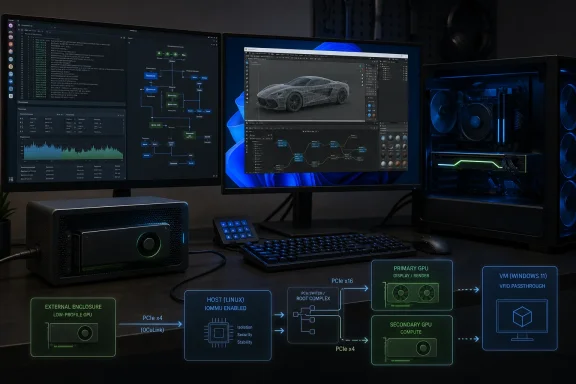 The useful part is VFIO passthrough, not dual-GPU rendering
The centerpiece of the reported build is GPU passthrough through VFIO, the Linux kernel framework used to assign a physical PCIe device directly to a virtual machine. Once the RTX A2000 is bound to the guest, Windows sees an actual Nvidia GPU rather than an emulated display adapter. That allows the guest to use Nvidia’s Windows driver, DirectX acceleration, CUDA-compatible applications, and physical display outputs in much the same way it would on a bare-metal PC.This is a sound use of a second GPU because it solves a problem that one GPU does not solve elegantly. A single-GPU passthrough machine can work, but the host must surrender its only display adapter when the VM starts, creating a less forgiving setup process and complicating recovery when a guest fails to boot cleanly. A Ryzen 5 5600G system has integrated Radeon graphics, which can soften that issue, but a discrete host GPU plus a discrete guest GPU creates a much cleaner division of responsibilities.
The account says the Windows 11 LTSC VM is used for Microsoft Office and selected PC Game Pass titles unavailable on Linux. Those results should be read as a report from one configuration, not a compatibility guarantee. Windows gaming in a virtual machine can still collide with anti-cheat policies, DRM, GPU-reset behavior, USB-controller assignment, and the specific IOMMU groupings exposed by a motherboard’s BIOS. Red Hat, Ubuntu, libvirt, and the Linux graphics community all document the same prerequisite: passthrough depends on a functioning IOMMU configuration and a host platform that can isolate the GPU and its associated audio device safely.
For the right workload, though, it is an unusually efficient arrangement. The guest gets a real Windows desktop and hardware-accelerated applications without requiring the user to dual boot, and the host stays available for Linux work, remote access, or troubleshooting.
The OCuLink link is slower than the article suggests
The MakeUseOf writer calls the OCuLink connection “perfectly serviceable” while arguing it is nowhere near saturating the A2000’s theoretical bandwidth. The first part is credible for a dedicated VM display card; the second needs qualification.Nvidia specifies the RTX A2000 with a PCIe 4.0 x16 interface. OCuLink can carry PCIe over a compact external cable, but the reported configuration is PCIe 4.0 x4 at most. That is one-quarter of the lane width of the A2000’s native interface. A Gen 4 x4 connection supplies roughly 8GB/s in each direction after encoding overhead, whereas Gen 4 x16 is roughly 32GB/s per direction.
There is a further limitation in this particular machine: AMD lists the Ryzen 5 5600G as a PCIe Gen 3 processor. Unless a different controller is involved, a PCIe 4.0-capable enclosure and GPU will negotiate down to the fastest common link speed. In practice, that makes the ceiling closer to PCIe 3.0 x4—about 4GB/s in each direction—rather than PCIe 4.0 x4.
That does not make the setup a bad idea. A VM that renders locally on the passed-through A2000 and drives a monitor connected to that card does not need to shuttle every completed frame through the host PCIe bus. Office applications, general Windows use, light 3D work, hardware video encode/decode, and modest GPU compute can all be reasonable fits. The bandwidth compromise becomes more consequential when workloads constantly exchange large textures, datasets, or frames with host memory, or when the machine expects the external A2000 to behave exactly like an internally mounted x16 gaming GPU.
The real takeaway is that OCuLink is a functional PCIe transport, not magic external bandwidth. Anyone copying this design should check three separate limits before buying parts: the processor’s PCIe generation, the motherboard slot or adapter’s lane wiring, and the enclosure’s actual OCuLink implementation. A physical x16 slot does not mean an attached device receives x16 lanes.
The RTX A2000 remains a sensible low-power guest card
Nvidia launched the original 6GB RTX A2000 in 2021 as a compact professional Ampere GPU, later adding a 12GB model. The hardware still has qualities that make it unusually convenient for a secondary role: 70W total board power, a low-profile dual-slot form factor, four Mini DisplayPort 1.4a outputs, hardware encode and decode blocks, ECC-capable GDDR6, and no external PCIe power connector.Those details matter more in a second-GPU system than the card’s gaming benchmark position. A card that consumes only slot power is far easier to house in a small server, a home-theater PC, or a workstation with limited cabling. Four physical display outputs also provide a straightforward way to attach monitors directly to a passed-through VM rather than relying on remote-desktop workarounds.
The article refers to the A2000 as “technically a Quadro.” That is understandable shorthand, but it is outdated branding. Nvidia retired the Quadro name in 2020 and sells this model as an Nvidia RTX professional GPU. The practical point holds: it uses Nvidia’s professional driver branch and was designed for workstation workloads rather than as a GeForce gaming card.
The more important limitation is the one the writer acknowledges: 6GB of VRAM is restrictive in 2026. Nvidia’s own specifications show the 12GB A2000 doubles the memory capacity while retaining the same 70W board-power rating. That is a meaningful upgrade for local AI inference, larger creative workloads, and more demanding Windows games in a VM. It does not transform the card into a modern high-end gaming GPU, but it reduces the first hard limit many GPU-accelerated applications will hit.
Claims about “virtual displays” also deserve a narrower reading. The A2000’s documented product specifications promise four physical Mini DisplayPort outputs and multi-display support. Nvidia’s data-center virtual-display and vGPU features are separate products with their own drivers, supported hardware, and licensing conditions. For a home VFIO build, a directly connected monitor is the least complicated path; headless operation may require a dummy plug, a virtual-display driver, or a remote-display arrangement depending on the guest OS and software.
Lossless Scaling gives a second card a gaming role—within limits
The other modern use case identified by MakeUseOf is Lossless Scaling, the Windows utility that can apply scaling and frame generation to games that do not natively support those features. Its official dual-GPU guidance describes a configuration in which the secondary GPU renders generated frames while the main GPU handles the game.That approach is technically distinct from SLI and CrossFire. The game engine is not balancing its render queue across two matching graphics cards. Instead, Windows and Lossless Scaling assign separate stages of the display pipeline to different adapters. A lower-powered second GPU can therefore help if the primary gaming GPU is already close to full utilization and frame generation is adding overhead.
Independent testing by Tom’s Hardware found that moving Lossless Scaling frame generation to another GPU can eliminate the overhead that the tool imposes on the primary GPU. But it is not a universal performance upgrade. The secondary GPU must have enough headroom to keep up with the output refresh rate, the display-routing configuration must be correct, and generated frames still do not reduce the latency or simulation time of the original game frames. Lossless Scaling itself also warns that it prefers free GPU resources; otherwise, its processing can reduce the game’s base frame rate.
An RTX A2000 can be adequate for that helper role, especially at sensible refresh targets, but the 6GB model’s memory headroom is not the main issue here. The deciding factors are GPU utilization, inter-GPU copying behavior, display wiring, and whether the base game already has a better integrated frame-generation option. A second card is worth testing for this use case only when the primary GPU is measurably frame-generation-bound rather than simply too slow to render the game’s real frames.
The reported system makes a stronger case for dual GPUs than nostalgia for SLI ever could: a 70W professional card can be a dedicated Windows VM adapter today and later become a compact HTPC, encoding, or compute card. But prospective builders should not buy a second GPU expecting shared gaming performance, and they should not mistake an OCuLink cable for a full-bandwidth x16 slot.
For a Ryzen 5 5600G build in particular, the external A2000 is likely operating over PCIe 3.0 x4. That is still enough for a useful, isolated Windows guest, but it is the concrete constraint that defines what this dual-GPU machine can do well.