
Sharp Electronics of Canada has opened pre-orders for the BP80C70 and BP80C80, two high-speed colour multifunction printers aimed at departments that need more than ordinary office copying but are not ready to operate a dedicated production press. The practical Windows and IT angle is clear: Sharp says the new models support Microsoft’s Modern Print Platform, Universal Print, Windows Protected Print mode, Microsoft Entra ID and a Sharp Print Support Application, giving organizations a possible route away from traditional vendor print drivers.
The Canadian announcement, distributed August 5 through GlobeNewswire and carried by The Manila Times, frames the machines as a “next-level” launch. The record shows something more specific: Canada is joining a rollout already underway elsewhere. Sharp’s U.S. business unit announced the same BP-80C70 and BP-80C80 on June 23, Europe said the pair became available through its partner network on July 20, and Sharp Corporation scheduled the 80-page-per-minute BP-80C80 for Japan on June 15.
That timeline matters for procurement teams. This is not a newly revealed platform whose capabilities exist only in a marketing presentation; Sharp’s own U.S., European and global materials all describe the same core engine, feeder, security architecture and finishing options. But it is also not yet a normal Canadian retail launch: Sharp Canada’s product catalogue still labels both models “coming soon,” even as the August 5 release says pre-orders are open through dealers and direct sales channels.
Sharp’s most consequential claim for Windows administrators is support for the Microsoft Modern Print Platform. The company’s U.S. technical brochure is more explicit than the Canadian announcement: it says the BP-80 series supports Universal Print and Windows Protected Print mode, with the Sharp Print Support Application providing vendor-specific customization.
Microsoft describes its modern stack as an IPP-based approach designed to eliminate the need for third-party drivers. Windows Protected Print mode goes further by allowing PCs to print only through that modern stack, rather than loading legacy v3 or v4 print drivers. This is significant in environments that have treated print drivers as a persistent source of patching, compatibility and print-spooler exposure.
The important qualification is that “supports Modern Print” does not mean every option becomes driverless by default. The BP-80C70 and BP-80C80 are highly configurable systems, with features such as booklet production, folding, punch patterns, colour-management controls and job scheduling. Sharp’s own literature says some features require optional hardware and/or software, while its U.S. launch material also advertises simultaneous Sharp and Fiery driver support.
In practice, organizations considering Windows Protected Print mode should validate their actual finishing workflows before treating these printers as a drop-in replacement for an existing driver-based queue. Basic office and Universal Print workflows may be the cleanest fit for the Microsoft stack; production-oriented jobs could still require Sharp’s Print Support Application, a Fiery queue, or both. The architectural benefit is that the Windows client does not necessarily need the old vendor driver merely to access the printer, but the print room may still depend on vendor tooling for the full value of the hardware.
Sharp also says the models support Microsoft Entra ID authentication in Azure-native environments and Active Directory integration. Those are useful claims, but they solve different problems. Entra authentication governs who can authenticate at the device and access Microsoft-connected services; Universal Print governs cloud print management; Windows Protected Print mode controls the Windows client’s print architecture. Buyers should avoid treating those three capabilities as a single security feature.
That heavy-media performance is the dividing line in this product category. A standard departmental MFP can be fast on plain paper yet slow sharply when asked to print covers, inserts, promotional sheets or short-run collateral. Sharp is positioning the BP-80 machines for organizations that regularly make course packets, proposals, direct-mail pieces, policy manuals and event materials internally, where a 70- or 80-ppm engine loses much of its value if thick stock forces it into a lower-speed mode.
The 300-sheet duplex single-pass feeder is rated for scanning at up to 300 images per minute. Sharp says its image processing can automatically correct skew, establish original size, set resolution and compression, and orient pages. It calls these features AI-assisted; the underlying benefit is more conventional but still useful: reducing manual scan-profile decisions and catching badly fed originals before a large digitization batch becomes a cleanup task.
Paper handling is modular rather than included in the base machine. The headline 13,500-sheet capacity depends on optional large-capacity trays, and the promoted triple air-feed handling is also optional. The two-tray inserter can handle media up to 360 gsm, according to Sharp’s documentation. For a buyer, that means a quote built around the bare MFP will not represent the system shown in much of Sharp’s promotional imagery.
Finishing is where the series moves toward light-production territory. Available options include 100-sheet stapling, saddle-stitched booklets, a multi-folding unit for Z-fold, C-fold, accordion-fold, double-fold and half-fold output, plus the GBC SmartPunch Plus for punch, crease and perforation work. A Plockmatic booklet maker can produce square-fold-spine booklets of up to 120 pages at engine speed, Sharp says.
The catch is financial rather than technical. Sharp Canada has published no Canadian list price for either base machine, no configuration pricing for the Fiery controller or finishers, and no delivery date. Sharp’s Japanese announcement priced the BP-80C80 at ¥5.6 million before tax, but that is a domestic-market price for a different electrical and sales configuration, not a usable Canadian purchase estimate. Canadian buyers will need dealer quotes that spell out the engine, paper decks, inserters, Fiery server, finishing line and support contract separately.
That is a useful separation of roles. An employee printing an ordinary Excel workbook can use Sharp’s standard print path, while an internal communications team producing brand-sensitive collateral can use the Fiery workflow. Sharp explicitly promotes the ability to operate Sharp and Fiery drivers in parallel, which suggests the company expects many deployments to be hybrid rather than an all-at-once migration to driverless Windows printing.
The hardware also includes Pantone matching and a 1,200 × 1,200 dpi print engine, according to Sharp’s U.S. brochure. Those specifications are only meaningful if an organization controls paper, calibration and queue workflow. For a company that outsources colour-critical material because its current office fleet cannot reproduce brand colours consistently, Fiery may be the deciding option. For ordinary departmental print, it may be an expensive capability that sits unused.
Sharp’s rollout language focuses heavily on bringing outsourced work inside the organization. That can reduce turnaround time and per-job vendor charges, but it shifts responsibility for colour calibration, paper inventory, operator training, service interruptions and finishing mistakes to the customer. The BP-80 models make that trade plausible for high-volume departments; they do not make it automatic.
Those features address an often-neglected reality: a high-end MFP is a networked computer with local storage, credentials, document data, a web interface and cloud connections. It deserves the same identity, firmware, monitoring and decommissioning controls as other managed infrastructure. The NIST-compatible erase capability is especially relevant for leasing arrangements, where a device can leave the organization with a disk containing years of scanned or queued documents.
Sharp’s materials consistently describe Bitdefender antivirus protection as optional. That needs to be reflected in purchase specifications and support discussions; it should not be assumed present simply because it appears in the security feature list. Similarly, automated firmware updates can reduce exposure but will require change-management consideration in regulated environments, especially where a printer’s configuration includes a Fiery server and complex finishing hardware.
Cloud integration covers Microsoft Teams, OneDrive for Business, SharePoint Online, Exchange Online, Google Drive, Dropbox, Box and Gmail through Sharp’s Application Portal. That provides convenience at the panel, but it creates a governance question: each enabled connector is an additional route by which scanned data can leave the internal network. IT teams should decide which repositories are permitted, who may enroll credentials, whether Entra conditional-access policies apply as intended, and whether scan-to-cloud functions conflict with document-retention rules.
The company’s own Canadian catalogue calling both models “coming soon” makes the timing gap harder to ignore. U.S. buyers could order the machines immediately from June 23, and European buyers could purchase through Sharp partners by July 20; Canada now has an ordering announcement without a public delivery commitment.
For Windows-focused organizations, the immediate work is not to replace every print queue. It is to identify sites where Universal Print, Entra authentication and Windows Protected Print mode are already planned, then test the BP-80’s modern print path alongside the legacy Sharp and Fiery workflows that complex print jobs still demand. The first Canadian deployment will be judged less by its 80-ppm headline speed than by whether that mixed Windows environment works without sacrificing the finishing controls that justify buying a production-class MFP in the first place.
That timeline matters for procurement teams. This is not a newly revealed platform whose capabilities exist only in a marketing presentation; Sharp’s own U.S., European and global materials all describe the same core engine, feeder, security architecture and finishing options. But it is also not yet a normal Canadian retail launch: Sharp Canada’s product catalogue still labels both models “coming soon,” even as the August 5 release says pre-orders are open through dealers and direct sales channels.
 The Windows printing claim is stronger than the usual “cloud-ready” label
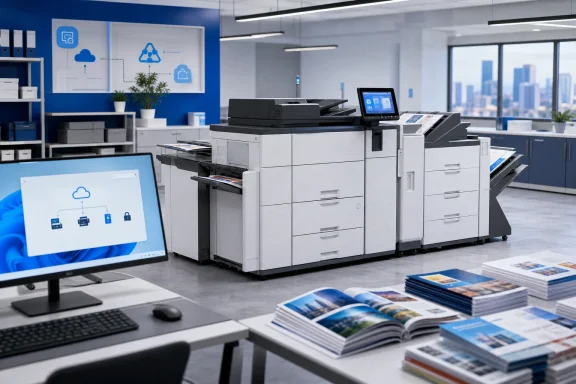
Sharp’s most consequential claim for Windows administrators is support for the Microsoft Modern Print Platform. The company’s U.S. technical brochure is more explicit than the Canadian announcement: it says the BP-80 series supports Universal Print and Windows Protected Print mode, with the Sharp Print Support Application providing vendor-specific customization.Microsoft describes its modern stack as an IPP-based approach designed to eliminate the need for third-party drivers. Windows Protected Print mode goes further by allowing PCs to print only through that modern stack, rather than loading legacy v3 or v4 print drivers. This is significant in environments that have treated print drivers as a persistent source of patching, compatibility and print-spooler exposure.
The important qualification is that “supports Modern Print” does not mean every option becomes driverless by default. The BP-80C70 and BP-80C80 are highly configurable systems, with features such as booklet production, folding, punch patterns, colour-management controls and job scheduling. Sharp’s own literature says some features require optional hardware and/or software, while its U.S. launch material also advertises simultaneous Sharp and Fiery driver support.
In practice, organizations considering Windows Protected Print mode should validate their actual finishing workflows before treating these printers as a drop-in replacement for an existing driver-based queue. Basic office and Universal Print workflows may be the cleanest fit for the Microsoft stack; production-oriented jobs could still require Sharp’s Print Support Application, a Fiery queue, or both. The architectural benefit is that the Windows client does not necessarily need the old vendor driver merely to access the printer, but the print room may still depend on vendor tooling for the full value of the hardware.
Sharp also says the models support Microsoft Entra ID authentication in Azure-native environments and Active Directory integration. Those are useful claims, but they solve different problems. Entra authentication governs who can authenticate at the device and access Microsoft-connected services; Universal Print governs cloud print management; Windows Protected Print mode controls the Windows client’s print architecture. Buyers should avoid treating those three capabilities as a single security feature.
These are production-capable MFPs, not ordinary office copiers
The BP-80C70 prints at up to 70 colour pages per minute and the BP-80C80 reaches 80 colour pages per minute. Sharp’s global documentation gives the corresponding monochrome ratings as 76 ppm and 81 ppm. Both systems retain full engine speed on media up to 220 gsm, according to Sharp, while supporting duplex printing and copying on stocks up to 300 gsm.That heavy-media performance is the dividing line in this product category. A standard departmental MFP can be fast on plain paper yet slow sharply when asked to print covers, inserts, promotional sheets or short-run collateral. Sharp is positioning the BP-80 machines for organizations that regularly make course packets, proposals, direct-mail pieces, policy manuals and event materials internally, where a 70- or 80-ppm engine loses much of its value if thick stock forces it into a lower-speed mode.
The 300-sheet duplex single-pass feeder is rated for scanning at up to 300 images per minute. Sharp says its image processing can automatically correct skew, establish original size, set resolution and compression, and orient pages. It calls these features AI-assisted; the underlying benefit is more conventional but still useful: reducing manual scan-profile decisions and catching badly fed originals before a large digitization batch becomes a cleanup task.
Paper handling is modular rather than included in the base machine. The headline 13,500-sheet capacity depends on optional large-capacity trays, and the promoted triple air-feed handling is also optional. The two-tray inserter can handle media up to 360 gsm, according to Sharp’s documentation. For a buyer, that means a quote built around the bare MFP will not represent the system shown in much of Sharp’s promotional imagery.
Finishing is where the series moves toward light-production territory. Available options include 100-sheet stapling, saddle-stitched booklets, a multi-folding unit for Z-fold, C-fold, accordion-fold, double-fold and half-fold output, plus the GBC SmartPunch Plus for punch, crease and perforation work. A Plockmatic booklet maker can produce square-fold-spine booklets of up to 120 pages at engine speed, Sharp says.
The catch is financial rather than technical. Sharp Canada has published no Canadian list price for either base machine, no configuration pricing for the Fiery controller or finishers, and no delivery date. Sharp’s Japanese announcement priced the BP-80C80 at ¥5.6 million before tax, but that is a domestic-market price for a different electrical and sales configuration, not a usable Canadian purchase estimate. Canadian buyers will need dealer quotes that spell out the engine, paper decks, inserters, Fiery server, finishing line and support contract separately.
Fiery is the bridge to commercial-style colour workflows
The optional Fiery BP-PE14 server is the part of the configuration that changes the BP-80 series from a fast MFP into a managed in-house print system. Sharp says Fiery Command WorkStation can run directly from the printer’s 10.1-inch panel, while the server adds one-step colour management, calibration and profiling, job scheduling, print-time estimation and workflow automation.That is a useful separation of roles. An employee printing an ordinary Excel workbook can use Sharp’s standard print path, while an internal communications team producing brand-sensitive collateral can use the Fiery workflow. Sharp explicitly promotes the ability to operate Sharp and Fiery drivers in parallel, which suggests the company expects many deployments to be hybrid rather than an all-at-once migration to driverless Windows printing.
The hardware also includes Pantone matching and a 1,200 × 1,200 dpi print engine, according to Sharp’s U.S. brochure. Those specifications are only meaningful if an organization controls paper, calibration and queue workflow. For a company that outsources colour-critical material because its current office fleet cannot reproduce brand colours consistently, Fiery may be the deciding option. For ordinary departmental print, it may be an expensive capability that sits unused.
Sharp’s rollout language focuses heavily on bringing outsourced work inside the organization. That can reduce turnaround time and per-job vendor charges, but it shifts responsibility for colour calibration, paper inventory, operator training, service interruptions and finishing mistakes to the customer. The BP-80 models make that trade plausible for high-volume departments; they do not make it automatic.
Security features are substantial, but several are optional or operationally dependent
Sharp says the BP-80 series uses its CR5.X controller platform and has been penetration-tested by Keypoint Intelligence. The company lists BIOS integrity checks with automatic recovery, firmware attack prevention, real-time intrusion detection, application allowlisting, TPM 2.0, 256-bit AES protection for data on local storage, automatic firmware updates and NIST SP 800-88-compatible end-of-lease data erasure.Those features address an often-neglected reality: a high-end MFP is a networked computer with local storage, credentials, document data, a web interface and cloud connections. It deserves the same identity, firmware, monitoring and decommissioning controls as other managed infrastructure. The NIST-compatible erase capability is especially relevant for leasing arrangements, where a device can leave the organization with a disk containing years of scanned or queued documents.
Sharp’s materials consistently describe Bitdefender antivirus protection as optional. That needs to be reflected in purchase specifications and support discussions; it should not be assumed present simply because it appears in the security feature list. Similarly, automated firmware updates can reduce exposure but will require change-management consideration in regulated environments, especially where a printer’s configuration includes a Fiery server and complex finishing hardware.
Cloud integration covers Microsoft Teams, OneDrive for Business, SharePoint Online, Exchange Online, Google Drive, Dropbox, Box and Gmail through Sharp’s Application Portal. That provides convenience at the panel, but it creates a governance question: each enabled connector is an additional route by which scanned data can leave the internal network. IT teams should decide which repositories are permitted, who may enroll credentials, whether Entra conditional-access policies apply as intended, and whether scan-to-cloud functions conflict with document-retention rules.
Canadian availability remains the unresolved detail
Sharp Canada’s announcement establishes that dealers and direct-sales channels can take pre-orders as of August 5. It does not state when systems will ship, how Canadian configurations differ from the U.S. model, what the base units cost, or which software, security and finishing options are included versus dealer-installed.The company’s own Canadian catalogue calling both models “coming soon” makes the timing gap harder to ignore. U.S. buyers could order the machines immediately from June 23, and European buyers could purchase through Sharp partners by July 20; Canada now has an ordering announcement without a public delivery commitment.
For Windows-focused organizations, the immediate work is not to replace every print queue. It is to identify sites where Universal Print, Entra authentication and Windows Protected Print mode are already planned, then test the BP-80’s modern print path alongside the legacy Sharp and Fiery workflows that complex print jobs still demand. The first Canadian deployment will be judged less by its 80-ppm headline speed than by whether that mixed Windows environment works without sacrificing the finishing controls that justify buying a production-class MFP in the first place.
References
- Primary source: The Manila Times
Published: 2026-08-05T12:19:12+00:00
Loading…
www.manilatimes.net - Related coverage: global.sharp
Loading…
global.sharp - Related coverage: sharp.ca
Loading…
sharp.ca - Related coverage: prnewswire.com
Loading…
www.prnewswire.com - Related coverage: sharp24.pl
Loading…
sharp24.pl - Related coverage: policies.sharpusa.com
Loading…
policies.sharpusa.com - Related coverage: corporate.jp.sharp
Loading…
corporate.jp.sharp - Related coverage: sharp.fr
Loading…
www.sharp.fr - Related coverage: sharp.ca
Loading…
sharp.ca - Related coverage: inplantimpressions.com
Loading…
www.inplantimpressions.com - Related coverage: thecannatareport.com
Loading…
www.thecannatareport.com - Related coverage: prnewswire.com
Loading…
www.prnewswire.com - Related coverage: global.sharp
Loading…
global.sharp - Related coverage: learn.microsoft.com
Loading…
learn.microsoft.com - Related coverage: learn.microsoft.com
Loading…
learn.microsoft.com