
World Business Outlook’s August 5 review presents Sigsync as a leading Microsoft 365 email-signature platform, but its strongest conclusion — that Sigsync belongs at the top of an organization’s shortlist — runs ahead of the evidence published alongside it. The product does offer the architecture many Microsoft 365 administrators need: central rules, Entra ID-driven contact fields, Outlook add-ins, and a server-side fallback for mail sent from unmanaged clients. The decision point is less whether Sigsync can stamp signatures than whether an IT team accepts a third-party relay in its outbound mail path and can verify the vendor’s current compliance claims during procurement.
Sigsync, operated by SHIFTTOCLOUD Inc., is listed in Microsoft’s commercial marketplace and offers a 14-day trial. Microsoft’s listing confirms the basic deployment model: server-side signatures are added after sending through Sigsync’s Azure service; client-side signatures are inserted in Outlook during composition; and a mixed mode combines both approaches. That is a credible way to solve the persistent mismatch between Outlook desktop, Outlook on the web, mobile clients, shared mailboxes, aliases, and third-party mail apps.
But calling it “the best” is not a finding that follows from the World Business Outlook article. The review does not publish a test tenant, comparison criteria, deliverability results, audit evidence, or side-by-side evaluation against established Microsoft 365 competitors such as CodeTwo, Exclaimer, Symprex, or Letsignit. Its “key features” and verdict track Sigsync’s own product documentation closely, including claims about three deployment modes, Azure AD fields, compliance, banners, and round-the-clock support.
For an admin, the useful takeaway is narrower and more practical: Sigsync is a plausible Microsoft 365 signature-management candidate, but its server-side design creates operational and security questions that the review barely addresses.
The World Business Outlook review correctly identifies where signature software succeeds or fails: where the signature is applied changes the user experience and the failure mode.
In Sigsync’s client mode, an Outlook add-in inserts the signature during composition. Users can see the banner, disclaimer, branding, and contact block before they send. The message then leaves through Microsoft 365 without detouring through Sigsync’s server-side relay. This is the model marketing teams usually prefer because employees can see the campaign banner and choose among permitted signature variants while composing.
The trade-off is coverage. Client-side insertion depends on Outlook add-in support and deployment. Sigsync documents support for current Outlook clients on Windows, Mac, web, Android, and iOS, but it also notes a limitation on shared mailboxes in Outlook for Mac because Microsoft’s add-in platform does not provide complete shared-mailbox support there. A company that relies on delegated shared mailboxes, Apple Mail, mobile-native mail clients, line-of-business SMTP senders, scanners, or other non-Outlook sources cannot treat a client add-in as complete enforcement.
Server mode answers that problem by routing matching outbound messages from Exchange Online to Sigsync’s Azure infrastructure, applying the signature, and returning the message to Microsoft 365 for delivery. It covers mail regardless of the originating device or client, and it can apply signatures to shared mailboxes, aliases, and Send As or Send on Behalf messages. It also provides a way to add the completed signature into Sent Items, although Sigsync says that setting must be explicitly enabled.
The mixed, or centralized, mode is therefore the sensible default for many Microsoft 365 organizations: Outlook users get a visible signature while composing, while server-side processing covers the gaps. This is not unique to Sigsync — it is a familiar pattern in enterprise signature products — but the approach is technically sound.
What the review leaves out is that “centralized” does not mean “no infrastructure change.” In server and mixed modes, the signature service becomes part of the outbound mail route for affected senders.
Sigsync’s own setup material describes Exchange Online connectors and routing rules that send qualifying outbound messages to the Sigsync Azure service. The vendor’s troubleshooting guidance is unusually clear about the consequence: if the relay has a service problem, administrators may need to disable the Sigsync routing rules so mail bypasses the service and continues through Microsoft 365 without signatures.
That is a reasonable continuity procedure, but it establishes the actual risk model. In server mode, an outage or misconfiguration can force a choice between delayed outbound mail and sending mail without the organization’s required signature, disclaimer, or campaign block. The correct rollout plan needs a documented bypass procedure, named owners for Exchange Online transport rules, and a test of that bypass before production deployment.
Mail-flow testing should also cover more than a standard Outlook message. Administrators should validate:
In server-side mode, Sigsync says a license is consumed when an email account sends mail through its Azure signature service, whether or not that message ultimately receives a signature. Shared mailboxes consume licenses, too. Aliases do not consume a separate license, but shared departmental mailboxes, service accounts, and automation identities can change the count materially in a tenant with broad mail-flow routing.
Sigsync also says use above the purchased quantity is charged at $0.50 per additional account, subject to a $5 minimum charge when the overage would otherwise be lower. The vendor provides group-scoping options to limit which senders are routed through the service, and that configuration should be completed before a full-tenant rollout rather than after the first unexpected invoice.
This does not make the pricing unreasonable. It means an IT buyer should budget from the number of mail-sending identities in scope, not simply the number of licensed employees. A 100-person organization with a large estate of shared mailboxes can have a different cost profile from a 100-person organization whose mail is entirely person-to-person.
Sigsync is available through Microsoft’s marketplace, and Microsoft hosts an information page for the Sigsync Signature Add-in for Outlook. Those are meaningful facts: the add-in is discoverable through Microsoft’s channels and has declared compatibility with Outlook for Windows, Mac, web, iOS, and Android.
Microsoft’s own page also labels the listing Publisher Attestation. Microsoft says the security, compliance, and data-handling information on that page is based on a self-assessment supplied by the developer and that Microsoft makes no guarantee about its accuracy. That is materially different from Microsoft 365 Certification, which is a separate assessment framework.
The distinction matters because the review leans heavily on assurance language. Sigsync’s current website says it is SOC 2 Type 2 certified and ISO 27001 certified. Yet the Microsoft Publisher Attestation page, last updated by the developer on April 5, 2024, records “No” for SOC 2 compliance and “Yes” for ISO 27001 certification. The older attestation may simply be stale — it predates Sigsync’s current SOC 2 claim — but the conflict means neither the review nor the marketplace badge should close a security review.
A procurement team should ask Sigsync for the current SOC 2 Type II report under NDA, the ISO certificate and its scope, the precise service components covered, the auditor and assessment dates, data-residency options, incident-notification commitments, and a current subprocessor list. It should also verify whether the SOC report covers the server-side Azure relay, the management dashboard, the Outlook add-in, and the specific tenant data paths the organization plans to use.
“HIPAA aligned” deserves similar caution. A software vendor can support a customer’s HIPAA obligations, but a signature product does not by itself make a Microsoft 365 mail deployment compliant. The relevant questions are whether a business associate agreement is available, what data is processed in transit, and whether the organization’s wider Exchange Online controls meet its regulatory requirements.
It is also explicitly Microsoft-focused. The World Business Outlook review identifies that as a limitation for Google Workspace organizations, and that is correct. Companies operating mixed Microsoft 365 and Google Workspace environments should not assume Sigsync will provide one governance layer across both platforms.
The review’s strongest claim should therefore be recast. Sigsync is not demonstrably “the best” Microsoft 365 email-signature solution on the published record; it is a feature-complete contender whose mixed deployment model deserves a controlled trial. The trial should measure mail flow, identity coverage, client behavior, signature rendering, licensing scope, and the documented relay-bypass process — because those are the details that determine whether the software remains a branding tool or becomes part of the organization’s email infrastructure.
But calling it “the best” is not a finding that follows from the World Business Outlook article. The review does not publish a test tenant, comparison criteria, deliverability results, audit evidence, or side-by-side evaluation against established Microsoft 365 competitors such as CodeTwo, Exclaimer, Symprex, or Letsignit. Its “key features” and verdict track Sigsync’s own product documentation closely, including claims about three deployment modes, Azure AD fields, compliance, banners, and round-the-clock support.
For an admin, the useful takeaway is narrower and more practical: Sigsync is a plausible Microsoft 365 signature-management candidate, but its server-side design creates operational and security questions that the review barely addresses.
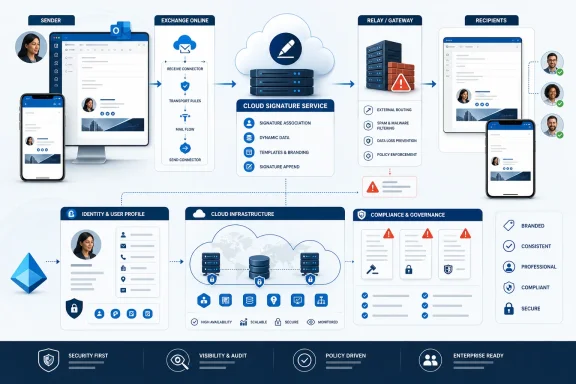 Three modes solve different problems
The World Business Outlook review correctly identifies where signature software succeeds or fails: where the signature is applied changes the user experience and the failure mode.In Sigsync’s client mode, an Outlook add-in inserts the signature during composition. Users can see the banner, disclaimer, branding, and contact block before they send. The message then leaves through Microsoft 365 without detouring through Sigsync’s server-side relay. This is the model marketing teams usually prefer because employees can see the campaign banner and choose among permitted signature variants while composing.
The trade-off is coverage. Client-side insertion depends on Outlook add-in support and deployment. Sigsync documents support for current Outlook clients on Windows, Mac, web, Android, and iOS, but it also notes a limitation on shared mailboxes in Outlook for Mac because Microsoft’s add-in platform does not provide complete shared-mailbox support there. A company that relies on delegated shared mailboxes, Apple Mail, mobile-native mail clients, line-of-business SMTP senders, scanners, or other non-Outlook sources cannot treat a client add-in as complete enforcement.
Server mode answers that problem by routing matching outbound messages from Exchange Online to Sigsync’s Azure infrastructure, applying the signature, and returning the message to Microsoft 365 for delivery. It covers mail regardless of the originating device or client, and it can apply signatures to shared mailboxes, aliases, and Send As or Send on Behalf messages. It also provides a way to add the completed signature into Sent Items, although Sigsync says that setting must be explicitly enabled.
The mixed, or centralized, mode is therefore the sensible default for many Microsoft 365 organizations: Outlook users get a visible signature while composing, while server-side processing covers the gaps. This is not unique to Sigsync — it is a familiar pattern in enterprise signature products — but the approach is technically sound.
What the review leaves out is that “centralized” does not mean “no infrastructure change.” In server and mixed modes, the signature service becomes part of the outbound mail route for affected senders.
The relay is the real deployment decision
World Business Outlook characterizes the SPF work as the one DNS change to plan. That understates the operational change.Sigsync’s own setup material describes Exchange Online connectors and routing rules that send qualifying outbound messages to the Sigsync Azure service. The vendor’s troubleshooting guidance is unusually clear about the consequence: if the relay has a service problem, administrators may need to disable the Sigsync routing rules so mail bypasses the service and continues through Microsoft 365 without signatures.
That is a reasonable continuity procedure, but it establishes the actual risk model. In server mode, an outage or misconfiguration can force a choice between delayed outbound mail and sending mail without the organization’s required signature, disclaimer, or campaign block. The correct rollout plan needs a documented bypass procedure, named owners for Exchange Online transport rules, and a test of that bypass before production deployment.
Mail-flow testing should also cover more than a standard Outlook message. Administrators should validate:
- Messages sent from shared mailboxes, aliases, Send As identities, and Send on Behalf permissions.
- Internal recipients, external recipients, replies, forwards, encrypted mail, and calendar-related messages where relevant.
- DKIM alignment, SPF behavior, transport rules, journaling, secure email gateways, and any existing outbound smart host.
- Plain-text mail and quoted reply chains, where a polished HTML signature can turn into clutter quickly.
- The behavior of the Sent Items signature option, especially for users who need an accurate record of exactly what recipients received.
Pricing can grow beyond the named user count
The review’s stated entry price of roughly $0.72 per user per month for a 100-user subscription may make Sigsync look inexpensive. World Business Outlook is the only source reviewed here that supplies that specific figure, however, and Sigsync’s public licensing documentation adds conditions absent from the review.In server-side mode, Sigsync says a license is consumed when an email account sends mail through its Azure signature service, whether or not that message ultimately receives a signature. Shared mailboxes consume licenses, too. Aliases do not consume a separate license, but shared departmental mailboxes, service accounts, and automation identities can change the count materially in a tenant with broad mail-flow routing.
Sigsync also says use above the purchased quantity is charged at $0.50 per additional account, subject to a $5 minimum charge when the overage would otherwise be lower. The vendor provides group-scoping options to limit which senders are routed through the service, and that configuration should be completed before a full-tenant rollout rather than after the first unexpected invoice.
This does not make the pricing unreasonable. It means an IT buyer should budget from the number of mail-sending identities in scope, not simply the number of licensed employees. A 100-person organization with a large estate of shared mailboxes can have a different cost profile from a 100-person organization whose mail is entirely person-to-person.
“Microsoft-approved” needs a more precise reading
The review calls Sigsync a “Microsoft-approved solution” and treats its marketplace listing as a signal of trust. The first half of that statement is imprecise.Sigsync is available through Microsoft’s marketplace, and Microsoft hosts an information page for the Sigsync Signature Add-in for Outlook. Those are meaningful facts: the add-in is discoverable through Microsoft’s channels and has declared compatibility with Outlook for Windows, Mac, web, iOS, and Android.
Microsoft’s own page also labels the listing Publisher Attestation. Microsoft says the security, compliance, and data-handling information on that page is based on a self-assessment supplied by the developer and that Microsoft makes no guarantee about its accuracy. That is materially different from Microsoft 365 Certification, which is a separate assessment framework.
The distinction matters because the review leans heavily on assurance language. Sigsync’s current website says it is SOC 2 Type 2 certified and ISO 27001 certified. Yet the Microsoft Publisher Attestation page, last updated by the developer on April 5, 2024, records “No” for SOC 2 compliance and “Yes” for ISO 27001 certification. The older attestation may simply be stale — it predates Sigsync’s current SOC 2 claim — but the conflict means neither the review nor the marketplace badge should close a security review.
A procurement team should ask Sigsync for the current SOC 2 Type II report under NDA, the ISO certificate and its scope, the precise service components covered, the auditor and assessment dates, data-residency options, incident-notification commitments, and a current subprocessor list. It should also verify whether the SOC report covers the server-side Azure relay, the management dashboard, the Outlook add-in, and the specific tenant data paths the organization plans to use.
“HIPAA aligned” deserves similar caution. A software vendor can support a customer’s HIPAA obligations, but a signature product does not by itself make a Microsoft 365 mail deployment compliant. The relevant questions are whether a business associate agreement is available, what data is processed in transit, and whether the organization’s wider Exchange Online controls meet its regulatory requirements.
The best fit is a defined Microsoft 365 use case
Sigsync appears well suited to a Microsoft 365 organization that needs centrally managed signatures, wants Entra ID attributes to populate contact details automatically, and cannot rely on staff to maintain Outlook signatures manually. Its Outlook-visible client mode and server-side fallback address a real operational tension: users want to see signatures before sending, while administrators need signatures to appear on mail sent from every device and identity.It is also explicitly Microsoft-focused. The World Business Outlook review identifies that as a limitation for Google Workspace organizations, and that is correct. Companies operating mixed Microsoft 365 and Google Workspace environments should not assume Sigsync will provide one governance layer across both platforms.
The review’s strongest claim should therefore be recast. Sigsync is not demonstrably “the best” Microsoft 365 email-signature solution on the published record; it is a feature-complete contender whose mixed deployment model deserves a controlled trial. The trial should measure mail flow, identity coverage, client behavior, signature rendering, licensing scope, and the documented relay-bypass process — because those are the details that determine whether the software remains a branding tool or becomes part of the organization’s email infrastructure.
References
- Primary source: World Business Outlook
Published: 2026-08-05T09:53:15+00:00
Loading…
worldbusinessoutlook.com - Related coverage: sigsync.com
Loading…
www.sigsync.com - Related coverage: sigsync.com
Loading…
www.sigsync.com - Related coverage: learn.microsoft.com
Loading…
learn.microsoft.com - Related coverage: learn.microsoft.com
Loading…
learn.microsoft.com - Related coverage: appsource.microsoft.com
Loading…
appsource.microsoft.com - Related coverage: appsource.microsoft.com
Loading…
appsource.microsoft.com - Related coverage: blog.sigsync.com
Loading…
blog.sigsync.com - Related coverage: download.microsoft.com
Loading…
download.microsoft.com - Related coverage: cdn-dynmedia-1.microsoft.com
Loading…
cdn-dynmedia-1.microsoft.com - Related coverage: g2.com
Loading…
www.g2.com - Related coverage: images.g2crowd.com
Loading…
images.g2crowd.com - Related coverage: milanconsult.de
Loading…
www.milanconsult.de - Related coverage: hub.exclaimer.com
Loading…
hub.exclaimer.com - Related coverage: hub.exclaimer.com
Loading…
hub.exclaimer.com