
GameObject instances. He is moving one million lightweight spline-instance records and rendering them through Unity’s instanced drawing API.That distinction is the practical news behind Spline Architect 2.7.2, which 80 Level reports adds GPU instancing to Mike Danielsson’s Unity spline package. Danielsson’s own recent Reddit demonstration confirms the underlying implementation and says the tool can update and render up to 1,000,000 instances along splines. For developers building traffic, crowds, repeated props, rails, pipes, or environmental motion, the update could remove a bottleneck that conventional Transform-driven workflows hit much earlier.
It is also a narrower feature than the marketing-friendly “one million objects” phrasing suggests. Unity’s standard object model, with a million active GameObjects, Transforms, renderers, colliders, and scripts, remains a nonstarter for most real projects. Spline Architect’s gain comes from avoiding most of that overhead, then drawing repeated meshes in batches.
 The million-instance test is a rendering architecture change
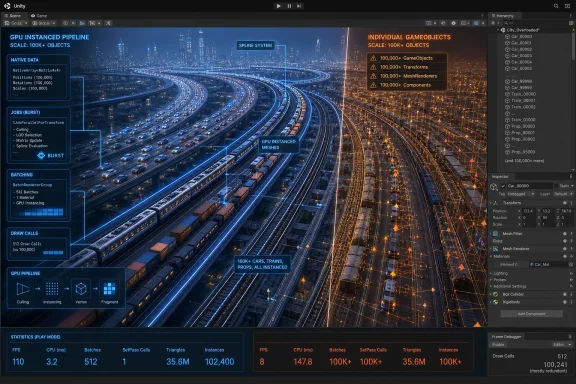
Danielsson described an earlier stress test involving 100,000 moving GameObjects, which reportedly ran in the 10–20 FPS range. The newer route replaces the per-object GameObject requirement for these mass-moving instances with an internal SplineInstance representation backed by a NativeSplineInstance stored in a Unity NativeList.
The important implementation detail, provided by Danielsson in the Reddit discussion, is that the position, rotation, scale, mesh, material, and spline-state data can be updated in a Burst job. The same native data is then used for drawing through Graphics.RenderMeshInstanced(), a Unity API designed to render mesh data directly rather than through a scene full of GameObjects and Transforms.
That is why the feature has the potential to be meaningful for PC projects rather than merely a benchmark trick. Unity’s own documentation says Graphics.RenderMeshInstanced() bypasses the normal GameObject path, which is specifically useful when a project needs instancing even in configurations where the SRP Batcher would otherwise take precedence. In other words, Spline Architect is putting its high-count objects on a data-oriented rendering path instead of asking Unity’s classic scene hierarchy to manage every moving item individually.
The result should be especially useful for systems where the visual units are numerous but simple: a line of cars following lane splines, railway wagons moving through a network, vegetation flowing along a path, stylized crowds, swarms, debris streams, or dense sci-fi traffic. Those are all cases where each item needs an individual position and can sometimes change route, while still sharing a small number of meshes and materials.
GPU instancing does not make every spline workflow faster
The feature’s limits matter as much as its scale claim. GPU instancing works best when many rendered items share a mesh and material, allowing Unity to issue fewer draw calls. If a scene contains a vast set of unique models, materials, shaders, or per-instance behavior that requires separate Unity components, batching efficiency will degrade and the new path loses much of its advantage.
Danielsson has also said the feature does not extend the same way to mesh deformation. That is expected: spline-deforming a mesh often produces a different final vertex shape for each object, whereas conventional GPU instancing is strongest when the renderer can reuse the same geometry. Spline Architect still supports static batching for deformed meshes, but developers should not treat the million-instance result as a guarantee for a kilometre of unique curved road segments, individually deformed buildings, or animated characters.
There is another constraint hidden by any large-count rendering demo: drawing is only one part of a game frame. One million instances may be viable as visual data, but it does not mean a project can give each instance an Animator, physics body, NavMesh agent, MonoBehaviour update, audio source, shadow-casting light, or complex collision query. Any of those additions can shift the bottleneck from draw calls to CPU simulation, memory bandwidth, physics, animation, or GPU fill rate.
For a traffic system, the productive design is likely a hybrid. Use the instanced spline layer for distant or routine vehicles, while promoting only nearby, interactive, collision-relevant vehicles to conventional GameObjects or an ECS-based simulation. The same approach applies to crowds and scenery: keep high-count background movement cheap, then reserve expensive components for the small fraction the player can affect.
The version record is less tidy than the announcement
There is a small but relevant versioning discrepancy in the public record. 80 Level identifies the newly updated release as Spline Architect 2.7.2. Danielsson’s July 31 Reddit announcement, meanwhile, calls GPU instancing a version 2.7.0 feature. That does not establish a contradiction; 2.7.2 may be a subsequent maintenance release carrying the same capability. But it does mean the public announcement does not show that GPU instancing first arrived specifically in 2.7.2.
The Unity Asset Store listing adds more ambiguity. Its currently indexed product page describes compatibility with Unity 2022 and Unity 6, and it documents the package’s Object Cloning and performance-oriented API, but the version field visible in the listing still identifies version 2.6.0. Storefront metadata can lag a publisher’s submitted build or be regionally cached, so that figure should not be taken as proof that 2.7.x is unavailable. It does, however, mean teams should inspect the imported package’s changelog and version number before planning around the instancing API.
This is not just bookkeeping. A studio buying a Unity Asset Store tool needs to know whether it is receiving the advertised implementation today, whether the function is in the base package or an add-on, and whether the specific release works with its target renderer and Unity editor version. Spline Architect’s listing says Object Cloning is included, while its Terrain Tools add-on is separately available; the updated instance-rendering path appears to be part of the core product rather than a separate GPU package, but the available public materials do not spell out licensing or migration requirements for existing customers.
What Unity developers should validate first
Before rebuilding a traffic or crowd system around Spline Architect, test the real workload rather than the one-million-cube ceiling. The largest test shown publicly is a visual stress case, and Danielsson says he tested it on his own PC. No public benchmark from an independent outlet establishes frame times, hardware configuration, target resolution, render pipeline, draw-call count, memory footprint, or behavior on consoles and mobile devices.
A useful proof-of-concept should answer a more grounded set of questions:
- Confirm that the project’s shaders, materials, and render pipeline preserve instancing rather than fragmenting batches through mesh and material variation.
- Measure CPU frame time and GPU frame time separately, because a Burst-driven update can solve main-thread Transform work while leaving the GPU overloaded by shadows, overdraw, or excessive visible geometry.
- Test camera movement and dense visibility, not only a fixed showcase view, since large repeated fields can become fill-rate and culling problems.
- Decide which instances need collision, gameplay logic, or networking, then keep those systems separate from the rendering-only population.
- Profile on target hardware, particularly lower-spec Windows handhelds and any intended mobile devices, instead of relying on a desktop demonstration.
The update’s concrete value is that Spline Architect now offers a bridge between artist-friendly spline authoring and a lower-overhead runtime representation. A designer can still lay out routes and connections in the Unity editor, while the runtime avoids creating a full GameObject hierarchy for every repeated item traveling through the network.
For Windows game developers, that can translate into denser roads, rail networks, moving environment effects, and background activity without turning the Unity hierarchy into the performance problem. But the million-instance number should be treated as a capacity demonstration, not a scene budget. The actual budget will depend on the mesh count, material count, shader features, visibility, target GPU, and how much simulation a project attaches to every item.