
That result is more useful than the rating alone suggests. Microsoft’s Xbox store currently labels The Planet Crafter “Mostly Compatible” for PC rather than presenting it as a fully optimized Windows-on-Arm title. The game’s availability and the test’s successful local gameplay settle the basic compatibility question for this configuration; the wide frame-rate spread is the part Surface owners need to plan around.
The test was published August 9, 2026, using the Game Pass PC edition, an Xbox Wireless Controller, and Qualcomm graphics driver 31.0.152.1. No independent benchmark matching the same Surface Pro 11 Snapdragon X Plus, 16GB memory configuration, Game Pass build, resolution, driver, and settings was available at publication, so the fps figures should be treated as one reproducible field report rather than a general performance average.
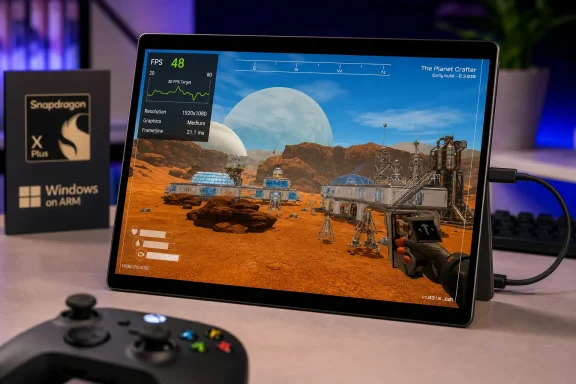 The important result is local Game Pass play, not the peak fps number
Microsoft added The Planet Crafter to PC Game Pass on July 21, alongside its Xbox Series X|S and cloud release. Xbox’s store listing also identifies it as an Xbox Play Anywhere game, and Microsoft says it supports online co-op for up to eight players. For Surface Pro 11 owners, however, the key distinction is that this was a local Game Pass PC installation, not Xbox Cloud Gaming.
That distinction would have carried more uncertainty only months ago. Microsoft announced in January that the Xbox PC app was available on Arm-based Windows 11 systems and said a wide range of catalog titles could be downloaded and played locally. The company later said more than 85% of the Game Pass catalog was compatible with Arm PCs, but “compatible” is intentionally broader than “performs like a gaming laptop.”
This test puts The Planet Crafter on the workable side of that line. It starts, accepts controller input, and delivers playable gameplay on a mainstream consumer Copilot+ PC without an external GPU, a cloud-streaming connection, or a switch to the Steam version. That is a concrete improvement in the practical value of the Surface Pro 11 as a Game Pass machine.
It does not establish native Arm support. Miju Games’ Steam listing specifies a 64-bit Windows requirement, and the developer’s support material has described x64 or equivalent emulation as necessary after the game’s Procedural Wrecks update. The Surface’s Snapdragon processor runs an Arm architecture; the successful result therefore demonstrates the current Windows-on-Arm compatibility stack handling this game, rather than a newly disclosed Arm64 build from Miju Games.
1080p Medium is a sensible baseline, but it is already the compromise
The video’s 1920×1080 setting deserves closer attention because the Surface Pro 11’s built-in panel is a much sharper 2880×1920 display. Running the game at the panel’s native resolution would require rendering roughly 2.4 times as many pixels as 1080p. The test did not try native resolution, higher presets, or a 30 fps frame cap, but its reported low-20s dips at 1080p Medium make a higher-resolution target difficult to recommend.
The performance range also matters more than an average would. A game that alternates between 20 fps and 80 fps can produce a respectable numerical mean while still feeling inconsistent in motion, especially while moving through bases, terrain, weather effects, or dense late-game construction. The Planet Crafter is built around exploration, base expansion, machinery, and a world that changes as terraforming progresses. Those are precisely the conditions in which a simple opening-area benchmark can become less representative over time.
PC Gamer reported in April that the game’s 2.0 update introduced a visual overhaul spanning skyboxes, terrain, vegetation, and water shaders, as well as environmental changes that reflect terraforming progress across the solar system. Those additions improve the game’s presentation, but they also make it unwise to assume that its modest-looking art style guarantees flat performance on integrated Adreno graphics.
For Surface owners, the practical conclusion is straightforward: begin at 1080p Medium, keep the device on external power, and expect to lower settings if consistent 30 fps matters more than image quality. The test did not publish a settings-by-settings breakdown or frame-time capture, so it cannot identify whether shadows, view distance, effects, terrain detail, or resolution offers the largest improvement. A player seeking steadier control response should try a 30 fps cap before raising any visual option.
The driver version makes this a current compatibility datapoint
The test used Qualcomm driver 31.0.152.1, identified in Snapdragon user reports as the Game Ready driver released in May 2026. That is important context: this is not an early Surface Pro 11 launch-era result preserved from the period when Windows-on-Arm gaming support was far more limited.
Graphics drivers and the Windows Prism translation layer can materially change whether an x64 game starts, how it handles shader compilation, and where performance bottlenecks appear on Snapdragon PCs. A reader reproducing the result with an older OEM image may not get the same behavior, while a later Qualcomm or Microsoft update could improve it. The tester also used a 1TB Corsair MP600 Mini SSD upgrade, though there is no evidence in the test that storage performance affected frame rate; it mainly removes capacity concerns for a growing Game Pass library.
Microsoft’s Surface documentation confirms that the consumer Surface Pro 11 configuration uses a 10-core Snapdragon X Plus processor and Windows 11, with 16GB memory serving as the entry-level configuration. That 16GB capacity is sufficient to make the game operate in this test, but it is shared territory for Windows, translated application code, the integrated GPU, background services, and the game itself. It leaves less headroom than a discrete-GPU gaming notebook, particularly if a browser, Discord, recording utility, or a large co-op session is running alongside the game.
The video was recorded with the Surface connected to power, so it should not be read as a battery-life test. The tester did not provide battery-mode numbers, power-plan details, ambient temperature, session length, or sustained thermal behavior. A fanless tablet chassis can behave differently after prolonged play than it does during a shorter capture, and those omissions are the main limits of the result.
“Mostly Compatible” is the right label for now
Microsoft’s own labeling is more candid than a generic Game Pass compatibility badge. “Mostly Compatible” tells Surface Pro 11 owners that the installation and play path exists, but that some aspect of the experience remains short of a clean, no-compromise recommendation. The new test gives that label a practical meaning: The Planet Crafter is viable for relaxed, controller-led sessions at reduced expectations, not a dependable high-refresh-rate showcase for Snapdragon graphics.
There is a significant upside for the right player. This is a noncompetitive survival and terraforming game, not a twitch shooter where every frame-time spike decides a match. Its adjustable difficulty, solo play, and co-op structure make a carefully tuned 30 fps target more acceptable than it would be in a fast online action game. Microsoft’s store describes the title as a “chill” experience, and its core loop of gathering, building, and slowly reshaping a planet fits that use case.
But the 20 fps floor should stop buyers from treating the Surface Pro 11 as a direct replacement for a dedicated gaming laptop. The test’s occasional 80 fps readings do not cancel out the lower figures; they show that performance depends heavily on the scene. Until a follow-up test measures longer sessions, more mature saves, and lower settings at a locked frame-rate target, the honest recommendation is to install it through Game Pass if you already subscribe, use 1080p Medium as the starting point, and decide whether its variable performance is acceptable before buying the game outright.
References
- Primary source: YouTube
Published: August 9, 2026 at 9:52 AM UTC
- Related coverage: xbox.com
Buy The Planet Crafter | Xbox
A space survival open world terraforming crafting game, designed for 1 to 8 players. Alter the ecosystem of an inhospitable planet to render it habitable for humanity. Survive, gather resources, and build your base. Then, generate oxygen, warmth, and pressure to create a brand new biosphere.www.xbox.com - Related coverage: support.microsoft.com
Surface Pro (11th Edition) features | Microsoft Support
Learn what features are included with Surface Pro (11th Edition).support.microsoft.com - Related coverage: learn.microsoft.com
Especificaciones técnicas: Surface Pro para empresas, Copilot+ PC, procesador snapdragon serie X, 11ª edición - Surface | Microsoft Learn
Consulte las especificaciones técnicas de Surface Pro 11ª edición con procesadores Snapdragon, incluida la pantalla, la duración de la batería y los puertos.learn.microsoft.com - Related coverage: pcgamingwiki.com
- Related coverage: microsoft.com
- Related coverage: learn.microsoft.com
技术规格 - Surface Pro商业版、Copilot+ 电脑、Snapdragon X 系列处理器、第 11 版 - Surface | Microsoft Learn
请参阅使用 Snapdragon 处理器的 Surface Pro 第 11 版的技术规范,包括显示器、电池使用时间和端口。learn.microsoft.com - Related coverage: systemrequirementslab.com
The Planet Crafter system requirements | Can I Run The Planet Crafter
Check the system requirements. Can I Run it? Test your specs and rate your gaming PC.www.systemrequirementslab.com
- Related coverage: microsoft.com
Surface Pro for Business 12th Edition – Intel and Snapdragon Laptop Tablet | Microsoft Surface
Discover Surface Pro for Business 12th Edition. These AI 2-in-1 laptop tablets are available with Intel® or Snapdragon® processors in 12-inch or 13-inch, with optional 5G. Built for teams that work anywhere.www.microsoft.com
- Related coverage: cdn-dynmedia-1.microsoft.com
- Related coverage: tomshardware.com
Microsoft debuts Surface Pro and Surface Laptop with new jade green color and Qualcomm Snapdragon X2 chips — refreshed devices start at $1,499 with 16GB of RAM | Tom's Hardware
The Laptop features Microsoft's new haptic touchpad.www.tomshardware.com - Related coverage: pcgamer.com
Terraforming survival game The Planet Crafter gets a beefy 2.0 update and a 50% discount: 'We wanted to take some time to improve multiple things' | PC Gamer
The latest patch adds a new biome, a graphics overhaul, and skyboxes that evolve in real-time.www.pcgamer.com - Related coverage: techradar.com
A massive Microsoft Surface sale is underway at Amazon and Best Buy — score 'the best Surface ever' for its lowest-ever price | TechRadar
Score a bargain laptop ahead of this year's new modelswww.techradar.com - Related coverage: tomsguide.com
Microsoft’s new Surface Laptop could pack an OLED panel — but how much will it cost? | Tom's Guide
A new report claims that next Microsoft Surface PCs are arriving this spring, and the Surface Laptop 8 will get an OLED upgrade. Here's what we've heard.www.tomsguide.com - Related coverage: trueachievements.com
The Planet Crafter News and Videos | TrueAchievements
All the latest The Planet Crafter news, sales, achievements, videos and screenshots.www.trueachievements.com
- Related coverage: blogs.windows.com
Play more: Xbox app is now available on Arm-based Windows 11 PCs
Windows has long been an open, flexible platform for gaming—built in partnership with developers, OEMs and silicon providers to deliver great experiences across devices. Thatblogs.windows.com - Related coverage: planet-crafter.fandom.com
Modding | Planet Crafter Wiki | Fandom
Install BepInEx Download the Windows 64-bit version BepInEx 5.4.23.4 from the official site. You'll need this version for SteamDeck, Linux and MacOS too because those platforms emulate Windows to run the game anyway. BepInEx_win_x64_5.4.23.4.zip Unzip it into the game's install directory...planet-crafter.fandom.com
- Related coverage: blogs.windows.com
Xbox PC App Experience Expanding on Arm®-based Windows 11 PCs
Today, we’re beginning to roll out an update for Arm®-based Windows 11 PCs, which introduces changes and improvements to the Xbox PC app experience. Game Downloads: The Xbox PC app experience is expanding to support gameblogs.windows.com - Related coverage: qualcomm.com

