
TMOG is therefore an interesting upcoming alternative, not a replacement Windows administrators can evaluate today. The project is notable less because it carries the Task Manager name than because Plummer is trying to compress a familiar Windows troubleshooting workflow—process inspection, performance data, and deeper diagnostics—into a standalone tool designed around a single, dense overview.
The Windows Central report follows Plummer’s July announcement of a macOS release, while earlier coverage from Tom’s Hardware and Club386 independently confirmed that he had been developing a Task Manager-style Mac utility. Those reports also establish a detail that matters when assessing the Windows promise: the Mac version was written in Swift and did not reuse Windows XP Task Manager code that Microsoft had permitted Plummer to demonstrate. A native Win32 edition would consequently be a separate implementation, not simply a Mac app repackaged for Windows.
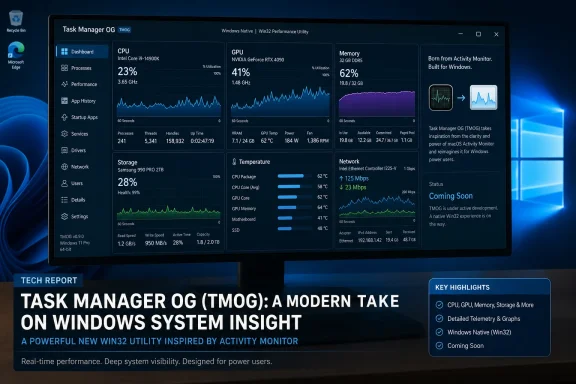 A Windows build is promised, but its scope remains undefined
Windows Central says TMOG’s site lists an upcoming native Win32 version with no browser shell required. That is a meaningful distinction in an era when some system utilities are built around embedded web technologies, but it is not yet a performance result. Until a Windows binary is public, there is no way to verify startup time, working-set memory use, CPU overhead during polling, administrative-elevation behavior, or whether the app maintains its responsiveness when the system is under the pressure that makes people open Task Manager in the first place.
The phrase “Windows support will follow shortly” is also the only timing guidance currently reported. No other outlet located during reporting has published a Windows release date or described a prerelease build, and Plummer has not publicly documented which Windows versions the app will support. For Windows 10 and Windows 11 users, that leaves several practical questions unanswered: whether TMOG will support ARM64 PCs, whether it will run without installation, and whether its deeper system views depend on administrator rights.
Those are not cosmetic details for a process-management utility. A tool can produce a polished dashboard while still being unable to expose the process, service, startup, GPU, security, or per-user information that administrators expect from the inbox Task Manager. Windows’ built-in utility is deeply integrated with the operating system; a third-party alternative must earn trust through accurate data, predictable privilege handling, and a clear explanation of what it can—and cannot—control.
The project began as a Mac answer to Activity Monitor
TMOG’s immediate release is for macOS, where Plummer positioned it as an alternative to Apple’s Activity Monitor. Tom’s Hardware reported in late July that the early project was intended as a free beta and written in Swift; Club386 later reported that Apple’s App Sandbox rules created a distribution problem because sandboxed Mac apps cannot terminate other applications’ processes. That restriction goes to the heart of what makes a task manager useful during a hang.
The move to a direct beta distribution appears to be the practical result. Apple’s sandboxing policy does not prevent Plummer from writing the application, but it limits the App Store route for a tool whose point is to inspect and force-close processes beyond its own sandbox. For Windows users, that macOS detour explains the project’s origin but does not itself validate the future Win32 version.
It also highlights why the Windows edition should not be treated as a rebellion against Microsoft’s current Task Manager. TMOG is being positioned as a separate utility with a different interface and philosophy, while Microsoft continues to ship, maintain, and integrate Task Manager with Windows itself. Plummer’s authorship makes the project historically resonant; it does not give TMOG any special relationship to the present-day Windows codebase.
Clarity and depth are goals, not a benchmark result
According to Windows Central, Plummer describes TMOG as combining the clarity of macOS Activity Monitor with the diagnostic depth of Windows Task Manager. The published images show an overview arranged around CPU, GPU, memory, storage, temperatures, and network activity, with more detailed views below. It is a sensible direction for enthusiasts who want a system-status screen that puts several live indicators in one place rather than requiring tab-by-tab navigation.
The reported “half the size of Windows Task Manager” claim needs more precision before it means much. Size could mean the executable’s on-disk footprint, a compressed download, installed files, memory consumed at runtime, or the total package including dependencies. Each measurement answers a different question, and none establishes that TMOG is faster, more accurate, or safer when monitoring a stressed machine.
Plummer has made a broader case for lean system utilities before. Tom’s Hardware reported in April that he put the original Task Manager at about 80 KB, compared with roughly 4 MB for the contemporary Windows executable in his comparison, and described design choices intended to limit allocations and redundant system calls. That history helps explain the emphasis on compactness, but it is not a like-for-like performance comparison with a 2026 tool expected to cover modern GPU telemetry, heterogeneous CPUs, multiple displays, virtualization features, security boundaries, and far more varied hardware.
The valuable test for TMOG will be operational rather than nostalgic. Does it identify a runaway process correctly? Does it distinguish active CPU work from scheduling artifacts? Does disk and network reporting remain intelligible under load? Can it safely end a process without obscuring what Windows itself will do next? Until the Windows release is available, the project’s screenshots and stated goals cannot answer those questions.
What Windows power users should do with TMOG
The sensible near-term approach is to watch TMOG as a beta utility, not to plan around it. Windows Task Manager remains the reliable first-line tool for ending unresponsive applications, checking startup impact, managing services, reviewing users, and opening deeper Windows management tools. For enterprise and managed-PC environments, replacing an inbox diagnostic tool with an untested third-party beta would add deployment, update, support, and trust questions without a demonstrated operational gain.
Early adopters should test TMOG on a non-critical Windows PC once the native build appears. Compare its CPU, memory, disk, GPU, and network readings against Task Manager, Resource Monitor, and, where applicable, Performance Monitor rather than assuming the prettiest graph is the correct one. They should also check what data the program collects, whether it requires elevation, how it is signed and updated, and whether force-ending a process produces behavior consistent with Windows’ own tools.
Plummer’s original Task Manager succeeded because it was a recovery tool as much as a monitor: it needed to stay usable when something else had already gone wrong. TMOG’s Windows version will face that same standard. For now, the concrete news is a stated Win32 plan attached to a released Mac beta—not a new Windows Task Manager that users can download, benchmark, or trust in a production incident.