
TechRadar’s retro-PC rebuild is a useful reminder that a Windows 11 gaming system does not need a new CPU, GPU, RAM kit, or SSD to feel new again. Moving an existing Intel Core i9-12900K and GeForce RTX 5070 system into Thermaltake’s beige Retro 360 TG chassis, adding a liquid cooler, then applying Stardock’s Windows Classic styling produces a machine that is visibly different without discarding working parts.
But the story, published by TechRadar on August 1, contains two practical details that deserve correction before readers copy the build: the Retro 360 TG is not consistently documented as a fanless case, and its account of the Corsair iCUE LINK hub problem should not be read as proof that an unpowered RGB/fan controller stops a PC from posting. Those are not small distinctions when the proposed project is meant to save money and reduce build-time surprises.
The sound idea remains: preserve the platform, replace the enclosure and cooling only where there is a reason, and use Windows customization to give familiar hardware a different identity. For owners sitting on a still-capable Z690, AM5, or recent-generation AM4 system, a case transplant is often more consequential to the day-to-day experience than a marginal processor upgrade.
Thermaltake’s Retro 360 TG is a current ATX mid-tower with the deliberate visual language of a 1990s desktop: beige plastic, imitation drive bays, a boxy front panel, and a tempered-glass side window that no period-correct PC would have carried. It is built for current hardware, with room for ATX motherboards, graphics cards up to 400 mm long, a 360 mm radiator at the top or side, and a front USB-C port.
That makes the case a much more sensible route to a retro-themed Windows PC than attempting to keep an actual beige Pentium-era tower alive. A genuine 1990s chassis will generally demand compromises around ATX mounting, graphics-card clearance, airflow, front I/O, power-supply fit, and radiator support. Thermaltake is selling the look of the old machine while retaining the geometry required by a 2026 gaming build.
PC Gamer’s separate review placed the Retro 360 TG at $90 in the United States and £92 in the United Kingdom. At that price, the case is less a cheap generic enclosure than a themed chassis purchase, but it remains far below the cost of replacing the central compute components in the TechRadar system.
The important caveat is that the floppy and optical-drive areas are aesthetic features, not functional bays. Readers who want to install a real 3.5-inch floppy drive, a DVD drive, or an IDE-to-USB project should examine the physical front-panel construction before buying. The machine can resemble a 1990s beige box without providing the expansion options that made those boxes practical.
The Retro 360 TG manual lists a front 120 mm intake fan and a rear 120 mm exhaust fan as part of the cooling system. Thermaltake’s newer Computex 2026 product material goes further, describing two pre-installed reverse-blade Infinity ARGB PWM fans on the right side and one Infinity ARGB PWM fan at the rear. Those two official descriptions do not entirely agree with each other, but they agree on the central point: the case is documented as shipping with fans.
That leaves a buyer with a real due-diligence problem. The product may have changed configuration between an earlier retail revision and the later show-floor specification, or Thermaltake may be publishing separate regional or batch-specific configurations. What readers should not do is budget automatically for three additional fans on the assumption that the case arrives empty.
Before ordering, confirm the exact retailer SKU, the manufacturer’s current package-contents listing, and any product photos showing installed fans. If the included fans are present and satisfactory, a case transplant can stay close to the cost of the chassis itself. If they are absent, or if the aim is a white RGB presentation matching the case’s beige exterior, then extra fan cost and controller requirements need to be included from the start.
This is the material consequence missing from the build narrative. A project framed as reusing old hardware can become an accessory-heavy rebuild quickly: a new case, 360 mm AIO, RGB fans, controller hub, extra PSU cable, custom stickers, retro keyboard, mouse, and paid Windows customization software are not insignificant purchases. The result may still be worthwhile, but it is a themed renovation rather than a zero-cost refresh.
Corsair’s iCUE LINK documentation specifies that its System Hub needs a dedicated PCIe power connection as well as a motherboard USB 2.0 connection. It is not a passive RGB splitter. If the hub is unpowered, attached iCUE LINK fans cannot be expected to operate or report correctly, and the software control layer will be unavailable.
Corsair also makes a point that should be treated as a hard rule: modular PSU cables are not universally interchangeable. The connector may physically fit while the pinout at the power-supply end differs. A cable from another PSU can damage hardware even when both units are from a familiar brand. The correct response to a missing cable is to locate the original set, buy a manufacturer-confirmed compatible replacement, or consult the PSU maker’s compatibility chart — not to test a random modular lead.
Never mix modular PSU cables by appearance alone. The article says a cable from a different PSU was tried and the system did not boot, but a non-boot is the fortunate outcome in this situation. The dangerous failure mode is power reaching the wrong pins.
There is a second unanswered point. TechRadar attributes its initial inability to boot to the unpowered iCUE LINK hub. Corsair’s instructions require power for the hub, but they do not establish that an unpowered hub itself prevents a PC from completing power-on self-test. The hub’s tach connection is documented as optional, and the author had installed a separate Thermaltake CPU cooler rather than an iCUE LINK CPU cooler. The missing cable plainly prevented the Corsair fans and hub from working as intended; the claimed relationship to the entire system failing to boot remains unproven.
For anyone doing a transplant, photograph every motherboard header and PSU connection before disassembly. Put each original modular cable in a labelled bag, retain all unused cables from the PSU box, and check whether the new case layout needs additional fan, SATA-power, USB-header, or PCIe-power connections. Those preparations take minutes and prevent the most frustrating kind of rebuild failure: one caused not by a bad component, but by an overlooked lead.
It works because the products target the most visible elements: window borders, taskbar presentation, Start menu behavior, icons, wallpaper, and desktop colors. Add a teal background, familiar 1990s iconography, and a beige keyboard, and the machine can immediately communicate the theme the builder is after.
It does not turn Windows 11 into Windows 95. File Explorer remains a modern application with tabs and contemporary shell behavior. Settings, notification surfaces, dialogs owned by Microsoft apps, security prompts, modern context menus, and updates will periodically break the illusion. TechRadar acknowledges some of those seams, including Explorer tabs and odd taskbar-clock behavior.
That limitation is an advantage as much as a defect. The machine keeps current driver support, current game compatibility, current security servicing, and the vendor control tools needed for the Thermaltake cooler’s LCD display. A 1990s interface style is being layered over a supported operating system, rather than requiring a user to run obsolete software for the sake of visual authenticity.
Still, the project demonstrates a category of upgrade that hardware coverage often undervalues: maintenance with intent. Reapplying thermal paste, cleaning up cabling, correcting fan placement, replacing an aging cooler, fixing a case layout, and building a desktop theme around hardware already owned can extend a system’s useful and enjoyable life without creating a pile of displaced components.
The case move also reportedly cleared an intermittent GPU startup problem. That should not be treated as a repair method; the cause was never isolated. Reseating the graphics card, changing PCIe power routing, relieving mechanical strain, or simply altering a marginal connection could all explain the outcome. But it is a reminder that a careful rebuild can expose and correct poor seating, worn cables, and cramped cable management that accumulated during an earlier assembly.
The sensible takeaway is narrower than the nostalgia pitch. Keep the parts that still meet your needs, spend only where the replacement changes thermals, noise, usability, or reliability, and verify the contents and cabling requirements before ordering a themed enclosure. A retro Windows 11 PC can be fun precisely because it is modern underneath — provided its supposedly budget-conscious rebuild does not begin with buying parts the case already includes.
The sound idea remains: preserve the platform, replace the enclosure and cooling only where there is a reason, and use Windows customization to give familiar hardware a different identity. For owners sitting on a still-capable Z690, AM5, or recent-generation AM4 system, a case transplant is often more consequential to the day-to-day experience than a marginal processor upgrade.
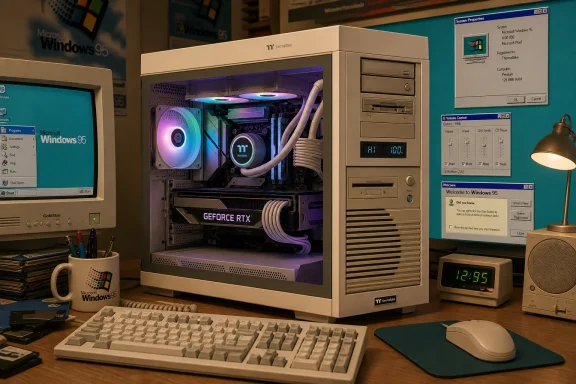 The Retro 360 TG is a real modern case behind the beige façade
Thermaltake’s Retro 360 TG is a current ATX mid-tower with the deliberate visual language of a 1990s desktop: beige plastic, imitation drive bays, a boxy front panel, and a tempered-glass side window that no period-correct PC would have carried. It is built for current hardware, with room for ATX motherboards, graphics cards up to 400 mm long, a 360 mm radiator at the top or side, and a front USB-C port.That makes the case a much more sensible route to a retro-themed Windows PC than attempting to keep an actual beige Pentium-era tower alive. A genuine 1990s chassis will generally demand compromises around ATX mounting, graphics-card clearance, airflow, front I/O, power-supply fit, and radiator support. Thermaltake is selling the look of the old machine while retaining the geometry required by a 2026 gaming build.
PC Gamer’s separate review placed the Retro 360 TG at $90 in the United States and £92 in the United Kingdom. At that price, the case is less a cheap generic enclosure than a themed chassis purchase, but it remains far below the cost of replacing the central compute components in the TechRadar system.
The important caveat is that the floppy and optical-drive areas are aesthetic features, not functional bays. Readers who want to install a real 3.5-inch floppy drive, a DVD drive, or an IDE-to-USB project should examine the physical front-panel construction before buying. The machine can resemble a 1990s beige box without providing the expansion options that made those boxes practical.
The “no included fans” claim does not match Thermaltake’s own record
TechRadar says the Retro 360 TG “doesn’t come with fans,” using that assertion to justify fitting a spare pack of Corsair RX120 RGB fans. Thermaltake’s own documentation conflicts with that statement.The Retro 360 TG manual lists a front 120 mm intake fan and a rear 120 mm exhaust fan as part of the cooling system. Thermaltake’s newer Computex 2026 product material goes further, describing two pre-installed reverse-blade Infinity ARGB PWM fans on the right side and one Infinity ARGB PWM fan at the rear. Those two official descriptions do not entirely agree with each other, but they agree on the central point: the case is documented as shipping with fans.
That leaves a buyer with a real due-diligence problem. The product may have changed configuration between an earlier retail revision and the later show-floor specification, or Thermaltake may be publishing separate regional or batch-specific configurations. What readers should not do is budget automatically for three additional fans on the assumption that the case arrives empty.
Before ordering, confirm the exact retailer SKU, the manufacturer’s current package-contents listing, and any product photos showing installed fans. If the included fans are present and satisfactory, a case transplant can stay close to the cost of the chassis itself. If they are absent, or if the aim is a white RGB presentation matching the case’s beige exterior, then extra fan cost and controller requirements need to be included from the start.
This is the material consequence missing from the build narrative. A project framed as reusing old hardware can become an accessory-heavy rebuild quickly: a new case, 360 mm AIO, RGB fans, controller hub, extra PSU cable, custom stickers, retro keyboard, mouse, and paid Windows customization software are not insignificant purchases. The result may still be worthwhile, but it is a themed renovation rather than a zero-cost refresh.
The iCUE LINK cable episode carries a more serious lesson
The most valuable part of the TechRadar account is the moment when the builder discovers that the modular Corsair HX1500i power supply lacks an installed cable for the iCUE LINK System Hub. This is exactly the sort of issue that turns a straightforward case move into an evening of cable tracing.Corsair’s iCUE LINK documentation specifies that its System Hub needs a dedicated PCIe power connection as well as a motherboard USB 2.0 connection. It is not a passive RGB splitter. If the hub is unpowered, attached iCUE LINK fans cannot be expected to operate or report correctly, and the software control layer will be unavailable.
Corsair also makes a point that should be treated as a hard rule: modular PSU cables are not universally interchangeable. The connector may physically fit while the pinout at the power-supply end differs. A cable from another PSU can damage hardware even when both units are from a familiar brand. The correct response to a missing cable is to locate the original set, buy a manufacturer-confirmed compatible replacement, or consult the PSU maker’s compatibility chart — not to test a random modular lead.
Never mix modular PSU cables by appearance alone. The article says a cable from a different PSU was tried and the system did not boot, but a non-boot is the fortunate outcome in this situation. The dangerous failure mode is power reaching the wrong pins.
There is a second unanswered point. TechRadar attributes its initial inability to boot to the unpowered iCUE LINK hub. Corsair’s instructions require power for the hub, but they do not establish that an unpowered hub itself prevents a PC from completing power-on self-test. The hub’s tach connection is documented as optional, and the author had installed a separate Thermaltake CPU cooler rather than an iCUE LINK CPU cooler. The missing cable plainly prevented the Corsair fans and hub from working as intended; the claimed relationship to the entire system failing to boot remains unproven.
For anyone doing a transplant, photograph every motherboard header and PSU connection before disassembly. Put each original modular cable in a labelled bag, retain all unused cables from the PSU box, and check whether the new case layout needs additional fan, SATA-power, USB-header, or PCIe-power connections. Those preparations take minutes and prevent the most frustrating kind of rebuild failure: one caused not by a bad component, but by an overlooked lead.
Windows 11 can wear the Windows 95 costume, with limits
The software half of the project is more achievable than a full Linux migration for users who want to retain their existing Windows games, Windows-only peripheral tools, and ordinary workstation applications. Stardock’s WindowBlinds 11 includes a Windows Classic skin, while Start11 offers classic Start-menu layouts. Windows Central independently demonstrated the same pairing as a way to approximate the Windows 95 visual style on Windows 11.It works because the products target the most visible elements: window borders, taskbar presentation, Start menu behavior, icons, wallpaper, and desktop colors. Add a teal background, familiar 1990s iconography, and a beige keyboard, and the machine can immediately communicate the theme the builder is after.
It does not turn Windows 11 into Windows 95. File Explorer remains a modern application with tabs and contemporary shell behavior. Settings, notification surfaces, dialogs owned by Microsoft apps, security prompts, modern context menus, and updates will periodically break the illusion. TechRadar acknowledges some of those seams, including Explorer tabs and odd taskbar-clock behavior.
That limitation is an advantage as much as a defect. The machine keeps current driver support, current game compatibility, current security servicing, and the vendor control tools needed for the Thermaltake cooler’s LCD display. A 1990s interface style is being layered over a supported operating system, rather than requiring a user to run obsolete software for the sake of visual authenticity.
The best upgrade here is preservation, not performance
The TechRadar machine was not obsolete before it entered the beige case. An Intel Core i9-12900K, 32 GB of DDR5 memory, multiple NVMe drives, and an RTX 5070 remain a substantial Windows 11 desktop configuration. Rehousing it will not increase frame rates by itself, and a new cooler is only a performance upgrade if it improves temperatures enough to prevent throttling or enables quieter fan curves.Still, the project demonstrates a category of upgrade that hardware coverage often undervalues: maintenance with intent. Reapplying thermal paste, cleaning up cabling, correcting fan placement, replacing an aging cooler, fixing a case layout, and building a desktop theme around hardware already owned can extend a system’s useful and enjoyable life without creating a pile of displaced components.
The case move also reportedly cleared an intermittent GPU startup problem. That should not be treated as a repair method; the cause was never isolated. Reseating the graphics card, changing PCIe power routing, relieving mechanical strain, or simply altering a marginal connection could all explain the outcome. But it is a reminder that a careful rebuild can expose and correct poor seating, worn cables, and cramped cable management that accumulated during an earlier assembly.
The sensible takeaway is narrower than the nostalgia pitch. Keep the parts that still meet your needs, spend only where the replacement changes thermals, noise, usability, or reliability, and verify the contents and cabling requirements before ordering a themed enclosure. A retro Windows 11 PC can be fun precisely because it is modern underneath — provided its supposedly budget-conscious rebuild does not begin with buying parts the case already includes.