
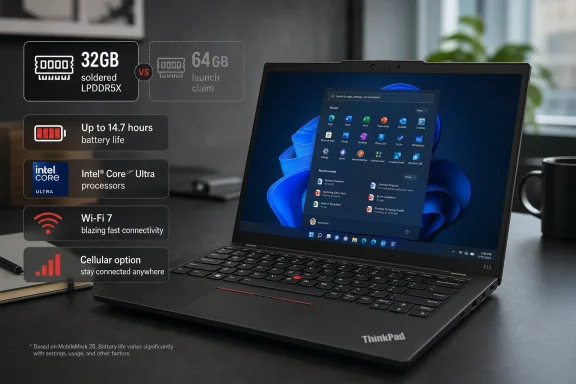
Lenovo’s ThinkPad X13 Gen 7 with Intel Core Ultra Series 3 processors is reaching more markets, but the newly visible configurations expose a familiar ThinkPad problem: the machine Lenovo announced with up to 64GB of memory is currently documented by Lenovo’s own Intel specification sheet as topping out at 32GB of soldered LPDDR5X memory.
Notebookcheck reported on August 6 that the 13.3-inch ThinkPad is now appearing in the UK, Australia, Hong Kong, Malaysia, and Singapore with Intel’s Panther Lake-era Core Ultra 5 325 through Core Ultra 7 356H processors, depending on country. The machine is the ThinkPad X13 Gen 7, not an “X1e Gen 7” as stated in the supplied report; Lenovo’s product pages, support listings, and PSREF specification database consistently identify it as the X13 Gen 7.
For Windows buyers and IT teams, this is an availability expansion rather than a brand-new launch. Lenovo formally announced the X13 Gen 7 on May 12, and Notebookcheck documented sales in parts of Asia-Pacific on May 20 and in the United States and Canada on May 27. What has changed is the number of storefronts carrying Intel versions and, more importantly, the configurations that can actually be ordered.
The practical consequence is clear: do not plan a deployment around Lenovo’s May launch promise of a 64GB X13 Gen 7 until the exact machine type is listed for sale in your region. On the current Intel PSREF record, the 64GB option is absent.
Lenovo’s headline battery figure is real, but it is easy to read too broadly. The company lists up to 30.1 hours of continuous local 1080p video playback, measured at 150 nits with the display in fullscreen playback. Its JEITA-BAT 3.0 result is split into 17.0 hours of video and 29.7 hours of idle time, both measured at 200 nits.
In other words, the 29.7-hour JEITA number is an idle result, not a web-browsing or office-work result. The 30.1-hour result is local video playback at a lower brightness level. Neither claim is equivalent to a full workday of Teams calls, browser tabs, VPN use, external displays, and cloud synchronization.
Lenovo’s own test conditions make the distinction more significant. The maximum-life configuration uses a non-touch 1920 × 1200 IPS panel, a 54.7Wh battery, 16GB of memory, Windows 11, the Core Ultra 5 332 processor, and the “best power efficiency” Windows power mode. The alternative configuration, using a touch display and Core Ultra 5 335, is rated at 24.5 hours of local video playback and 24.7 hours of JEITA idle time.
That test machine is not necessarily the model buyers will find in every country. Notebookcheck says the wider release generally begins with the Core Ultra 5 325, while UK availability is centered on Core Ultra 7 355 and Core Ultra 7 365 vPro configurations. The claimed battery maximum therefore belongs to a particular low-power configuration, not automatically to the higher-priced Intel systems now arriving at regional Lenovo stores.
For a Windows fleet manager, the useful figure is Lenovo’s MobileMark 30 result: up to 15.6 hours at 250 nits, with a stated performance score of 610. It remains a vendor laboratory result, but it is materially closer to a productivity-oriented workload than looping a local video file.
The current Intel PSREF page tells a different story. It lists only 16GB and 32GB soldered-memory configurations, explicitly says there are no memory slots, and identifies LPDDR5X-7467 and LPDDR5X-8533 support. Lenovo also notes that memory physically installed as LPDDR5X-8533 may run at LPDDR5X-7467 in some configurations because of platform limitations.
This is more than a technicality. On a machine designed to stay in service for several years, the difference between 32GB and 64GB can determine whether it remains viable for developers, virtual machines, large Power BI models, local AI tools, and heavy browser-based line-of-business work. Since the RAM cannot be expanded later, buyers must treat the configured capacity as permanent.
There are a few possible explanations for the discrepancy: Lenovo may reserve 64GB for the AMD version, for specific enterprise channels, or for yet-to-be-listed Intel machine types. But Lenovo has not made that distinction clear in the current public Intel PSREF documentation. What the record supports today is narrower: 64GB was part of the launch messaging, while Lenovo’s current public specification sheet for the Intel X13 Gen 7 lists a 32GB ceiling.
The same caution applies to storage. Lenovo’s current PSREF says the Intel model has one M.2 2280 slot and lists both PCIe 4.0 and PCIe 5.0 SSD offerings up to 1TB. Earlier Notebookcheck reporting on regional store configurations said Intel models were being sold with PCIe 4.0 storage while AMD models could be configured with PCIe 5.0. The machine has only one internal SSD slot either way, so there is no second-drive expansion path. Buyers who care about sustained storage performance should verify the installed drive rather than infer it from the slot specification.
That makes the Core Ultra 7 356H the materially different option for users who need parallel CPU capacity, but it does not bring the Arc B-series graphics found in some higher-tier Panther Lake parts. Lenovo’s PSREF lists standard Intel integrated graphics across these X13 configurations, with up to 40 TOPS of GPU compute and up to 50 TOPS from the NPU. The systems qualify as Copilot+ PCs where configurations meet Microsoft’s memory, storage, and NPU requirements.
For typical managed Windows 11 workloads, the distinction is more likely to show up in local multitasking, compiling, data processing, and AI-assisted features than in gaming. The X13 is still an ultraportable business notebook with a 60Hz 1920 × 1200 IPS display, not a mobile workstation. Every listed panel is 400 nits, anti-glare, 100% sRGB, and either touch or non-touch. Lenovo is not offering an OLED or higher-refresh option on this model.
The portability proposition remains strong. The X13 Gen 7 starts at 930g with the 41Wh battery or 964g with the 54.7Wh battery. It includes two Thunderbolt 4 ports, HDMI 2.1 capable of 4K at 60Hz, one USB-A port, Wi-Fi 7, and optional LTE or sub-6GHz 5G. There is no built-in Ethernet, although Lenovo supports it through an optional USB-C adapter.
The limitation is regional availability. Lenovo’s own documentation warns that wireless operation is subject to country regulations, and the product pages do not establish that each modem option can be ordered in every market. A company standardizing on always-connected notebooks should confirm the exact WWAN card, carrier certification, physical SIM arrangement, and SKU before purchase. The Intel specification includes a nano-SIM slot only on WWAN-capable models, while some listed eSIM programs are Japan-specific bids rather than a general consumer feature.
Pricing also varies sharply by market and configuration. Notebookcheck lists the UK starting point at £2,199 for a Core Ultra 7 355 system with 16GB of memory, while systems in Australia, Hong Kong, Malaysia, and Singapore begin at substantially different local prices. This is not a low-cost X-series refresh; it is being sold as a premium, sub-1kg enterprise notebook.
The ThinkPad X13 Gen 7’s wider availability gives buyers more choice in processor, cellular, and regional sales channels. But the configuration sheet is doing more work than Lenovo’s launch headline: the battery claim belongs to a carefully tuned low-power test unit, the RAM is permanently soldered, and the published 64GB capability has not translated into the current Intel PSREF. For anyone ordering the machine for a four- or five-year Windows lifecycle, the exact SKU—not the announcement—should decide the purchase.
For Windows buyers and IT teams, this is an availability expansion rather than a brand-new launch. Lenovo formally announced the X13 Gen 7 on May 12, and Notebookcheck documented sales in parts of Asia-Pacific on May 20 and in the United States and Canada on May 27. What has changed is the number of storefronts carrying Intel versions and, more importantly, the configurations that can actually be ordered.
The practical consequence is clear: do not plan a deployment around Lenovo’s May launch promise of a 64GB X13 Gen 7 until the exact machine type is listed for sale in your region. On the current Intel PSREF record, the 64GB option is absent.
 The 30-hour figure is a narrow battery claim
Lenovo’s headline battery figure is real, but it is easy to read too broadly. The company lists up to 30.1 hours of continuous local 1080p video playback, measured at 150 nits with the display in fullscreen playback. Its JEITA-BAT 3.0 result is split into 17.0 hours of video and 29.7 hours of idle time, both measured at 200 nits.In other words, the 29.7-hour JEITA number is an idle result, not a web-browsing or office-work result. The 30.1-hour result is local video playback at a lower brightness level. Neither claim is equivalent to a full workday of Teams calls, browser tabs, VPN use, external displays, and cloud synchronization.
Lenovo’s own test conditions make the distinction more significant. The maximum-life configuration uses a non-touch 1920 × 1200 IPS panel, a 54.7Wh battery, 16GB of memory, Windows 11, the Core Ultra 5 332 processor, and the “best power efficiency” Windows power mode. The alternative configuration, using a touch display and Core Ultra 5 335, is rated at 24.5 hours of local video playback and 24.7 hours of JEITA idle time.
That test machine is not necessarily the model buyers will find in every country. Notebookcheck says the wider release generally begins with the Core Ultra 5 325, while UK availability is centered on Core Ultra 7 355 and Core Ultra 7 365 vPro configurations. The claimed battery maximum therefore belongs to a particular low-power configuration, not automatically to the higher-priced Intel systems now arriving at regional Lenovo stores.
For a Windows fleet manager, the useful figure is Lenovo’s MobileMark 30 result: up to 15.6 hours at 250 nits, with a stated performance score of 610. It remains a vendor laboratory result, but it is materially closer to a productivity-oriented workload than looping a local video file.
Lenovo’s memory story no longer lines up
Lenovo’s May announcement described the ThinkPad X13 Gen 7 as supporting up to 64GB of LPDDR5X-8533 memory. That specification was repeated by independent coverage from Heise, PCWorld, and others at launch. It was a meaningful upgrade because the prior ThinkPad X13 Gen 6 was limited to 32GB, and memory in this class of ThinkPad is soldered rather than upgradeable.The current Intel PSREF page tells a different story. It lists only 16GB and 32GB soldered-memory configurations, explicitly says there are no memory slots, and identifies LPDDR5X-7467 and LPDDR5X-8533 support. Lenovo also notes that memory physically installed as LPDDR5X-8533 may run at LPDDR5X-7467 in some configurations because of platform limitations.
This is more than a technicality. On a machine designed to stay in service for several years, the difference between 32GB and 64GB can determine whether it remains viable for developers, virtual machines, large Power BI models, local AI tools, and heavy browser-based line-of-business work. Since the RAM cannot be expanded later, buyers must treat the configured capacity as permanent.
There are a few possible explanations for the discrepancy: Lenovo may reserve 64GB for the AMD version, for specific enterprise channels, or for yet-to-be-listed Intel machine types. But Lenovo has not made that distinction clear in the current public Intel PSREF documentation. What the record supports today is narrower: 64GB was part of the launch messaging, while Lenovo’s current public specification sheet for the Intel X13 Gen 7 lists a 32GB ceiling.
The same caution applies to storage. Lenovo’s current PSREF says the Intel model has one M.2 2280 slot and lists both PCIe 4.0 and PCIe 5.0 SSD offerings up to 1TB. Earlier Notebookcheck reporting on regional store configurations said Intel models were being sold with PCIe 4.0 storage while AMD models could be configured with PCIe 5.0. The machine has only one internal SSD slot either way, so there is no second-drive expansion path. Buyers who care about sustained storage performance should verify the installed drive rather than infer it from the slot specification.
Core Ultra naming conceals two different classes of CPU
The regional processor list also needs decoding. The Core Ultra 5 325, Core Ultra 7 355, and Core Ultra 7 365 are eight-core chips with four performance cores and four low-power efficiency cores. The Core Ultra 7 356H is a 16-core chip, adding eight standard efficiency cores and four low-power efficiency cores alongside four performance cores.That makes the Core Ultra 7 356H the materially different option for users who need parallel CPU capacity, but it does not bring the Arc B-series graphics found in some higher-tier Panther Lake parts. Lenovo’s PSREF lists standard Intel integrated graphics across these X13 configurations, with up to 40 TOPS of GPU compute and up to 50 TOPS from the NPU. The systems qualify as Copilot+ PCs where configurations meet Microsoft’s memory, storage, and NPU requirements.
For typical managed Windows 11 workloads, the distinction is more likely to show up in local multitasking, compiling, data processing, and AI-assisted features than in gaming. The X13 is still an ultraportable business notebook with a 60Hz 1920 × 1200 IPS display, not a mobile workstation. Every listed panel is 400 nits, anti-glare, 100% sRGB, and either touch or non-touch. Lenovo is not offering an OLED or higher-refresh option on this model.
The portability proposition remains strong. The X13 Gen 7 starts at 930g with the 41Wh battery or 964g with the 54.7Wh battery. It includes two Thunderbolt 4 ports, HDMI 2.1 capable of 4K at 60Hz, one USB-A port, Wi-Fi 7, and optional LTE or sub-6GHz 5G. There is no built-in Ethernet, although Lenovo supports it through an optional USB-C adapter.
Cellular options are available, but they are not a blanket promise
Notebookcheck reports choices of Cat 6 4G and Cat 19 5G connectivity in the expanded market release. Lenovo’s PSREF is more specific: LTE uses Qualcomm’s Snapdragon X12 modem, while the 5G option is a Rolling Wireless RW350R-GL sub-6GHz modem with embedded eSIM support.The limitation is regional availability. Lenovo’s own documentation warns that wireless operation is subject to country regulations, and the product pages do not establish that each modem option can be ordered in every market. A company standardizing on always-connected notebooks should confirm the exact WWAN card, carrier certification, physical SIM arrangement, and SKU before purchase. The Intel specification includes a nano-SIM slot only on WWAN-capable models, while some listed eSIM programs are Japan-specific bids rather than a general consumer feature.
Pricing also varies sharply by market and configuration. Notebookcheck lists the UK starting point at £2,199 for a Core Ultra 7 355 system with 16GB of memory, while systems in Australia, Hong Kong, Malaysia, and Singapore begin at substantially different local prices. This is not a low-cost X-series refresh; it is being sold as a premium, sub-1kg enterprise notebook.
The ThinkPad X13 Gen 7’s wider availability gives buyers more choice in processor, cellular, and regional sales channels. But the configuration sheet is doing more work than Lenovo’s launch headline: the battery claim belongs to a carefully tuned low-power test unit, the RAM is permanently soldered, and the published 64GB capability has not translated into the current Intel PSREF. For anyone ordering the machine for a four- or five-year Windows lifecycle, the exact SKU—not the announcement—should decide the purchase.
References
- Primary source: Notebookcheck
Published: August 6, 2026 at 10:40 PM UTC
Loading…
www.notebookcheck.net - Related coverage: psreftest.lenovo.com
Loading…
psreftest.lenovo.com - Related coverage: psref.lenovo.com
Loading…
psref.lenovo.com - Related coverage: psref.lenovo.com
Loading…
psref.lenovo.com - Related coverage: psref.gtm.lenovo.com
Loading…
psref.gtm.lenovo.com - Related coverage: psrefstuff.lenovo.com
Loading…
psrefstuff.lenovo.com - Related coverage: psreftest.lenovo.com
Loading…
psreftest.lenovo.com - Related coverage: campusfabrik.de
Loading…
www.campusfabrik.de - Related coverage: lenovo.com
Loading…
www.lenovo.com - Related coverage: lenovo.com
Loading…
www.lenovo.com - Related coverage: pcsupport.lenovo.com
Loading…
pcsupport.lenovo.com - Related coverage: pcsupport.lenovo.com
Loading…
pcsupport.lenovo.com - Related coverage: notebookcheck.net
Loading…
www.notebookcheck.net - Related coverage: lapstars.de
Loading…
www.lapstars.de - Related coverage: media.lenovonews.fiestic.com
Loading…
media.lenovonews.fiestic.com - Related coverage: news.lenovo.com
Loading…
news.lenovo.com - Related coverage: lunar.computer
Loading…
lunar.computer - Related coverage: heise.de
Loading…
www.heise.de - Related coverage: digitalcitizen.life
Loading…
www.digitalcitizen.life - Related coverage: heise.de
Loading…
www.heise.de - Related coverage: pcworld.com
Loading…
www.pcworld.com - Related coverage: jagatreview.com
Loading…
www.jagatreview.com - Related coverage: newsminimalist.com
Loading…
www.newsminimalist.com - Related coverage: storagereview.com
Loading…
www.storagereview.com - Related coverage: tomshardware.com
Loading…
www.tomshardware.com - Related coverage: techradar.com
Loading…
www.techradar.com