
As reported by Bedroom Producers Blog and confirmed by Ohlhorst Digital’s product documentation, Trama 1.0.7 is also available for Apple Silicon Macs and x86_64 Linux systems. On Windows and Linux, it automatically uses an NVIDIA GPU through CUDA when one is available; otherwise, it falls back to CPU processing. AMD GPU acceleration is absent, while the macOS build currently runs the workload on the CPU rather than Apple’s MPS GPU backend.
The important caveat for Windows users is that Trama is not introducing a new separation engine. It packages Meta’s established htdemucs_ft model in a large, portable GUI bundle. That is still useful: the official Demucs project has long offered the same four-stem separation, but its normal Windows workflow involves Python, dependencies, model downloads, and command-line options. Trama’s contribution is removing that setup burden, at the cost of a multi-gigabyte download and fewer advanced controls.
 Trama 1.0.7 fixes a startup failure in the previous build
The currently offered Windows release is version 1.0.7, dated May 30, 2026. Ohlhorst Digital says it rebuilt the application after the original 1.0.6 binary was corrupted during its build process and could fail at launch with a Python DLL loading error.
That history matters more than the version number suggests. Trama’s first two weeks brought a rapid series of fixes: a launch failure tied to a torchcodec dependency, an error while saving completed stems, a macOS launch issue, and then the corrupted 1.0.6 package. The latest build may be usable, but this is young desktop software rather than a mature, long-tested production tool.
Ohlhorst Digital also added a device selector in version 1.0.6, retained in the current release, letting users choose automatic detection, CPU, or GPU. That is a sensible escape hatch for older NVIDIA hardware where automatic CUDA selection crashes against the bundled runtime. The application also includes diagnostic logging, which should be enabled before reporting a failure rather than repeatedly retrying a large batch job.
For a workstation that needs predictable output, the sensible first run is a short, disposable test file. Confirm that the stems complete, land in the intended folder, and open normally in the DAW before feeding Trama an entire session archive.
Four stems are useful, but they are not isolated multitracks
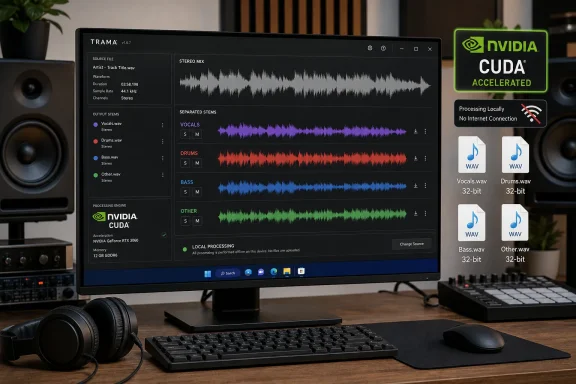
Trama outputs vocals, drums, bass, and “other,” all as 32-bit floating-point WAV files at 44.1 kHz. That makes the results convenient for remix sketches, transcription, practice tracks, dialogue cleanup, and rough audio analysis. It does not turn a finished stereo master into the original multitrack recording.
The “other” file contains everything the model does not classify as vocals, drums, or bass: guitars, keyboards, orchestral parts, percussion not recognized as drums, ambience, effects, and often some leakage from the named stems. A user hoping for a clean guitar or piano stem should not mistake Trama’s four-source workflow for the experimental six-source Demucs variant. Demucs’ own documentation warns that its piano separation in that six-stem model has substantial bleeding and artifacts.
Meta’s htdemucs_ft is a fine-tuned ensemble version of Hybrid Transformer Demucs. The Demucs maintainers describe it as a more time-consuming option that may yield better separation than the base htdemucs model. In Trama, the model choice explains both the good baseline quality and the file size: Ohlhorst Digital says the fine-tuned ensemble consists of four models bundled with the application.
Trama’s quality modes expose that quality-versus-time compromise without requiring users to understand Demucs command-line settings. Normal performs two shifted passes, High performs five, and Ultra performs 10; the results are averaged. The vendor estimates that a three-minute song in High mode takes around one to two minutes on a compatible NVIDIA GPU or 10 to 15 minutes on a CPU. Ultra increases that to roughly two to four minutes on GPU or 20 to 30 minutes on CPU.
Those estimates also reveal why the “High” preset is the practical default rather than Ultra. High means 20 model passes per song—five shifts across the four-model ensemble. Ultra doubles that workload to 40 passes, which is difficult to justify for bulk processing unless a particular track has artifacts that are audibly improved by the extra work.
The offline claim needs one qualification
Trama’s strongest selling point is local processing. The models are bundled, the files are processed on the machine, and Ohlhorst Digital says no model download or account is required. That is a meaningful distinction for music, legal, internal training, or client material that should not be uploaded to an online separator.
But “fully offline” is not quite the same as “never makes a network request.” Ohlhorst Digital’s own 1.0.1 changelog says it added an online update check that makes one HTTPS request at application launch. The vendor says users can opt out through the check_updates=false setting in od_trama.ini.
That leaves an omission in the current documentation: the product page prominently describes the program as requiring no internet connection, but it does not place the update-check behavior or the opt-out setting alongside that claim. Users working under a strict air-gap or a policy that prohibits unapproved outbound traffic should disable the check before first use if possible, or block the executable at the firewall until they have verified its configuration.
The distinction does not undermine the local-processing model. It does mean administrators should treat Trama as a bundled desktop application with an optional update mechanism, rather than assuming it has zero network behavior by design.
Windows users get CUDA acceleration; Apple Silicon does not
Trama’s hardware split is unusually stark. Windows and Linux systems with supported NVIDIA GPUs are the intended fast path, and Ohlhorst Digital claims CUDA processing is typically 10 to 30 times faster than CPU execution. The official Demucs documentation supports the broader point that GPU memory and CUDA configuration have a major effect on performance; it also notes that CPU operation can be dramatically slower for long tracks.
A Windows PC without an NVIDIA card can still use Trama, but it should be treated as a queued background job, not a quick utility. CPU-only separation of a three-minute song at High quality can occupy the machine for 10 to 15 minutes, according to the vendor’s own estimate. Longer material, high-quality presets, and batches scale from there.
The macOS requirement is also narrower than some early third-party coverage suggested. Ohlhorst Digital’s current page says Trama 1.0.7 requires macOS 12 or later on Apple Silicon and does not support Intel Macs. It further says MPS is not enabled, so even an M-series Mac performs separation on the CPU. The macOS download is much smaller—about 500 MB—than the Windows and Linux packages, but it is not the accelerated option.
Windows users should also budget disk space beyond the download itself. Every selected stem is exported as a 32-bit float WAV, while audio at other sample rates is resampled to 44.1 kHz during separation. Float WAV stems are appropriate for editing because they preserve headroom, but they grow quickly, especially in batches.
Metadata preservation is Trama’s more practical differentiator
The feature that may matter most to DAW users is not the AI model but the file handling. Ohlhorst Digital says Trama copies Broadcast Wave metadata, cue points, labels, playlists, instrument information, ID3 tags, and Reaper markers from the input into every output stem.
If that works consistently in real projects, it solves a tedious part of moving separated audio back into an editing workflow. A stem separator that produces technically good audio but drops timeline markers and cues forces manual reconstruction; a separator that retains them can be used for faster comping, analysis, and pre-production.
There is one operational wrinkle: if a user selects only some stems, Trama merges all unselected material into an additional file. Select vocals alone, for example, and the remainder is delivered as a combined accompaniment file. If “other” itself is selected, the combined remainder is named rest.wav instead. That behavior is efficient for karaoke-style exports, but it means users should select all four stems when they need separate components for later mix work.
Trama’s appeal on Windows is therefore straightforward. It is a free, portable way to run a capable local Demucs ensemble without assembling a Python environment, fetching model weights, or learning the command line. The tradeoffs are just as concrete: a 3.1 GB package, NVIDIA-only GPU acceleration, four broad categories rather than true instrument multitracks, and a release history that warrants testing before production use.