
Turbo VPN’s Windows client has received a second privacy fix in the space of days after TechRadar found it could expose users’ real IP addresses while the app reported an active VPN connection. The newly issued version 3.7.0.0 appears to stop the remaining IPv6 leakage on the test networks used by TechRadar, but the remedy matters as much as the bug: it blocks IPv6 traffic rather than carrying IPv6 through the VPN.
For Windows users, the immediate advice is plain. Update Turbo VPN before relying on it for privacy-sensitive work, and do not assume that an older “connected” status meant traffic was protected. TechRadar’s reporting covered versions 3.5.2.0 and 3.6.0.0; the first reportedly had intermittent IPv4 exposure under certain configurations, while the subsequent release consistently masked IPv4 but still allowed native IPv6 traffic outside the encrypted connection.
Turbo VPN’s own Windows download page promotes “advanced leak protection,” “best-in-class encryption,” and the ability to hide a user’s IP location. Yet the company’s public Windows product material does not explain the routing design or cryptographic construction of its newer proprietary protocols, Lepus and LinkSentinel. That absence is now the central issue: the patch closes the leak TechRadar demonstrated, but users still cannot independently tell what they are selecting when they choose either proprietary mode.
According to TechRadar, Turbo VPN first shipped version 3.6.0.0 after receiving the publication’s initial technical findings. That build reportedly corrected the inconsistent IPv4 behavior, including a condition where tests on an IPv4-only network could reveal the customer’s public IPv4 address despite the client showing a successful connection.
The IPv6 problem remained. On a dual-stack connection — the ordinary configuration where a machine has both IPv4 and IPv6 connectivity — TechRadar found that Turbo VPN 3.6.0.0 masked IPv4 but exposed the device’s real IPv6 address through Lepus, LinkSentinel, and OpenVPN. The outlet says its test evidence showed no IPv6 virtual interface, no IPv6 gateway route through the VPN, and no firewall rule preventing outbound IPv6 traffic.
Those details describe a routing failure, not a cosmetic leak-test anomaly. A VPN that creates only an IPv4 tunnel still leaves Windows with a valid route to the internet over the physical network adapter’s IPv6 connection unless the client either tunnels IPv6 or positively blocks it. Microsoft’s networking documentation treats IPv6 routes as a separate part of the Windows routing table, and Internet standards define address-selection behavior for systems that have both protocol families available. A protected IPv4 path does not automatically capture IPv6 traffic.
TechRadar reports that version 3.7.0.0 now blocks unencrypted IPv6 traffic and consistently masks IPv4. No other outlet had independently published testing of that exact build by the time of publication, so the confirmation is TechRadar’s rather than a broad third-party validation. Still, the reported change matches a legitimate leak-prevention approach: deny IPv6 egress when the VPN cannot provide an IPv6 tunnel.
That should prevent an IPv6-capable browser or application from silently bypassing an IPv4-only VPN tunnel. It does not mean Turbo VPN now offers native IPv6 VPN connectivity.
That is generally the right trade-off in an emergency patch. A broken connection is disruptive, but a connection that claims privacy while disclosing the user’s ISP-assigned IPv6 address defeats the product’s primary purpose. For users trying to conceal their home, office, or mobile-network address from a website, the distinction is decisive.
The consequence is that Turbo VPN’s version 3.7.0.0 should be read as an IPv4 VPN client with IPv6 leak prevention, not as a complete dual-stack VPN service. That distinction will matter more in organizations and networks that have begun deploying IPv6-first or IPv6-only resources. A Windows device that can no longer reach an IPv6-only internal service while Turbo VPN is connected may be behaving exactly as the new protection intends.
Windows administrators should also be wary of treating this as a server-side correction. The reported remedy is client behavior. It needs to be present on every Windows endpoint, which means unmanaged systems, delayed app updates, and portable installations may remain exposed on earlier builds. Turbo VPN has not published a public security advisory, CVE identifier, affected-build matrix, or deployment guidance that would let administrators identify vulnerable endpoints at scale.
That omission is unusually consequential for a VPN defect. An application update can be enough for a consumer, but an enterprise or school network cannot reliably establish remediation status from a vague instruction to update.
A local proxy can protect applications that honor Windows proxy settings, particularly browsers. It is not automatically equivalent to a virtual network adapter carrying all device traffic. Background operating-system traffic, desktop apps that ignore the proxy configuration, command-line programs, and services may use their normal network routes unless another mechanism intercepts them.
TechRadar says version 3.6.0.0 subsequently protected outbound IPv4 traffic through a system-wide encrypted tunnel under Lepus. If accurate, that is an important correction. But Turbo VPN did not answer TechRadar’s question about how long the prior proxy-like behavior had existed, and it did not provide public technical documentation explaining what Lepus is, how it routes packets, or what safeguards make it a full-device VPN in current builds.
The company’s own Telegram announcement from an earlier Windows update described Lepus and LinkSentinel simply as new protocols for improved speed and stability. Its consumer-facing Windows pages similarly make broad privacy claims but offer no meaningful protocol documentation. Searches of Turbo VPN’s public site do not surface technical pages for either Lepus or LinkSentinel.
That leaves users to make a security decision from marketing labels. “Camouflage,” speed, and restricted-network compatibility may be useful properties, but they do not tell a Windows user whether the software creates a TUN-style interface, manipulates routes, installs filtering rules, uses a local proxy, or handles DNS and IPv6. For a product whose job is to control all outbound traffic, that is information users should not have to reverse-engineer.
That matters because protocol changes are not merely interface cleanups. A Windows user may have selected V2Ray precisely because it worked on a restrictive network, matched an existing deployment, or behaved more reliably than other modes. Removing it without a release note leaves users unable to distinguish a deliberate security response from a temporary regression.
Independent reviews published before this incident had already documented that Turbo VPN’s Windows protocol menu varied by version and included combinations of OpenVPN, V2Ray, SSR, Lepus, and LinkSentinel. That history makes transparent change logs more important, not less. The protocol list is moving while the public technical record remains thin.
Turbo VPN told TechRadar that the reported behavior arose only in certain network configurations and that its team reviewed and improved the latest Windows build. The wording does not dispute the leakage findings. It instead narrows their apparent scope, but the company has not stated which configurations were affected, whether all Windows editions were tested, whether free and paid tiers used identical networking components, or how the company verified the fix beyond the publication’s test cases.
It does not yet support the broader conclusion that Turbo VPN’s proprietary protocols have undergone a transparent, independently audited security review. Nor does it establish that every traffic type, network adapter combination, split-tunneling configuration, captive portal, or IPv6-only environment behaves correctly in version 3.7.0.0.
For users who must keep Turbo VPN in service, the practical verification is to test from the actual Windows network they use: confirm the installed version, connect using the chosen protocol, check both IPv4 and IPv6 address exposure, and repeat after reconnecting or switching networks. A browser-only check is helpful but insufficient if the concern includes desktop applications, system services, or command-line workloads.
Turbo VPN has fixed the immediate leak TechRadar demonstrated, but it has also shown why a VPN’s green connection indicator is not proof of privacy. On Windows, privacy depends on interfaces, routes, DNS behavior, firewall rules, and the traffic each application actually sends. Until Turbo VPN documents Lepus and LinkSentinel and publishes a proper Windows security changelog, version 3.7.0.0 should be treated as a necessary update — not a reason to stop verifying the tunnel.
Turbo VPN’s own Windows download page promotes “advanced leak protection,” “best-in-class encryption,” and the ability to hide a user’s IP location. Yet the company’s public Windows product material does not explain the routing design or cryptographic construction of its newer proprietary protocols, Lepus and LinkSentinel. That absence is now the central issue: the patch closes the leak TechRadar demonstrated, but users still cannot independently tell what they are selecting when they choose either proprietary mode.
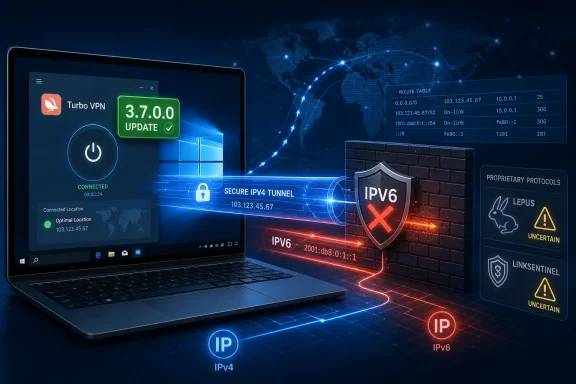 Version 3.7.0.0 fixes the observed IPv6 escape route
According to TechRadar, Turbo VPN first shipped version 3.6.0.0 after receiving the publication’s initial technical findings. That build reportedly corrected the inconsistent IPv4 behavior, including a condition where tests on an IPv4-only network could reveal the customer’s public IPv4 address despite the client showing a successful connection.The IPv6 problem remained. On a dual-stack connection — the ordinary configuration where a machine has both IPv4 and IPv6 connectivity — TechRadar found that Turbo VPN 3.6.0.0 masked IPv4 but exposed the device’s real IPv6 address through Lepus, LinkSentinel, and OpenVPN. The outlet says its test evidence showed no IPv6 virtual interface, no IPv6 gateway route through the VPN, and no firewall rule preventing outbound IPv6 traffic.
Those details describe a routing failure, not a cosmetic leak-test anomaly. A VPN that creates only an IPv4 tunnel still leaves Windows with a valid route to the internet over the physical network adapter’s IPv6 connection unless the client either tunnels IPv6 or positively blocks it. Microsoft’s networking documentation treats IPv6 routes as a separate part of the Windows routing table, and Internet standards define address-selection behavior for systems that have both protocol families available. A protected IPv4 path does not automatically capture IPv6 traffic.
TechRadar reports that version 3.7.0.0 now blocks unencrypted IPv6 traffic and consistently masks IPv4. No other outlet had independently published testing of that exact build by the time of publication, so the confirmation is TechRadar’s rather than a broad third-party validation. Still, the reported change matches a legitimate leak-prevention approach: deny IPv6 egress when the VPN cannot provide an IPv6 tunnel.
That should prevent an IPv6-capable browser or application from silently bypassing an IPv4-only VPN tunnel. It does not mean Turbo VPN now offers native IPv6 VPN connectivity.
Blocking IPv6 is a containment fix, not full dual-stack support
Turbo VPN appears to have chosen the safer short-term option. Instead of issuing IPv6 addresses to the VPN adapter and routing IPv6 through its service, TechRadar says the Windows client now prevents IPv6 traffic from leaving outside the protected path. Web traffic that can fall back to IPv4 should continue to work through the encrypted IPv4 tunnel; traffic that requires IPv6 may fail rather than leak.That is generally the right trade-off in an emergency patch. A broken connection is disruptive, but a connection that claims privacy while disclosing the user’s ISP-assigned IPv6 address defeats the product’s primary purpose. For users trying to conceal their home, office, or mobile-network address from a website, the distinction is decisive.
The consequence is that Turbo VPN’s version 3.7.0.0 should be read as an IPv4 VPN client with IPv6 leak prevention, not as a complete dual-stack VPN service. That distinction will matter more in organizations and networks that have begun deploying IPv6-first or IPv6-only resources. A Windows device that can no longer reach an IPv6-only internal service while Turbo VPN is connected may be behaving exactly as the new protection intends.
Windows administrators should also be wary of treating this as a server-side correction. The reported remedy is client behavior. It needs to be present on every Windows endpoint, which means unmanaged systems, delayed app updates, and portable installations may remain exposed on earlier builds. Turbo VPN has not published a public security advisory, CVE identifier, affected-build matrix, or deployment guidance that would let administrators identify vulnerable endpoints at scale.
That omission is unusually consequential for a VPN defect. An application update can be enough for a consumer, but an enterprise or school network cannot reliably establish remediation status from a vague instruction to update.
Lepus raised a more fundamental Windows traffic-routing concern
The more serious part of TechRadar’s investigation was not the IPv6 leak alone. During initial testing of the Lepus protocol, the publication found behavior resembling a local ShadowsocksR proxy rather than a conventional system-wide VPN tunnel. It reported that the client launched a localssr.exe process and enabled the Windows proxy setting, directing traffic to a local port.A local proxy can protect applications that honor Windows proxy settings, particularly browsers. It is not automatically equivalent to a virtual network adapter carrying all device traffic. Background operating-system traffic, desktop apps that ignore the proxy configuration, command-line programs, and services may use their normal network routes unless another mechanism intercepts them.
TechRadar says version 3.6.0.0 subsequently protected outbound IPv4 traffic through a system-wide encrypted tunnel under Lepus. If accurate, that is an important correction. But Turbo VPN did not answer TechRadar’s question about how long the prior proxy-like behavior had existed, and it did not provide public technical documentation explaining what Lepus is, how it routes packets, or what safeguards make it a full-device VPN in current builds.
The company’s own Telegram announcement from an earlier Windows update described Lepus and LinkSentinel simply as new protocols for improved speed and stability. Its consumer-facing Windows pages similarly make broad privacy claims but offer no meaningful protocol documentation. Searches of Turbo VPN’s public site do not surface technical pages for either Lepus or LinkSentinel.
That leaves users to make a security decision from marketing labels. “Camouflage,” speed, and restricted-network compatibility may be useful properties, but they do not tell a Windows user whether the software creates a TUN-style interface, manipulates routes, installs filtering rules, uses a local proxy, or handles DNS and IPv6. For a product whose job is to control all outbound traffic, that is information users should not have to reverse-engineer.
V2Ray’s removal adds another unanswered change
TechRadar also reports that V2Ray disappeared from the Windows client during the rapid update cycle. Turbo VPN told the outlet it was still checking the protocol when asked about the removal. The company has not publicly explained whether V2Ray was disabled for security, compatibility, maintenance, regional availability, or another reason.That matters because protocol changes are not merely interface cleanups. A Windows user may have selected V2Ray precisely because it worked on a restrictive network, matched an existing deployment, or behaved more reliably than other modes. Removing it without a release note leaves users unable to distinguish a deliberate security response from a temporary regression.
Independent reviews published before this incident had already documented that Turbo VPN’s Windows protocol menu varied by version and included combinations of OpenVPN, V2Ray, SSR, Lepus, and LinkSentinel. That history makes transparent change logs more important, not less. The protocol list is moving while the public technical record remains thin.
Turbo VPN told TechRadar that the reported behavior arose only in certain network configurations and that its team reviewed and improved the latest Windows build. The wording does not dispute the leakage findings. It instead narrows their apparent scope, but the company has not stated which configurations were affected, whether all Windows editions were tested, whether free and paid tiers used identical networking components, or how the company verified the fix beyond the publication’s test cases.
What Windows users should treat as resolved — and what they should not
The evidence supports a narrow conclusion: TechRadar observed real-IP exposure in Turbo VPN’s Windows app, reported the findings to the vendor, and then retested version 3.7.0.0 as blocking the exposed IPv6 path. Users on older builds should consider their privacy protection unreliable until they update.It does not yet support the broader conclusion that Turbo VPN’s proprietary protocols have undergone a transparent, independently audited security review. Nor does it establish that every traffic type, network adapter combination, split-tunneling configuration, captive portal, or IPv6-only environment behaves correctly in version 3.7.0.0.
For users who must keep Turbo VPN in service, the practical verification is to test from the actual Windows network they use: confirm the installed version, connect using the chosen protocol, check both IPv4 and IPv6 address exposure, and repeat after reconnecting or switching networks. A browser-only check is helpful but insufficient if the concern includes desktop applications, system services, or command-line workloads.
Turbo VPN has fixed the immediate leak TechRadar demonstrated, but it has also shown why a VPN’s green connection indicator is not proof of privacy. On Windows, privacy depends on interfaces, routes, DNS behavior, firewall rules, and the traffic each application actually sends. Until Turbo VPN documents Lepus and LinkSentinel and publishes a proper Windows security changelog, version 3.7.0.0 should be treated as a necessary update — not a reason to stop verifying the tunnel.
References
- Primary source: TechRadar
Published: August 7, 2026 at 1:30 PM UTC
Loading…
www.techradar.com - Related coverage: techradar.com
Loading…
www.techradar.com - Related coverage: reviewsally.com
Loading…
reviewsally.com - Related coverage: bestturbo.net
Loading…
bestturbo.net - Related coverage: aceturbo.net
Loading…
aceturbo.net - Related coverage: turbovpn.com
Loading…
turbovpn.com - Related coverage: vpnmentor.com
Loading…
www.vpnmentor.com - Related coverage: allaboutcookies.org
Loading…
allaboutcookies.org - Related coverage: wizcase.com
Loading…
www.wizcase.com - Related coverage: learn.microsoft.com
Loading…
learn.microsoft.com - Related coverage: support.microsoft.com
Loading…
support.microsoft.com - Related coverage: learn.microsoft.com
Loading…
learn.microsoft.com - Related coverage: github.com
Loading…
github.com