
The rollout was scheduled to begin in mid-July and finish by late July 2026, according to Microsoft’s Message Center notice for MC1326512, which was preserved by Modern Workplace Pro and M365 Admin. The roadmap entry was last updated on August 10 and carries a July 2026 general-availability date, so organizations that still see only screenshot export should treat that as a tenant-level availability or documentation issue worth checking now—not as a feature still awaiting release.
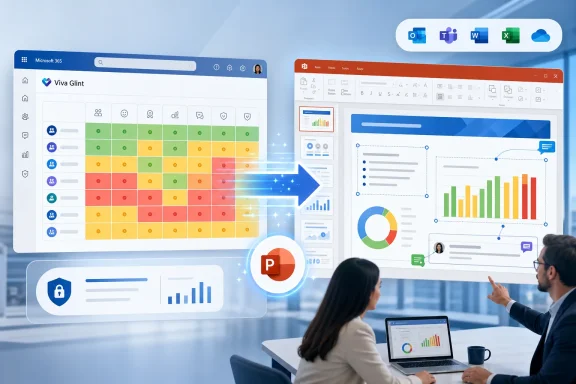 What managers receive in the new export
Within a Viva Glint Heat Map report, users with access to the report should find a new Export report to PowerPoint action in the Export and Share menu. It sits alongside the existing Export screenshots to PowerPoint choice rather than replacing it.
The new option exports selected default report sections as native elements in a
.pptxfile. Microsoft says those slides support PowerPoint’s normal editing controls, meaning managers can revise text, move items, alter slide layouts, add annotations, apply organization branding, and reuse data in a leadership deck without having to crop or cover up a rendered image.
That distinction is meaningful for Heat Maps. Viva Glint uses the report to compare high- and low-scoring teams across engagement questions and other survey drivers, with colors shown relative to the median result in the current view. It is a report designed for identifying patterns and outliers across populations—not a simple chart someone can accurately recreate from a screenshot. Editable output reduces the drudgery of preparing a presentation, but it also makes it easier to alter the visual framing of results after they leave Glint.
Microsoft’s Message Center notice says the export should improve layout consistency, reduce unnecessary whitespace, and improve generation reliability. It also says the old screenshot-based export remains available, which is important for organizations that have built briefing templates or review processes around fixed-image output.
The current documentation does not fully reflect the shipped scope
There is a documentation mismatch that administrators should recognize before declaring the rollout unsuccessful. Microsoft Learn’s current “Export to PowerPoint” article, last updated on June 26, says editable Export Report to PowerPoint is available only for Team Summary and Executive Summary reports. Yet Microsoft’s later rollout notice explicitly identifies Heat Map reports as receiving the same native, editable export option, and the roadmap now lists that feature as launched.
The dates explain much of the discrepancy: the Learn article predates the scheduled July rollout. Still, the stale limitation matters because it is the page many support teams and Glint users will find first when looking for the new capability. Microsoft has updated the separate Heat Map documentation more recently—the page shows a July 2 update and instructs users to use Export and Share—but it does not yet spell out the new Heat Map-specific PowerPoint workflow.
In practical terms, the product record is more current than the help article here. If the Heat Map export menu offers Export report to PowerPoint, the older statement limiting editable export to Team Summary and Executive Summary should not prevent teams from using it. If it does not appear, capture the user role, survey program, tenant type, and the options shown in Export and Share before opening a support case.
The documentation also establishes an important product boundary: editable export is for the report’s default sections. Microsoft has not said that every on-screen customization, ad hoc view, or custom report section will become a fully native PowerPoint object. Its existing export guidance says sections without data are excluded, and custom sections are excluded from the general native PowerPoint export workflow. Teams should test the exact Heat Map views used in executive reporting rather than assume every configured section will survive the export identically.
Permissions stay in Glint; files do not
Microsoft says the feature is enabled by default, requires no administrative configuration, and honors existing Viva Glint role-based permissions. That means the export action should be governed by who can already access the Heat Map report; it does not create a new route into suppressed survey results.
Viva Glint’s confidentiality protections remain especially relevant. Heat Map results are displayed only when confidentiality thresholds are met. Microsoft’s default rated confidentiality threshold is five responses, and Glint can suppress nearby groups as well to avoid revealing the results of a too-small population through comparison. Those controls apply to report visibility inside the service.
Once an authorized user exports a PowerPoint file, however, the security question changes from who can view the report in Viva Glint to who can receive, edit, save, forward, or upload the presentation elsewhere. Microsoft’s PowerPoint export documentation says exported files receive a General sensitivity label by default, though the label can be changed in PowerPoint. That default is an operational detail administrators should not overlook: a General label may be inappropriate for employee sentiment results, particularly where exported slides identify departments, locations, or management hierarchies.
The Message Center notice says the update does not change underlying data access, storage locations, or permissions. It does add a more malleable copy of existing data to a format that travels easily through email, Teams, SharePoint, and personal download folders. For HR, security, and compliance teams, the practical risk is not that Glint suddenly exposes data to unauthorized managers; it is that authorized managers can now turn report content into independently editable presentation material with less friction.
Custom templates can help, but require testing
Organizations already using Viva Glint’s PowerPoint templates should test the new Heat Map output before their next survey readout. Microsoft’s template system allows administrators to select a PowerPoint export template at the survey-program level, include organization branding, reserve space for annotations, and use report-content layouts. The generated deck’s slide dimensions should match the template selected for that survey.
There is a catch rooted in the older screenshot-oriented template model. Microsoft’s template documentation still describes a placeholder slide where report images are inserted and explains sizing choices for those images. Editable Heat Map output is meant to be native PowerPoint content, so administrators should verify how existing masters, placeholder layouts, logos, footers, and annotation areas behave with the new export rather than relying on a template built for screenshot slides.
Microsoft also warns that locked or editing-restricted custom PowerPoint templates can cause export failures. That warning becomes more important now that the export is positioned as a faster, more reliable alternative to screenshots. A rollout can be technically complete while users continue to hit export problems caused by tenant-created templates.
A sensible validation pass should include:
- Exporting a representative Heat Map from a manager account and an HR or senior-leader account with different report permissions.
- Confirming that suppressed or insufficient groups remain absent in the downloaded deck.
- Comparing the editable deck with the report in Viva Glint for labels, scores, color coding, selected comparisons, and section order.
- Opening the file in the organization’s standard PowerPoint build and confirming the applied sensitivity label and template behavior.
- Checking whether the old screenshot export is still needed for any automated review, archival, or fixed-layout workflow.
The immediate change is in presentation work, not survey analytics
Viva Glint’s Heat Map remains the same report: a permission-filtered comparison view for survey scores across teams and attributes. It can display scores, score changes, company comparisons, and other configured comparators, while its colors remain relative to the selected population rather than absolute performance grades. Exporting that result to PowerPoint does not make the Heat Map a new analysis engine.
What has changed is the handoff from HR analytics to the meeting room. The screenshot export forced a hard boundary between Glint analysis and PowerPoint presentation. Editable export lowers that boundary, giving managers a usable deck more quickly but transferring more responsibility for accuracy, confidentiality, branding, and retention to the organization after download.
For Microsoft 365 administrators, the next action is concrete: confirm that the Heat Map’s Export and Share menu now offers the native PowerPoint option in the relevant tenant, then update manager guidance to distinguish it from Export screenshots to PowerPoint. The feature is launched; Microsoft’s own general export documentation is the part that has not yet fully caught up.