
The product’s core design is sound. FireCloud routes a connected user’s traffic through a nearby WatchGuard point of presence, where WatchGuard applies its cloud firewall, web filtering, intrusion-prevention and malware-scanning policies. The Total Access licence adds controlled access to named private resources behind a Firebox or a FireCloud gateway, rather than placing a remote PC broadly onto the corporate LAN. For Windows shops that still expose RDP hosts, file shares, printers and line-of-business applications through remote-access VPN profiles, that narrower model is the practical attraction.
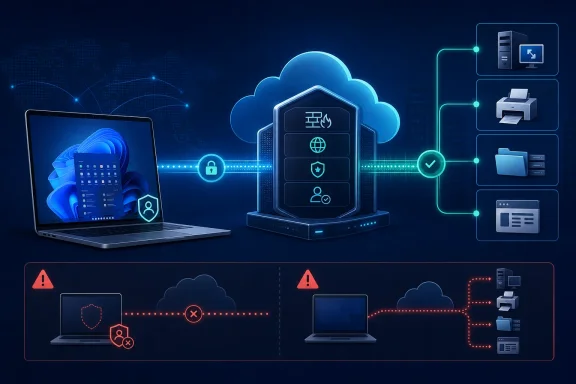
But FireCloud is not a set-and-forget VPN replacement. Its protection and private-resource access depend on the Connection Manager being installed, authenticated and connected. WatchGuard’s own documentation makes clear that a user who manually disconnects, or cannot establish a FireCloud connection, can still reach the internet — just without FireCloud protection. That makes client deployment, user experience and policy design operational controls, rather than mere onboarding tasks.
 A cloud security service with a Windows endpoint dependency
IT Pro reviewed FireCloud Total Access, the higher of WatchGuard’s two FireCloud editions. Internet Access supplies the cloud firewall and secure web gateway functions for roaming users; Total Access adds application-level access to private resources. WatchGuard describes that latter capability as zero-trust network access, or ZTNA, because administrators publish individual destinations and attach access rules to user groups instead of granting a device general access to every reachable subnet.
For a Windows administrator, the distinction is concrete. A user can be assigned an internal hostname for a specific RDP endpoint, a printer’s LPR service, an SMB share, or an application listener on a defined port. A FireCloud gateway establishes the connection back into the organization, while the endpoint’s Connection Manager sends approved traffic through the service.
IT Pro demonstrated the model by publishing a Brother printer and reaching it from Windows 11 using a configured FQDN and LPR port, then connecting to a Windows system through the ordinary RDP client. That is useful evidence that FireCloud can handle more than browser-based SaaS access: it can provide a controlled route to older on-premises services that have not been moved to Microsoft 365, Azure Virtual Desktop or a web front end.
The security improvement over an old remote-access VPN is conditional. A conventional VPN commonly gives a successfully authenticated computer broad IP connectivity and relies on firewall rules to contain it afterward. FireCloud’s resource definitions make it possible to begin with only the applications a group needs. Administrators should use that advantage rather than recreate a VPN by publishing wide port ranges and large internal networks.
The agent overlap is a deployment issue, not a footnote
The most valuable finding in IT Pro’s review concerns environments already using WatchGuard EPDR. The publication found that, even after configuring deployment for FireCloud only, Windows clients appeared in the EPDR console as unlicensed endpoints. WatchGuard told IT Pro that the shared installer behavior is a known issue and that separate installers are expected in FireCloud v2.
WatchGuard’s current product documentation confirms the underlying architecture: the downloaded FireCloud installer is the WatchGuard Agent, which can deploy both the Connection Manager and WatchGuard Endpoint Security components according to centrally configured deployment behavior. In other words, the shared agent is intentional; the unexpected EPDR inventory appearance described by IT Pro is the part administrators need to validate.
That has several consequences for teams with established endpoint-security workflows:
- Endpoint-security and network-security owners should agree on the WatchGuard Agent deployment policy before users receive a FireCloud installation link.
- Inventory, licensing and alerting processes should account for devices that may surface in the Endpoint Security console even when they are not licensed for EPDR.
- A pilot should include devices with existing WatchGuard endpoint products, not only clean Windows test machines.
- Service providers should test this separately per managed account, because WatchGuard states that an account-specific agent installer is intended only for users in that WatchGuard Cloud account.
The FireCloud v2 timing remains a vendor statement relayed by IT Pro; WatchGuard’s public FireCloud release notes do not provide a matching public schedule for separate installers. That does not invalidate the product, but it does mean buyers should not base a near-term rollout plan on a promised packaging change until WatchGuard publishes it.
FireCloud uses a tunnel, and its bypasses remove inspection
“VPN-free” is accurate in the narrow sense that Total Access can replace a remote-user VPN service for published internal resources. It should not be read as meaning that no secure tunnel exists between the endpoint and WatchGuard’s cloud. WatchGuard says the Connection Manager establishes a WireGuard tunnel to the nearest point of presence; the cloud service then enforces its rules there.
That architecture shifts the control plane from a branch firewall or concentrator to WatchGuard Cloud, but it introduces a policy question familiar to every secure-web-gateway deployment: what traffic is allowed to avoid inspection?
FireCloud’s Tunnel Bypass feature lets administrators send specified IP addresses and networks directly to the internet. WatchGuard documents valid reasons, including avoiding latency for streaming services or accommodating destinations that require a direct connection. The same documentation is unambiguous about the trade-off: intrusion prevention, content filtering and content scanning do not apply to bypassed traffic.
This is where a seemingly harmless performance exception can erode the security case for FireCloud. A bypass list should be treated like a firewall allow-list: limited, documented, reviewed, and assigned to only the access rules that require it. A global exception applies to future rules as well as current ones, which makes it easier to create a blind spot that later user groups inherit.
IT Pro’s review correctly notes that traffic normally goes through the nearest point of presence. Proximity can reduce latency, but it is not an availability guarantee, nor does it eliminate application compatibility work. WatchGuard says FireCloud uses UDP port 4500 by default for point-of-presence communication; restrictive hotel, guest, branch or corporate networks can therefore become part of the rollout test matrix.
Access rules need least privilege and a tested fallback plan
FireCloud groups web filtering, application controls, malware scanning, geolocation and private-resource permissions into access rules. That is simpler than assembling several separate appliances and clients, but it also concentrates the chance of a configuration error into one policy object.
WatchGuard’s documentation says the default FireCloud rule applies to all users and connections, with security services enabled using default settings. Administrators that disable this catch-all rule must ensure every intended user matches a more specific rule; otherwise, FireCloud denies the connection. Rule priority also matters. When a group belongs to more than one rule, FireCloud applies the highest-priority match, which can accidentally remove private-resource access if the resource-bearing rule sits lower in the order.
The migration procedure should therefore start with a small group, a defined set of resources, and a deny-by-default position. Publishing an FQDN and only the required ports is safer than allowing a range “just in case.” The test must cover normal work, reboot persistence, password resets, home networks, office networks, mobile hotspots and failure to authenticate.
There is a specific Windows remote-desktop wrinkle as well. IT Pro successfully tested a basic RDP connection to a named Windows system. WatchGuard separately documents that Remote Desktop Services requires an HTTPS decryption exception for the RDS server hostname. Those are different deployment cases. An administrator should not assume a successful direct RDP test proves that an RD Gateway or a broader RDS deployment will work unchanged through FireCloud’s inspection policies.
This is most persuasive for organizations already running Firebox and WatchGuard Cloud
FireCloud’s easiest private-resource path is a Firebox gateway. IT Pro used a Firebox T185 and reported that declaring it as a gateway took seconds, while WatchGuard’s documentation says the needed service is already installed on eligible Fireboxes. Virtual gateways are available for VMware, Hyper-V and Proxmox, and WatchGuard has also introduced a Windows Server gateway in beta.
That integration is FireCloud’s strongest practical advantage for existing WatchGuard customers. The same WatchGuard Cloud tenancy can hold endpoint, firewall and FireCloud data, and the product’s reporting exposes user activity, security blocks and private-resource traffic from the same console. For managed service providers, that may remove enough separate VPN administration to justify a per-user service.
For organizations without Firebox hardware or a WatchGuard Cloud operational model, the comparison should be stricter. FireCloud’s per-user licences must be weighed against the cost of existing VPN infrastructure, Microsoft Entra-based application proxying, Microsoft Global Secure Access, or other ZTNA services already under contract. The relevant question is not whether FireCloud has malware scanning, IPS and filtering; it is whether those controls replace overlapping tools or add another agent, console and renewal.
FireCloud Total Access is a credible option for replacing broad remote-access VPN profiles with specific, identity-based access to Windows-era internal services. Its real deployment risk is not the private-resource feature demonstrated in IT Pro’s lab, but the behavior around the shared WatchGuard Agent, policy bypasses and disconnected clients. Treat those as acceptance criteria before moving remote workers off the VPN, and FireCloud can reduce exposed network reach without creating a new unmanaged path around the controls it was bought to provide.
