
That makes WidBar more interesting than a novelty that displays CPU usage beside the Start button. It is becoming a small taskbar application platform. The same architecture that makes it extensible also creates the questions users and administrators should ask about full-trust code, per-widget permissions, memory overhead, updates, privacy, and compatibility with future Windows shell changes.
 What WidBar offers now
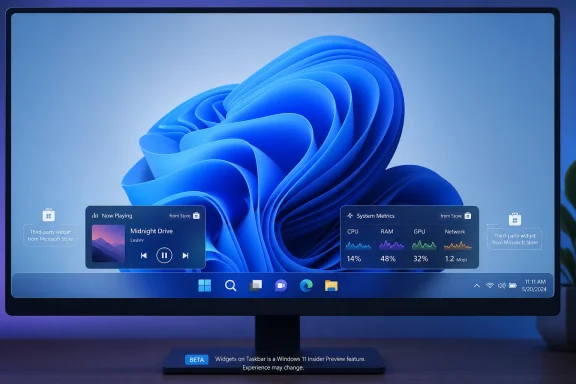
WidBar is a free Microsoft Store application for Windows 11 version 22621 or later. The host runs from the system tray, detects open taskbar space, and lets users arrange separately installed widgets through an interactive preview. It supports multiple monitors, individual widget settings, light and dark themes, Windows-style flyouts, optional startup launch, and direct repositioning by dragging widgets on the taskbar.
The official showcase contained seven widgets in early August 2026:
- System Metrics — CPU, memory, GPU, storage, network, and supported temperature readings.
- Media Now Playing — artwork, title, source, playback position, and media controls for applications that report sessions to Windows.
- Pomodoro Focus — configurable focus sessions and a stopwatch.
- Stock Watcher — selected prices and daily market movement.
- Shelf — pinned files and folders, recent items, drag-and-drop access, and clipboard history.
- Weather — current conditions, hourly information, saved cities, and a ten-day forecast.
- News — selected Google News topics, local stories, saved articles, and custom RSS feeds.
Widgets are separate Store packages, not features compiled into the WidBar host. Installing WidBar alone does not install every widget. That modularity is the foundation of the product—and the source of most of its operational tradeoffs.
How the SDK 2.0 architecture works
The public developer template shows that a WidBar widget is an ordinary packaged WinUI 3 application registered through a Windows AppExtension named com.widbar.widget. WidBar discovers the extension, launches its executable, and hosts the UI it returns.
A widget can provide three surfaces:
- A compact preview displayed in available taskbar space.
- A richer flyout opened from the preview.
- An optional settings page hosted by WidBar.
Developers implement a plugin class through WidBar.SDK. The host supplies a per-instance identifier, saved settings, a data directory, preview-refresh requests, flyout controls, and attention signals. Standard WinUI theme resources allow the same widget to follow Windows light and dark modes.
This is different from Microsoft’s built-in Widgets board. WidBar uses its own host and plugin contract; the public template does not turn a widget into a native provider for Microsoft’s board. It occupies taskbar space through WidBar’s runtime while using standard Windows packaging and AppExtension discovery for its plug-in model.
One process per widget package changes the risk model
WidBar runs widget code outside the host process. That separation has useful consequences. A widget can ship its own managed or native libraries without colliding with another widget’s dependency versions, and one crashing widget does not need to take down the entire host.
WidBar documents crash restart with backoff. After three consecutive failures, the widget is disabled until the user re-enables it. Developers can inspect widget-specific logs and a separate host log.
The isolation is not one process for every placed copy. One widget process serves every instance of that widget package, while each placed copy receives its own instance ID and settings. Developers must keep instance state out of static fields or two copies can interfere with one another.
Separate processes also mean separate overhead. In an August developer spot check, the WidBar host used roughly 30–50 MB of memory, while Media and System Metrics used roughly 30 MB and 50 MB respectively. Those are informal observations, not controlled benchmarks, and resource use varies with the widget. The key point is architectural: adding widgets can add processes, memory, timers, network activity, and failure states.
Smart stacks are more than a cosmetic feature
Taskbar space is finite, especially on laptops or systems with many pinned applications. Smart stacks let multiple widgets share one slot. The visible member can rotate, and a hidden widget can request attention when a timer completes or another important event occurs.
The SDK exposes visibility state so well-behaved widgets can pause preview-only polling while hidden. This is important for battery life and background efficiency. A widget that continues refreshing graphics, sensors, feeds, or prices while buried in a stack defeats much of the benefit.
The host also supports direct interaction in a preview. Buttons can receive clicks without opening the flyout, while noninteractive areas can open it. Dragging a file over a preview can ask the host to open a flyout so the drag continues into a larger drop target. Shelf is the clearest example of why that matters.
Standalone and companion widgets create a real developer path
The SDK supports two packaging models.
- Standalone widget: a dedicated MSIX package whose only purpose is the widget.
- Companion widget: a small secondary executable added to an existing packaged WinUI application.
The companion model is the more strategically interesting option. A music application could expose playback controls, a monitoring tool could expose status, or a communications app could expose presence and unread counts without publishing a completely separate product.
The public templates target x64 and ARM64, use .NET 8, WinUI 3, Windows App SDK, and WidBar.SDK 2.0. Store packaging produces an extension manifest and a generated plugin.json containing the widget’s identity, description, category, version, and preferred width.
The template repository is MIT-licensed. That does not mean the complete WidBar host is open source; the public repository provides the widget templates and developer documentation. Users should distinguish an open SDK/template surface from a fully auditable host application.
Microsoft Store distribution helps, but it is not a sandbox
Store distribution gives WidBar and its widgets signed packages, ordinary update delivery, declared product identities, and a familiar uninstall path. It also makes widget discovery simple: install a compatible widget package and WidBar can detect its AppExtension.
The Store listing for the WidBar host nevertheless declares “Uses all system resources” and Internet access. The public widget template requires the restricted runFullTrust capability. In practical terms, users should treat WidBar widgets as desktop applications, not as harmless visual cards confined to a browser-style sandbox.
That is not evidence of malicious behavior. It is a reason to apply normal software trust decisions:
- Confirm the publisher of every widget package.
- Review the package’s permissions and privacy statement separately from WidBar’s.
- Install only widgets whose data access matches their function.
- Remove abandoned widgets that stop receiving updates.
- Do not assume inclusion in WidBar’s optional showcase constitutes a security audit.
The official showcase is a public catalog, while installation still comes from Microsoft Store. A developer can also distribute a compatible Store package without appearing in the showcase. That openness is useful for growth, but it means WidBar is a host ecosystem rather than a single-vendor bundle.
Privacy needs to be evaluated per widget
WidBar’s own site states that the host, website, and showcase do not collect, use, or sell personal information. It also warns that third-party widgets may have their own services, behavior, and collection practices.
The current Microsoft Store metadata introduces an avoidable inconsistency: the host’s privacy link points to a page under a different product site rather than WidBar’s dedicated privacy page. That does not prove different data handling, but it makes the Store disclosure harder to verify and should be corrected by the publisher.
Data exposure depends heavily on the installed widgets. System Metrics reads local hardware and performance data. Media observes active media sessions. Shelf handles files, folders, recent items, and clipboard history. Weather, stocks, news, and RSS necessarily retrieve network content. Each of those has a different threat and privacy profile.
For managed endpoints, a single allow decision for the WidBar host is therefore insufficient. Administrators need an inventory of the actual widget packages and publishers.
The current Store package is not especially small
Microsoft Store currently reports an approximate WidBar package size of 279 MB and a maximum installation size around 302 MB. That is substantial for a taskbar host, although it likely reflects bundled desktop runtime and framework components rather than the visible interface alone.
The host supports x86, x64, and ARM64 packages according to Store metadata, while the public widget templates recommend x64 and ARM64 for Windows 11. The minimum supported operating system is Windows 11 build 22621.
The August 10 Store update added direct taskbar repositioning, retained configuration after removing and re-adding a widget, flyout-size persistence, and general stability improvements. These are meaningful maturity improvements because layout persistence and shell interaction are precisely where a taskbar utility can become irritating if state is lost.
What administrators should test
WidBar remains a young, shell-adjacent ecosystem. Before allowing it broadly, test the actual host and chosen widget set rather than judging screenshots.
- Shell compatibility: Windows cumulative updates, taskbar alignment, auto-hide, multiple monitors, display rotation, scaling, and Explorer restarts.
- Resource behavior: idle and active CPU, memory per widget process, network polling, battery impact, and whether hidden smart-stack members pause work.
- Failure recovery: a crashed or hung widget, repeated restart behavior, host restart, sign-out, and configuration recovery.
- Security controls: Store allowlisting, AppLocker or WDAC behavior, full-trust declarations, outbound destinations, and package update ownership.
- Data handling: clipboard history, dropped files, media-session metadata, hardware telemetry, saved locations, feeds, and financial watchlists.
- Accessibility: keyboard navigation, screen readers, contrast, animation, taskbar focus order, and high-DPI rendering.
Organizations should also decide whether taskbar widgets are information only or can perform actions. A passive VPN-status indicator is a different risk from a widget that changes configuration, opens files, or triggers a business workflow.
The opportunity is larger than seven widgets
WidBar’s most important feature is not any individual widget. It is the companion-app contract. If developers adopt it, existing Windows applications can expose small, contextual controls without forcing users to open a dashboard.
That model is especially attractive for utilities, media players, timers, device-management clients, backup tools, communication apps, and developer services. The taskbar works best when the information is glanceable, the action is immediate, and the widget is quiet when nothing requires attention.
The danger is turning the taskbar into another feed. News, stocks, weather, notifications, and third-party extensions can quickly consume the same space and attention WidBar was designed to reclaim. Smart stacks solve physical space; they do not solve information overload.
Bottom line
WidBar has progressed from a clever two-widget beta into a credible small platform. Seven showcase widgets, SDK 2.0, standalone and companion packages, smart stacks, process recovery, ARM64 tooling, and active Store updates give developers and enthusiasts something concrete to evaluate.
It should still be treated as a full-trust, shell-adjacent desktop ecosystem. The Store distribution path is useful, but each widget remains code with its own publisher, permissions, data, network behavior, and maintenance lifecycle. The public templates explain the widget side well; they do not make the entire host independently auditable.
For enthusiasts, that trade can be reasonable. For enterprises, WidBar should enter through the same application-control, privacy, performance, and update review used for any other extensible desktop platform. Its success will depend less on how many widgets it accumulates than on whether those widgets remain useful, restrained, secure, and reliable across Windows updates.
