
The list holds up because each program reduces friction in an area where Windows still leaves important trade-offs. VLC is the compatibility player; 7-Zip remains the full archive utility; Everything is a filename locator built for speed; and PowerToys is Microsoft’s expanding set of power-user workflow tools. Their longevity is real. So is the operational difference between putting them on a personally managed laptop and making them standard software on a business fleet.
How-To Geek presents the four as enduring essentials. The closer look is that Windows has absorbed part of what made some of them indispensable, while the remaining gaps are more specific—and in a few cases more important—than the usual “Windows should have done this already” framing suggests.
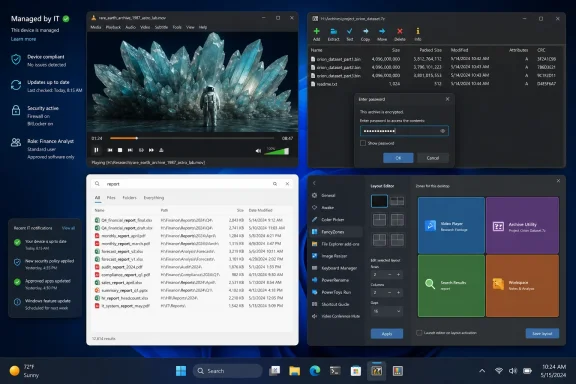 VLC Still Solves the Awkward Media File Problem
VLC remains the cleanest recommendation on the list for people who receive local media files from outside their usual services: recordings from cameras, old DVDs, unusual audio containers, downloaded clips, surveillance exports, network streams, and files created by somebody else’s editing suite. VideoLAN describes VLC as free and open-source software capable of playing most multimedia files, discs, devices, and streaming protocols without separate codec packs.
That last part is the real benefit. The old Windows habit of searching for a codec pack was never merely inconvenient; it created a reliable route to bundled installers, dubious downloads, and software nobody could account for later. VLC’s value is that it consolidates playback support in a known application rather than sending users hunting for a decoder every time a .mkv, .flac, or unfamiliar video export refuses to open.
Its role today is less “replace the default media player” than “keep one dependable compatibility tool available.” Windows’ own Media Player is adequate for common consumer formats and streaming services have moved many viewing habits into the browser or dedicated applications. VLC earns its place when the file is local, odd, legacy, or simply not behaving.
For managed endpoints, however, VLC should be treated like any other media parser exposed to untrusted files: install it from VideoLAN or a controlled package source, keep it current, and do not confuse an open-source reputation with an exemption from patching. The same compatibility breadth that makes VLC useful also means it processes a broad range of file types.
Windows 11 Narrowed 7-Zip’s Everyday Advantage
7-Zip is still the strongest example of a program Windows adopted around without fully replacing. Microsoft now says Windows 11 version 24H2 can create and extract ZIP archives and work with ZIP, RAR, 7z, and TAR files. That removes the old assumption that every PC needs a third-party archive program merely to open a downloaded .rar or .7z file.
But Microsoft’s own support documentation identifies the line Windows has not crossed: Windows 11 24H2 does not support operations on encrypted archives. Microsoft explicitly points users toward third-party tools such as 7-Zip or WinRAR for creating or decompressing them. 7-Zip also continues to offer its own 7z format, LZMA/LZMA2 compression, AES-256 encryption for 7z and ZIP archives, and a mature command-line toolchain.
That changes the practical recommendation. A user who only extracts ordinary ZIP files may no longer need 7-Zip at all. A user who exchanges password-protected archives, works with software packages and disk images, needs repeatable command-line compression, or wants predictable Explorer context-menu operations still has a concrete reason to install it.
The security maintenance point is no longer theoretical. The official 7-Zip download page lists version 26.02, released June 25, 2026. The National Vulnerability Database records that versions 9.34 through 26.00 were affected by CVE-2026-48092, a 32-bit-build flaw involving crafted SquashFS data, and says version 26.01 fixed it. The record also exposes a useful warning about relying on one severity label: NVD scored the issue 8.1 High, while the GitHub security advisory acting as the CVE source scored it 4.3 Medium. Both records agree on the affected versions and the fix; they differ on the impact assessment.
For administrators, that is the important part. “Free” does not mean “set and forget.” If 7-Zip is part of the standard image, it needs an owner, inventory coverage, and a defined update path. The current official download page provides both executable and MSI packages for x64, x86, and ARM64 Windows, which makes controlled deployment possible; it does not make unmanaged old versions acceptable.
Everything Is Faster Because It Searches Less
Everything is the application in this group most likely to be misunderstood. It feels dramatically faster than Windows Search because it is built around a different job: locating files and folders by name. Voidtools says Everything initially indexes every file and folder name, can build its database in seconds on a fresh Windows 11 installation, and keeps NTFS results current using the USN Change Journal.
That is an elegant design decision, not magic. If a user remembers that a document was called Budget-FY26-Final.xlsx, knows it was probably a PDF, or wants every folder containing “drivers,” Everything can return the answer with very little ceremony. Its results update as paths and filenames change, and the simple query interface remains faster to operate than navigating several Explorer windows.
The limitation belongs in the recommendation as prominently as the speed claim. Everything can search file contents using its content: function, but Voidtools says content is not indexed and those searches are slow. Windows Search, by contrast, is designed to index file names, properties, and—in supported and configured formats—full text through its indexing infrastructure. It also serves a broader role across applications, settings, people, mail, and system search surfaces.
So Everything does not replace Windows Search; it specializes in the task Windows Search is not optimized to foreground. It is a superior filename-and-path finder, especially for technical users working across large local NTFS volumes. It is not the right answer when someone needs to find a sentence inside a Word document, an email message, or a scanned PDF.
There is also a deployment detail that personal recommendations often skip. Voidtools says NTFS indexing requires either the Everything service or running the program with administrative privileges. On a personal machine, that is a small setup choice. On a managed device, it affects elevation, service policy, support expectations, and whether a user can search all intended volumes. The application is freeware, but it is not a no-configuration utility in every environment.
PowerToys Is Microsoft’s Optional Windows Layer
PowerToys is different from the other three because Microsoft publishes it, documents it, and distributes it through the Microsoft Store, GitHub releases, and WinGet. Microsoft describes the package as a collection of utilities intended to tune and streamline Windows for power users. That makes it easier to support than an unknown third-party tweak suite, but it still should not be confused with a built-in Windows component.
Its best modules fix narrow, recurring problems. FancyZones gives multi-window and multi-monitor users custom layouts beyond the defaults they get from normal snapping. PowerRename performs previewable bulk rename operations, including search-and-replace and regular expressions. Always On Top pins a selected window above others with a keyboard shortcut. PowerToys Run and Command Palette can shorten the path to applications, files, commands, extensions, clipboard history, and other daily actions.
The program’s strength is also its deployment complication: installing PowerToys means enabling a collection of tools, some with global keyboard shortcuts, background components, shell integration, configuration files, and behavior that can surprise an untrained user. An IT department that installs it everywhere but leaves every module enabled has not standardized a productivity tool; it has created a new support surface.
Microsoft’s own documentation provides per-user and machine-wide WinGet installation options, and it now supports configuration through Desired State Configuration resources for individual utilities such as FancyZones, Always On Top, and PowerRename. That is the signal that PowerToys can be managed deliberately. The right approach is to select the modules that solve a demonstrated problem, configure them consistently, and disable the rest.
PowerToys also serves as a reminder that a feature outside Windows is not necessarily a feature Microsoft has forgotten. It is often a feature that changes behavior across the desktop, has a specialized audience, or needs rapid iteration without becoming a permanent operating-system commitment.
A Better Default Is a Role-Based Install Set
The four-app list is a solid personal setup checklist, but it is not a one-size-fits-all Windows baseline. The difference matters most on shared PCs, corporate devices, family systems maintained by someone else, and machines that will be handed off years later.
- VLC belongs on systems that regularly open diverse local media files, not necessarily on office PCs that only play browser video and Teams recordings.
- 7-Zip belongs where encrypted archives, unusual archive formats, command-line automation, or advanced compression are routine; Windows 11 24H2 covers more casual extraction than many older recommendations acknowledge.
- Everything belongs on workstations where users search large local NTFS stores by filename and path, with its service and indexing requirements understood in advance.
- PowerToys belongs where specific modules save repeated effort, rather than as an unchecked bundle of desktop behavior changes.
The value of all four is durability: each survives because it reduces a real daily annoyance more directly than the Windows default. The consequence is equally durable: a tool installed on every new PC becomes part of that PC’s maintenance burden. Install these applications for the problem each solves, update them as software rather than treating them as timeless utilities, and Windows gets meaningfully better without turning a clean build into an unowned collection of “essential” extras.
