
Windows 11 Insider build 26300.9032 adds a hover preview for recent phone messages and notifications in the Start menu, letting users read more of an alert without opening Phone Link or reaching for the handset. The feature is a small interface change with a larger practical effect: notification content that previously required an explicit click can now be exposed by merely moving the pointer over the Recent section.
Microsoft documented the change in its July 31 release notes for the Windows Insider Experimental channel. Android Authority first highlighted the test as part of Microsoft’s broader effort to place Phone Link activity directly in Start, rather than confining it to the standalone Phone Link app. Insiders need Windows 11 version 26H2 build 26300.9032 and Phone Link version 1.26021.3.0 or later, but Microsoft is using a gradual rollout, so qualifying devices may not receive it immediately.
The important qualification is that Microsoft’s own announcement calls this a feature for a linked “mobile device”; it does not say the preview is restricted to Android. Android Authority’s framing reflects its Android-focused reporting and the Android example shown, but the official release note does not establish the platform boundary. Microsoft supports Phone Link notification syncing on both Android and iPhone, though it has not separately confirmed that this specific Start-menu hover experience is available to iPhone users.
The new behavior applies to recent messages and notifications shown inside Start’s Phone Link companion area. Hovering an item displays its contents in a preview bubble, which means a LinkedIn alert, incoming message, or other synced notification can be assessed without opening the item itself.
That removes a click from the workflow, but it also changes the interaction model. Windows has long used hover states for tooltips and taskbar thumbnails; Microsoft is now applying that passive action to content arriving from a second device. For a user clearing routine alerts while working, that is convenient. For anyone sharing a screen, using a laptop in public, or opening Start during a meeting, the same convenience can make message text visible sooner than expected.
Microsoft’s wording is specific about the objective: users should be able to decide whether a notification needs attention without opening it or picking up the phone. The company does not say how much text is exposed for different notification types, whether previews are truncated consistently, or whether the preview respects every per-app notification privacy setting already configured on the phone. Those are consequential omissions because Phone Link is often used precisely to centralize work and personal alerts on a single PC.
An independent ElevenForum walkthrough shows a Notification previews control under Phone Link’s Settings > Start menu personalization page. Microsoft’s release note directs users to that same Start-menu personalization area, though it does not spell out the control’s default state. Insiders who receive the feature should check the setting before assuming that preview content remains hidden until clicked.
That is the key technical limit on the new preview. A user should not expect a hover card in Start to become a shortcut for authentication codes or other Android-protected alerts. The limitation is enforced before the notification reaches Phone Link, so it applies equally to the Phone Link notification feed and to the new Start-menu surface.
Microsoft also documents several ways ordinary Android notification sync can fail or be restricted. Low laptop battery, Battery Saver, Focus Assist, Android battery optimization, and revoked notification-access permissions can stop or interrupt delivery. Samsung Secure Folder notifications are another explicit exception: they remain on the phone and do not appear in Phone Link.
The feature therefore increases visibility only for alerts that already pass through the existing Phone Link pipeline. It does not represent a new message-syncing mechanism, a workaround for Android 15’s sensitive-notification rules, or an expansion of the types of data Windows can retrieve from an Android device.
Microsoft has also included its standard warning for Experimental features: they can change, be removed, or never ship outside the Insider program. There is no stated timeline for Dev, Beta, Release Preview, or general Windows 11 availability. There is no statement that the feature will arrive with a particular 26H2 servicing release.
A version-history wrinkle reinforces why users should not treat every third-party build reference as a guaranteed activation path. ElevenForum’s August 1 tutorial says notification previews began with Experimental build 26300.8772 and references a different Phone Link version threshold. But Microsoft’s official July 6 release notes for build 26300.8772 contain no Phone Link preview announcement, while the July 31 notes for build 26300.9032 explicitly introduce the hover behavior and specify Phone Link 1.26021.3.0 as the minimum version.
That does not prove the UI could not have appeared earlier for some testers: controlled rollouts can be server- or feature-flag mediated, and Microsoft’s changelogs are not always exhaustive. It does mean the primary record supports 26300.9032 as the public announcement point, not 26300.8772. For troubleshooting, Microsoft’s stated requirements should take priority over an earlier community-reported build association.
For personal PCs, that can be useful. A user can inspect a message preview, decide it is unimportant, and continue working without opening a separate app window. The value is less about new phone functionality than about reducing interruption cost.
For managed PCs, the change deserves a privacy review before it reaches broader channels. A phone notification preview may contain client names, calendar information, direct-message text, delivery alerts, or other content that is acceptable in a dedicated Phone Link window but undesirable on a projected display. Microsoft’s announcement does not describe enterprise policy controls, Microsoft Intune management, audit behavior, or a separate organization-wide switch for the Start-menu preview.
The practical response for Insider users is straightforward:
The important qualification is that Microsoft’s own announcement calls this a feature for a linked “mobile device”; it does not say the preview is restricted to Android. Android Authority’s framing reflects its Android-focused reporting and the Android example shown, but the official release note does not establish the platform boundary. Microsoft supports Phone Link notification syncing on both Android and iPhone, though it has not separately confirmed that this specific Start-menu hover experience is available to iPhone users.
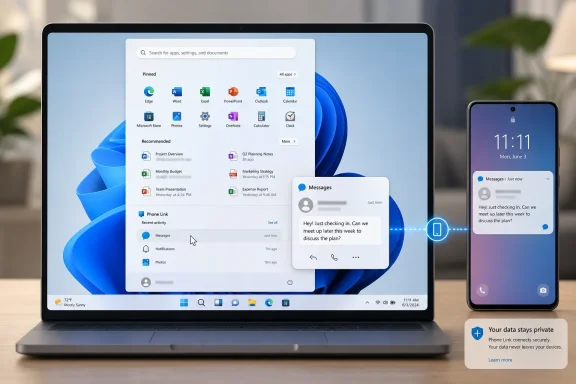 Start now reveals the content behind a recent alert
The new behavior applies to recent messages and notifications shown inside Start’s Phone Link companion area. Hovering an item displays its contents in a preview bubble, which means a LinkedIn alert, incoming message, or other synced notification can be assessed without opening the item itself.That removes a click from the workflow, but it also changes the interaction model. Windows has long used hover states for tooltips and taskbar thumbnails; Microsoft is now applying that passive action to content arriving from a second device. For a user clearing routine alerts while working, that is convenient. For anyone sharing a screen, using a laptop in public, or opening Start during a meeting, the same convenience can make message text visible sooner than expected.
Microsoft’s wording is specific about the objective: users should be able to decide whether a notification needs attention without opening it or picking up the phone. The company does not say how much text is exposed for different notification types, whether previews are truncated consistently, or whether the preview respects every per-app notification privacy setting already configured on the phone. Those are consequential omissions because Phone Link is often used precisely to centralize work and personal alerts on a single PC.
An independent ElevenForum walkthrough shows a Notification previews control under Phone Link’s Settings > Start menu personalization page. Microsoft’s release note directs users to that same Start-menu personalization area, though it does not spell out the control’s default state. Insiders who receive the feature should check the setting before assuming that preview content remains hidden until clicked.
Android 15 still blocks the notifications users may care about most
The hover preview does not bypass Android’s notification privacy protections. Microsoft’s Phone Link support documentation says Android 15 and later can classify certain alerts as sensitive, including one-time passcodes, two-factor authentication codes, and similar content. Phone Link cannot display those notifications; it substitutes a notice that sensitive content is hidden.That is the key technical limit on the new preview. A user should not expect a hover card in Start to become a shortcut for authentication codes or other Android-protected alerts. The limitation is enforced before the notification reaches Phone Link, so it applies equally to the Phone Link notification feed and to the new Start-menu surface.
Microsoft also documents several ways ordinary Android notification sync can fail or be restricted. Low laptop battery, Battery Saver, Focus Assist, Android battery optimization, and revoked notification-access permissions can stop or interrupt delivery. Samsung Secure Folder notifications are another explicit exception: they remain on the phone and do not appear in Phone Link.
The feature therefore increases visibility only for alerts that already pass through the existing Phone Link pipeline. It does not represent a new message-syncing mechanism, a workaround for Android 15’s sensitive-notification rules, or an expansion of the types of data Windows can retrieve from an Android device.
The rollout language matters more than the build number
Build 26300.9032 is an Experimental-channel Windows 11 26H2 preview delivered through an enablement package. Microsoft says these builds use Controlled Feature Rollout technology, enabling a change for a subset of eligible Insiders and expanding it while the company monitors feedback. Installing the build and updating Phone Link therefore establishes eligibility, not entitlement.Microsoft has also included its standard warning for Experimental features: they can change, be removed, or never ship outside the Insider program. There is no stated timeline for Dev, Beta, Release Preview, or general Windows 11 availability. There is no statement that the feature will arrive with a particular 26H2 servicing release.
A version-history wrinkle reinforces why users should not treat every third-party build reference as a guaranteed activation path. ElevenForum’s August 1 tutorial says notification previews began with Experimental build 26300.8772 and references a different Phone Link version threshold. But Microsoft’s official July 6 release notes for build 26300.8772 contain no Phone Link preview announcement, while the July 31 notes for build 26300.9032 explicitly introduce the hover behavior and specify Phone Link 1.26021.3.0 as the minimum version.
That does not prove the UI could not have appeared earlier for some testers: controlled rollouts can be server- or feature-flag mediated, and Microsoft’s changelogs are not always exhaustive. It does mean the primary record supports 26300.9032 as the public announcement point, not 26300.8772. For troubleshooting, Microsoft’s stated requirements should take priority over an earlier community-reported build association.
Phone Link is becoming part of the shell, not just an app
This test continues a shift Microsoft began when it placed the Phone Link companion experience in Start: phone status, photos, calls, messages, and recent activity increasingly appear in the Windows shell itself. The design reduces context switching, but it also makes Start a more data-bearing screen than its traditional role as an application launcher.For personal PCs, that can be useful. A user can inspect a message preview, decide it is unimportant, and continue working without opening a separate app window. The value is less about new phone functionality than about reducing interruption cost.
For managed PCs, the change deserves a privacy review before it reaches broader channels. A phone notification preview may contain client names, calendar information, direct-message text, delivery alerts, or other content that is acceptable in a dedicated Phone Link window but undesirable on a projected display. Microsoft’s announcement does not describe enterprise policy controls, Microsoft Intune management, audit behavior, or a separate organization-wide switch for the Start-menu preview.
The practical response for Insider users is straightforward:
- Update to Windows 11 Insider Experimental build 26300.9032 and ensure Phone Link is at version 1.26021.3.0 or newer if the test has not appeared.
- Open Phone Link and review Settings > Start menu personalization to see whether Notification previews is available and enabled.
- Treat the feature as an additional on-screen disclosure surface, particularly on shared, public, or meeting-room displays.
- Do not rely on it for Android 15 authentication codes or alerts marked sensitive, because those remain blocked from Phone Link.
References
- Primary source: Android Authority
Published: 2026-08-03T17:44:26+00:00
Loading…
www.androidauthority.com - Related coverage: support.microsoft.com
Troubleshooting notifications in the Phone Link | Microsoft Support
Troubleshooting notifications in the Phone Linksupport.microsoft.com - Related coverage: learn.microsoft.com
Loading…
learn.microsoft.com - Related coverage: elevenforum.com
Loading…
www.elevenforum.com - Related coverage: support.microsoft.com
Loading…
support.microsoft.com - Related coverage: microsoft.com
Loading…
www.microsoft.com - Related coverage: blogs.windows.com
Loading…
blogs.windows.com - Related coverage: blogs.windows.com
Loading…
blogs.windows.com - Related coverage: learn.microsoft.com
Loading…
learn.microsoft.com - Related coverage: aztcs.apcug.org
Loading…
aztcs.apcug.org