 Background / Overview
The Canary Channel remains Microsoft’s earliest public testbed for experimental platform work — a place where low‑level plumbing, UI experiments, and gated feature toggles are tried on a subset of Insiders before (sometimes) moving to Dev and Beta. Builds in this channel are often released with limited documentation and are commonly staged via server‑side toggles (Controlled Feature Rollout) so Microsoft can watch telemetry and feedback osure. For that reason, Insiders should expect partial rollouts, incomplete localization, and behaviors that may change quickly across subsequent flights.
This particular flight — identified in the announcement as Build 28020.1737 and packaged under KB 5079452 in the release notes provided to Insiders — is small on headline features but important in what it signals: closer integration between pen hardware actions and the system’s Copilot key behavior, plus the usual Canary warnings about instability, limited documentation, and the requirement that returning to a more stable channel may require a clean Windows install. Those policy points are repeated in Microsoft’s Canary guidance and the build announcement.
What’s in Build 28020.1737
A focused change: Pen settings refinement
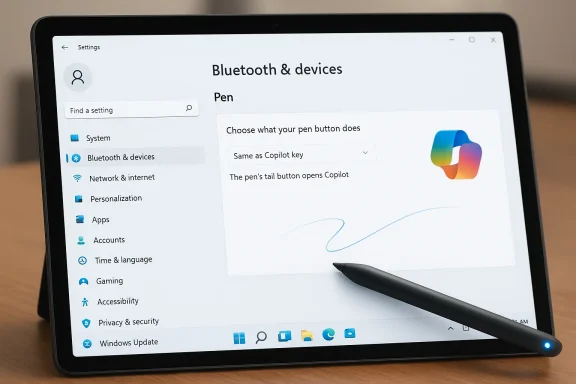
The announcement identifies one user-facing refinement rolling out gradually with a server toggle: updates to the Pen settings page, including small adjustments to the options for the pen tail button. The notable addition is a new option labelled “Same as Copilot key”, which — when enabled — lets the pen tail button launch the same app or action as the device’s Copilot key. This ties the physical pen behavior directly to Microsoft’s Copilot trigger, an intuitive mapping for users who want consistent one‑press access to an assistant or a chosen experience.
Microsoft asked Insiders to send feedback via Feedback Hub under Devices and Drivers > Bluetooth – Keyboards, Mice, and Pens, signaling that the company is looking for interaction and reliability feedback for pen and peripheral combos. That is a clear invitation to testers: try the new option, report what breaks, and provide repro information so the team can refine behavior and compatibility.
Rollout mechanics and documentation caveats
As with recent Canary flights, the change is being delivered via Controlled Feature Rollout an immediate, universal switch. That means:
- Only a subset of Insiders will see the new option at first.
- Microsoft will ramp the change gradually based on telemetry and feedback.
- The announcement intentionally includes minimal technical detail, because feature gating and experimental device behavior are still in flux.
Microsoft also reiterates standard Canary warnings: desktop watermarks are expected, documentation may be limited, localization may be incomplete in early previews, and switching out of Canary to a lower build‑number channel typically requires a clean install. Insiders must plan accordingly before opting in.
Why the pen tail ↔ Copilot key link matters
Unified triggers for muscle memory and accessibility
For users who rely on pens — Surface devices, many convertible tablets, and a wide range of Wacom/third‑party styluses — the physical pen tail button is one of the few hardware gestures readily accessible without touch or keyboard shortcuts. Aligning that button’s action with the Copilot key provides a consistent single‑press entry point to the same assistant function, reducing friction.
This is useful for:
- Creators who switch between pen and keyboard and want the assistant to be reachable identically from either input method.
- Accessibility scenarios where a single hardware press (rather than navigating system UI) is preferable.
- Workflows where rapid context capture or search via Copilot is part of the pen’s use case (e.g., annotating a screenshot and immediately asking Copilot to summarize).
These are design benefits Microsoft appears to be testing with this build — a small change with potentially outsized UX impact if implemented thoughtfully.
Device and driver compatibility — the real friction point
The flip side is mechanical and driver diversity. Pen tail buttons are exposed to Windows in different ways depending on vendor drivers, Bluetooth or HID stack implementation, and firmware. Mapping the pen tail to the Copilot key implicitly requires consistent scancodes/events and clear driver behavior across devices.
Potential friction includes:
- Inconsistent mappings between pen hardware vendors (some pens report only a generic button, others expose multiple virtual buttons).
- Interference with existing pen‑oriented workflows (e.g., drawing apps that already use the tail button for Undo, Erase, or contextual menus).
- Conflicts with OEM‑supplied utilities that already repurpose the tail button.
Insiders should pay close attention to how the change affects their most‑used creative apps and report regressions via the Feedback Hub as requested.
Security, privacy, and telemetry considerations
Tying hardware to the Copilot key raises a few architecture and privacy questions that Insiders and IT pros should think about:
- Trigger telemetry: if Copilot features are gated by device capabilities or personalized assistant settings, mapping the pen tail may require additional telemetry to determine context and available actions. Microsoft’s staged rollouts and telemetry analysis are designed to observe such patterns before increasing exposure.
- Permission surfaces: Copilot integrations can involve local indexing or cloud connectivity (depending on the specific Copilot capability). Ensure you understand whether the new mapping merely launches a local app or triggers data‑intensive AI features that might leverage cloud services.
- Attack surface: hardware mappings that automatically open system services can be inconvenient if they produce modal UI or require network access at inopportune times. If malioof button events, there may be knock‑on implications for automation and unintended triggers. While no specific vulnerability is linked to this build, it’s prudento validate expected behavior in lab environments.
If you manage devices in a corporate fleet, treat this Canary feature as experimental and validate behavior under your security policies before broad deployment.
Rollout risks and stability — what to expect
The Canary Channel’s mission means risk is baked into the experience. Observed patterns from recent Canary flights illustrate the tradeoffs Insiders accept:
- Builds often arrive with incomplete documentation and features behind server toggles, making it unclear whether a control will persist to later flights.
- Some Canary changes are platform‑level experiments (for example, early Copilot and on‑device AI gating) that never ship broadly; they’re designed to explore engineering directions rather than ship polished experiences.
- Localization and accessibility text may be incomplete; if you find language issues, Microsoft asks for Feedback Hub reports to ensure those gaps are addressed.
Practically, expect limited initial availability of the “Same as Copilot key” option, potential UI polish issues in Settings, and behaviors that may change in the next Canary drop. For mission‑critical work, avoid running Canary on primary machines.
How to test and report feedback (practical steps)
Microsoft explicitly pointed Insiders to Feedback Hub under Devices and Drivers > Bluetooth – Keyboards, Mice, and Pens. Follow these practical steps to validate and report behavior:
- Check Windows Update > Windows Insider Program to confirm you’re on the Canary Channel and that the build 28020.1737 (or your current 28020.x build) is installed. If you do not see the new option, remember it may be staged — give it time or check other Insiders’ reports.
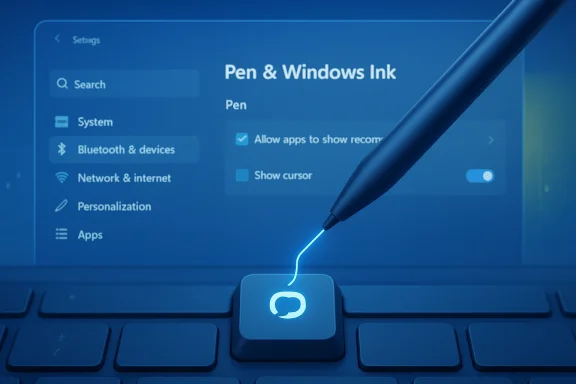
- Open Settings > Bluetooth & devices > Pen & Windows Ink (or the named Pen settings page) and look for the new option “Same as Copilot key” beneath pen tail button options. If you see it, toggle it and exercise both:
- Press the pen tail button and note what app or action launches.
- Press the Copilot key on your keyboard and confirm the action is identical.
- Test with your top creative apps (Photoshop, Affinity Designer, Clip Studio, OneNote, etc.) and with background apps that historically listen for pen buttons (e.g., Bluetooth utilities).
- If behavior differs between pen and Copilot key, capture a Feedback Hub report:
- Open Feedback Hub (WIN + F).
- Choose Report a problem and include Devices and Drivers > Bluetooth – Keyboards, Mice, and Pens as the category.
- Attach a short screen capture or a reproduction video and list the build number and KB reference shown in Settings > Attps://www.reddit.com/r/Windows11/comments/1rst4no/announcing_windows_11_insider_preview_build/)
Use the Feedback Hub’s diagnostic data share option to include logs; Microsoft asked for these specifics to help pinpoint driver or firmware mismatches.
Recommendations for Insiders and IT pros
- Insiders (power users & creators): If you’re comfortable with instability, test the new mapping to see whether it benefits your workflow. Focus testing on app compatibility and whether the new behavior interferes with established pen shortcuts.
- Photographers / designers / illustrators: Watch for collisions between Copilot mapping and app‑specific tail button behaviors. Some drawing apps rely on the tail for Undo or tool toggles; map conflicts could degrade muscle memory.
- IT administrators and security teams: Treat Canary builds as experimental. Don’t rollout Canary devices en mae lab devices to validate driver behavior and ensure that Copilot triggers do not open services that violate corporate data policies. Note that once moved to Canary and opted into certain optional platform streams, returning to a lower channel may require a clean install — plan image and recovery strategies accordingly.
- OEMs & driver vendors: Now is the time to verify scancode exposures and ensure pen firmware exposes consistent events. Work with your device teams to confirm long‑press, double‑press, and tail button events are correctly routed to Windows input layers.
Broader context: where this fits in Microsoft’s strategy
Microsoft’s steady additions of small, device‑level UX experiments — pen mappings, Copilot triggers, voice typing refinements, and Sysmon as an in‑box optional feature earlier this cycle — point to an iterative roadmap where hardware affordances and assistant experiences are being tuned to create a consistent, unified input model on Windows. Recent Canary drops have focused more on integrating Copilot and making assistant triggers uniformly accessible across input devices (keyboard key, pen tail, maybe future touch gestures). This build is another step in that direction.
That iterative approach is sensible from a product‑engineering perspective — it lets Microsoft explore behavior with real users on real hardware — but it has clear tradeoffs for enterprise rollout, documentation completeness, and localization. The Canary corridor is not where polished, enterprise‑ready changes should be expected; it’s where Microsoft experiments and learns.
Verification notes and what we could not independently confirm
- The announcement packaged the flight under a KB number (KB 5079452) in the Insider message provided to Insiders. At the time of writing, the public Flight Hub confirms ongoing 28020.x Canary activity and the general staging approach, but an indexed KB article for KB 5079452 was not discoverable in Microsoft’s public KB index the same way some earlier Canary KBs were. It’s possible Microsoft’s KB pages lag behind channel announcements or that the KB is an internal identifier in the announcement. Insiders tracking exact KB indexing should check Flight Hub and the Windows Insider blog for the official post and Flight Hub entries for the build’s listed KB once Microsoft fully indexes it. Treat the KB reference as part of the blog announcement metadata until Microsoft publishes a separate KB detail page.
- Because this feature is being rolled out behind a server toggle, availability will vary. If you do not see the option immediately it does not necessarily mean your device or drivers are incompatible — it may simply not be enabled for your account or device yet. This is standard practice for Canary feature rollouts.
Checklist: Should you try Build 28020.1737?
- Yes, if:
- You are an Insider comfortable with early, experimental code.
- You rely on pen input how the tail button integrates with Copilot workflows.
- You can accept risk and have backups or test devices available.
- No, if:
- You use your PC for critical production work and cannot tolerate regressions.
- You are responsible for a fleet of managed devices without lab validation.
- You require fully localized and documented features for compliance or training.
If you do try the build, collect feedback in Feedback Hub under Devices and Drivers > Bluetooth – Keyboards, Mice, and Pens and include steps to reproduce, app versions, and whether you’re using OEM‑supplied pen drivers or the default Windows HID stack.
Final analysis — a small change, but the right direction
On paper, Build 28020.1737 is a minor experiment: a small settings tweak. In practice, linking the pen tail button to the Copilot key is a tidy move toward consistent, hardware‑level access to assistant features across input devices. For users and creators, that uniformity can reduce friction; for Microsoft, it’s a low‑risk way to validate demand and compatibility.
But the devil is in the drivers. The user experience will hinge on vendor firmware, drivers, and how well Microsoft handles app collisions and localization. Canary is the right place to surface those mismatches, and Microsoft’s explicit feedback guidance shows the company expects to iterate.
If you value early access and are prepared to test, this build is worth enabling on a secondary device. If you manage a fleet or depend on stability, keep an eye on Flight Hub and the Insider blog for confirmation that the mapping is stable and broadly compatible before considering any adoption.
In short: the feature is small, its ambition is pragmatic, and its success will depend on the ecosystem — the pens, the drivers, and the apps that rely on them. Test, report, and watch this space; small hardware affordances like these often compound into meaningful changes in how Windows feels to use.
Source: Microsoft - Windows Insiders Blog Announcing Windows 11 Insider Preview Build 28020.1737 (Canary Channel)