
MakeUseOf’s Wireshark walk-through of an OpenWrt DHCP server and a Windows 11 client is a useful reminder that a DHCP lease is not merely an address assignment. In one renewal, the server can supply the IP address, subnet mask, default gateway, DNS resolvers, domain-search behavior, lease timers, and even routes that Windows installs into its own TCP/IP stack.
That matters for homelabs as much as enterprise networks. A PXE deployment, segmented lab, or rapidly rebuilt virtual environment becomes far easier to manage when clients receive their network personality automatically instead of relying on per-machine configuration.
The test network used an OpenWrt VM at
As MakeUseOf notes, the actual client address sits in the DHCP packet’s dedicated
In the capture, Windows requested its previous
Windows also sent Option 60 with the vendor class identifier
That history is not just protocol trivia. Mixed networks can still contain old DHCP behaviors, WINS-related settings, proxy discovery, and vendor-specific extensions. Administrators troubleshooting an unexpected proxy, route, or resolver should treat a DHCP capture as a first-line diagnostic tool—not assume that the lease only touched the IPv4 address.
After a fresh lease, Windows adopted the DNS servers and suffix configuration, while PowerShell showed the test route installed with
For Windows admins, the key takeaway is that DHCP-delivered routes and DNS settings can override assumptions made at the desktop. A machine can appear correctly configured in the adapter UI while its effective behavior is being shaped by a scope option, reservation policy, or relay-served DHCP server elsewhere on the network.
That distinction is critical for dual-stack environments: DHCPv4, DHCPv6, and IPv6 Router Advertisements can each influence client behavior. Fixing a Windows name-resolution issue may require examining all three, especially when an IPv6 resolver remains reachable and preferred.
For the upcoming PXE lab that inspired the test, the lesson is straightforward: DHCP can provide far more than an address, but its options must be designed around the client firmware, boot mode, VLAN boundaries, and IPv4/IPv6 path actually in use. The next packet capture may explain not only why a machine received an address, but why it booted, routed, searched, or resolved the way it did.
 The lease is a configuration package
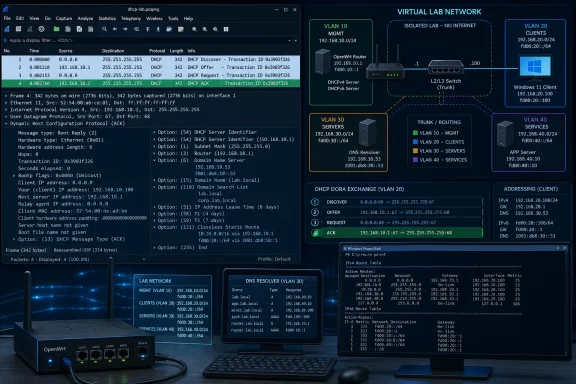
The test network used an OpenWrt VM at 192.168.24.254 as router and DHCP server, with a Windows 11 VM attached through an isolated VMware Workstation network. Capturing ipconfig /release and ipconfig /renew in Wireshark exposed the familiar Discover, Offer, Request, and Acknowledgment exchange—DORA—but also the data packed into the final ACK.As MakeUseOf notes, the actual client address sits in the DHCP packet’s dedicated
yiaddr field, short for “your IP address.” The numbered DHCP options carry much of the remaining configuration: Option 1 for the subnet mask, Option 3 for the router, Option 6 for DNS servers, Option 15 for the domain name, and Options 51, 58, and 59 for the lease, renewal, and rebinding timers.In the capture, Windows requested its previous
192.168.24.138 lease using Option 50. OpenWrt validated the request and reissued the address, then supplied a 12-hour lease with a six-hour T1 renewal point and a 10.5-hour T2 rebinding point. That is the operational difference between a device simply “having an IP” and a client continuously maintaining a managed network configuration.
Windows has a long DHCP shopping list
The more revealing packet was Windows 11’s Option 55 Parameter Request List. Rather than accepting an arbitrary selection of settings, the client listed the options it understands and wants to receive, including DNS, domain name, vendor data, captive-portal information, domain-search lists, Web Proxy Auto-Discovery, and both standard and Microsoft-specific classless static routes.Windows also sent Option 60 with the vendor class identifier
MSFT 5.0, a long-standing compatibility marker that survives in current Windows DHCP traffic. Microsoft’s protocol documentation confirms Windows DHCPv4 clients include this vendor identifier and recognize Option 249, Microsoft’s classless static route format, alongside the standards-based Option 121.That history is not just protocol trivia. Mixed networks can still contain old DHCP behaviors, WINS-related settings, proxy discovery, and vendor-specific extensions. Administrators troubleshooting an unexpected proxy, route, or resolver should treat a DHCP capture as a first-line diagnostic tool—not assume that the lease only touched the IPv4 address.
Four options changed Windows without touching Windows
MakeUseOf then altered the OpenWrt DHCP scope to distribute Quad9 and Cloudflare resolvers through Option 6, setlab.home.arpa through Option 15, added two search domains through Option 119, and pushed a default route plus a route for 198.51.100.0/24 through Option 121.After a fresh lease, Windows adopted the DNS servers and suffix configuration, while PowerShell showed the test route installed with
Dhcp as its route protocol. That is a practical demonstration of DHCP as a lightweight configuration-management plane for endpoint networking.For Windows admins, the key takeaway is that DHCP-delivered routes and DNS settings can override assumptions made at the desktop. A machine can appear correctly configured in the adapter UI while its effective behavior is being shaped by a scope option, reservation policy, or relay-served DHCP server elsewhere on the network.
IPv6 remains a separate control plane
The experiment also found the boundary of that control. Changing DHCPv4 Option 6 altered Windows’ IPv4 resolvers, butnslookup still selected OpenWrt’s IPv6 address because IPv6 DNS was being advertised separately.That distinction is critical for dual-stack environments: DHCPv4, DHCPv6, and IPv6 Router Advertisements can each influence client behavior. Fixing a Windows name-resolution issue may require examining all three, especially when an IPv6 resolver remains reachable and preferred.
For the upcoming PXE lab that inspired the test, the lesson is straightforward: DHCP can provide far more than an address, but its options must be designed around the client firmware, boot mode, VLAN boundaries, and IPv4/IPv6 path actually in use. The next packet capture may explain not only why a machine received an address, but why it booted, routed, searched, or resolved the way it did.
References
- Primary source: makeuseof.com
Published: 2026-07-31T15:00:12+00:00
Loading…
www.makeuseof.com