
That distinction becomes important the moment an administrator enters addresses into a Windows 11 PC, DHCP scope, router, or firewall. A filtered resolver paired with an unfiltered “alternate” resolver does not create a graceful fallback. It creates a network that can lose its malware, phishing, advertising, or adult-content policy when the preferred service does not answer.
MakeUseOf’s August 11 report also contains a more fundamental error: it says DNSSEC “adds and handles encryption for DNS records.” DNSSEC does no such thing. ICANN’s DNSSEC material is explicit that DNSSEC authenticates DNS data; it does not encrypt DNS messages. Encryption between a Windows client and its resolver comes from DNS over HTTPS or DNS over TLS, which Microsoft supports in Windows 11 and which Cloudflare, Google, Quad9, and AdGuard support through their own endpoints.
The practical consequence is straightforward. Typing an IPv4 address into Windows’ DNS fields often changes where requests go, but it does not by itself guarantee that those requests are encrypted on the path between the PC and resolver. A home user who wants both filtering and private transport needs to select a resolver policy and configure DoH or DoT where the device, router, or management platform supports it.
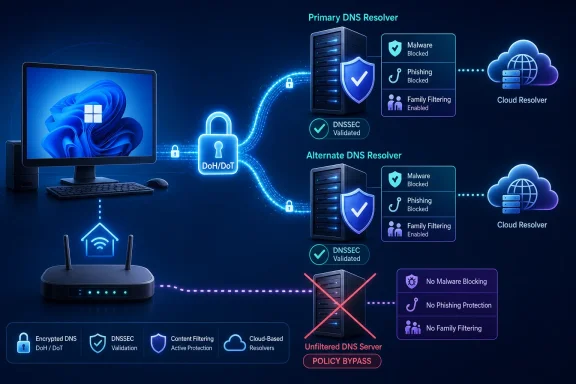 The “secondary” addresses are service pairs, not secret switches
Cloudflare’s documentation makes the model unusually clear. Its ordinary public resolver uses
1.1.1.1and
1.0.0.1as a pair, with no content filtering. Its malware-and-phishing filtering service uses
1.1.1.2and
1.0.0.2; its family resolver, which additionally filters adult content, uses
1.1.1.3and
1.0.0.3.
Those second addresses in each pair are meant to keep name resolution working during a route or service failure. They are not optional decoration. Configuring only
1.1.1.2, as many simplified DNS guides encourage, will work until that particular address is unreachable; configuring the matching
1.0.0.2preserves the same malware-and-phishing policy.
AdGuard uses the same pairing model, but MakeUseOf’s presentation makes the addresses appear more interchangeable than they are. AdGuard documents the following public IPv4 pairs:
| Resolver policy | Preferred resolver | Matching alternate resolver |
|---|---|---|
| Ads and trackers blocked | 94.140.14.14 | 94.140.15.15 |
| Family filtering, Safe Search, and Safe Mode where available | 94.140.14.15 | 94.140.15.16 |
| No filtering | 94.140.14.140 | 94.140.14.141 |
The MakeUseOf article names only one address for each AdGuard option. That omission is not catastrophic for a single desktop, but it is poor deployment guidance for a router or DHCP server intended to serve an entire household.
It also credits AdGuard’s family resolver with malware and phishing protection. AdGuard’s current public-DNS documentation describes that resolver as blocking ads, trackers, adult content and enabling Safe Search and Safe Mode where possible. It does not make the same malware-and-phishing claim in that description. Readers should not assume protections that the provider has not documented for the endpoint they configure.
Quad9 changed the meaning of its “unsecured” endpoint this year
The largest time-sensitive issue is Quad9. MakeUseOf describes
9.9.9.9as its filtering address and
9.9.9.10as the unfiltered alternative, then broadly states that unfiltered services still validate DNSSEC. That generalization used to be especially unsafe for Quad9, because
9.9.9.10historically existed specifically as a non-filtering, non-validating diagnostic-style service.
Quad9 changed that policy on June 15, 2026. In an April announcement, Quad9 said it would enable DNSSEC validation on all service endpoints while retaining
9.9.9.10as a service with no malicious-domain blocking. Its current service documentation describes the
.10service as unprotected from malware blocking but DNSSEC-validating.
So, as of August 11, 2026, an administrator selecting Quad9’s unfiltered service is no longer necessarily giving up DNSSEC validation. They are giving up Quad9’s threat blocking. The proper IPv4 pair is
9.9.9.10and
149.112.112.10, not simply one memorable address.
The more useful correction concerns Quad9’s recommended resolver.
9.9.9.9with
149.112.112.112blocks domains Quad9 identifies as malicious and performs DNSSEC validation. It is not an adult-content filter. A household wanting broad family-category controls should not read “malware filtering” as a substitute for explicit adult-content filtering.
Quad9’s 2026 transition also demonstrates why evergreen DNS advice needs dates. Resolver addresses look like static infrastructure, yet the security guarantees behind an endpoint can change. A blog post that says an address is “unfiltered” without spelling out its current DNSSEC, threat-blocking, privacy, and encrypted-transport behavior can become misleading without a single digit changing.
OpenDNS Home is configured by network, not by individual PC
OpenDNS is another case where MakeUseOf gets the broad choice right but overstates the granularity. Cisco’s OpenDNS FamilyShield is a fixed-policy service designed to block adult content, phishing, and malware. Its public IPv4 resolver pair is
208.67.222.123and
208.67.220.123.
OpenDNS Home is the customizable alternative, and it does require an account. But its controls are attached to a registered public network address in the OpenDNS dashboard. In a normal home deployment, that means the filtering policy applies to devices using that network’s DNS configuration; it is not a genuinely per-device control plane simply because a user enters settings from a PC.
That limitation matters for homes with changing public IP addresses, multiple SSIDs, VPN users, or devices that use their own encrypted DNS. A parent or admin who expects an OpenDNS Home rule to follow one laptop everywhere will discover that the policy is tied to the network setup, unless they use a separate client, router, or managed DNS mechanism that enforces it.
Google Public DNS is the useful counterexample to the article’s “every major free DNS service” premise. Google offers its public resolver at
8.8.8.8and
8.8.4.4, validates DNSSEC, and supports encrypted DNS through DoH and DoT. It does not offer Cloudflare-style public addresses that turn on malware filtering, family filtering, or advertising blocking merely by changing a digit.
That is not a missing feature hidden behind undocumented addresses. It is simply a different product policy.
Windows DNS failover can turn a backup into a policy bypass
Windows administrators should treat the preferred and alternate DNS fields as an availability design, not a menu of different providers or policies. Microsoft’s DNS client documentation explains that Windows begins with the first configured server, then expands its query attempts when a response does not arrive. It can also adjust server preference based on response behavior.
Putting a filtered DNS resolver first and an unfiltered resolver second therefore creates inconsistent enforcement during timeouts or path failures. The same applies to mixing providers with different adult-content, advertising, malware, privacy, or logging policies.
For a Windows 11 endpoint, router, or DHCP scope, use two endpoints from the same resolver policy:
- Use Cloudflare’s
1.1.1.2and1.0.0.2together for malware and phishing filtering, or its1.1.1.3and1.0.0.3together for that filtering plus adult-content blocking. - Use Quad9’s
9.9.9.9and149.112.112.112together for its recommended threat-blocking service. - Use both members of one AdGuard or OpenDNS policy pair rather than mixing a filtered server with an unfiltered backup.
- Use a DNS encryption configuration—DoH or DoT—if the goal includes preventing local-network or ISP-path observers from reading the DNS requests.
Microsoft documents Windows 11 support for both DoH and DoT. That gives administrators a path to encrypted resolver traffic without installing a third-party client, but it does not make DNS filtering a comprehensive web-security control.
DNS filtering is useful, but its boundaries are narrow
Protective DNS works by refusing or redirecting lookups for domains on threat or category lists. Cloudflare says its family resolvers return
0.0.0.0for domains classified as malicious, for example. That can stop a browser or application before it connects to a known bad destination, which is worthwhile as a low-friction layer for unmanaged home devices and networks without a full security gateway.
It cannot inspect a malicious file already downloaded, block a dangerous path hosted on an otherwise legitimate domain, replace browser hardening, or clean an infected PC. It can also produce false positives when a provider misclassifies a domain, while newly registered malicious domains can appear before any resolver has placed them on a blocklist.
CISA’s protective-DNS guidance treats DNS-layer protection as one defensive service among several, which is the right way to read these free offerings. Select one with a policy that matches the network, deploy its complete resolver pair, encrypt the client-to-resolver link where possible, and test the actual behavior from a Windows endpoint.
The addresses are not hidden modes. They are publicly documented service profiles—and using the wrong alternate address can quietly undo the profile an administrator thought they had chosen.