
That distinction is more than Insider-channel trivia. The Experimental channel is Microsoft’s earliest public test track, where features are explicitly subject to controlled rollout, revision, or removal. Release Preview is the final pre-release channel generally used to validate a feature update before wider deployment. Microsoft has confirmed Emoji 17.0 for the former; it has not listed the new emoji among the features in the latter’s 26H2 announcement.
Emojipedia’s visual documentation remains useful: Microsoft has prepared Fluent artwork for the Emoji 17.0 set and has revised several existing designs. But the availability claim needs a narrower reading. For now, the supported route to test the new characters is a Windows Insider installation on the Experimental channel, not a regional servicing update for regular Windows 11 PCs.
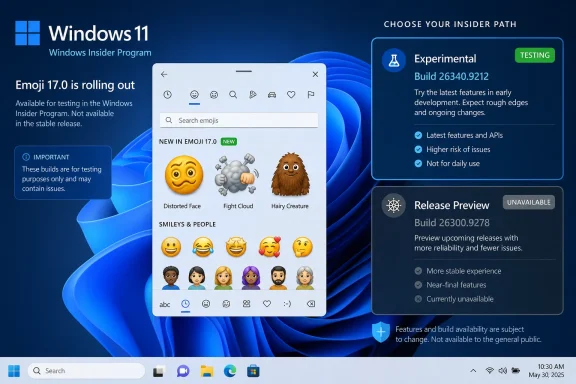 Microsoft’s build numbers tell the story
Microsoft announced Windows 11 version 26H2 for the Release Preview Channel on August 27, 2026. The company identifies that release as Build 26300.9278 and says it can be installed by Release Preview Insiders who manually seek the feature update through Windows Update. Commercial participants in the Windows Insider Program for Business can also begin validation through Windows Update policies and Windows Server Update Services.
The Emoji 17.0 release notes are attached to a different build: 26340.9212. Microsoft published those notes ten days earlier, on August 17, under the Experimental channel. Its documentation says the build is based on version 26H2 and delivered through an enablement package, but it also explicitly describes the emoji additions as a gradual rollout to a subset of Experimental Insiders.
The two builds share a version family, yet that does not mean their feature sets are interchangeable. Microsoft’s 26H2 strategy uses an enablement package for Windows 11 versions 24H2, 25H2, and 26H2 because they share a servicing branch. That lets Microsoft change the version label and activate selected functionality quickly. It does not turn every feature seen in an Experimental build into a Release Preview or general-availability feature.
For administrators, that is the operative fact. An organization piloting 26H2 through Release Preview should not assume it can test Emoji 17.0 simply because its devices have moved to the 26H2 version designation. The build number and Insider channel remain the reliable indicators of whether the feature is actually being evaluated.
What Emoji 17.0 adds to Windows
Microsoft says Emoji 17.0 includes additions such as distorted face, fight cloud, and hairy creature, accessible through the Windows emoji panel with Windows key + period. The company also says it has adjusted existing artwork for saluting face, face with peeking eye, goose, lotus, and kissing cat to improve cross-platform consistency.
Unicode finalized Emoji 17.0 in September 2025 as part of Unicode 17.0. Unicode’s charts list 163 newly defined emoji characters and sequences for the release, a total that includes more than a handful of entirely new pictographs as well as new combinations and skin-tone variants. That distinction is why headline counts can look inflated: implementations may add a small set of new visual concepts while still gaining a much larger number of selectable sequences.
The technical change matters most when a Windows user receives an Emoji 17.0 character from another platform. Before font and application support arrive, the same code point can display as an empty box, a fallback symbol, or an unstyled glyph. Once Windows has the appropriate Segoe UI Emoji data and the app uses the system’s emoji rendering pipeline, that character can appear as Microsoft intended.
Windows’ rollout still does not force a common visual design across the internet. Unicode standardizes the encoded characters and sequences, not the artwork. Microsoft, Apple, Google, Samsung, and individual applications remain free to depict a distorted face or fight cloud differently. The standard is designed to preserve the meaning and interchangeability of text, not to make every rendering identical.
The Fluent design change is partly a font-platform story
Emojipedia notes that Windows’ 3D Fluent emoji are rendering in more places. Microsoft has been moving Windows toward richer color-font rendering since 2023, when it began testing COLRv1 support in Windows 11. COLRv1 is a color-font format that supports features including gradients, allowing emoji artwork to retain more depth than older flat-color font formats.
Microsoft described that change at the time as a way to display emoji with a 3D-like appearance in supported apps and browsers. The qualifier matters. Emoji appearance depends on the text stack used by an individual application, its browser engine, and whether it calls into the relevant Windows font and rendering capabilities. A new system font does not guarantee that every application will display an identical Fluent design on day one.
That is also why an emoji update is more than a cosmetic refresh for developers. Applications that bundle their own fonts, use an older text renderer, rely on remote-session rendering, or substitute a web platform’s emoji assets can show a different result from the Windows emoji panel. The character may be supported while the visual result differs.
Microsoft’s own prior testing history offers a reminder that the pipeline can be fragile. The company temporarily disabled COLRv1-based emoji rendering in Insider builds during late 2023 after bugs caused the updated designs and Unicode Emoji 15 support to disappear. It later restored the functionality. The point is not that Emoji 17.0 is currently broken—Microsoft has announced no such issue—but that emoji support spans fonts, text layout, app behavior, and feature rollout controls rather than a single downloadable picture pack.
A changed design is still a compatibility change
The existing-emoji revisions documented by Emojipedia are likely to draw the most immediate attention because users recognize the old shapes. The site identifies visible changes including a neutral-mouth saluting face, a white goose, a rotated pinching hand, a repositioned lime, and revised lotus, oyster, cupcake, wheel, flashlight, trumpet, and hair-pick artwork.
Microsoft’s release notes corroborate only a subset of that design work by naming saluting face, face with peeking eye, goose, lotus, and kissing cat. The broader inventory and the interpretation that some changes pursue closer visual convergence with competing platforms come from Emojipedia’s analysis. Microsoft has not published a full public change log for every adjusted glyph in Build 26340.9212.
For enterprise IT, the practical impact is limited but real in communications-heavy environments. A message can contain a new Emoji 17.0 sequence before a recipient’s Windows device has a matching font update. The recipient should still receive the underlying text, but may see an unsupported-character box or a different vendor’s graphic in a web app. Help desks should treat that as a client support gap, not as data loss or corruption.
There is no administrative policy in Microsoft’s Emoji 17.0 notes for selectively blocking the new set, and no separate deployment package has been identified. The update appears to be integrated into the Windows feature payload. That means organizations that tightly control Insider enrollment should avoid using an Experimental build merely to obtain emoji support; it also carries unrelated in-development changes, including a redesigned File Explorer context menu, WMIC removal, and Windows Recovery networking changes.
What is confirmed—and what is still missing
Microsoft has confirmed three things: Emoji 17.0 is in the Windows 11 26H2 code line; it is rolling out gradually to some Insiders on Experimental Build 26340.9212; and several existing Fluent emoji designs have changed. Unicode independently confirms that Emoji 17.0 contains 163 new characters and sequences defined in 2025.
What Microsoft has not confirmed is a timetable for moving Emoji 17.0 into Release Preview, monthly servicing for supported production versions, or the eventual general release of 26H2. Its August 27 post says 26H2 is expected to reach general availability later in 2026, but it does not name a date or promise that every Experimental feature will arrive with it.
For now, Windows users who want to verify availability should open winver and check their Insider channel rather than relying on the 26H2 label alone. Emoji 17.0 is presently an Experimental-channel feature in Build 26340.9212; the public Windows 11 rollout has not been announced.