
MakeUseOf highlighted Cross-device Resume, Start menu integration, and expanded Android app windows as evidence that Phone Link has grown beyond notifications and calls. Microsoft’s own support material confirms each capability exists. The record also shows they did not arrive as one unified Phone Link upgrade, and they do not share the same hardware or software requirements.
For Windows users deciding whether to set up Phone Link, that distinction matters. Messaging, calls, photos, and basic file transfer are broadly useful. The more ambitious features—the ones that can actually reduce phone switching during a workday—remain conditional.
 Cross-device Resume has a very short supported-app list
Microsoft’s Cross-device Resume feature places a phone-badged app icon on the Windows 11 taskbar when an eligible activity begins on an Android phone. Clicking the alert should continue that task on the PC, rather than merely opening a mirrored phone screen. Microsoft first previewed the Spotify version for Windows Insiders in August 2025, where the taskbar prompt could install Spotify from the Microsoft Store if it was not already on the PC.
MakeUseOf describes a broader selection that includes Spotify, Office documents, WhatsApp, and Copilot file handoff on phones from Samsung, Honor, Oppo, Vivo, and Xiaomi. Microsoft’s current support page tells a narrower story. Its list, dated January 2026, names Spotify, vivo Browser, and WhatsApp as the supported Resume experiences.
That is a material discrepancy. Microsoft’s documentation may be lagging a staged rollout, or particular Office and Copilot flows may be limited to preview builds, individual phone partnerships, regions, or separately enabled experiences. What readers should not assume is that opening a Word, Excel, or PowerPoint file on Android will reliably produce a Windows taskbar handoff on any linked Phone Link setup. Microsoft does not document that as a generally available Resume scenario.
The more significant limitation is structural: Cross-device Resume depends on app makers participating. Phone Link can provide the Windows taskbar plumbing, but it cannot turn every mobile app into a resumable Windows workload. Spotify works because Microsoft and Spotify have implemented a defined handoff. WhatsApp support continues a conversation in the PC client rather than streaming the entire phone app. That is useful continuity, but it is a long way from a universal Android-to-Windows equivalent of Apple’s Handoff.
Windows developers also have a role here. Microsoft’s documentation for the Continuity SDK positions Cross Device Resume as the recommended implementation path for new task-continuity integrations. The feature’s usefulness will therefore rise or fall on whether major developers build Windows and Android clients that participate—not on Phone Link updates alone.
For now, Resume is best viewed as an opt-in productivity enhancement. On a Windows 11 PC, it is controlled under Settings > Apps > Resume, and Microsoft says it requires Android 10 or later, an internet connection on both devices, Link to Windows on the phone, and the device registered under Windows’ Mobile devices settings.
Start menu controls are more widely useful, but still roll out gradually
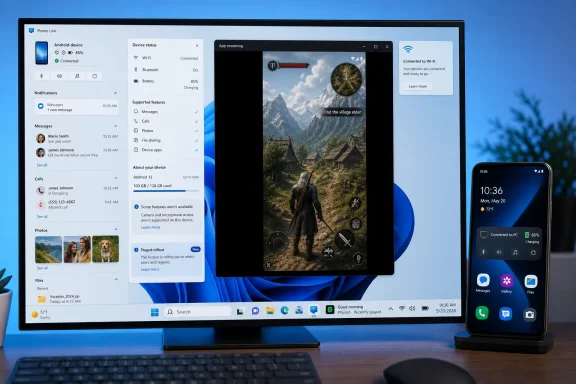
The Phone Link companion panel in the Windows 11 Start menu has become the most broadly practical part of the recent work. It can show phone battery and connectivity status, recent activity, messages, calls, photos, and a file-sharing shortcut without requiring users to first open the full Phone Link app.
Microsoft began testing this Start menu integration with Windows Insiders in June 2024. It expanded the feature in Windows 11 version 24H2’s Release Preview channel in April 2025, and Microsoft later tested single-click Android screen mirroring and grouped mobile-app notifications from Start. In other words, this is not a brand-new August 2026 Phone Link launch; it is the visible result of a long, phased deployment.
Microsoft’s current support page also makes clear that availability is still gradual. It requires Windows 11, a Microsoft account, Phone Link version 1.25032.82.0 or later, and a connected phone. Android connections require Wi-Fi, while iPhone connections use Bluetooth Low Energy. The Start menu companion offers fewer controls on iPhone: users can access battery status, connectivity, messages, calls, recent activities, and file sharing, but not the Android-specific Photos shortcut or app streaming.
That platform divide is important for IT administrators. Phone Link has gained iPhone support, but it has not become a feature-for-feature Windows counterpart to Apple’s iPhone-and-Mac integration. Android remains the platform where Microsoft can offer deeper functions because Link to Windows has permissions and system integration that iOS does not expose.
Users who do not see the panel should check Settings > Personalization > Start for the “Show mobile device in Start” control. If it is absent, updating Phone Link may be necessary—but it may not be sufficient. Microsoft explicitly says the feature is rolling out gradually, which means eligible machines can still be waiting for server-side availability.
Screen mirroring and Android apps remain a supported-device feature
MakeUseOf’s most appealing claim is that a phone can effectively be used from the PC: click the phone icon from Start, open the screen, and interact using the Windows mouse and keyboard. That workflow is real, but the required hardware support is easy to miss.
Microsoft says Phone Link’s Phone screen capability works only on select Android devices in select markets, running Android 10 or later and equipped with Link to Windows. The PC and phone must be on the same Wi-Fi network, and Microsoft calls for a DirectX 11-capable GPU. This is not a generic Android casting protocol that will work with every handset that can install Phone Link.
The same limitation applies to the separate Apps experience, which streams individual Android apps into their own Windows windows. Microsoft’s supported-device documentation names select Samsung, Honor, Oppo, and Asus models for app streaming. The company’s support pages also distinguish between phone-screen mirroring and individual-app windows: they are related but not interchangeable features.
That distinction affects user expectations. Screen mirroring displays the entire phone and behaves like remote interaction with the device. App streaming opens a selected mobile app in a separate window, which is more useful for keeping a chat, shopping app, or media service beside native Windows software. Neither is equivalent to installing an Android app locally on Windows; the phone remains the runtime device, and Wi-Fi quality, handset power management, and app behavior all affect the result.
Microsoft also notes that Phone Link Apps does not support multiple Android user profiles or work/school accounts. That is an especially relevant restriction in managed environments. A personally enrolled Android device may work smoothly, while a work-profile application or a phone shared across profiles may not appear in the Windows app list at all.
Expanded view improves the window, not the compatibility problem
The expanded-view option is a legitimate improvement for supported Android apps. Beginning with Phone Link version 1.25091.39.0, users can switch compatible streamed apps between compact and expanded layouts, or configure Phone Link to open apps expanded by default through Phone Link > Settings > Features > Apps.
The mode does not make a portrait-first phone app into a polished Windows application. It gives the phone app more space and can prompt responsive Android interfaces to adopt a tablet-like layout. Apps designed exclusively around a narrow vertical screen can still show empty space, awkward scaling, or layouts that simply do not benefit from the larger window.
This is where Microsoft’s strategy is more visible than the marketing language. Phone Link is building a bridge from Android workflows into Windows rather than trying to revive Windows Subsystem for Android or run Android software natively on a PC. For communication and quick task completion, that approach avoids the need to install duplicate apps, sign in again, or synchronize another app database. For prolonged work, it still leaves users dependent on a phone connection and a mobile interface that may not have been designed for keyboard, mouse, or a 27-inch display.
The useful setup is more modest than the pitch
Phone Link is worth configuring on a Windows 11 PC if the goal is to keep routine phone interruptions off the desk. The Start menu panel, file sending, messages, calls, and photo access provide immediate value, particularly for Android users. Cross-device Resume is worth enabling if Spotify or WhatsApp fits the user’s day, but it should be treated as an app-specific convenience rather than an operating-system-wide handoff system.
Before relying on app streaming, users should verify their exact phone model against Microsoft’s supported-device list, keep both devices on the same reliable Wi-Fi network, and test the individual Android apps they expect to use. Organizations should also test work-profile behavior rather than assuming that a personal Phone Link setup will translate to managed Android deployments.
Phone Link has indeed moved beyond its origins as a notification mirror. Its problem is no longer a lack of ideas. It is that Windows 11 exposes a growing collection of capabilities whose availability still depends on the particular combination of PC version, Phone Link release, Android maker, connected app, account type, and rollout state.