
The August 13 Windows IT Pro Blog post brings together capabilities that have arrived on different schedules and with sharply different readiness levels. Microsoft Learn documentation and June reporting by BleepingComputer confirm that point-in-time restore has begun rolling out on Windows 11 24H2 and 25H2, while Cloud rebuild remains an Experimental-channel preview. Windows Central’s reporting on Cloud rebuild similarly confirms the important distinction: it is a full reinstall from WinRE that obtains both Windows and device drivers from Windows Update, rather than a conventional reset leaning on local recovery components.
For administrators, the central conclusion is straightforward: recovery is now dependent on endpoint preparation, network access, identity recovery, and data placement. A device that cannot boot is a poor time to discover that WinRE cannot join the corporate wireless network, that its BitLocker recovery key cannot be retrieved, or that the user’s critical files existed only on the local disk.
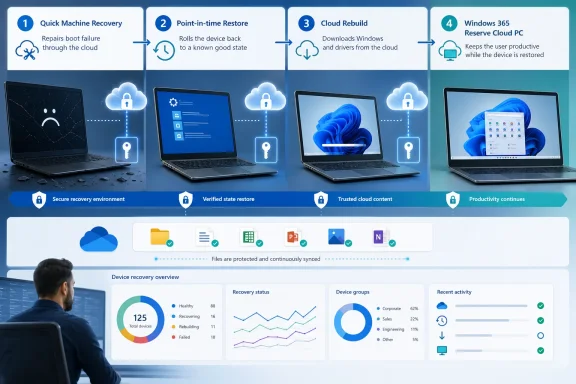 Quick Machine Recovery Is a Targeted Outage Tool
Quick Machine Recovery, or QMR, is the least disruptive of Microsoft’s newer options. When Windows repeatedly fails to start, the system can enter the Windows Recovery Environment, connect to Windows Update, look for a Microsoft-published remediation package, apply it, and reboot. It extends Startup Repair rather than replacing it: Startup Repair remains the local automatic response, while QMR adds a cloud-delivered fix if Microsoft has identified one.
This is designed for the class of incident that made endpoint recovery a board-level concern after the CrowdStrike outage: a broadly deployed change leaves a population of PCs unable to boot, and the normal management agent cannot run because Windows never loads. In that circumstance, an in-band policy reversal through Intune is useless. QMR gives Microsoft a route into WinRE to distribute a narrowly targeted remediation.
There are limits that matter in an enterprise deployment. Microsoft’s current QMR documentation calls it a best-effort feature, not an assurance that every boot failure will have a cloud fix. It will not repair an isolated bad driver, failed storage device, corrupted firmware, or a problem for which Microsoft has no published remediation. If no package is found, the PC returns to the usual WinRE recovery choices.
The network requirement is also more restrictive than the broad phrase “connect to the network” suggests. Microsoft documents support for wired Ethernet and WPA/WPA2 password-based Wi-Fi. That should make IT teams pause before assuming QMR will work on a device sitting outside the office, behind a captive portal, or on a certificate-based enterprise Wi-Fi deployment. The recovery environment needs a usable network driver as well as credentials it can use before the operating system starts.
Microsoft’s Windows IT Pro Blog says QMR is generally available on Windows 11 24H2 and later, but the more specific Microsoft Learn documentation puts a floor under that claim: Windows 11 24H2 needs build 26100.4700 or later. The Recovery CSP documentation lists later build thresholds for managed configuration. Organizations should therefore inventory monthly patch levels instead of treating “24H2” alone as proof that their fleet is ready.
For consumer PCs and unmanaged Pro systems, cloud remediation is enabled by default. Managed Pro, Enterprise, and Education systems default to cloud remediation disabled, so organizations must deliberately enable and test it through the Recovery CSP or the reagentc configuration path. That default is sensible: enterprises get control over whether their unbootable endpoints contact Windows Update from WinRE, but they do not get the benefit unless someone turns it on.
Point-in-Time Restore Can Also Roll Back User Data
Point-in-time restore is the most consequential addition for routine endpoint incidents because it goes beyond the traditional System Restore model. It captures local restore points using Volume Shadow Copy Service, including the Windows installation, applications, settings, and local user files. The default schedule is roughly every 24 hours, with a default retention period of 72 hours.
That makes it potentially valuable after a faulty application deployment, incompatible driver, broken configuration, or damaging local change. It also makes the feature easy to misunderstand as a backup. It is not one.
When an administrator or user selects a restore point in WinRE, the device returns to that complete earlier state. Files created or edited after that snapshot, recent passwords, certificates, encryption keys, installed applications, and configuration changes can disappear. Microsoft explicitly says data held in cloud services such as OneDrive is not affected, but that distinction only protects users whose work was actually synchronized before the restore. Local-only data is part of the rollback.
A restoration window of up to 72 hours is also a recovery convenience, not a retention policy. Microsoft warns that restore points can be removed earlier when storage becomes constrained, Volume Shadow Copy cannot preserve the changes, or free space drops to 20 GB or less. The restore-point storage ceiling is not reserved disk capacity; other activity can consume the room that the recovery feature needs.
The compatibility details are equally important. Point-in-time restore is local-only today, initiated from WinRE, and BitLocker-protected systems require the recovery key to unlock the volume. It cannot restore a snapshot created under a different Windows edition, and Microsoft says use of Encrypting File System, or EFS, prevents system restoration. Devices with multiple volumes only restore the OS volume.
Those restrictions change the deployment checklist. A service desk should verify BitLocker key escrow and recovery workflows before advertising the feature. Security teams should identify any remaining EFS use. Endpoint engineering should model available disk space on smaller systems rather than assuming a full-state snapshot feature will retain three days of history everywhere.
Microsoft says non-managed Home and Pro devices have the feature enabled by default where the OS volume is at least 200 GB. Enterprise-managed PCs, including domain-joined or management-enrolled Pro devices, default to off until Windows 11 version 26H2. That means the organizations most likely to want centrally controlled rollback need to turn it on through policy and validate it themselves. BleepingComputer reported the feature’s staged arrival with the June optional cumulative update, which is a reminder that build and rollout state may vary across a fleet even where the documented Windows version matches.
Cloud Rebuild Solves a Different Problem Than Reset This PC
Cloud rebuild is Microsoft’s answer when a rollback is too narrow or the installed operating system cannot be trusted to provide its own recovery image. It formats the system disk, downloads a Windows image matching the device’s installed release, edition, and language, obtains drivers from Windows Update, installs the latest monthly security update, and ends in out-of-box experience.
Its most practical advantage over Reset this PC is the driver path. Reset can be appropriate for many standard rebuilds, but Cloud rebuild is designed to return a machine with Windows and its required device drivers obtained from the service, avoiding a custom image, USB installer, or dependence on a working local installation. Windows Central highlighted this distinction in its July coverage, and it is why the feature could reduce hands-on depot work for remotely located devices.
It is not a production recovery standard yet. Microsoft’s own Cloud rebuild documentation says it is in preview and should be evaluated only on non-production devices. At present, it is available to Windows Insiders in the Experimental channel, and the initial WinRE workflow requires someone with physical access to the PC. Microsoft has said remote initiation and administrator customization through enterprise endpoint management will come later, but neither is available now as a routine production response.
The prerequisite list exposes another operational boundary: WinRE must itself be healthy, a compatible network driver must be included in that environment, and the device must reach the internet through Ethernet or personal WPA Wi-Fi. A laptop with a damaged disk, a missing recovery environment, or inaccessible network hardware may still need recovery media or hands-on service.
Cloud rebuild should be treated as a destructive rebuild with a better download mechanism, not as a remote repair. The system disk is formatted. Windows Autopilot, Intune enrollment, Windows settings backup and restore, and OneDrive can make the post-rebuild experience look familiar, but they cannot recover unsynchronized files from the erased drive.
Windows 365 Reserve Must Be Provisioned Before the Incident
Windows 365 Reserve belongs in the same guide because it addresses the user’s productivity rather than the failed endpoint. If a laptop is lost, under forensic isolation, physically damaged, or awaiting replacement, a temporary Cloud PC can keep the employee working from another device with corporate applications and policies applied.
But Reserve is not an emergency purchase-and-provision switch. Microsoft’s licensing documentation says each license includes up to 10 days of Cloud PC access per user per year, and it imposes a seven-day eligibility delay after a license is first assigned or after coverage lapses. The initial wait means an organization that waits until a disruption occurs has already missed the moment when Reserve is most useful.
It also is a separate product with licensing prerequisites that include Windows Enterprise, Intune, and Microsoft Entra ID P1. The practical deployment decision is therefore a capacity one: identify the workers who need continuity coverage, assign their licenses and provisioning policy in advance, then test access through Windows App or the web portal. Licenses cannot simply be treated as a shared pool after a user has consumed one by having a Cloud PC provisioned.
For many organizations, a replacement device enrolled through Autopilot will remain cheaper and more durable than keeping Reserve capacity for every employee. Reserve earns its place where hours matter more than hardware turnaround time—executive roles, frontline response teams, critical operations staff, or users affected by a broader security containment action.
The Recovery Plan Starts With Data and WinRE
Microsoft’s new framework is strongest as an escalation sequence: use QMR for a known widespread boot failure, point-in-time restore for a recent local regression, Cloud rebuild for a clean operating-system reinstall, and Windows 365 Reserve when restoring the physical device cannot restore the user’s ability to work.
The missing step is the one administrators must supply: prove the dependencies work under failure conditions. Enable QMR on a pilot group, include a wired or supported Wi-Fi WinRE test in the validation plan, escrow and retrieve BitLocker recovery keys, test point-in-time restore with representative applications and encrypted data, and enforce OneDrive Known Folder Move before relying on any rollback that overwrites local files.
A recovery option that has not been tested with the organization’s network, disk layouts, drivers, encryption, identity controls, and data policies is documentation—not resilience.
