
Windows 11 showed substantially higher reported memory use than Linux Mint in a Linus Tech Tips side-by-side, but the comparison does not establish that Windows is exhausting RAM or making either browsing or games slower. Notebookcheck reports Windows 11 at 9.3 GB while idle versus 4.7 GB for Linux Mint, widening to 15 GB versus 9 GB in Baldur’s Gate 3 with Discord running. Those are real enough numbers to matter on a machine with limited memory; they are not, on their own, a verdict on either operating system’s memory management.
The important finding is narrower and more useful: Windows 11 can arrive at a given workload with several additional gigabytes already accounted for, leaving less immediate headroom on 16 GB systems. The material missing from the test is whether that higher figure represented memory that applications could reclaim on demand, committed allocations that Windows had promised to back, file cache, GPU-related allocations, or a mixture of all four.
Notebookcheck’s report is based on a Linus Tech Tips video, and no independent outlet has published a full methodology or a repeatable data set for these specific runs. That leaves the headline figures as an illustrative comparison rather than a benchmark that administrators or gamers should use to choose an operating system.
According to Notebookcheck, the Linus Tech Tips comparison recorded 9.3 GB in use on an otherwise idle Windows 11 installation and 4.7 GB on Linux Mint. Opening the LTT Store website in Firefox reportedly raised those readings to 10.7 GB on Windows and 5.9 GB on Linux. The incremental increase was relatively close—1.4 GB on Windows against 1.2 GB on Linux—but Windows began from a baseline roughly 4.6 GB higher.
That baseline dominates the story. A web page consuming roughly a gigabyte of additional system memory is not a surprising outcome in a modern multiprocess browser with media, scripts, extensions, network buffers, font caches, and GPU processes. The meaningful difference is that Linux Mint entered the same browsing task with much more apparent capacity left over.
The gaming examples are larger. Notebookcheck says the Windows system reported 12.5 GB in the test it identifies as Slay the Spite 2, compared with 7.1 GB under Linux, and 15 GB in Baldur’s Gate 3, compared with 9 GB under Linux. Discord was reportedly open in the background for those measurements.
For an owner of a 32 GB desktop, those figures may be largely academic if frame times remain stable and no paging occurs. For a 16 GB laptop, however, the distinction could become practical quickly. A Windows session already reporting 15 GB before accounting for a browser, capture software, RGB utilities, antivirus scanning, a launcher, or a second display workload has little room for a transient spike. Linux reporting 9 GB in the same scenario may have more room to absorb one.
That is a headroom argument, not proof that Linux runs Baldur’s Gate 3 faster, smoother, or with lower input latency.
Microsoft’s own Windows documentation separates several relevant concepts. A process working set is the set of pages currently resident in physical memory. Committed memory is a different measure: memory Windows has committed for processes and the operating system, whether or not every page is resident in RAM at that instant. Windows also keeps file data in its system cache, and its standby list contains previously used cached data that can be made available if an application needs physical memory.
This does not make every large Windows memory number “free RAM in disguise.” Windows can have genuine kernel, driver, service, browser, application, and graphics allocations that are actively consuming capacity. It does mean a total displayed on a performance panel needs to be broken down before readers can decide whether it reflects unavoidable pressure or an intentional cache that will be discarded when demand arrives.
Linux adds another complication. Its kernel supports configurable overcommit policies, including the common heuristic default that can allow virtual allocations without immediately reserving the full amount of physical RAM and swap. That behavior can produce a lower apparent figure under certain workloads, particularly where applications reserve address space or allocate memory pools they do not immediately touch. It can be beneficial, but it is also a different contract: under real pressure, Linux may reclaim pages, swap, reject allocation, or invoke its out-of-memory handling depending on configuration and workload.
A prominent YouTube comment highlighted by Notebookcheck makes a version of this argument, suggesting that Windows and Linux reserve and report memory differently. It is a useful warning against simplistic readings, but it is not a substitute for tracing the systems. The claim would need process-level commit, resident-set, shared-memory, cache, and GPU allocation data to show how much of the gap comes from actual working memory rather than accounting policy.
The public report does not specify the following:
The comparison also cannot distinguish between a one-off snapshot and stable behavior. Memory management should be measured over time: cold launch, game loading, a repeat scene, an hour of play, background application switching, and exit to desktop. A value that rises, plateaus, and returns capacity to the system is different from a value that continually climbs through a session. Microsoft’s own profiling guidance recommends tracing allocations over a scenario and looking for sustained growth when investigating memory leaks.
A 16 GB Windows machine can be perfectly usable, including for gaming, when its applications and background load are controlled. Yet the Linus Tech Tips snapshots suggest that Windows users on that capacity should stop treating “16 GB installed” as the same thing as “16 GB available to a game.” The gap between those two values can be wide before a game’s own working set reaches its busiest scene.
The response should not be to disable services indiscriminately or run registry scripts marketed as Windows “debloat” tools. Those changes can break search, updates, driver behavior, security components, and management tooling while producing little reliable improvement. Windows administrators should instead identify the load: Task Manager can establish the broad picture, while Resource Monitor, Process Explorer, RAMMap, and Windows Performance Recorder can show whether pressure comes from processes, commit, drivers, cached pages, or a runaway service.
For gamers, the operational warning is simpler. When a Windows 11 system with 16 GB begins stuttering under a game and background applications, watch Available memory, committed memory, page-file activity, disk activity, and frame times—not just the percentage on Task Manager’s Memory panel. If available memory collapses and the page file becomes active during the stutters, adding RAM or reducing the concurrent workload is likely to help. If those signals remain healthy, a high total alone is not the culprit.
Linux Mint’s lower reported footprint remains a legitimate advantage for memory-constrained hardware. The Linus Tech Tips comparison supports that conclusion. It does not support the larger claim that Windows 11’s higher displayed RAM use is automatically wasteful, nor does it show a gaming-performance winner. The result readers can act on is more concrete: on 16 GB systems, Windows 11 leaves less margin for error, while Linux Mint appears to preserve more of it.
Notebookcheck’s report is based on a Linus Tech Tips video, and no independent outlet has published a full methodology or a repeatable data set for these specific runs. That leaves the headline figures as an illustrative comparison rather than a benchmark that administrators or gamers should use to choose an operating system.
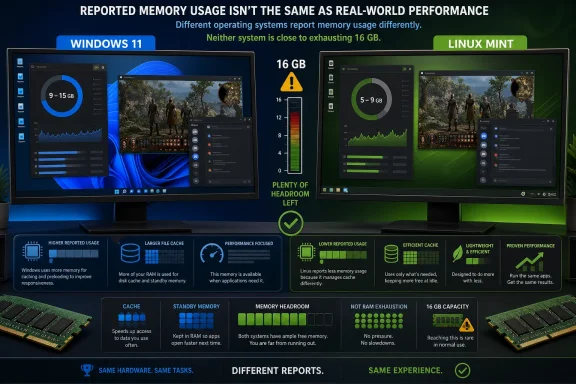 The reported gap is large, especially before a game starts
According to Notebookcheck, the Linus Tech Tips comparison recorded 9.3 GB in use on an otherwise idle Windows 11 installation and 4.7 GB on Linux Mint. Opening the LTT Store website in Firefox reportedly raised those readings to 10.7 GB on Windows and 5.9 GB on Linux. The incremental increase was relatively close—1.4 GB on Windows against 1.2 GB on Linux—but Windows began from a baseline roughly 4.6 GB higher.That baseline dominates the story. A web page consuming roughly a gigabyte of additional system memory is not a surprising outcome in a modern multiprocess browser with media, scripts, extensions, network buffers, font caches, and GPU processes. The meaningful difference is that Linux Mint entered the same browsing task with much more apparent capacity left over.
The gaming examples are larger. Notebookcheck says the Windows system reported 12.5 GB in the test it identifies as Slay the Spite 2, compared with 7.1 GB under Linux, and 15 GB in Baldur’s Gate 3, compared with 9 GB under Linux. Discord was reportedly open in the background for those measurements.
For an owner of a 32 GB desktop, those figures may be largely academic if frame times remain stable and no paging occurs. For a 16 GB laptop, however, the distinction could become practical quickly. A Windows session already reporting 15 GB before accounting for a browser, capture software, RGB utilities, antivirus scanning, a launcher, or a second display workload has little room for a transient spike. Linux reporting 9 GB in the same scenario may have more room to absorb one.
That is a headroom argument, not proof that Linux runs Baldur’s Gate 3 faster, smoother, or with lower input latency.
“Memory in use” is not a universal unit of comparison
The test’s most significant limitation is its choice of metric—or, more precisely, the lack of a precise explanation of it. Operating systems do not present RAM use through one universal accounting method. A number shown in Windows Task Manager is not automatically comparable to one displayed by Linux Mint’s system monitor, htop,free, or another Linux utility.Microsoft’s own Windows documentation separates several relevant concepts. A process working set is the set of pages currently resident in physical memory. Committed memory is a different measure: memory Windows has committed for processes and the operating system, whether or not every page is resident in RAM at that instant. Windows also keeps file data in its system cache, and its standby list contains previously used cached data that can be made available if an application needs physical memory.
This does not make every large Windows memory number “free RAM in disguise.” Windows can have genuine kernel, driver, service, browser, application, and graphics allocations that are actively consuming capacity. It does mean a total displayed on a performance panel needs to be broken down before readers can decide whether it reflects unavoidable pressure or an intentional cache that will be discarded when demand arrives.
Linux adds another complication. Its kernel supports configurable overcommit policies, including the common heuristic default that can allow virtual allocations without immediately reserving the full amount of physical RAM and swap. That behavior can produce a lower apparent figure under certain workloads, particularly where applications reserve address space or allocate memory pools they do not immediately touch. It can be beneficial, but it is also a different contract: under real pressure, Linux may reclaim pages, swap, reject allocation, or invoke its out-of-memory handling depending on configuration and workload.
A prominent YouTube comment highlighted by Notebookcheck makes a version of this argument, suggesting that Windows and Linux reserve and report memory differently. It is a useful warning against simplistic readings, but it is not a substitute for tracing the systems. The claim would need process-level commit, resident-set, shared-memory, cache, and GPU allocation data to show how much of the gap comes from actual working memory rather than accounting policy.
What Linus Tech Tips did not publish determines what the numbers mean
A side-by-side test can be valuable, particularly as a visual demonstration of day-to-day headroom. But the reported comparison omits the details needed to turn that demonstration into a performance finding.The public report does not specify the following:
- It does not identify the installed RAM capacity, memory speed, CPU, GPU, storage device, or whether both operating systems were tested on identical hardware and firmware settings.
- It does not state the exact Windows 11 build, Linux Mint edition and version, Linux kernel, desktop session, graphics driver, or whether Windows features and vendor utilities were left at their defaults.
- It does not identify the precise browser versions, enabled extensions, browser process counts, cache state, or whether the same pages had already been loaded before measurements were taken.
- It does not disclose the Proton, Wine, Vulkan, DirectX, or graphics-translation configuration used for the Linux game runs.
- It does not provide frame rates, one-percent lows, frame-time plots, loading times, swap or page-file activity, disk I/O, CPU load, GPU VRAM use, or repeat runs.
- It does not define whether the reported number is physical memory in use, committed memory, an application total, or a visual reading from separate monitoring tools.
The comparison also cannot distinguish between a one-off snapshot and stable behavior. Memory management should be measured over time: cold launch, game loading, a repeat scene, an hour of play, background application switching, and exit to desktop. A value that rises, plateaus, and returns capacity to the system is different from a value that continually climbs through a session. Microsoft’s own profiling guidance recommends tracing allocations over a scenario and looking for sustained growth when investigating memory leaks.
The Windows consequence is most acute on 16 GB PCs
The test does put a real practical issue in focus. Windows 11’s official minimum memory requirement remains 4 GB, but that figure says only that the operating system can install and boot. It says little about a modern PC carrying Edge or Chrome, Teams or Discord, cloud sync, endpoint security, a vendor control center, game launchers, and a demanding game at the same time.A 16 GB Windows machine can be perfectly usable, including for gaming, when its applications and background load are controlled. Yet the Linus Tech Tips snapshots suggest that Windows users on that capacity should stop treating “16 GB installed” as the same thing as “16 GB available to a game.” The gap between those two values can be wide before a game’s own working set reaches its busiest scene.
The response should not be to disable services indiscriminately or run registry scripts marketed as Windows “debloat” tools. Those changes can break search, updates, driver behavior, security components, and management tooling while producing little reliable improvement. Windows administrators should instead identify the load: Task Manager can establish the broad picture, while Resource Monitor, Process Explorer, RAMMap, and Windows Performance Recorder can show whether pressure comes from processes, commit, drivers, cached pages, or a runaway service.
For gamers, the operational warning is simpler. When a Windows 11 system with 16 GB begins stuttering under a game and background applications, watch Available memory, committed memory, page-file activity, disk activity, and frame times—not just the percentage on Task Manager’s Memory panel. If available memory collapses and the page file becomes active during the stutters, adding RAM or reducing the concurrent workload is likely to help. If those signals remain healthy, a high total alone is not the culprit.
Linux Mint’s lower reported footprint remains a legitimate advantage for memory-constrained hardware. The Linus Tech Tips comparison supports that conclusion. It does not support the larger claim that Windows 11’s higher displayed RAM use is automatically wasteful, nor does it show a gaming-performance winner. The result readers can act on is more concrete: on 16 GB systems, Windows 11 leaves less margin for error, while Linux Mint appears to preserve more of it.
References
- Primary source: Notebookcheck
Published: 2026-08-04T12:04:00+00:00
Loading…
www.notebookcheck.net - Related coverage: learn.microsoft.com
Loading…
learn.microsoft.com - Related coverage: learn.microsoft.com
Loading…
learn.microsoft.com - Related coverage: support.microsoft.com
Loading…
support.microsoft.com - Related coverage: support.microsoft.com
Loading…
support.microsoft.com - Related coverage: microsoft.com
Windows 11 Specs and System Requirements | Microsoft Windows
View Windows 11 specs, system requirements, and features from Microsoft. Learn about the device specifications, versions, and languages available for Windows 11.www.microsoft.com - Related coverage: microsoft.com
Windows 11 Specs and System Requirements | Microsoft Windows
View Windows 11 specs, system requirements, and features from Microsoft. Learn about the device specifications, versions, and languages available for Windows 11.www.microsoft.com - Related coverage: linustechtips.com
Loading…
linustechtips.com - Related coverage: handheldmastery.com
Loading…
handheldmastery.com - Related coverage: notebookcheck.se
Loading…
www.notebookcheck.se - Related coverage: notebookcheck.pl
Loading…
www.notebookcheck.pl - Related coverage: notebookcheck.pl
Loading…
www.notebookcheck.pl - Related coverage: notebookcheck.it
Loading…
www.notebookcheck.it