
Microsoft announced the changes in a July 13 Windows Insider Blog post by Windows product lead Jeff Petty and Bing Search manager Anderson Aiziro. MediaPost correctly identified the removal of promotional content as a potential loss of high-visibility Windows real estate for advertisers. But its report goes further than the primary announcement supports when it describes a planned global Windows 11 rollout later this year. Microsoft has not published a general-availability date, named a retail Windows 11 version, or promised that every current behavior will ship unchanged.
For administrators and ordinary users, the immediate takeaway is simpler: this is an Experimental-channel preview, delivered through Controlled Feature Rollout, and it will not automatically appear on every Insider PC.
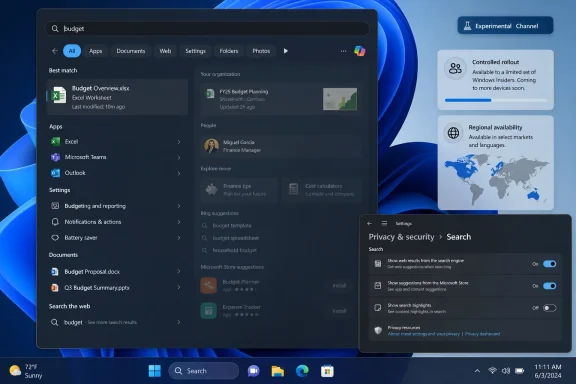 The change removes promotions from web results, not every Windows ad surface
Microsoft’s wording is precise. “Promotional content” has been removed from web results, which will now show what Microsoft calls the most relevant answer rather than presenting related products and promotions first. The company also says it has simplified the Search home page, made result origins clearer, and improved ranking for local apps, files, and Settings entries.
That should not be read as a declaration that Windows 11 is ad-free. Microsoft did not say that it is removing recommendations from Start, Widgets, File Explorer, Settings, the Microsoft Store, Edge, or other surfaces where promotional content may appear. Nor did it announce that Bing web search itself is being removed from Windows Search.
The distinction matters because Windows Search still supports online results. What is changing is the treatment of promotional material in that result set and the ability for the user to choose whether web and Store suggestions appear alongside local matches. A user who leaves web search enabled should still expect Windows Search to send web queries into Microsoft’s search experience; the preview does not turn the taskbar search field into a purely offline file index by default.
The Register, which tested the Experimental-channel experience, reported that the cleaner results were visibly easier to scan and felt faster after the relevant feature flag was enabled. That is encouraging, but it remains an early hands-on observation rather than a broad reliability finding. Microsoft itself says its work on Search reliability is ongoing.
The new switches are the larger operational change
The two settings Microsoft has described are located under Settings > Privacy & Security > Search. One controls web suggestions; the other controls Microsoft Store suggestions. Combined with local-result prioritization, they give users a supported path to make taskbar search behave more like a local launcher and finder.
This is more consequential than merely deleting a promotional card. Windows Search has long blended at least three different jobs: finding local files and applications, reaching Windows settings, and forwarding queries to Bing or Store content. Those functions have competed for rank and screen space, producing a familiar annoyance: typing the name of something that is clearly on the PC only to be offered a web result or an app listing first.
Microsoft says local apps, settings, and files will now appear ahead of web and Store suggestions when the local item is the stronger match. It also says Search has gained more forgiving app matching, including tolerating typos and partial words, plus support for two-character file searches. The company cites “utlook” returning Outlook as an example.
For help desks, that could reduce a small but persistent source of friction. Staff troubleshooting a setting, hunting for a local executable, or opening a known file generally do not benefit from a web answer occupying the first result position. The new controls make it easier to standardize a cleaner experience for individual power users, although Microsoft has not yet documented an enterprise policy, MDM control, or Group Policy setting for enforcing the two choices across a managed fleet.
That omission is important. A consumer-facing toggle is useful, but it is not the same as a centrally manageable configuration. Organizations should not assume these controls will be deployable through Intune or Group Policy until Microsoft publishes the relevant policy documentation.
The preview is controlled, regional, and potentially changeable
Microsoft’s Insider post says the Search changes are rolling out to the Experimental channel through Controlled Feature Rollout. In plain terms, enrollment in the Experimental channel does not guarantee the feature is present. Microsoft says users may need to restart, and that feature flags can expose the changes, but availability is deliberately staggered.
The Experimental channel is now Microsoft’s earliest mainstream Windows Insider track for new feature work. Microsoft has positioned Beta as the more stable preview option closer to shipping, while Experimental is where features arrive first and may be adjusted based on feedback. That makes this a poor basis for production deployment planning.
The company also adds a short but material qualification: “Experiences vary by region.” It does not explain which Search components vary, which countries receive the full package, or whether the web and Store toggles are identical in every market.
Regional differences are particularly relevant because the European Economic Area already has a distinct Windows Search framework under the Digital Markets Act. In its compliance documentation, Microsoft says EEA users can enable a properly manifested third-party web-search provider in Windows Search, while systems outside the EEA can use Bing through Windows Search but do not get the same provider choice. The new preview controls appear to expand suppression of web and Store suggestions beyond that narrower regulatory context; they do not, based on Microsoft’s announcement, establish a worldwide mechanism for selecting Google, DuckDuckGo, or another provider inside Windows Search.
Windows Central had spotted related hidden controls in a June Experimental build, 26300.8697, before Microsoft formally announced the broader Search work. At the time, the settings reportedly required ViveTool feature IDs and were not exposed in the Insider feature-flags page. Microsoft’s July post converts the concept from an undocumented build discovery into an announced preview capability, but does not identify a specific build number or say that every Experimental branch receives it.
MediaPost’s advertiser framing overstates what Microsoft confirmed
MediaPost frames the change as the loss of sponsored cards and prime placement for advertisers reaching developers through Windows. The broader commercial inference is reasonable: fewer promotional placements in taskbar search results mean fewer opportunities to capture a click directly from the operating system.
But Microsoft’s announcement never calls the removed material “ads,” never names advertisers, and does not disclose inventory, impressions, revenue, campaign formats, or a partner program affected by the decision. It says only that related products and promotions will no longer appear before the most relevant web answer.
That is not a semantic quibble. “Ads” can refer to paid placements, while “promotional content” could include Microsoft’s own product recommendations, Bing experiences, Store prompts, or other non-paid material. Microsoft has left the exact category of removed content undefined. Until it provides more detail, it is safer to describe the preview as the removal of promotional content from Search web results—not as the verified shutdown of a Windows Search advertising product.
The same restraint applies to rollout claims. Microsoft’s July 13 post says the company will refine the changes “as they roll out to more Insiders.” It does not state that all Windows 11 users will receive the redesign in 2026. The Register likewise noted that Microsoft had not given a general-availability date, while suggesting that Windows 11 26H2 or an earlier release might be a plausible destination. That remains informed speculation, not a commitment.
What Windows users can do now
Windows Insiders who already receive the preview can inspect the Search settings under Privacy & Security and decide whether web results and Microsoft Store suggestions belong in their local Search workflow. Turning both off should make the taskbar search experience more focused on installed applications, Windows settings, and indexed files, although the exact behavior may vary by region and build.
Users outside the Experimental channel should not use unsupported feature-enablement tools on a work machine merely to obtain this interface early. Controlled rollouts are intended to expose failures and performance regressions before a broader release, and Microsoft has explicitly said that Search reliability work is unfinished.
For IT teams, the sensible move is to test the feature on a non-production Insider ring and watch for two things Microsoft has not yet supplied: a documented delivery target for supported Windows 11 releases, and management controls for the web and Store toggles. The headline is not that Microsoft has eliminated advertising from Windows. It is that Windows Search is finally being tested as a local-search tool first—and Microsoft still has to prove it will deliver that experience consistently beyond the Experimental channel.