
For years, Windows has offered granular permission switches primarily to Microsoft Store apps while grouping conventional desktop applications behind one broad setting. Under the current public Windows 11 documentation, disabling Let desktop apps access your camera or its microphone equivalent affects the entire desktop-app category. A user who needs Discord to use a microphone, for example, has had to leave that same hardware available to Chrome, a game client, an audio editor, and any other Win32 process covered by the setting.
If the controls seen in build 26340.9212 are backed by real enforcement rather than only a new Settings interface, that changes a practical privacy decision from “all desktop apps or none” to a policy users can actually tailor.
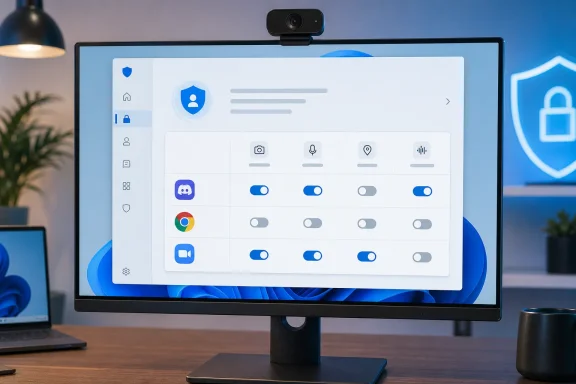 Build 26340.9212 changes the desktop-app model
Neowin reports that the new controls are visible in the latest Windows Insider Experimental build and can be used to revoke individual desktop apps’ access to the camera and microphone. Its testing also found similar treatment for Location and Voice activation. Jakub’s post showed the feature operating in Settings without requiring a third-party utility or an undocumented feature-enablement command.
The important qualification is that Microsoft did not call out per-app Win32 privacy permissions in the build’s published changelog. That omission matters more than it would for a cosmetic tweak: it means Microsoft has not said which permission types are intended to be covered, how the access rules are enforced, whether administrators can manage them, or whether the behavior will reach a retail Windows 11 build.
Experimental flights are deliberately where Microsoft can test partially implemented features and vary availability between devices. Neowin says the controls were not present for every Insider running the same build, although the outlet confirmed the feature on its own test system. At this stage, the supported conclusion is narrower than “Windows 11 now has Win32 permission management”: Microsoft is testing it with at least some Experimental-channel Insiders.
Microsoft’s own support pages still describe the old limitation
Microsoft’s current Windows support documentation makes the gap unusually explicit. On the Camera and Microphone privacy pages, the company says Microsoft Store apps can be toggled individually, but desktop-app privacy settings cannot be changed at an individual desktop-app level. The desktop switch is described as a category-wide control.
That documentation also includes a second warning that complicates how users should interpret any new toggle: desktop applications may not always appear in the Settings list and may still be able to access a camera or microphone even when the desktop-app setting is off. Microsoft has historically tied those limits to the diverse ways classic Windows software can interact with hardware, services, drivers, helper processes, browsers, and legacy APIs.
The distinction between Store apps and Win32 apps is not merely about where software was downloaded. A Store-packaged app normally declares capabilities that Windows can associate with an app identity. A conventional Win32 program can be installed by an organization, unpacked from a ZIP archive, launched from an external drive, or invoked through another process. It may also update itself, change executable paths, or use components shared by several products.
Windows already records some desktop-app access in Settings, which is why users can see recent camera or microphone activity attributed to applications. But observation is not the same as a reliable permission boundary. Microsoft’s public documentation has until now treated the list as an activity record while reserving actual access control for a single desktop-app master switch.
That is why the meaningful technical question is not whether Settings can display names such as Discord or Chrome. It clearly can. The question is whether build 26340.9212 is introducing a durable enforcement mechanism that can reliably identify a Win32 app and deny it access without blocking unrelated software, a helper process, or a Windows component used on the app’s behalf.
The immediate benefit is least privilege for everyday PCs
For ordinary users, the strongest use case is straightforward. Someone may want Zoom or Teams to access a camera and microphone but have no reason to give the same access to a browser, game launcher, media player, or older utility installed years ago. Under the public Windows 11 model, enabling a desktop-app permission has generally meant accepting that broader category-level exposure.
Per-app controls would make it possible to remove access after a one-time use instead of choosing between breaking a needed application and leaving a device sensor broadly available. That is a particularly useful improvement for laptops, where the camera and microphone are integrated hardware rather than peripherals that can simply be unplugged.
Location is similarly consequential. A weather app, mapping tool, or conferencing app may have a reasonable use for a system location, while many traditional programs do not. Voice activation has a narrower audience but can involve persistent microphone-related behavior, making a direct user-facing control valuable when an app is no longer wanted in that role.
The feature should not be mistaken for a replacement for app-level controls. Browsers remain a separate layer: allowing Microsoft Edge, Chrome, or Firefox to use a camera does not automatically grant every website access. Sites still require their own browser permission decisions. Nor would Windows-level controls stop an application from collecting data a user provides directly, accessing files the user selects, or communicating with online services through permissions that this interface does not cover.
Enterprise management is the missing part of the story
Windows administrators already have privacy policies that can broadly allow or deny camera, microphone, and other app access on managed devices. Microsoft’s Policy CSP documentation includes privacy controls for Windows clients, but the material publicly available before this Experimental build does not describe a supported policy model for managing individual Win32 executables through the Settings-style switches shown by Neowin.
That absence leaves several operational questions unanswered. An enterprise would need to know whether a rule follows an executable filename, installation path, publisher signature, package identity, or some other identifier. Filename and path rules are easy to evade or accidentally break during an update; publisher- or identity-based rules are more durable but require a clear trust model. Microsoft has not described one for this feature.
There is also a supportability issue. If an organization deploys a conferencing client whose microphone access is disabled by a user-level permission state, help desks will need a way to identify the block and restore access without turning on every desktop app. The existing broad toggle is crude, but its behavior is predictable. Granular controls become valuable only when Windows makes their state discoverable, enforceable, and manageable.
For now, IT teams should treat the discovery as an Insider observation, not as a new baseline capability to include in Windows 11 privacy guidance or endpoint configuration standards.
What Insiders should test before trusting the toggle
Insiders who have build 26340.9212 and see the controls can provide useful feedback, but should test the feature conservatively. Start with a noncritical application, disable one permission, fully close and relaunch the app, then test the specific feature that uses the camera, microphone, location, or voice activation. Check Settings’ recent-access history afterward to see whether Windows reports the attempted access coherently.
Users should also test applications that rely on helpers or shared components. Video-conferencing software, browser-based calling, creative suites, and accessibility tools often use more than one executable. A control that blocks a visible front-end app but leaves a background helper with access would be far less useful than the Settings interface suggests.
The present public record does not establish whether existing Win32 permissions will migrate automatically, whether users will be prompted when a desktop app first requests access, or whether toggles apply across user accounts. Microsoft has also not said whether the feature is headed for the Windows 11 25H2 servicing line, a later release, or nowhere at all.
Microsoft has finally put a potentially meaningful answer to a legacy Windows privacy problem into testing. Until it documents the enforcement model and commits the controls to a supported channel, though, users should view build 26340.9212 as evidence of direction—not a feature they can count on outside the Experimental Insider program.
