
Apple’s advice is particularly consequential for homes using an iPhone, iPad, or Mac that supports Wi-Fi 6E or Wi-Fi 7. Apple says that when a router exposes 2.4 GHz, 5 GHz, and 6 GHz as separate networks, compatible devices flag the arrangement as “limited compatibility,” locate the related 5 GHz network, and offer to join it. Accepting that prompt moves the device off 6 GHz and loses some of the benefits that justified buying a 6E or Wi-Fi 7 router in the first place.
Microsoft does not dispute that Windows can operate on a unified network. Its support page explicitly says Windows will automatically connect to the best available band when a router presents one network name. Yet the same page advises different SSIDs so the user can see which band a device has selected. That recommendation is useful, but it is not a general finding that manual band selection produces a better wireless network.
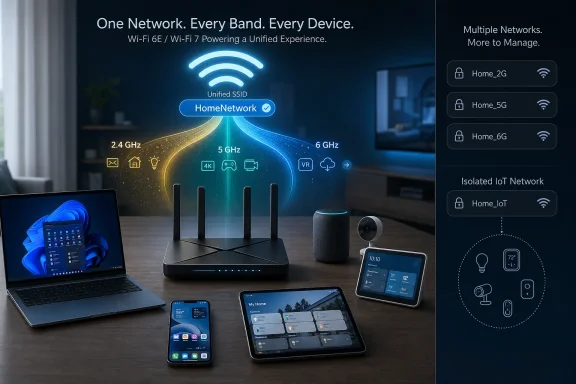 Apple’s warning is about 6 GHz behavior, not a cosmetic preference
The SSID is the visible network name, but it also tells a device which radios belong to the same logical Wi-Fi network. A router can broadcast the same SSID and security settings from multiple radios, allowing a capable client to choose among 2.4 GHz, 5 GHz, and 6 GHz without asking the user to manage separate saved networks.
That arrangement is not merely about convenience. The 6 GHz band used by Wi-Fi 6E and Wi-Fi 7 has different discovery and security requirements from earlier Wi-Fi bands. Cisco’s technical documentation on Wi-Fi 6E explains that clients commonly use information advertised on 2.4 GHz or 5 GHz to discover 6 GHz service, and that access points can steer capable clients toward 6 GHz. Keeping the bands under a consistent network identity is part of making that transition predictable.
Apple’s documentation, updated on August 25, 2026, is unusually direct: a router should use one name across 2.4 GHz, 5 GHz, and 6 GHz for the best performance with Apple devices. The company is not saying every device will always remain on the fastest radio. Range, signal quality, congestion, power consumption, and roaming behavior still matter. It is saying the network should give the device a coherent set of choices.
For an Apple household, splitting the names turns a normal radio-selection decision into a compatibility branch that the user must understand and manage. That is a poor trade for most people, especially when the result may be a supported 6 GHz client voluntarily joining a 5 GHz network simply because its router was configured to expose distinct labels.
Microsoft’s recommendation is useful — in a narrower role
Microsoft’s “Wi-Fi and your home layout” support article is practical consumer advice, not a Wi-Fi deployment standard. Its section on network names follows a useful explanation of the tradeoffs among the three bands: 2.4 GHz travels farther and works with more older devices; 5 GHz usually provides more throughput and less congestion; 6 GHz can offer the strongest performance at close range but requires newer hardware.
From that perspective, separate SSIDs do exactly what Microsoft says: they make the current choice visible. A Windows laptop connected to Home-6G leaves no ambiguity about its radio. If a desktop near the router is stubbornly attaching to 2.4 GHz, a separate 5 GHz or 6 GHz SSID gives the owner a quick way to test whether the problem is radio selection, coverage, a driver, or something unrelated to Wi-Fi.
That can be valuable when diagnosing an actual problem. It is also valuable for a device that must remain on a particular radio, such as an older Wi-Fi-only printer or a temperamental smart-home product that supports 2.4 GHz and nothing else.
But manual visibility is different from automatic optimization. A separate SSID does not make the 5 GHz or 6 GHz radio faster, improve its range, or eliminate interference. It creates multiple networks the user must select, save, prioritize, and revisit as conditions change. A laptop that is forced onto 6 GHz may deliver excellent performance in the same room, then lose usable signal sooner than it would on 5 GHz while the user moves through the house.
Windows’ own wording recognizes this limitation. It says Windows will choose the best available band on networks that present one name. Microsoft does not claim that a user can consistently outperform the client and access point’s selection logic by choosing a band once in the Wi-Fi flyout.
The real technical issue is steering, and it is imperfect
The sensible objection to a unified SSID is that client steering can fail. Some devices cling to a weak 5 GHz connection instead of moving to 2.4 GHz. Others may settle on 2.4 GHz despite a strong 5 GHz or 6 GHz signal. A router’s band steering feature, which encourages compatible clients to use a preferred radio, is not magic; Cisco notes that steering behavior remains dependent on the particular client implementation and that some clients may not react as intended.
This is the strongest case for Microsoft’s recommendation. If a device keeps making a bad choice, split names give an administrator a visible, reversible workaround. They can prove whether 6 GHz is reachable, isolate an unreliable client, or keep a stationary workstation on a less congested band.
It is not a reason to begin every network with three similarly named SSIDs. Doing so treats every device as a steering failure before one has happened. It also means a household may end up with several saved entries for the same router, each with its own automatic-join behavior and password-management consequences.
The more productive order is to first confirm that the router has current firmware, that its band-steering controls are enabled where appropriate, and that the Windows device has a current wireless adapter driver. If a Windows 11 PC still chooses poorly, then separate SSIDs become a diagnostic step or a deliberate exception — not the permanent default for every phone, tablet, console, and laptop.
IoT setup is a reason for an exception, not three permanent networks
MakeUseOf correctly identifies the common smart-home problem: many plugs, bulbs, cameras, and appliances support 2.4 GHz only. Their companion apps sometimes fail during setup when the phone is on 5 GHz or 6 GHz, even though the router is broadcasting 2.4 GHz with the same SSID.
That failure has helped popularize the idea that every home needs split Wi-Fi names. It does not. A 2.4 GHz-only device can generally join a unified SSID if the router offers 2.4 GHz and uses security settings the device supports. The setup complication is usually that the phone app, device firmware, or local-discovery process handles the initial provisioning badly.
There are better responses than permanently dividing a primary network:
- Temporarily disable 5 GHz and 6 GHz during the initial setup if the router offers that control.
- Use a router feature that pauses the higher bands or creates a temporary 2.4 GHz onboarding network.
- Put genuinely legacy smart-home gear on a dedicated 2.4 GHz IoT SSID, ideally separated from trusted computers and phones where the router supports network isolation.
- Restore the unified main SSID after the device has joined, unless that device proves it needs the separate network.
The third option is especially important for security-minded households. An old smart plug does not need the same network access as a Windows 11 workstation holding work files. A distinct IoT network can serve a security boundary; three names that merely correspond to radio frequencies do not.
WPA3 makes 6 GHz a compatibility boundary anyway
There is another practical omission in the simplistic “put everything on 6 GHz” argument. Wi-Fi 6E’s 6 GHz operation requires WPA3 and protected management frames; older devices built for WPA2 cannot use it. Cisco’s Wi-Fi 6E documentation describes 6 GHz as incompatible with open and WPA2-only security configurations.
That means a Wi-Fi 6E or Wi-Fi 7 router already has to accommodate old and new clients differently. Depending on the router, it may use WPA3 transition support on 2.4 GHz and 5 GHz while enforcing WPA3 on 6 GHz, or it may offer a separate legacy or IoT network. The exact behavior is router-specific, which is why neither Apple’s short compatibility guidance nor Microsoft’s home-layout article should be read as a universal router configuration manual.
For Windows users, the immediate check is straightforward: confirm that the PC’s adapter, driver, and Windows version actually support 6 GHz before diagnosing SSID naming. A 6E-capable router alone does not add 6 GHz to an older laptop. Microsoft’s support material says 6 GHz requires both compatible networking hardware and drivers, and Cisco similarly notes that Windows 11 or later is required for 6E support on Windows.
A better default for Windows households
For a current Windows 11 PC, recent phones, and a router with competent steering, use one primary SSID with identical security settings across all supported bands. That matches Apple’s guidance, preserves the intended 6 GHz experience for Apple hardware, and lets Windows do what Microsoft says it will do: select the best available band.
Create a separate 2.4 GHz network only when there is a defined reason: onboarding a broken IoT device, supporting a legacy device that cannot use the main network’s security configuration, or isolating smart-home equipment. Create a manual 5 GHz or 6 GHz test SSID only when troubleshooting shows that a client or router is making persistently bad choices.
Microsoft’s advice makes sense as a way to expose and control a troublesome radio decision. Apple’s advice makes more sense as the baseline configuration for a home network expected to roam cleanly across 2.4 GHz, 5 GHz, and 6 GHz. The practical consequence is simple: do not split bands preemptively just to make them visible; split them when a specific device, setup process, or security policy gives you a reason.
