
A guide published by Mejoress on August 7 tells Windrose server owners to install and manage their worlds through WindowsGSH, but the proposed workflow cannot currently be followed: WindowsGSH’s own site says its first public
For administrators, the practical conclusion is straightforward: do not install an executable or import a module merely because a guide names
The discrepancy is unusually direct. Mejoress says readers should download WindowsGSH from GitHub Releases, extract
WindowsGSH’s own public website describes those same capabilities as planned functionality, but it also labels the product as a preview whose first public build has not yet arrived. Its page says real screenshots will be added “as the preview build settles”; its download area says to watch for preview builds, release notes, checksums, and setup instructions; and its public documentation sections are placeholders.
The site’s module material is equally clear. It describes a future community module catalog, labels the displayed Valheim entry as “Example only,” and says modules are not verified. Windrose is not among the listed target server modules. That does not prove a private or unindexed experimental module cannot exist, but it does mean the guide provides no verifiable public release path for the component it requires.
This distinction matters beyond convenience. A server-management application has access to executable paths, SteamCMD downloads, firewall settings, passwords, Discord tokens, save archives, and potentially remote-control functions. The guide correctly warns that C# modules execute with the permissions of the current Windows user, then asks readers to import code from a named repository that is not established in WindowsGSH’s own public release material. Those two statements should not sit together without a signed release, a commit or release tag, a checksum, and a documented support channel.
For a straightforward Windows deployment, the supported route is considerably less elaborate than the WindowsGSH guide suggests:
The important difference is operational ownership. Steam and SteamCMD are established distribution paths for the server. The hypothetical WindowsGSH layer would be an additional application between the administrator and those tools. It may eventually make management easier, but it currently adds an unverified dependency without eliminating the need to understand the server’s own files, logs, ports, and backup state.
But the native procedure includes a step the WindowsGSH-centric account can obscure: after changing a
That is more than bookkeeping. Windrose’s saves use RocksDB-based layouts, and the game’s documentation explicitly warns administrators not to rename world folders because the database relies on their identifiers. Editing an active database or treating world JSON as a generic config file risks creating a world that fails to load, points at the wrong save, or silently generates a new world.
The official guide also corrects a small but meaningful wording problem around “Easy Explore.” The configuration key is a legacy name; turning it on enables what the game calls Immersive exploration, which removes map markers for points of interest and makes exploration harder, not easier.
Direct IP support is not merely an untested feature, however. Windrose’s official guide documents it as a supported configuration: enable
The actual caveat is that a firewall exception does not solve NAT. Administrators must reserve or otherwise stabilize the server’s LAN address, create matching router rules, and confirm that their ISP provides a reachable public IP. Carrier-grade NAT will block unsolicited inbound connections even when the Windows firewall and router interface appear correctly configured. In that case, invite-code hosting is the practical answer unless the provider can supply a public address.
Version matching is another recurring failure point. Windrose’s documentation says the client and dedicated server should remain on matching versions; Steam Community reports from server operators show that version mismatches have occurred after updates. Before applying a game patch, stop the server cleanly, copy the entire relevant save hierarchy to storage outside the live server directory, update App ID
It also has a different risk profile from a normal JSON configuration edit. WindrosePlus installs UE4SS through a proxy DLL, can require elevation, can expose a local or network-bound dashboard, and can generate game override PAK files. Its maintainers warn that certain inventory, stack-size, weight, and crop-related changes were disabled or gated after crash reports, and they advise out-of-band save backups before enabling state-affecting overrides.
That means RCON and Discord-style automation should come after the base server is stable, backed up, and understood. Do not expose a dashboard on
WindowsGSH may eventually offer a useful Windows-native control plane for all of this. On August 7, 2026, though, the server owners who need a reliable Windrose host should use the released Steam tool or SteamCMD, retain manual control of
0.1.0-preview build is still “in progress,” its documentation is “coming soon,” and its module catalog is planned for a later preview. There is no public, released WindowsGSH download or verified Windrose module established by the project’s own published status.
That leaves the article’s central promise — avoiding SteamCMD, batch files, firewall work, updates, backups, and configuration through a ready-made Windows GUI — ahead of the software it describes. Windrose itself does have a working dedicated-server route on Windows, but it is the game’s native Steam tool and configuration files, not the unreleased WindowsGSH workflow presented as available today.For administrators, the practical conclusion is straightforward: do not install an executable or import a module merely because a guide names
WindowsGSH/WindowsGSH.Windrose. Until WindowsGSH publishes an actual release, checksums, documentation, and a discoverable Windrose module from that repository, treat the instructions as a prospective design rather than production guidance.
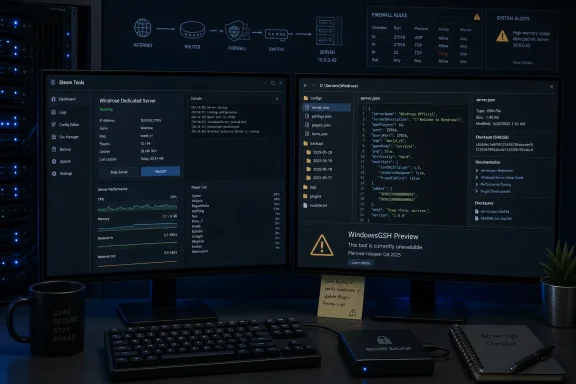 WindowsGSH’s public status does not match the guide
The discrepancy is unusually direct. Mejoress says readers should download WindowsGSH from GitHub Releases, extract WindowsGSH.exe, open Module Management, search for “Windrose” or WindowsGSH.Windrose, and import a beta-candidate module. It goes further, describing an interface that can install the dedicated server, translate the game’s JSON configuration into fields, add firewall rules, make backups, schedule jobs with cron, and integrate with Discord.WindowsGSH’s own public website describes those same capabilities as planned functionality, but it also labels the product as a preview whose first public build has not yet arrived. Its page says real screenshots will be added “as the preview build settles”; its download area says to watch for preview builds, release notes, checksums, and setup instructions; and its public documentation sections are placeholders.
The site’s module material is equally clear. It describes a future community module catalog, labels the displayed Valheim entry as “Example only,” and says modules are not verified. Windrose is not among the listed target server modules. That does not prove a private or unindexed experimental module cannot exist, but it does mean the guide provides no verifiable public release path for the component it requires.
This distinction matters beyond convenience. A server-management application has access to executable paths, SteamCMD downloads, firewall settings, passwords, Discord tokens, save archives, and potentially remote-control functions. The guide correctly warns that C# modules execute with the permissions of the current Windows user, then asks readers to import code from a named repository that is not established in WindowsGSH’s own public release material. Those two statements should not sit together without a signed release, a commit or release tag, a checksum, and a documented support channel.
Windrose’s official dedicated server is real — and already supports Windows hosting
The underlying Windrose server instructions are not fictional. Kraken Express’s official Windrose dedicated-server documentation says the game has a free “Windrose Dedicated Server” Steam tool, while SteamDB identifies that tool as App ID4129620 and marks it released. Windrose launched in Early Access on April 14, 2026, and its dedicated-server tool is a separate download from the client.For a straightforward Windows deployment, the supported route is considerably less elaborate than the WindowsGSH guide suggests:
- Install Windrose Dedicated Server from Steam’s Tools section, or deploy it with SteamCMD using App ID
4129620. - Launch
StartServerForeground.batfor a console-visible server session, or useWindroseServer.exewhen a background process is required. - Run the server once so it generates
ServerDescription.jsonand the first world’sWorldDescription.json. - Connect through the invite code emitted in the console or stored in
ServerDescription.json.
7777. The official guide also confirms the hardware figures reproduced in the article: 8 GB RAM for two players, 12 GB for four, 16 GB for ten, and 35 GB of SSD storage. Hosting the game client and server on the same PC carries a recommendation of roughly 24 GB total RAM.The important difference is operational ownership. Steam and SteamCMD are established distribution paths for the server. The hypothetical WindowsGSH layer would be an additional application between the administrator and those tools. It may eventually make management easier, but it currently adds an unverified dependency without eliminating the need to understand the server’s own files, logs, ports, and backup state.
The configuration details need one correction: update world files properly
The Mejoress article appropriately tells administrators to shut down before changing world settings and to avoid manually replacing persistent IDs or island IDs. Windrose’s official guide confirms thatPersistentServerId should not be edited and that WorldIslandId must correspond to the selected world’s IslandId and directory.But the native procedure includes a step the WindowsGSH-centric account can obscure: after changing a
WorldDescription.json file, administrators should run R5WorldDescriptionUpdater.exe against that world file before restarting. The official documentation places world definitions under the server’s R5\Saved\SaveProfiles\Default\RocksDB_v2\<game version>\Worlds\<world ID> structure and directs users to execute the updater from the server root.That is more than bookkeeping. Windrose’s saves use RocksDB-based layouts, and the game’s documentation explicitly warns administrators not to rename world folders because the database relies on their identifiers. Editing an active database or treating world JSON as a generic config file risks creating a world that fails to load, points at the wrong save, or silently generates a new world.
The official guide also corrects a small but meaningful wording problem around “Easy Explore.” The configuration key is a legacy name; turning it on enables what the game calls Immersive exploration, which removes map markers for points of interest and makes exploration harder, not easier.
Invite codes should be the default; direct IP is a deliberate fallback
The submitted guide’s networking advice is substantially sound. Windrose uses NAT punch-through for ordinary invite-code connections, and the official documentation tells hosts to use the invite code first. That route avoids the public router configuration that direct IP connections require and is the lower-risk option for a small private group.Direct IP support is not merely an untested feature, however. Windrose’s official guide documents it as a supported configuration: enable
UseDirectConnection, select a server port, allow both TCP and UDP in Windows Firewall, and forward both protocols from the router’s public address to the host machine’s private address. The guide’s example of an external port mapping to an internal port is consistent with the official documentation.The actual caveat is that a firewall exception does not solve NAT. Administrators must reserve or otherwise stabilize the server’s LAN address, create matching router rules, and confirm that their ISP provides a reachable public IP. Carrier-grade NAT will block unsolicited inbound connections even when the Windows firewall and router interface appear correctly configured. In that case, invite-code hosting is the practical answer unless the provider can supply a public address.
Version matching is another recurring failure point. Windrose’s documentation says the client and dedicated server should remain on matching versions; Steam Community reports from server operators show that version mismatches have occurred after updates. Before applying a game patch, stop the server cleanly, copy the entire relevant save hierarchy to storage outside the live server directory, update App ID
4129620, and test a local connection before inviting players back.Windrose+ adds administration features, but it is a separate trust decision
The article’s reference to WindrosePlus is real, but it needs a firmer boundary. WindrosePlus is a community-maintained, server-side framework that adds a web dashboard, RCON-like administration, server-query responses, live-map functions, gameplay multipliers, logs, and Lua-mod support. Its GitHub project explicitly says it is not affiliated with or endorsed by Windrose’s developers.It also has a different risk profile from a normal JSON configuration edit. WindrosePlus installs UE4SS through a proxy DLL, can require elevation, can expose a local or network-bound dashboard, and can generate game override PAK files. Its maintainers warn that certain inventory, stack-size, weight, and crop-related changes were disabled or gated after crash reports, and they advise out-of-band save backups before enabling state-affecting overrides.
That means RCON and Discord-style automation should come after the base server is stable, backed up, and understood. Do not expose a dashboard on
0.0.0.0 without access controls. Do not reuse a password. Do not assume a third-party “server query” is native Windrose telemetry. And do not use local live-session identifiers as permanent player identities for bans or access control.WindowsGSH may eventually offer a useful Windows-native control plane for all of this. On August 7, 2026, though, the server owners who need a reliable Windrose host should use the released Steam tool or SteamCMD, retain manual control of
ServerDescription.json and WorldDescription.json, run R5WorldDescriptionUpdater.exe after world edits, and keep tested offline backups before every update or mod change.
References
- Primary source: Mejoress
Published: August 7, 2026 at 12:43 AM UTC
Loading…
www.mejoress.com - Related coverage: store.steampowered.com
Loading…
store.steampowered.com - Related coverage: windrosewiki.wiki
Loading…
www.windrosewiki.wiki - Related coverage: playwindrose.com
Loading…
playwindrose.com - Related coverage: store.steampowered.com
Loading…
store.steampowered.com - Related coverage: gameserverkings.com
Loading…
www.gameserverkings.com - Related coverage: cres.gr
Loading…
www.cres.gr - Related coverage: gameserverkings.com
Loading…
www.gameserverkings.com - Related coverage: dustbowl.games
Loading…
dustbowl.games - Related coverage: dustbowl.games
Loading…
dustbowl.games - Related coverage: windrose.runonflux.com
Loading…
windrose.runonflux.com - Related coverage: gamesomg.com
Loading…
gamesomg.com