
Wispr announced the launch on August 5 through its official community channel, calling Notetaker its first product beyond dictation. The company says the Mac feature works across meeting platforms, can record calendar-free conversations with a manual tap, and uses calendar information and Flow’s existing personal dictionary to improve speaker attribution and transcription of names, acronyms, and specialized terms.
For Mac users who already rely on Wispr Flow to dictate emails, tickets, Slack messages, and documentation, the appeal is obvious: one desktop application can now capture both the work before a meeting and the decisions made during it. For IT administrators, however, this is not merely an extra productivity feature in a dictation tool. It introduces system-audio capture, mandatory cloud synchronization, calendar and contact integrations, and a new category of meeting data that can contain other employees’ conversations and identities.
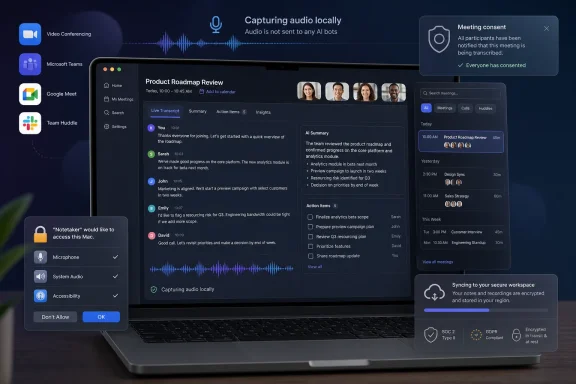 A botless recorder changes the compliance problem
Most cloud meeting assistants make themselves conspicuous. They enter calls as a participant, appear on attendee lists, or trigger a platform notice that a transcription service is present. Wispr Flow takes a different route. It runs on the Mac and captures the meeting audio directly, so there is no external bot account joining the call.
That design removes friction for the user and makes the product useful in calls that do not support bots, including Slack Huddles and ad hoc conversations. It also means a host cannot rely on the meeting platform’s participant list to discover that recording is taking place. A visible AI attendee is often annoying; it is also a practical notice mechanism. Removing it means organizations need a policy that does not depend on the platform to police disclosure.
Wispr’s terms make that responsibility explicit. The company requires users to obtain any notice or consent required by law, contracts, or organizational policy before recording or transcribing a meeting. It also says it does not determine when consent is required and does not provide legal advice. In other words, Flow may be technically quiet, but it is not a workaround for recording rules.
That distinction deserves particular attention in enterprises with customer calls, regulated workflows, employee-relations meetings, health information, or cross-border teams. A manager who has approved Teams transcription may still need to evaluate Flow separately because the capture happens from an endpoint and can apply to meetings beyond the company’s sanctioned conferencing stack.
Notetaker requires cloud storage, even with training disabled
The supplied reporting presents Notetaker as a natural extension of Wispr’s dictation service. Wispr’s own documentation shows a more consequential change: Notetaker cannot run with Private Cloud Sync disabled.
Wispr separates two controls that users may reasonably assume are the same thing. Privacy Mode governs whether audio, transcripts, and edits can be used to evaluate, train, or improve AI models. Private Cloud Sync governs whether transcripts and related material are stored on Wispr’s servers and synchronized across devices. A user can enable Privacy Mode and still use Notetaker, but they must also enable Private Cloud Sync.
That is a meaningful tradeoff. A user who has configured Flow for minimal cloud retention for dictation will need to change that posture to record meetings. Wispr says it processes meeting data to create transcripts, summaries, action items, speaker labels, and insights; meeting data can include participant names, email addresses, calendar metadata, and the communications of other people on the call.
Its privacy policy says encrypted meeting audio may be retained temporarily on the device and/or in cloud storage to support functions such as resuming meetings, improving transcription, accuracy checks, troubleshooting, and related features. The company says meeting audio is not used for model training unless that use is expressly disclosed and enabled in the applicable settings. But disabling model training does not turn Notetaker into a zero-retention, local-only recorder. The product’s own documentation is direct: turning off Private Cloud Sync stops meeting recording and meeting sharing.
For administrators, the practical question is therefore not simply whether employees have enabled Wispr’s Privacy Mode. It is whether the organization permits this category of synchronized meeting content to be sent to a third-party service at all, under what retention rules, and for which types of meeting.
macOS permissions are the real deployment gate
Notetaker changes the permissions profile of Wispr Flow on the Mac. Dictation needs a microphone and Accessibility access so the application can insert text into other apps. Meeting capture additionally needs access to system audio, allowing Flow to listen to the audio playing through the Mac.
Wispr’s MDM guidance says Notetaker’s system-audio capture requires macOS 14.4 or later. The company also says microphone access cannot be silently granted to third-party apps through normal device management workflows, so users should expect a native macOS prompt on first use. Its enterprise documentation describes custom PPPC configuration for pre-authorizing system-audio access on supported Macs, while Accessibility can be addressed with the supplied configuration profile.
This is where the launch shifts from a consumer feature to an endpoint-management issue. An organization can deploy Wispr Flow for dictation but deny or restrict the permissions and cloud settings needed for meeting recording. Wispr’s team-plan documentation acknowledges that administrators can block Notetaker when cloud synchronization, a HIPAA Business Associate Agreement, or organizational privacy controls do not permit recording.
The documentation also says Flow ships as separate Apple Silicon and Intel Mac builds and that Intel builds are blocked from running under Rosetta 2 on Apple Silicon Macs. That is unrelated to Notetaker itself, but it matters when rolling out an update to a mixed fleet: deploying the wrong installer can turn a policy decision into an avoidable support incident.
The feature’s edge is context, not the summary itself
Wispr is entering a packed market. Microsoft Teams already offers Copilot-based recap features for organizations with the relevant licensing and policy configuration, while specialist products such as Otter, Fireflies, and Granola have established approaches to transcription and meeting summaries. A summary and a task list alone do not set Notetaker apart.
Wispr’s stated differentiator is pre-existing user context. The company says a Flow personal dictionary carries over into meeting transcription, while calendar invites supply participant names for speaker labels. It also says the app produces a live transcript during the call, then reprocesses the complete recording with that context afterward to improve the final output.
That can solve a real problem for IT teams and technical workers. Meeting transcription often fails where it matters most: product codenames, customer names, internal acronyms, command names, incident identifiers, and the difference between two people with similar names. A dictation product that already knows a user’s vocabulary has a plausible advantage over a standalone bot arriving cold.
Wispr also says Notetaker can expose meeting output through Model Context Protocol, or MCP, to tools such as Claude, ChatGPT, and custom agents. That may be useful for querying a meeting archive or producing follow-up material, but it expands the governance concern. A bad speaker label or incorrectly captured decision does not remain a bad transcript when it becomes context for another automated system. It can be repeated into project plans, tickets, customer updates, and management reporting.
Wispr itself warns in its terms that transcripts, summaries, action items, speaker attributions, and insights may contain errors, omissions, and misattributions and should be reviewed before they are used for business, legal, employment, compliance, or other decisions. That is standard generative-AI caution, but it is especially relevant when the tool is designed to identify who committed to what.
The launch reporting overstated how it was discovered
The submitted account says TechCrunch spotted amended terms before an official launch and that 9to5Mac then confirmed launch details. A search of those outlets did not surface matching reporting on this August 2026 release. The public record that is readily verifiable instead points to Wispr’s August 5 announcement, its late-July updated terms and privacy policy, and support documents describing Notetaker’s permissions and cloud requirements.
The timing does support the broader observation that the company prepared its legal and technical documentation before launch. Wispr’s terms and privacy policy are marked July 25, 2026, and explicitly define Notetaker and Meeting Data. But that is different from independently confirming that the feature was first exposed by either publication. The launch should be treated as an official Wispr release, not as a scoop validated by the two outlets named in the submitted story.
What Mac users and IT teams should do now
Individual Mac users should update Flow, inspect the permissions requested during Notetaker onboarding, and decide whether meeting summaries are worth enabling Private Cloud Sync. They should also establish a plain spoken disclosure habit before recording: say that Wispr Flow is recording and transcribing the meeting, even when the conferencing platform does not display an AI participant.
Administrators should treat Notetaker as a separate approval decision from ordinary voice dictation. Before allowing it, they should review the cloud-storage requirement, calendar and directory permissions, available retention controls, MCP or external-AI integrations, and whether current conferencing, legal, records-management, and data-loss-prevention policies cover endpoint-based audio capture.
Wispr says Windows support is on the way, but Notetaker is currently a Mac launch. That gives Windows and cross-platform IT teams time to decide whether this is a useful consolidation of dictation and meeting notes—or an unsanctioned recorder that will be harder to spot precisely because it never joins the call.
