
WizTree 4.32 adds officially confirmed Windows on Arm compatibility through Microsoft’s Prism emulation layer and fixes a reporting flaw that could leave filtered imported CSV inventories showing misleading totals. The release arrived on August 5, 2026, with Neowin first flagging the update and Antibody Software’s own WizTree release notes confirming the same change list.
For Windows administrators, the CSV change is the consequential part of what otherwise looks like a modest maintenance release. WizTree is commonly used for fast, repeatable storage investigations: scan a volume, export the file inventory, then reopen it later to identify large files, stale data, or fast-growing folders without rescanning the original machine. Until now, filtering an imported CSV did not recalculate displayed totals, even when the CSV contained a full file-level inventory. Version 4.32 distinguishes complete exports from partial ones and enables recalculation only where the source data can support it.
That is a correction to the tool’s analysis, not merely its interface.
WizTree’s release notes explain why the old behavior existed: its CSV format can represent incomplete exports, such as folders without the files beneath them. If the application blindly recalculated a folder’s size from that incomplete data, it would manufacture an invalid figure. The conservative behavior was to preserve the original total values from the CSV, even when a user applied a filter.
The flaw was that the same restraint applied to complete CSV files. An administrator could export every file and folder from a workstation, reopen the CSV, filter for a department path, extension, date range, or size threshold, and still see totals inherited from the unfiltered dataset. The individual matching rows could be useful, but the aggregate number was not an answer to “how much space does this filtered set consume?”
WizTree 4.32 now recognizes a complete CSV import and permits filters with recalculation enabled. In practical terms, a full export can become a portable storage dataset that supports credible follow-up work:
This is particularly relevant because CSV export has been a more prominent part of WizTree’s workflow since version 4.25, which added more export choices to the graphical interface and improved CSV import performance. The command-line documentation also supports scripted exports, including file and folder selection and filtering. That makes the corrected import behavior useful beyond one-off desktop cleanup: it improves the integrity of a workflow that can feed audits and storage triage.
Microsoft documents Prism as the Windows 11 on Arm emulator that translates x86 and x64 instructions to Arm64 at runtime. It was introduced with Windows 11 version 24H2 and is intended to run conventional Windows applications without their developers rebuilding them for Arm. Microsoft also makes the tradeoff clear in its developer guidance: emulation can provide broad compatibility, while native Arm64 software has the better case for performance, latency, and battery consumption.
For WizTree, that distinction is unlikely to turn a disk-space investigation into a bad experience. Its standout NTFS scan mode reads the Master File Table directly rather than recursively asking Windows to enumerate every file, so much of the benefit comes from its scanning method. But the product still has user-interface code, CSV parsing, sorting, filtering, treemap rendering, and non-NTFS scanning paths running through emulation on an Arm PC.
The release therefore removes a support ambiguity for organizations deploying Snapdragon-based Windows 11 hardware. It is not evidence that WizTree has joined the growing list of native Arm64 Windows utilities. Admins looking to standardize on it for Windows on Arm endpoints should record it as validated under emulation, then test the exact tasks they automate: NTFS scans with elevation, network-share scans, CSV imports, and command-line exports.
There is also a platform limit worth keeping in view. Microsoft says Windows 11 on Arm supports both x86 and x64 application emulation, while Windows 10 on Arm supports x86 emulation only. Because the WizTree announcement specifically calls out Prism, its new confirmation most directly applies to Windows 11 on Arm systems using the modern emulation stack—not to every historical Arm-based Windows deployment.
That means users relying on expressions involving time of day or relative time had almost a year in which results could diverge from the intended criteria. WizTree 4.27 added filters such as exact times, comparisons like “before 3 a.m.,” and relative expressions using the
The 4.32 notes do not identify the precise failure mode, affected expressions, or whether the bug could produce false positives, false negatives, or both. There is no published advisory suggesting a security issue or data-loss risk. Still, anyone who generated a report or removal list based on date-and-time filtering in versions 4.27 through 4.31 should treat the old result set as unverified rather than assuming it was complete.
The sensible response is to rescan or reopen the relevant complete CSV in 4.32, rerun the filter, and compare the matching count and total allocated space before taking action. That is especially warranted when filters supported retention work, profile cleanup, or a post-incident review.
WizTree now converts Linux-style forward slashes to Windows backslashes while importing CSV files containing Linux paths. The conversion does not make a Linux file inventory magically actionable from Windows, but it prevents a path-format mismatch from undermining cross-platform reporting or imported data review.
The application also now accepts dotted command-line parameters such as
The installed version now presents an elevation prompt when someone attempts to enter a new supporter code while running without administrator rights. Previously, it could fail silently because it lacked permission to write the required configuration. Silent licensing failures are not glamorous, but in an IT setting they produce needless redeployment and troubleshooting work.
Finally, 4.32 addresses an
For teams that archive complete WizTree CSV exports and filter them later, however, the update is worth deploying promptly. The newly recalculated totals close a gap between the rows users saw and the aggregate figures they could responsibly report. Add the date-filter repair, and storage reports based on WizTree 4.27 through 4.31 deserve a quick validation pass before they become the basis for deletion, quota, or capacity decisions.
That is a correction to the tool’s analysis, not merely its interface.
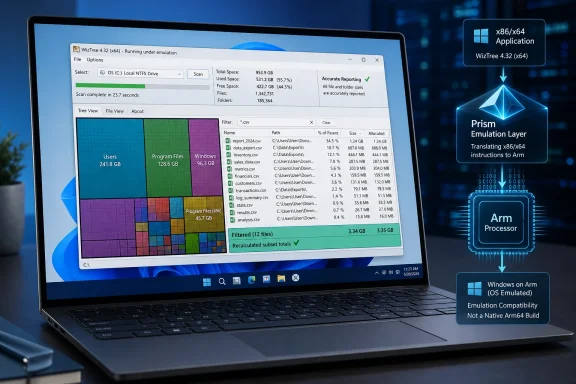 CSV filters can now produce meaningful subset totals
WizTree’s release notes explain why the old behavior existed: its CSV format can represent incomplete exports, such as folders without the files beneath them. If the application blindly recalculated a folder’s size from that incomplete data, it would manufacture an invalid figure. The conservative behavior was to preserve the original total values from the CSV, even when a user applied a filter.The flaw was that the same restraint applied to complete CSV files. An administrator could export every file and folder from a workstation, reopen the CSV, filter for a department path, extension, date range, or size threshold, and still see totals inherited from the unfiltered dataset. The individual matching rows could be useful, but the aggregate number was not an answer to “how much space does this filtered set consume?”
WizTree 4.32 now recognizes a complete CSV import and permits filters with recalculation enabled. In practical terms, a full export can become a portable storage dataset that supports credible follow-up work:
- A help desk team can filter a previously collected inventory to identify files above a threshold without asking a remote employee to rerun the scan.
- A sysadmin can compare the footprint of file classes or business folders from an archived export and use the recalculated values in capacity reporting.
- An incident responder can isolate a path or time window in a full inventory and obtain a subset total that reflects the matching data rather than the entire original drive.
This is particularly relevant because CSV export has been a more prominent part of WizTree’s workflow since version 4.25, which added more export choices to the graphical interface and improved CSV import performance. The command-line documentation also supports scripted exports, including file and folder selection and filtering. That makes the corrected import behavior useful beyond one-off desktop cleanup: it improves the integrity of a workflow that can feed audits and storage triage.
“Windows Arm support” means Prism compatibility, not an Arm-native WizTree
The other headline item needs a precise reading. Antibody Software says WizTree now officially works on Windows Arm devices “via Prism Emulation.” That wording confirms compatibility testing and support for running the existing application under Windows’ translation layer. It does not announce a compiled Arm64 edition of WizTree.Microsoft documents Prism as the Windows 11 on Arm emulator that translates x86 and x64 instructions to Arm64 at runtime. It was introduced with Windows 11 version 24H2 and is intended to run conventional Windows applications without their developers rebuilding them for Arm. Microsoft also makes the tradeoff clear in its developer guidance: emulation can provide broad compatibility, while native Arm64 software has the better case for performance, latency, and battery consumption.
For WizTree, that distinction is unlikely to turn a disk-space investigation into a bad experience. Its standout NTFS scan mode reads the Master File Table directly rather than recursively asking Windows to enumerate every file, so much of the benefit comes from its scanning method. But the product still has user-interface code, CSV parsing, sorting, filtering, treemap rendering, and non-NTFS scanning paths running through emulation on an Arm PC.
The release therefore removes a support ambiguity for organizations deploying Snapdragon-based Windows 11 hardware. It is not evidence that WizTree has joined the growing list of native Arm64 Windows utilities. Admins looking to standardize on it for Windows on Arm endpoints should record it as validated under emulation, then test the exact tasks they automate: NTFS scans with elevation, network-share scans, CSV imports, and command-line exports.
There is also a platform limit worth keeping in view. Microsoft says Windows 11 on Arm supports both x86 and x64 application emulation, while Windows 10 on Arm supports x86 emulation only. Because the WizTree announcement specifically calls out Prism, its new confirmation most directly applies to Windows 11 on Arm systems using the modern emulation stack—not to every historical Arm-based Windows deployment.
A date-filter bug has been fixed after nearly a year
Version 4.32 also repairs date filters that were not operating as expected. Antibody Software traces the regression to WizTree 4.27, released on August 26, 2025, when time-based filtering was introduced.That means users relying on expressions involving time of day or relative time had almost a year in which results could diverge from the intended criteria. WizTree 4.27 added filters such as exact times, comparisons like “before 3 a.m.,” and relative expressions using the
NOW variable. Those capabilities are useful for targeted cleanup and for investigating a sudden burst of file creation, but only if the filter engine handles the comparison correctly.The 4.32 notes do not identify the precise failure mode, affected expressions, or whether the bug could produce false positives, false negatives, or both. There is no published advisory suggesting a security issue or data-loss risk. Still, anyone who generated a report or removal list based on date-and-time filtering in versions 4.27 through 4.31 should treat the old result set as unverified rather than assuming it was complete.
The sensible response is to rescan or reopen the relevant complete CSV in 4.32, rerun the filter, and compare the matching count and total allocated space before taking action. That is especially warranted when filters supported retention work, profile cleanup, or a post-incident review.
Small fixes matter in managed and atypical Windows environments
Several remaining changes target cases that do not affect most home users but can matter in support estates.WizTree now converts Linux-style forward slashes to Windows backslashes while importing CSV files containing Linux paths. The conversion does not make a Linux file inventory magically actionable from Windows, but it prevents a path-format mismatch from undermining cross-platform reporting or imported data review.
The application also now accepts dotted command-line parameters such as
., .., and ..\Folder, expanding them to full paths. That restores familiar Command Prompt semantics for scripts and ad hoc investigations. A technician working from a directory can use WizTree64 . to scan the current folder rather than manually resolving its absolute path.The installed version now presents an elevation prompt when someone attempts to enter a new supporter code while running without administrator rights. Previously, it could fail silently because it lacked permission to write the required configuration. Silent licensing failures are not glamorous, but in an IT setting they produce needless redeployment and troubleshooting work.
Finally, 4.32 addresses an
ETaskbarException during taskbar initialization that could occur on Windows Server Core, defaults to a classic theme when ReactOS is detected, and corrects Turkish and Thai installer translations that were swapped. The Server Core fix continues a recent pattern: WizTree 4.31, released March 23, also addressed a similar taskbar initialization exception on some systems.Update priority: routine, with one exception
WizTree 4.32 is a routine update for users who scan local NTFS disks interactively. The Arm compatibility statement is reassuring rather than transformational, and there is no native Arm64 build or newly published performance claim behind it.For teams that archive complete WizTree CSV exports and filter them later, however, the update is worth deploying promptly. The newly recalculated totals close a gap between the rows users saw and the aggregate figures they could responsibly report. Add the date-filter repair, and storage reports based on WizTree 4.27 through 4.31 deserve a quick validation pass before they become the basis for deletion, quota, or capacity decisions.
References
- Primary source: Neowin
Published: 2026-08-05T15:10:01+00:00
WizTree 4.32 | Neowin
WizTree is a disk space analyzer for quickly scanning your entire hard drive and then shows you which files and folders are using the most disk space. www.neowin.net
- Related coverage: wiztree.world
Download WizTree — Free Disk Space Analyzer
Download WizTree for free. For 32 and 64 bit versions of Windows 11, 10, 8, 7, Vista, XP, Server. Installer and portable versions available.wiztree.world - Related coverage: wiztree.world
What's New in WizTree — Release Notes
Updates and Upgrades for WizTree. View all release notes and download the latest version.wiztree.world - Related coverage: wiztree.app
WizTree - Free Download for Windows PC
Download WizTree free for Windows. Scan your entire hard drive in seconds and find what files use the most space.wiztree.app - Related coverage: wiztree.cc
WizTree下载_WizTree官网_WizTree绿色版中文官网免费下载_快速磁盘空间分析工具
WizTree下载官方正版,WizTree中文版免费提供,WizTree官网支持Windows磁盘空间快速分析。WizTree官网最新版便携下载,WizTree怎么用?一键扫描磁盘占用,比SpaceSniffer更快。WizTree免费版持续更新,立即下载体验高效磁盘管理工具。www.wiztree.cc - Related coverage: malwaretips.com
New Update - WizTree Update Thread | MalwareTips Forums
What is WizTree? WizTree is a very high speed disk space analyzer utility for Windows. It scans your hard drive and shows you which files and folders are...malwaretips.com - Related coverage: learn.microsoft.com
Jak działa emulacja na Arm | Microsoft Learn
Dowiedz się, jak emulacja aplikacji x86 i x64 sprawia, że bogaty ekosystem istniejących aplikacji Win32 jest dostępny na urządzeniach arm.learn.microsoft.com - Related coverage: learn.microsoft.com
How emulation works on Arm | Microsoft Learn
Learn how emulation for x86 and x64 apps makes the rich ecosystem of existing Win32 apps available on Arm devices.learn.microsoft.com
