
WORD1.exe that can run on current Windows systems without Windows 3.x, DOS, or an emulator. The catch is important: this is presently a source build for developers, not a ready-to-install retro Word package for ordinary Windows 11 users.Neowin first reported the project on August 8, describing it as actual Word 1.1a running natively on Windows 11 rather than an emulated or lookalike application. Marshall’s public GitHub repository supports the core claim. Its build targets the original Word codebase and resources, while substituting modern x64-safe implementations for the 16-bit assembly routines, segmented-memory model, and Win16 interfaces that the 1990 program depended on.
That makes this more technically meaningful than simply placing an old executable inside a compatibility wrapper. It is also considerably less turnkey than the announcement suggests.
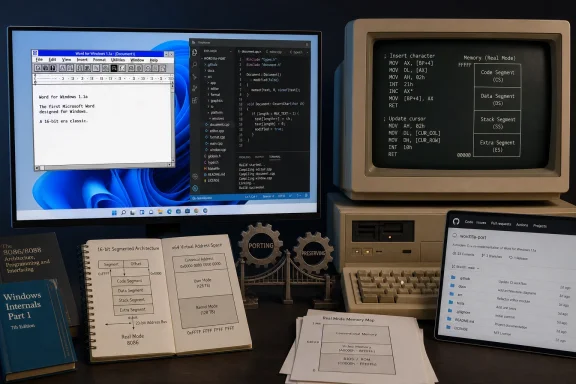 The original application is there, but so is a large porting layer
Marshall’s repository describes the project as a native x64 port of Word for Windows 1.1a, code-named Opus. The original C source, historical resources, supporting tools, and program documentation are retained in the tree. The port adds a new runtime, translated assembly behavior, replacement build tools, and adapters from Win16-era functions to current Win32 APIs.
Those details matter because Word 1.1a was never designed around the assumptions of 64-bit Windows. Its original build used 16-bit x86 assembly and a segmented-memory environment where a pointer could not be treated like the flat, 64-bit address used by modern Windows applications. Marshall says the port maps the old handle and memory behavior to an x64-safe runtime, translates assembly entry points to fixed-width C or C++, and rebuilds historical program assets with native host tools.
The repository’s documentation also says the old assembly files are preserved as reference material but are not compiled into the AMD64 targets. In other words, this is faithful to the original program logic where possible, but it is not a bit-for-bit rebuild of Microsoft’s 1990 executable. It could not be: the architecture, compiler toolchain, API layer, and memory model are different.
That distinction does not diminish the project. It explains the accomplishment. Marshall has taken a source tree that assumed Windows 3.0-era conventions and supplied enough new plumbing to make its original editor engine and user interface operate as a modern 64-bit desktop application.
There is no downloadable Word 1.1a binary yet
The practical detail omitted by Neowin’s “you can get it” framing is that Marshall’s project does not currently publish a GitHub Release, packaged installer, ZIP archive, or precompiled
WORD1.exe. The repository provides source code and build instructions.
To produce a working executable, users need 64-bit Windows, Visual Studio 2022 with the Desktop Development with C++ workload, a Windows 10 or Windows 11 SDK, CMake 3.25 or newer, and PowerShell. They must clone the repository, configure one of the CMake presets, build the project, and then launch the resulting executable from the locally generated
bindirectory.
That puts the port in a different category from abandonware-style preservation projects that offer a program download. At this stage, it is best understood as a reproducible engineering project and historical research artifact. It will interest Windows developers, reverse-engineering hobbyists, software preservationists, and anyone interested in how a foundational Windows application worked. It is not a replacement for WordPad, Notepad, LibreOffice, or modern Microsoft Word.
Marshall does include an automated test suite. According to the project documentation, it covers startup, legacy Word data structures and command tables, typing, selections, formatting, dialogs, and saving through automated UI workflows. That is useful evidence that the project is aiming beyond a screenshot-ready demo.
But functionality testing is not the same thing as a security review. The repository does not claim that the port has been audited for modern security standards, and there is no release channel indicating a supported, stable build. Anyone compiling it should treat it as experimental software, not as a trusted editor for sensitive documents.
Microsoft made the code available, but it did not open-source Word
One phrase surrounding the project needs correcting. Neowin says Microsoft “open-sourced” Word for Windows 1.1a in 2014. The primary record at the Computer History Museum says something narrower: Microsoft permitted the museum to make the January 10, 1991 source snapshot available for non-commercial use.
The Computer History Museum’s terms also state that access does not grant people the right to license copies to third parties by posting them elsewhere on the web. That is source availability for historical study, not an open-source release under a conventional license such as MIT, BSD, Apache-2.0, or GPL.
Marshall’s own repository acknowledges the issue rather than claiming a new license. It retains Microsoft and third-party copyright notices and explicitly says there is no top-level license file. The project advises users to review applicable rights before redistributing either source or binaries.
That warning has immediate consequences. A person can examine the port, build it for research, and learn from the engineering work. They should not assume they can redistribute a compiled Word 1.1a package, bundle it into a commercial retro-software collection, fork it under an open-source license, or ship it as part of another product.
The lack of an explicit distribution path may explain why the repository currently offers build instructions rather than ready-made executables. It does not resolve the legal question, but it avoids presenting a public binary download as though Word 1.1a had entered the public domain.
A 1990 application explains why Word’s early Windows lead mattered
The Computer History Museum says the Word 1.1a source archive contains 1,021 files across 33 folders, including C source, x86 assembly, build scripts, utilities, and documentation. It also places the code snapshot on January 10, 1991, even though the 1.1a release itself followed Word for Windows 1.0 in 1990.
That archive captures Word before the Office suite became synonymous with document editing and before the
.docxformat, Ribbon interface, cloud collaboration, macro automation, or AI-assisted writing. Yet Word 1.1a already belonged to the important early phase of WYSIWYG desktop publishing: text on screen was intended to reflect the printed page, rather than requiring users to embed formatting commands in a text file and discover the result only after printing.
The historical record also makes clear why this particular codebase is worth preserving. The museum notes that the first Windows release of Word arrived in late 1989, followed by version 1.1a the next year. Word’s Windows adoption helped reshape the PC word-processing market during the years when Windows itself was becoming a viable graphical platform for mainstream business software.
Marshall’s port does not make Word 1.1a newly useful for modern productivity. Its file handling, print expectations, fonts, UI conventions, and feature set come from another computing era. What it does provide is an unusually direct way to run and inspect a real early Windows application on hardware and operating systems its original authors could never have targeted.
For Windows enthusiasts, the significance is in the port itself: the original program’s engine is being carried forward, while the assumptions that made it 16-bit software are being isolated and replaced. The project has made historic source code executable again, but its current form means the first thing interested users will need is a C++ build environment—not a document to write.
References
- Primary source: neowin.net
Published: August 8, 2026 at 10:32 AM UTC
Loading…
www.neowin.net - Independent coverage: neowin.net
Published: August 8, 2026 at 10:32 AM UTC
Loading…
www.neowin.net - Related coverage: computerhistory.org
Loading…
computerhistory.org - Related coverage: pcworld.com
Loading…
www.pcworld.com - Related coverage: techradar.com
Loading…
www.techradar.com - Related coverage: netspi.com
Loading…
www.netspi.com - Related coverage: arstechnica.com
Loading…
arstechnica.com - Related coverage: techtimes.com
Loading…
www.techtimes.com - Related coverage: sysnative.com
Loading…
www.sysnative.com - Related coverage: techspot.com
Loading…
www.techspot.com - Related coverage: storagenewsletter.com
Loading…
www.storagenewsletter.com - Related coverage: ultimatepopculture.fandom.com
Loading…
ultimatepopculture.fandom.com - Related coverage: learn.microsoft.com
Loading…
learn.microsoft.com - Related coverage: learn.microsoft.com
Loading…
learn.microsoft.com - Related coverage: nationalheraldindia.com
Loading…
www.nationalheraldindia.com - Related coverage: github.com
Loading…
github.com - Related coverage: github.com
Loading…
github.com