
But the August 5 roadmap update leaves out the restriction that matters most to multinational deployments. Microsoft’s corresponding Message Center notice, MC1183010, says the feature is initially enabled for en-US users only—even though the roadmap entry still labels its cloud instance “Worldwide (Standard Multi-Tenant).” Those are not interchangeable claims: the service can be available in the worldwide commercial cloud while the actual interactive voice experience remains limited to U.S. English.
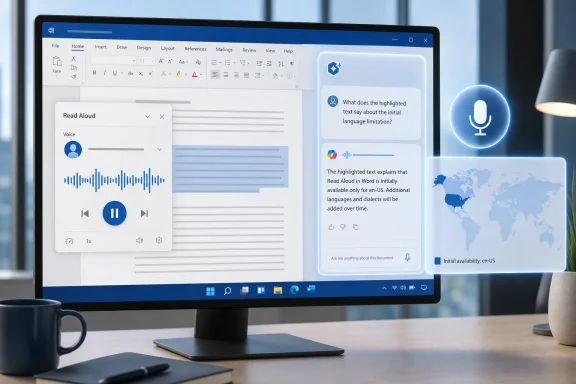 Roadmap 523205 is a new layer on top of Word Read Aloud
Word’s traditional Read Aloud feature remains a text-to-speech control: it reads the document and offers playback settings. Roadmap 523205 turns that playback session into an interactive Copilot conversation for people who already have the right license. The entry point stays the same, according to Microsoft’s Message Center announcement, but eligible users receive a new voice-driven experience while everyone else continues with classic Read Aloud.
This distinction matters for support desks. A user who sees Read Aloud but cannot ask questions has not necessarily encountered a broken rollout. Microsoft explicitly says the enhanced experience requires a Microsoft 365 Copilot license; ordinary Microsoft 365 licensing does not unlock it. The company also says the feature is enabled by default for eligible users and requires no new admin policy or tenant configuration.
The functionality itself is narrower than the promotional description suggests. It is intended to answer questions about the document being read, clarify a passage, and summarize a selected or current section. It does not turn Read Aloud into a general hands-free assistant across an organization’s files, SharePoint sites, mailboxes, or web results.
Microsoft’s earlier Word voice-chat preview made that boundary explicit. In a June 2025 Microsoft 365 Insider post, Microsoft said voice chat in Word did not support searches across web or enterprise data. The newer Read Aloud integration appears to package that document-grounded interaction directly into the listening workflow rather than expand Copilot’s data reach.
The rollout took longer than the roadmap now implies
The current roadmap record gives the feature a general-availability date of February 2026 and a status of Launched. That description is technically consistent with the first availability date, but it compresses a rollout that Microsoft repeatedly moved.
MC1183010 was first published on November 5, 2025, with Microsoft initially projecting availability from late November through December 2025. The schedule then moved to January 2026, then to early February. Microsoft’s latest Message Center revision, dated July 20, 2026, says rollout began in early February and was expected to complete by the end of July.
That timeline matters because the August 5 roadmap update can look like a fresh product launch when it is better read as a status confirmation after a delayed deployment. The feature was already announced, had already begun reaching tenants in February, and had its planned completion date pushed into late July. Microsoft has not published a Word build number that administrators can use to determine whether a particular Windows installation should have the feature.
Third-party Microsoft 365 change trackers, including M365 Admin and DeltaPulse, preserved parts of the earlier roadmap history. Their records show the release date shifting from November 2025 to January 2026 before Microsoft settled on February. The delay is not unusual for Microsoft 365 feature deployment, but it is a reminder that “GA” in the roadmap is a rollout classification, not proof that every eligible user can use a feature on that date.
“Worldwide” does not mean every language or tenant is ready
The central discrepancy is in Microsoft’s own metadata. Roadmap 523205 remains categorized for the worldwide standard multi-tenant cloud, while the latest Message Center notice says the feature will be enabled for en-US only initially. Microsoft has not published a timetable for other languages or identified which locales will follow.
For IT teams outside the United States, that means the roadmap’s Launched label should not be treated as a deployment green light. Microsoft has made a similar distinction elsewhere in its Copilot documentation: real-time voice is a licensed Microsoft 365 Copilot feature, and Copilot capabilities can be released gradually to a subset of users in a tenant before broader expansion. Here, the language limitation is more concrete than the roadmap entry suggests.
The company also has not clarified whether “en-US only” is determined by the Office display language, Windows regional settings, the user’s spoken language, tenant geography, or some combination of those factors. That missing implementation detail creates predictable helpdesk cases: a Copilot-licensed employee may have the desktop app, microphone permission, and Read Aloud control, yet still see only the classic behavior.
Administrators should avoid promising availability based solely on the roadmap’s worldwide cloud classification. The usable scope, based on the latest Message Center text, is U.S. English first.
This is licensed Copilot voice time, not free accessibility playback
Microsoft positions the feature as an accessibility and comprehension enhancement, and it may be especially useful for reviewing long policies, contracts, technical drafts, and training documents without constantly switching between reading and typing. Yet it should not be confused with the free or broadly available accessibility function already present in Word.
Classic Read Aloud remains available to users without Microsoft 365 Copilot. The conversational layer is a Copilot entitlement. Microsoft’s Message Center notice says users without a Copilot subscription continue using classic Read Aloud, while those with a license receive the interactive experience.
Microsoft’s previous Word voice-chat documentation also set a pooled allowance of 60 minutes per day for all Copilot voice interactions for licensed users. The Message Center update for 523205 does not state whether Q&A during Read Aloud uses that same allowance, creates a separate limit, or has changed the policy. Until Microsoft documents otherwise, organizations should assume that voice use may be governed by the broader Copilot voice limits rather than treating Read Aloud Q&A as unlimited speech input.
There is a second operational consideration: voice is not invisible. Microsoft’s 2025 Insider guidance says that when a user exits a Word voice chat, the verbal exchange is captured as text in the Copilot pane. The newer roadmap item does not explain whether Read Aloud Q&A follows the identical transcript behavior, but IT and compliance teams should test it before presenting the feature as a purely ephemeral listening aid.
Microsoft also tells users to review generated and transcribed content for accuracy. That warning is routine for generative AI, but it has particular weight here: spoken answers can feel authoritative because they arrive in the same rhythm as Read Aloud. Users should treat a response as a navigation aid to the underlying document, not as a substitute for checking the actual clause, requirement, or technical instruction Word is reading.
What admins should verify before announcing it
No Microsoft 365 admin action is required to enable Roadmap 523205, according to MC1183010. That does not mean there is nothing to validate. The rollout is default-on for eligible users, which shifts the work from deployment to entitlement, client readiness, privacy expectations, and support documentation.
A practical validation pass should include the following:
- Confirm that the test user has a Microsoft 365 Copilot license rather than only Microsoft 365 Copilot Chat access.
- Use a desktop Word installation and an en-US test profile, because Microsoft has publicly limited the initial rollout to en-US.
- Confirm Windows and Word microphone permissions, then test Read Aloud with a document containing material that can be checked against the source text.
- Ask a targeted question about a selected paragraph as well as a broader document question, and verify whether responses stay grounded in the intended content.
- Check whether spoken prompts and responses appear in the Copilot pane and ensure employees understand the organization’s retention and review expectations.
The feature is an incremental improvement to Word’s document-review workflow, not a reason to replace formal document controls. For organizations that have already licensed Copilot, it removes some friction from reading and questioning a document. For everyone else—including licensed users outside the initial U.S. English scope—the old Read Aloud experience remains the expected result until Microsoft publishes a broader language rollout and concrete client requirements.
References
- Primary source: Microsoft 365 Roadmap
Published: 2026-08-05T22:47:32.7900752Z
Microsoft 365 Roadmap | Microsoft 365
The Microsoft 365 Roadmap lists updates that are currently planned for applicable subscribers. Check here for more information on the status of new features and updates.www.microsoft.com
- Related coverage: support.microsoft.com
Have Microsoft 365 Copilot read aloud to you | Microsoft Support
Learn how to have Microsoft 365 Copilot Chat read aloud its responses to you.support.microsoft.com - Related coverage: support.microsoft.com
Create a summary of your document with Copilot in Word | Microsoft Support
Summarize a long document using the power of AI in Microsoft 365 Copilot in Word.support.microsoft.com - Related coverage: learn.microsoft.com
Copilot Cowork common questions | Microsoft Learn
Frequently asked questions about Cowork in Microsoft 365 Copilot.learn.microsoft.com - Related coverage: word.cloud.microsoft
AI summarizer: generate text summaries with Copilot in Word | Microsoft Word
Try Copilot AI summarizer tools in Word to gather the most important information from any text and summarize multiple documents at once.word.cloud.microsoft - Related coverage: learn.microsoft.com
What is Microsoft 365 Copilot? | Microsoft Learn
Learn about what Microsoft 365 Copilot is and common Copilot features in Microsoft 365 apps, like Word, Excel, PowerPoint, and Teams. This article answers common questions about Copilot, including what is Copilot, how Copilot works, and the benefits of using Copilot.learn.microsoft.com - Related coverage: github.com
microsoft-365-docs/copilot/release-notes.md at public · MicrosoftDocs/microsoft-365-docs · GitHub
This repo is used to host the source for the Microsoft 365 documentation on https://docs.microsoft.com. - microsoft-365-docs/copilot/release-notes.md at public · MicrosoftDocs/microsoft-365-docs github.com
- Related coverage: m365visualroadmap.net
◉ M365 Visual Roadmap | M365 Visual Roadmap
This site provides a visual representation of the Microsoft 365 Roadmap.m365visualroadmap.net - Related coverage: techcommunity.microsoft.com
- Related coverage: cdn-dynmedia-1.microsoft.com
- Related coverage: it.nc.gov
- Related coverage: windowscentral.com
Microsoft Edge's Read Aloud taken over by Copilot Vision | Windows Central
Does the simple text reader really need to change over to Copilot?www.windowscentral.com - Related coverage: windowscentral.com
How to get started with Microsoft Copilot — your new AI assistant that’s everywhere and nowhere | Windows Central
Copilot is more than just an app on Windows 11, and in this guide, I'll outline the steps to get started with the AI chatbot and actions with the app and the integration across the desktop.www.windowscentral.com - Related coverage: m365admin.handsontek.net
Microsoft Copilot (Microsoft 365): Use voice for Q&A during Read Aloud in Word - M365 Admin
Interact in real time with read aloud in Word with Copilot. While your document is being read aloud, you can ask questions with your voice—such as “What does this mean?” or “Summarize this section”—and get answers instantly. No need to pause and search manually. This keeps you in context...m365admin.handsontek.net - Related coverage: mwpro.co.uk
Microsoft 365 Copilot Q&A: Real-Time Voice in Read Aloud MC1183010-2
Explore the latest Microsoft 365 Copilot update (MC1183010-2) enabling real-time voice interactions in Read Aloud. Discover how this feature enhances productivity and accessibility for users.mwpro.co.uk - Related coverage: supersimple365.com
What’s new in Microsoft 365 and Copilot? January 2026 - Super Simple 365
Welcome to our first roundup of 2026. We review what was announced, released, and delayed across Microsoft 365 and Copilot in January. Check out the December blog for lots of content still rolling out this month. If you are an Update Insiders member, take a sneak peek at the latest blog, which... supersimple365.com
- Related coverage: linkedin.com
#microsoft365 #copilot #artificialintelligence #productivityai #futureofwork #microsoftteams #accessibility #innovation #digitalworkplace #aitransformation | Daniele De Bruyn
🔊 M365 Copilot Just Made Audio Interactive: Real‑Time Voice Q&A for Read Aloud and Podcasts Starting February–March 2026, users with a Copilot license will experience a new level of interactive, conversational audio across both Read Aloud and Podcast features — initially available for en‑US...www.linkedin.com
- Related coverage: kbworks.eu
Microsoft Roadmap, messagecenter and blogs updates from 21-07-2026 - KbWorks - SharePoint and Teams Specialist
21-July-2026 Below you will find a collection of news published yesterday. This news consists of Microsoft's Roadmap when it is updated it will be below withkbworks.eu
